




PHP2Shell: What PHP 7.4, 8.0 and 8.1 Websites Should Do Now


PHP2Shell is the name given to two critical vulnerabilities in the PHP runtime: CVE-2026-109618 and CVE-2026-109619. Both can allow an unauthenticated attacker to execute code remotely on an affected server. They are rated Critical, with a CVSS v4.0 score of 9.2.
Because these vulnerabilities affect the PHP runtime environment, simply updating a CMS such as WordPress or Drupal, changing the website’s theme, or updating plugins is not enough to prevent exploitation. This article explains the scope of the vulnerabilities and how website administrators, particularly those managing systems still running PHP 7.4, 8.0, or 8.1, can work with their hosting providers to protect their business data.
What is PHP2Shell? How dangerous is it?
PHP2Shell consists of two identifiers: CVE-2026-109618 and CVE-2026-109619. Both are rated extremely critical, scoring a massive 9.2/10 on the CVSS v4.0 scale.
When a user visits a website, the PHP engine processes the application code to generate content for the browser. Because the bug exists right in this processing stage, a site can be attacked even if its application code is perfectly clean. Specifically:
- CVE-2026-109618 (RCE via out-of-memory corruption): This issue relates to how PHP handles out-of-memory situations. When a process stops abruptly, the data cleanup step incorrectly uses invalid memory areas. The result is memory corruption.
- CVE-2026-109619 (RCE via stale global state): When memory is freed, error states are not cleared out. Subsequent requests sent to the same PHP process can reuse this malicious state. This creates the perfect condition for hackers to take control and execute commands (RCE).
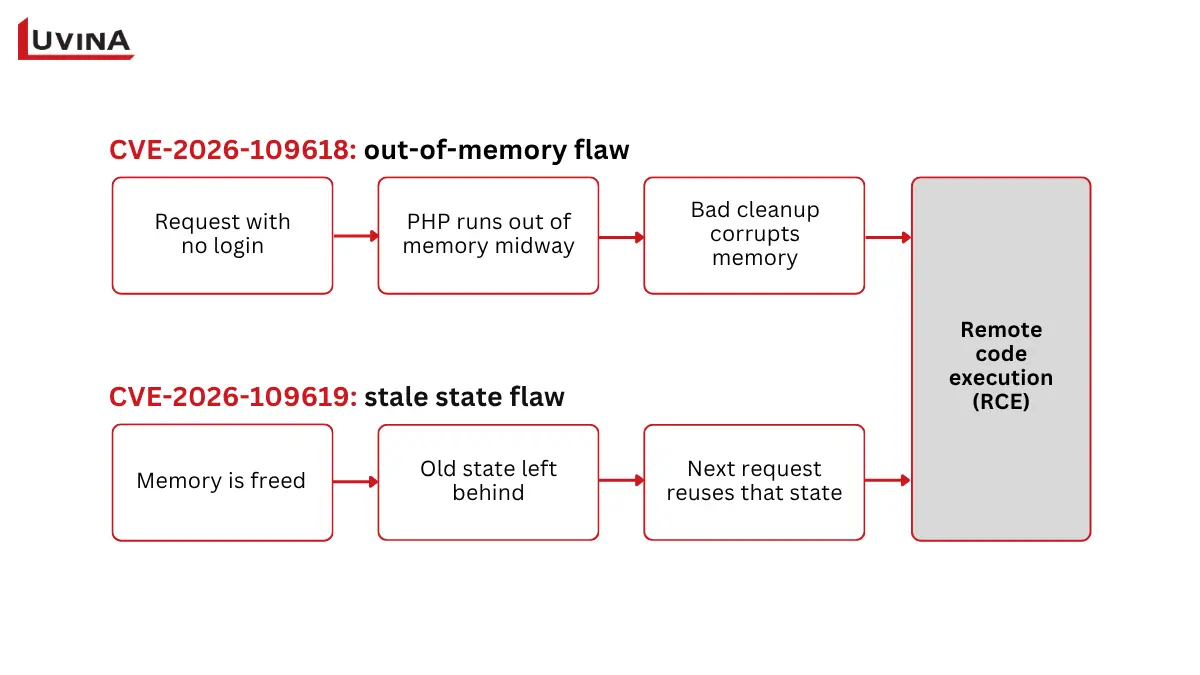
How the two PHP2Shell vulnerabilities lead to remote code execution (RCE)
The role of AI in detecting the flaw: According to Wiz, at least one weakness in this group has been lurking in PHP since version 5.4. However, it wasn’t until August 2026 that a research team at Calif, teaming up with OpenAI and Wiz, used AI to analyze the code and build successful exploit scenarios.
PHP released security updates on October 21, 2026, for PHP 8.2, 8.3, 8.4, and 8.5. PHP 7.4, 8.0, and 8.1 are end-of-life and have no official release fixes from the PHP project. Organizations running these versions should check with their hosting or software vendors for patched packages or backports and plan an upgrade to a supported PHP version.
Which websites could be affected by?
Any system using an unpatched PHP version to handle web requests is at risk, including:
- Popular platforms: WordPress, Drupal, Joomla, MediaWiki, or custom-built web apps.
- Server environments: PHP-FPM, php-cgi, FrankenPHP, LiteSpeed, and especially Apache (mod_php). PHP warns that this specific configuration carries the highest risk.
Note: You still need to check even if your website doesn’t have a file upload form. With Apache mod_php, CVE-2026-109618 can be triggered by an unauthenticated request right before the application code even runs. PHP-FPM, php-cgi, FrankenPHP, and LiteSpeed are also affected, so these setups must be patched as well.
Consequences of an exploit: Attackers can run malicious code with the permissions of the PHP process, allowing them to:
- Steal sensitive data (passwords, tokens, API keys) from the process of memory.
- Modify website content or plant backdoors.
- Disrupt transactions, severely damaging a company’s reputation and finances.
Three steps to check if your website is affected
A website that looks normal on the outside doesn’t mean your backend is safe. Team up with your IT staff or hosting provider to take these 3 steps immediately:
Step 1: Pinpoint your exact PHP version
- For WordPress: Go to Tools → Site Health → Info → Server to quickly view your PHP version.
- For Hosting/VPS: Check your control panel (cPanel, DirectAdmin) or run the php -v command. Keep in mind that this only shows the CLI version. You need to cross-check it with the running web service, like PHP-FPM. Don’t forget to check subdomains and testing environments.
Step 2: Verify the patch and backports
Just looking at the version number (like PHP 8.3) isn’t enough. You need to be absolutely sure your server is running the patched release:
- PHP 8.5: Update to 8.5.12
- PHP 8.4: Update to 8.4.27
- PHP 8.3: Update to 8.3.36
- PHP 8.2: Update to 8.2.35 (Reaches End-of-Life on Dec 31, 2026).
If you are using OS-distributed PHP packages (like Ubuntu, Debian, RHEL, or AlmaLinux), ask your hosting provider to confirm if the package version includes the backport for CVE-2026-109618 and CVE-2026-109619. Also, make sure the services were actually restarted after the update.
Step 3: Scan for signs of compromise
If your website ever ran a vulnerable PHP version, review your access and error logs. Check for unusually modified files and audit any newly created admin accounts. Patching only closes the loophole. It doesn’t automatically remove malware if a hacker has already paid your server for a visit.
If you find signs of compromise and the site handles personal data, assess whether it is a notifiable data breach under Singapore’s PDPA. The PDPC’s guide on managing and notifying data breaches explains how.
What should websites using PHP (7.4, 8.0, 8.1) do right now?
PHP 7.4, 8.0 and 8.1 are end-of-life. The PHP project has not released official security fixes for these branches in response to PHP2Shell. A system running one of these versions remains exposed unless a vendor-provided security fix or source backport has been applied.
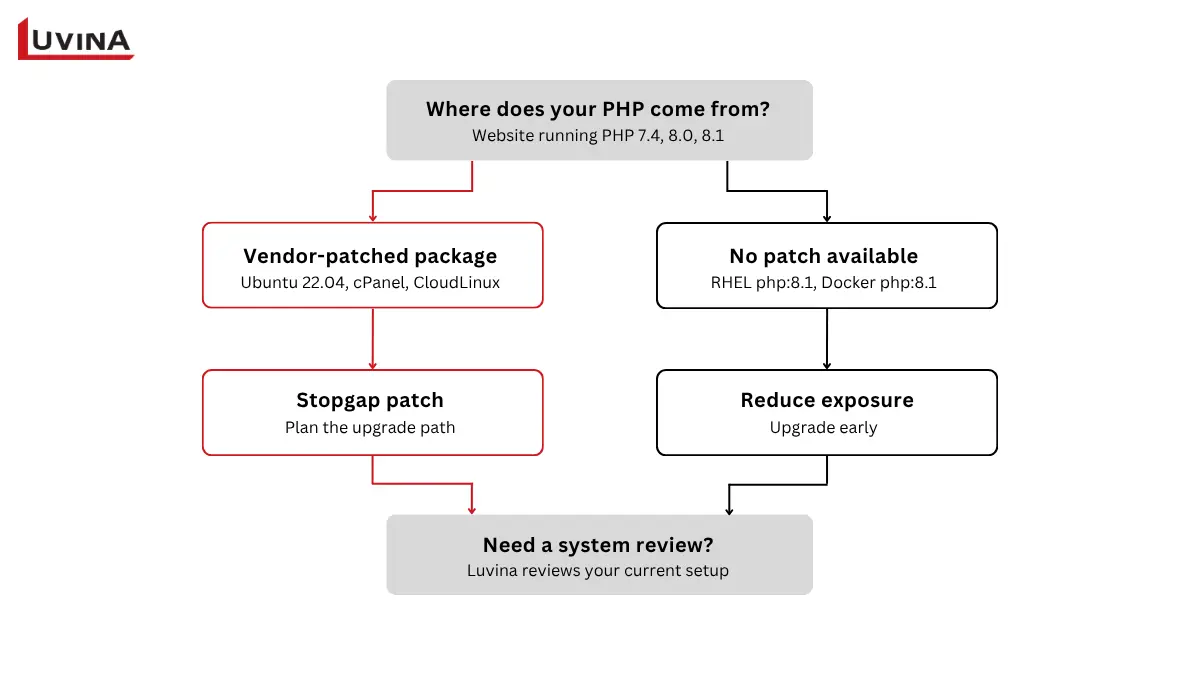
Flowchart for handling PHP2Shell on websites running PHP 7.4, 8.0, and 8.1
Immediate Risk Mitigation
- Ask your OS/Hosting provider about backports: Some Linux distributors (like Ubuntu or Debian) might offer self-compiled backport packages for older PHP versions. Ask them to confirm this.
- Reduce the attack surface: Reconfigure your Web Application Firewall (WAF) and block abnormal requests. Restrict IP access to the admin dashboard or use a VPN if it’s an internal system.
- Apply interim settings only as a stopgap: The PHP project lists temporary settings that reduce exposure to specific attack paths, such as turning off session upload progress. It states that only an update fully fixes the vulnerabilities. Apply these settings only with your server administrator and test them first.
- If you cannot patch soon, limit exposure: For a site on PHP 7.4, 8.0 or 8.1 with no vendor backport yet, consider restricting public access or taking the site offline until a fix is in place. The NSA has advised this for systems that cannot be patched quickly.
Plan a Comprehensive Upgrade Roadmap (Long-term Solution)
To ensure both security and performance, businesses should plan a migration to PHP 8.3, 8.4, or 8.5. This process requires caution, so you don’t accidentally crash the server:
- Inventory & Backup: Evaluate all source code, plugins, and third-party libraries (like payment gateways or CRMs). Back up the entire database and source code.
- Create a Staging Environment: Set up an independent testing environment. Upgrade PHP to the target version and fix any incompatible code (Deprecations/Fatal Errors).
- Comprehensive Testing: Thoroughly test revenue-generating flows (ordering, payments, email sending, logging in) to guarantee zero disruptions.
- Actual Deployment: Roll out the fixed version to the live environment during off-peak hours. Restart services and monitor everything closely.
If your system relies on an outdated CMS or abandoned plugins that just won’t work with PHP 8.x, it might be time to consider re-platforming to newer technologies entirely.
Partner with Luvina Software: Safe System Transformation and Upgrades
Are you worried because your server is still stuck on PHP 7.4? Or maybe you just aren’t sure if your server has been patched against PHP2Shell? Manually modifying server settings or blindly upgrading PHP can break your website’s entire functionality.
Not sure which PHP version your website runs, or whether your hosting provider has applied for a backport?
Luvina Software works with businesses on software development, system integration, and application modernization. Our engineers can discuss your current PHP environment, application dependencies, and upgrade requirements to help identify a practical remediation approach.
👉 [Contact Luvina Software today for secure website upgrade consulting!]
Reference Sources
The numbers in the article correspond to the sources below.
[1] PHP. Security announcements and updates on Oct 21, 23, and 26, 2026
[2] Wiz Research. PHP2Shell and exploit testing on PHP applications
[3] PHP Security Advisory. CVE-2026-109618 — RCE via OOM corruption
[4] PHP Security Advisory. CVE-2026-109619 — RCE via stale global state
[5] Calif Research. PHP2Shell and the discovery timeline
[6] CERT-EU. Security Advisory 2026-018 — Critical Vulnerabilities in PHP
[7] Canonical Ubuntu. Patched PHP packages and distribution verification guide
[8] PHP. Supported Versions Lifecycle
[9] WordPress Documentation. Site Health screen
[10] PHP Manual. PHP command line options
[11] PHP Manual. Backward incompatible changes when migrating from PHP 7.4 to PHP 8.0
[12] The PHP Foundation. The discovery and remediation process of the two PHP vulnerabilities
[13] PHP2Shell Research. Scope of impact and update guidelines
READY TO START A PROJECT?
Our experts are eager to explore your needs.

Read More From Us?
Sign up for our newsletter
Read More From Us?
Sign up for our newsletter