




Dynamics 365 Developer: What Defines a High-Impact Hire


Often, the difference between a CRM system that merely “works” and one that really fuels quantifiable business expansion is a Dynamics 365 developer. Many businesses only realize the importance of a skilled D365 developer after failed implementations, budget overruns, or low user adoption.
The difficulty is not just employing a coder. It’s knowing what really defines a great hire. Thus, how do you locate the type of developer who can convert Dynamics 365 from a pricey system into a real competitive advantage? The abilities that count and what distinguishes an average hire from one that provides long-term value are discussed in this piece, together with the real activities of a D365 developer.
What Is a Dynamics 365 Developer?
A Dynamics 365 developer is a specialist responsible for building and customizing Dynamics 365 solutions based on specific business requirements. Rather than building systems from scratch, they collaborate with the platform to produce ERP and CRM capabilities fitting with a company’s operational objectives.
Usually working across several sectors, including finance, IT, and commerce, where companies use Dynamics 365 to handle supplier and customer connections, these experts typically.
What Does a D365 Developer Do?
On the Dynamics 365 platform, a Dynamics 365 developer will create, maintain, and build applications. Business demands will be transformed into functional solutions that simplify processes, increase customer engagement, and boost efficiency. Their work encompasses CRM and ERP systems, so guaranteeing businesses maximize Microsoft Dynamics 365.
A D365 developer’s primary duties fall under 3 basic categories:
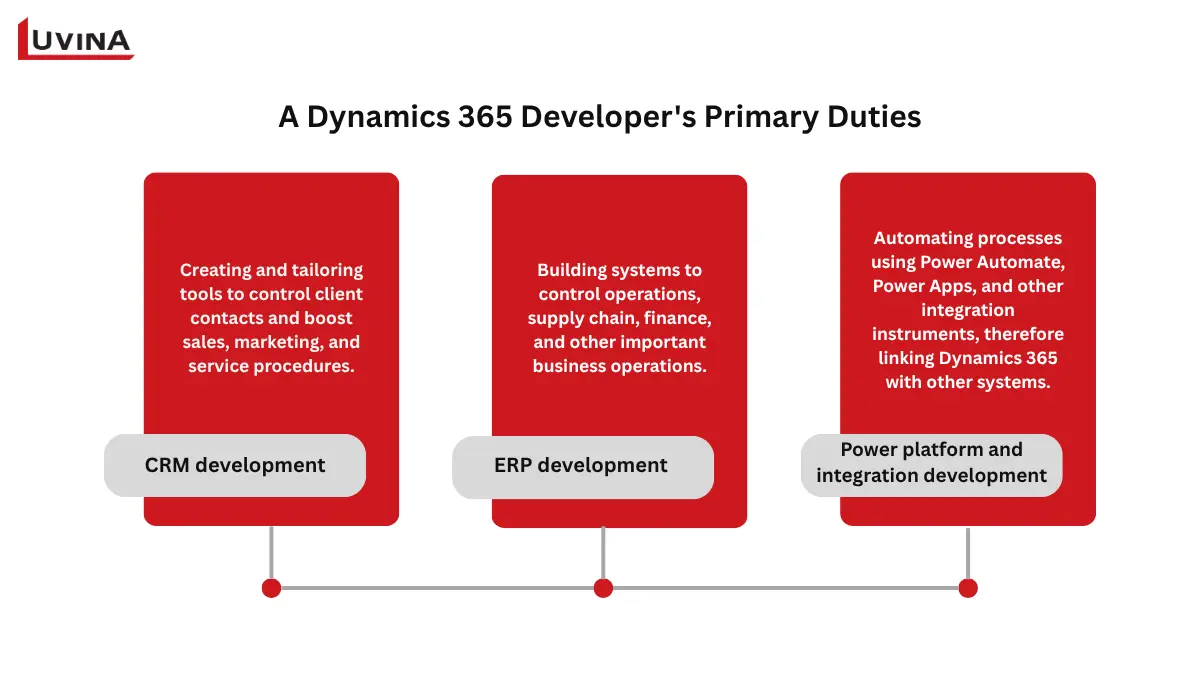
Main responsibilities of a Dynamics 365 developer
– CRM development (Customer engagement): Creating and tailoring tools to control client contacts and boost sales, marketing, and service procedures.
– ERP development (Finance and operations/ Business Central): Building systems to control operations, supply chain, finance, and other important business operations.
– Power platform and integration development: Automating processes using Power Automate, Power Apps, and other integration instruments, therefore linking Dynamics 365 with other systems.
More specifically, a D365 developer has to:
– Make test scripts to make sure applications meet quality standards.
– Troubleshot mistakes and fixed problems for functional customers.
– For long-term usage, keep software documentation and records.
– Identify any areas of inefficiency within the software development lifecycle and reduce waste.
– Perform code reviews/mentoring of other Dynamics 365 developers who work with clients.
– Work closely with client teams to determine their business needs (or requirements) and how to turn those into technical solutions.
– Maintain valid certifications/education required to keep current with updates to the platform and best practices in place for that platform.
Key Skills to Look for When Hiring a Dynamics 365 Developer
Technical knowledge is not nearly sufficient on its own to succeed as a D365 developer. Professionals must combine technical, hands-on experience with strong analytical and communication skills, along with a clear business perspective. In this section, we will outline the key skills/credentials of Dynamics 365 developers capable of making the maximum impact of Dynamics 365, and how to ensure a smooth Dynamics 365 implementation.
| Category | Skills/certifications | Description |
| Technical skills (soft skills) | Must-have: – Customization and configuration of Dynamics 365 applications- Programming and tools JavaScript, C# .NET, MS SQL, MS CRM SDK)- CRM administration | Ensuring fluent operation and adherence to best practices, a developer creates, integrates, and administers scalable solutions. |
| Nice-to-have: – ERP development (Finance and operations, Business Central)- Programming X++- Azure DevOps and project tools- Power Platform integration | ||
| Soft and analytical Skills | Must-have: – Communication – Attention to detail- Problem-solving and analytical thinking | These abilities enable a Dynamics 365 developer to effectively manage tasks, adapt to changes, communicate technical ideas to non-technical stakeholders, and deliver solutions that meet company needs. |
| Nice-to-have: – Prioritization- Flexibility- Client perspective | ||
| Business analysis and project management skills | Must-have: – Business process analysis- Stakeholder collaboration | Using agile techniques, you must analyze needs, collaborate with customers and technical teams, and support an effective Dynamics 365 implementation. |
| Nice-to-have: Agile project methodology | ||
| Certifications | Must-have: Microsoft Certified: Dynamics 365 Fundamentals | Show ability to manage difficult Dynamics 365 projects, confirm experience, and stay current. |
| Nice-to-have: – Microsoft Certified: Dynamics 365 Developer Associate, – Power Platform Certifications |
Skills and certifications required for a D365 developer
Dynamics 365 Developer vs. Consultant vs. Solution Provider: Key Differences
Organizations pick the correct specialists for their initiatives by knowing the parts of several Dynamics 365 experts. Although a D365 developer, a Dynamics 365 consultant, and a Dynamics 365 solution provider might all use the same platform, their responsibilities, emphasis, and contributions differ dramatically. The following table provides a summary of these main distinctions:
| Aspect | Dynamics 365 consultant | Dynamics 365 developer | Dynamics 365 solution provider |
| Primary goal | Match Dynamics 365 with business operations. | Adapt, extend, and integrate Dynamics 365 functionality | Make sure solutions are designed strategically, scalably, and securely. |
| Key responsibility | Study requirements, set forms, dashboards, and workflows; educate users; assess system performance. | Create plugins, processes, bespoke extensions; interface with ERP/third-party applications; automate processes; troubleshoot | Lead teams design architectures, conduct fit-gap analyses, make technology decisions, and ensure compliance. |
| Tools and skills | Reporting, documentation, and Dynamics 365 native configuration tools | Programming: X++, JavaScript, C .NET; MS SQL; Power Platform; CRM SDK; Azure DevOps; | Architectural design of systems, governance structures, and cross-module integration knowledge |
| Level of technical involvement | Low to moderate; minimal coding | High; hands-on coding and technical problem solving | Low; strategic oversight and coordination |
| Collaboration | Works closely with Dynamics 365 developers to translate business needs | Works with consultants to implement technical solutions; follows guidance from the solution provider | Coordinates consultants and D365 developers; ensures alignment with business strategy |
Comparison table: D365 developer vs. consultant vs. solution provider
A Dynamics 365 developer brings together business requirements and technical implementation by working with both a consultant and a solution provider to develop a successful Dynamics 365 implementation.
– Dynamics 365 consultant: When your project focuses on fitting Dynamics 365 into your current business processes, has minimal custom code needed, needs configuration for workflow, and/or focuses on end-user training.
– Dynamics 365 developer: When your project needs custom features, has complex integrations, has automation that is beyond what is in the standard configuration, or has technical issues that a consultant cannot solve by themself.
– Dynamics 365 solution provider: When your project is large, involves multiple modules, or has to deal with projects across borders, requires strategic planning, has an overall design of a system, and needs to coordinate multiple groups.
>> Read more: Microsoft Dynamics 365 for retail
Dynamics 365 On-Premise: What It Means for Development Today
For many businesses, Dynamics 365 On-premise represents a way to maintain full control over their systems, data, and customization capabilities. It is often chosen by organizations that need to align technology closely with internal processes or strict compliance requirements.
Even with careful planning, on-premise environments can create ongoing pressure for any Dynamics 365 developer, especially as systems grow more complex over time. Key challenges include:
– High long-term development workload: continuous customization, bug fixing, and performance tuning
– Strong dependency on specialized skills (SQL Server, security, system configuration)
– Manual updates lead to outdated systems and harder maintenance
– Complex integrations requiring custom code and ongoing support
– Data management challenges (migration, deduplication, consistency)
– Limited exposure to new features compared to cloud environments
These challenges often intensify across different stages of the ERP implementation life cycle, where development, testing, and maintenance demands overlap.
On-premise is most suitable when your business requires strict data control, must comply with specific regulations, or depends on legacy systems that need deep customization. It also works well if you already have a strong internal team, including an experienced D365 developer, and existing infrastructure to support long-term operations.
However, this model places greater responsibility on your team. Without the right expertise, even routine changes can become resource-intensive, making the role of a skilled Dynamics 365 developer critical to long-term success.
How to Choose the Right Dynamics 365 Implementation Partner
For a project to go well and successfully, choosing the proper Dynamics 365 partner is imperative. A partner with demonstrated competence and experience in Dynamics 365 development will save time, lower risks, and guarantee that your Dynamics 365 solution satisfies both business and technical criteria. A pragmatic way to help you decide is given here.
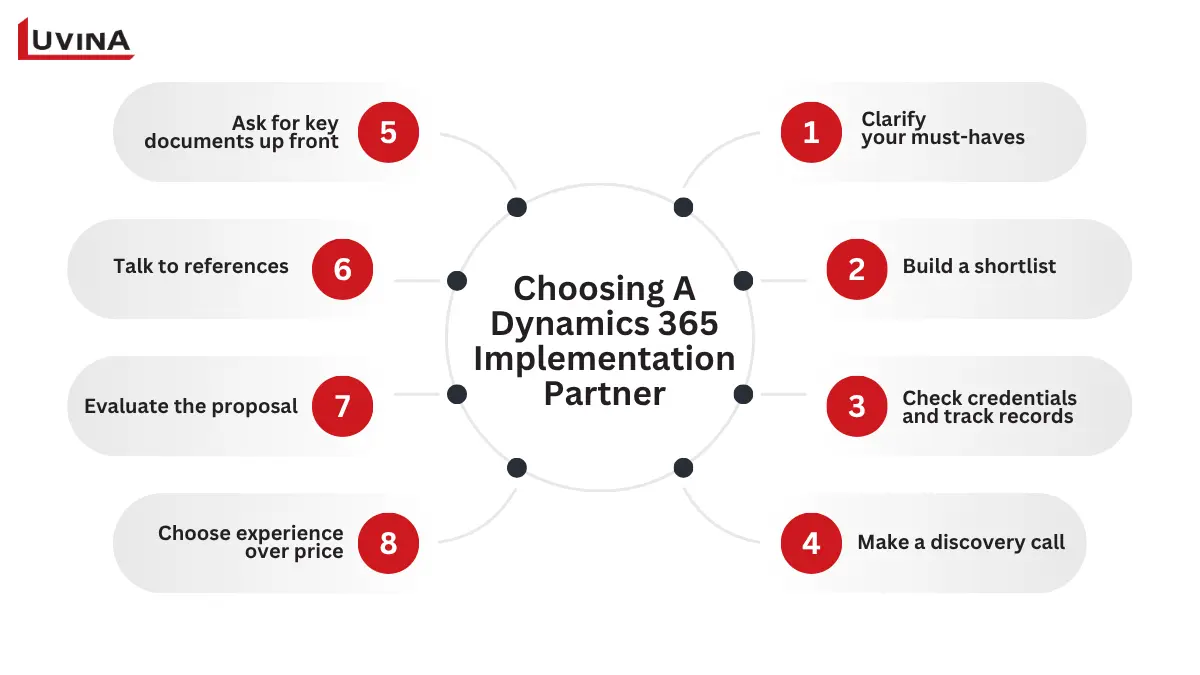
Guide to choosing a Dynamics 365 implementation partner in 8 steps
Step 1: Clarify your must-haves
Clear your project requirements before contacting any partner. Define any industry-specific integrations, the Dynamics 365 products you require, your user base and growth goals, historical systems to replace, launch restrictions, and go-live constraints. Set a reasonable spending plan and write your walk-away restrictions. Recording these facts helps to create a precise RFP against which every prospective partner will regularly assess.
Step 2: Build a shortlist
To prevent decision paralysis, concentrate on four or five competent partners. Official sources like Microsoft AppSource, confirmed reviews on Clutch.co or G2.com, sector listings, and reliable advice from your network can help you to get started. At this point, you want partners with a proven reputation and Dynamics 365 developers with expertise on projects like yours.
Step 3: Check credentials and track records
Confirm every partner’s qualifications, solutions partner status, and the credentials of the D365 developers slated for your project. Examine verified case studies and thoroughly read reviews to spot patterns in performance and customer happiness.
Step 4: Make a discovery call
The initial discovery call is revealing. Pay attention to whether the partner asks more questions than they answer, references industry-specific implementations, assigns a dedicated Dynamics 365 developer, and avoids making promises before fully understanding your processes. These signals indicate their approach to understanding and delivering your project.
Step 5: Ask for key documents up front
Their project technique (e.g., Sure Step) and certificates for the designated team should be offered by a professional partner, along with a sample Statement of Work. They should also include two or three actual client referrals. Inability or unwillingness to provide these records is a warning sign that the spouse might not have a systematic implementation approach.
Step 6: Talk to references
Avoid asking exclusively generic questions. Concentrate on the original versus actual go-live dates, issues in communication, day-to-day assistance, lessons learned, and whether they would pick the same partner or Dynamics 365 developers again. The most revealing view is sometimes derived from posing, “What could have been better done?”
Step 7: Evaluate the proposal
A robust proposal establishes scope, assumptions, the change request procedure, hypercare period, and continued support precisely. Proposals delivered too quickly should be treated with care, as they sometimes indicate universal templates instead of a well-considered scoping procedure.
Step 8: Choose experience over price
Finally, consider results and experience rather than cost only. Far more valuable than a less costly execution that goes over budget or falls short of expectations is a higher-priced project completed on scope, on time, and producing desired results.
Engagement Models and Cost: In-House vs. Freelance vs. Outsourcing
Choosing how to involve talent is among the first – and most important -decisions while designing a Dynamics 365 project. Should you hire full-time staff, bring in freelance Dynamics 365 developers, or depend on an outside partner providing ERP implementation services? Every choice affects the cost, pace, and control of your project in different ways. To assist you with this choice, here is a fast comparison:
| Model | Pros | Cons | Cost |
| In-house | Full control, deep business knowledge, and immediate access to Dynamics 365 developers | High salaries and retention, limited scalability | High |
| Freelance | Flexible, rapid hiring, pay per project | Less consistency, communication, and security concerns | Medium-low |
| Outsourcing | Access to certified experts, scalable, and faster resolution | Less direct control, onboarding required | Flexible, contract-based |
What’s the difference between in-house, outsourcing, and freelancing?
How to choose:
– An in-house development team would suit those businesses that require total control over their development process and intend to carry out long-term projects.
– Those businesses that require temporary and very specialized (e.g., just-in-time) resources should consider hiring freelance Dynamics 365 developers, as this will allow for quicker performance and less expense on average than relying upon in-house developers.
– For complex projects that require broad, expansive skills, large development teams, or ongoing technical assistance, working with an outsourced partner is the best solution.
Many companies now are utilizing a hybrid approach to staffing, retaining their core internal staff for daily operations, and using outsourced staff to help them maintain their operational flexibility and minimize costs through specialized or seasonal staffing. A common mistake is hiring a developer too early, before defining business requirements. In many cases, what organizations need first is a consultant to map processes, not a developer to write code.
What to Expect from a Dynamics 365 Implementation Project (Timeline, Cost & Risks)
A methodical path that changes how your company handles projects, resources, and customer interactions, a Dynamics 365 implementation project transforms your organization’s management philosophy. Usually, here is what you might anticipate throughout the process:
– Efficient project management: Dashboard, scheduling, and analytics instruments enable cost, progress, and task completion tracking.
– Connected teams and processes: Unified workflows, artificial intelligence insights, and automation improve teamwork and lower manual effort.
– Resource an expense optimization: Tasks are assigned according to skill and availability; integrated time and expense tracking ensures precise reporting
– Integrated customer and financial Insights: Sales and finance dashboards provide a 360° view, enabling personalized interactions and better profitability.
– Data visibility and actionable reporting: Integration with Power BI and other Microsoft tools breaks data silos and helps inform decisions.ity.
FAQ
1. What does a Dynamics 365 developer do?
A D365 developer customizes, configures, and develops Dynamics 365 applications, integrates systems, builds workflows, and ensures solutions meet business requirements.
2. What is the difference between a D365 developer and a consultant?
A developer focuses on coding, customization, and technical solutions, while a consultant analyzes business processes, configures modules, and guides users without heavy coding.
3. How much does it cost to hire a Dynamics 365 developer?
The cost depends on role, experience, and location. For example:
– In the US: ~$75,000 – 150,000 per year, with a typical range from roughly $98,000 to $168,000 depending on experience and company size.
– In the UK: ~ around £32,000 – £56,000 per year (average), though London salaries can be higher.
4. Is Dynamics 365 on-premise still supported?
Yes, Dynamics 365 on-premise is supported by Microsoft, but new features are primarily cloud-focused, so updates may be limited.
5. What certifications should a D365 developer have?
Key certifications include Microsoft Certified: Dynamics 365 Fundamentals, Dynamics 365 Finance & Operations Apps Developer, and related Power Platform certifications.
Conclusion
Successfully using commercial solutions demands not just the tools but also the correct knowledge. Customizing, integrating, and optimizing Microsoft Dynamics 365 to fit your specific company needs depends critically on a competent Dynamics 365 developer. Their technical expertise, problem-solving abilities, and knowledge of corporate processes guarantee that your D365 projects yield tangible outcomes and operating efficiency.
Having more than 20 years of experience helping companies, Luvina is especially skilled in providing ERP and CRM systems services. Apart from Dynamics 365, our team is an expert in Salesforce, Workday, GrandIT, and other corporate systems. This lets us customize solutions to meet your company goals, improve processes, and produce clear results.
Whether you need to customize Dynamics 365, integrate complex systems, or rescue a struggling implementation, Luvina’s certified D365 experts can help you deliver results faster and with lower risk.
Resources
- https://www.freelancermap.com/blog/what-does-Dynamics-365-developer-do/
- https://community.Dynamics.com/blogs/post/?postid=bb9db053-9c79-4c0a-919e-e5a49eafa335
- https://www.lived365.com/post/roles-explained-Dynamics-365-functional-consultant-vs-technical-developer-vs-solution-architect
- https://msDynamicsworld.com/blog-post/best-microsoft-Dynamics-365-partner-complete-guide-choosing-right-one
- https://www.techcronus.com/blog/cost-to-hire-microsoft-dynamics-developer/
READY TO START A PROJECT?
Our experts are eager to explore your needs.


Read More From Us?
Sign up for our newsletter
Read More From Us?
Sign up for our newsletter