




Non-Functional Testing: Definition, Types, Techniques, and Examples


Non-functional testing evaluates how a software system performs under different conditions. Instead of verifying what the software does, it measures how well it does it by assessing quality attributes such as performance, security, reliability, scalability, and usability.
Unlike functional testing, which checks whether a feature works correctly, non-functional testing determines whether the software can consistently deliver a high-quality user experience in real-world environments. To learn how non-functional testing fits into the overall QA process, explore Luvina’s guide to Software Testing.
Simply put, non-functional testing answers one essential question: Is this software fast enough, secure enough, and reliable enough?
What Is Non-Functional Testing in Software Testing?
Non-functional testing in software testing verifies whether an application satisfies its non-functional requirements (NFRs), including performance, security, scalability, usability, and reliability.
Non-functional testing is essential because software that functions correctly is not always ready for production. An application that crashes under heavy traffic, fails a security audit, or cannot scale to meet user demand can still create serious business risks despite passing all functional tests.
Depending on the testing objectives, non-functional testing may involve QA engineers, performance engineers, security specialists, and UX researchers. Non-functional testing can be performed throughout the software development lifecycle. Some activities occur during design and development, while others are performed after functional testing, before release, or as part of CI/CD pipelines to verify software quality continuously.
Why Is Non-Functional Testing Important?
Understanding non-functional testing is only the first step. The real value lies in how it improves software performance, reduces operational risks, and supports successful business outcomes. The table below summarizes its technical and business benefits.
| Technical Benefit | Business Impact |
| Faster response times | Improves customer satisfaction and increases user retention |
| Higher system reliability | Reduces downtime and protects business continuity |
| Stronger security | Prevents data breaches and safeguards brand reputation |
| Better scalability | Supports business growth without service disruptions |
| Improved usability | Makes applications easier to learn and use, increasing customer adoption |
| Greater accessibility | Reaches more users and supports regulatory compliance |
| Better compatibility across devices and browsers | Delivers a consistent customer experience across platforms |
| Early detection of performance issues | Lowers maintenance costs and reduces production incidents |
Technical benefits and business impact of non-functional testing
Non-functional testing helps organizations deliver software that performs reliably in real-world environments. It also supports long-term business success by reducing operational risks and improving user experience.
What Does Non-Functional Testing Include?
Non-functional testing includes a wide range of testing activities that evaluate whether a software system meets its non-functional requirements. While there are different ways to classify non-functional testing, this guide groups the most common test types into four categories to make them easier to understand and apply.
1. Performance Testing Cluster
Performance testing focuses on how efficiently a system responds under different workloads and operating conditions.
- Performance testing measures application speed, response time, throughput, and stability under expected workloads.
- Load testing evaluates how the system performs with anticipated numbers of concurrent users or transaction volumes.
- Stress testing pushes the system beyond its normal operating limits to identify its breaking point and observe how it fails.
- Scalability testing verifies whether the application can scale up or down while maintaining acceptable performance as demand changes.
- Endurance (soak) testing runs the system under sustained workloads for an extended period to detect memory leaks, resource exhaustion, or performance degradation.
2. Reliability and Recovery Testing Cluster
This cluster focuses on ensuring the application remains stable over time and can recover successfully from unexpected failures.
- Reliability testing verifies that the system operates consistently without unexpected failures during normal use.
- Recovery testing validates the application’s ability to recover after crashes, hardware failures, network interruptions, or other unexpected events.
- Availability testing confirms that the system meets uptime and availability targets defined in service level agreements (SLAs).
3. Security Testing Cluster
Security testing helps detect vulnerabilities and reduce the risk of unauthorized access, data breaches, and other cyber threats.
- Security testing uncovers weaknesses that attackers could exploit to compromise the application.
- Penetration testing simulates real-world attacks to uncover exploitable security vulnerabilities before they can be abused.
- Compliance testing verifies that the application complies with relevant standards, regulations, contractual requirements, or industry frameworks, such as OWASP, PCI DSS, and GDPR, where applicable.
4. Usability, Accessibility, and Compatibility Testing Cluster
This category evaluates how effectively users can interact with the application while ensuring it remains accessible and functions consistently across different environments.
- Usability testing measures how easily users can learn, navigate, and complete tasks within the application.
- Accessibility testing verifies that the software is usable by people with disabilities and complies with accessibility standards such as WCAG.
- Compatibility testing ensures that the application functions correctly across different browsers, operating systems, devices, screen sizes, and hardware configurations.
Together, these four clusters provide a comprehensive view of software quality. By combining performance, reliability, security, and usability testing, organizations can identify potential risks early and deliver applications that are ready for real-world use
Non-Functional Testing Metrics
Running non-functional tests is only the first step. To determine whether an application meets its performance objectives, teams need measurable metrics that evaluate performance, reliability, security, usability, and accessibility. These metrics provide objective data to identify bottlenecks, validate improvements, and confirm whether the system satisfies predefined acceptance criteria.
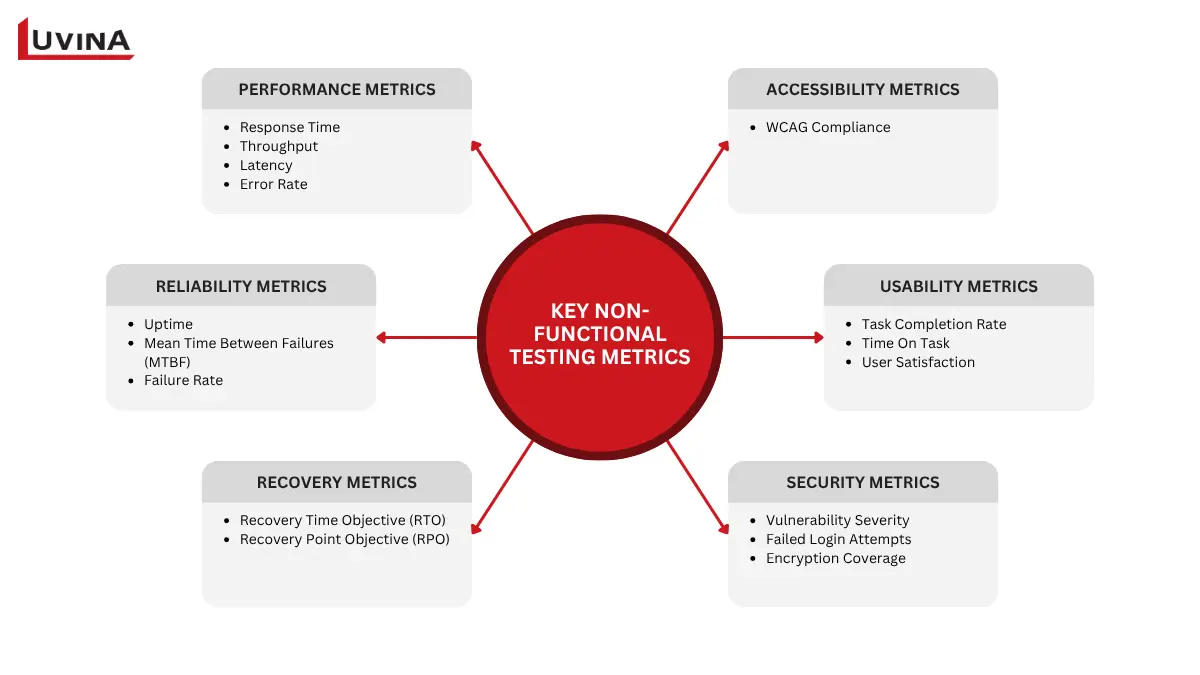
Six key non-functional testing metric categories
Performance Metrics
Performance metrics measure how efficiently an application responds under different workloads.
- Response time measures how long the system takes to process a request and return a response. Lower response times generally provide a better user experience.
- Throughput indicates the number of requests or transactions the system can process within a given period. Higher throughput reflects greater processing capacity.
- Latency measures the delay before a request begins to receive a response. High latency often results in slow and unresponsive applications.
- Error rate tracks the percentage of failed requests, transactions, or operations during testing. An increasing error rate may indicate performance bottlenecks or system instability.
In real projects, QA teams rarely monitor every metric equally. Performance testing often prioritizes response time and throughput, while security testing focuses on vulnerability severity and remediation status.
Reliability Metrics
Reliability metrics evaluate how consistently the application operates over time.
- Uptime measures the percentage of time the system remains available without interruption. It is commonly used to verify compliance with service level agreements (SLAs).
- Mean Time Between Failures (MTBF) represents the average operating time between system failures. A higher MTBF indicates greater system reliability.
- Failure rate measures how frequently failures occur during a specific period or workload, helping teams identify recurring stability issues.
Recovery Metrics
Recovery metrics assess how quickly and effectively the application can recover from failures.
- Recovery Time Objective (RTO) defines the maximum acceptable time required to restore services after an outage.
- Recovery Point Objective (RPO) defines the maximum acceptable amount of data loss measured by the time between the last recoverable backup and the failure.
Security Metrics
Security metrics help evaluate the effectiveness of an application’s security controls and identify potential risks.
- Vulnerability severity measures the risk level of identified security vulnerabilities, often using frameworks such as the Common Vulnerability Scoring System (CVSS).
- Failed login attempts monitor authentication failures to detect brute force attacks or suspicious user activity.
- Encryption coverage measures how much sensitive data is protected through encryption during storage and transmission.
Usability Metrics
Usability metrics assess how efficiently users can complete tasks and interact with the application.
- Task completion rate measures the percentage of users who successfully finish a specific task.
- Time on task tracks how long users take to complete a task, helping identify inefficient workflows.
- User satisfaction is typically measured through surveys or usability studies to understand how users perceive the overall experience.
Accessibility Metrics
Accessibility metrics determine whether the application is usable by people with different abilities.
- WCAG compliance level measures how well the application satisfies the requirements of the Web Content Accessibility Guidelines (WCAG), such as Level A, AA, or AAA.
Before comparing different metrics, the following table summarizes the primary measurements used in non-functional testing.
| Category | Common Metrics | What They Measure |
| Performance | Response time, Throughput, Latency, Error rate | Speed, capacity, responsiveness, and stability under load |
| Reliability | Uptime, MTBF, Failure rate | System stability and operational consistency |
| Recovery | RTO, RPO | Recovery speed and acceptable data loss after failures |
| Security | Vulnerability severity, failed login attempts, Encryption coverage | Security posture and effectiveness of security controls |
| Usability | Task completion rate, Time on task, User satisfaction | Ease of use and overall user experience |
| Accessibility | WCAG compliance level | Compliance with accessibility standards and inclusive user experience |
Summary of non-functional testing metrics
While the specific metrics vary depending on the testing objective, they all provide measurable evidence of whether a software system meets its non-functional requirements. By defining the right metrics and monitoring them throughout the development lifecycle, teams can make data-driven decisions, identify quality issues early, and ensure the application is ready for production. The next step is selecting the appropriate testing techniques and tools to collect and analyze these metrics effectively.
Non-Functional Testing Techniques & Tools
Choosing the right testing technique is just as important as selecting the right metrics. Different techniques enable teams to evaluate specific quality attributes, while specialized tools automate test execution, monitor system behavior, and generate actionable insights.
Common Non-Functional Testing Techniques
- Benchmarking compares system performance against a predefined baseline or industry standard to determine whether performance objectives are met.
- Profiling monitors resource usage such as CPU, memory, disk I/O, and network activity during test execution. It helps reveal performance bottlenecks and inefficient resource utilization.
- Load simulation generates synthetic user traffic or transactions to evaluate how the application performs under expected levels of concurrent activity.
- Penetration testing uses ethical hacking techniques to identify exploitable security vulnerabilities before they can be discovered by attackers.
- Fault injection deliberately introduces failures, such as network interruptions, server crashes, or service timeouts, to validate the system’s resilience and recovery capabilities.
Common Tools Used in Non-Functional Testing
Different tools are designed to support different aspects of non-functional testing. The following are some of the most widely used solutions in modern software testing.
| Testing Area | Common Tools | Primary Purpose |
| Performance and load testing | Apache JMeter, Gatling, k6, LoadRunner | Simulate user traffic and measure system performance under different workloads |
| Security testing | OWASP ZAP, Burp Suite | Detect vulnerabilities and perform security assessments |
| Accessibility testing | Lighthouse, axe | Evaluate accessibility issues and compliance with WCAG guidelines |
| Cross-browser and device testing | BrowserStack | Verify application behavior across browsers, operating systems, and devices |
Common tools used for different types of non-functional testing
The most effective non-functional testing strategy typically combines multiple techniques and tools rather than relying on a single solution. The choice depends on the application’s quality objectives, technology stack, testing scope, and release requirements.
Non-Functional Testing Automation Strategy
Automation enables teams to validate non-functional requirements continuously throughout the SDLC. It accelerates feedback, improves testing consistency, and reduces the risk of production issues without relying solely on manual validation before release. This approach supports faster release while maintaining application stability and user experience.
What Should Be Automated?
Not every non-functional test needs automation. The highest return usually comes from tests that are repetitive, measurable, and executed frequently.
| Testing Area | Automation Priority | Typical Frequency |
| Performance baseline | High | Every build or sprint |
| Load testing | High | Before major releases |
| Security scanning | High | Every CI/CD pipeline |
| Accessibility testing | High | Every UI update |
| Compatibility testing | Medium | Before release |
| Usability testing | Low | Manual with real users |
Recommended automation priorities for common non-functional testing activities
Best Practices
- Define performance and security thresholds before automating tests.
- Integrate automated testing into CI/CD pipelines to detect regressions early.
- Execute heavy load or stress tests separately from routine build validation.
- Review test results regularly and update thresholds as the application evolves.
- Combine automated testing with manual usability and exploratory testing for complete coverage.
Automation improves consistency and shortens feedback cycles, but it does not replace expert analysis. The most effective strategy combines automated validation with experienced QA engineers who can interpret results, investigate root causes, and prioritize improvements based on business impact.
Functional Testing vs. Non-Functional Testing
Functional testing and non-functional testing serve different purposes. Functional testing verifies whether the software performs the expected functions, while non-functional testing evaluates whether it delivers those functions with the required level of performance, reliability, and security. Together, they ensure software is both correct and ready for production.
Before exploring the differences in detail, the following table summarizes the key characteristics of each testing approach.
| Aspect | Functional Testing | Non-Functional Testing |
| Goal | Verify that software functions as specified | Evaluate how well the software performs under different conditions |
| What it validates | Functional requirements and business logic | Non-functional requirements, including performance, security, reliability, scalability, and usability |
| Test types included | Unit testing, integration testing, system testing, user acceptance testing (UAT) | Performance testing, load testing, stress testing, security testing, usability testing, accessibility testing, reliability testing, and compatibility testing |
| Who runs it | QA engineers, developers, business testers | QA engineers, performance engineers, security specialists, UX researchers |
| When in the lifecycle | Throughout development, typically before non-functional testing | Usually after core functional testing passes, before release, and continuously in CI/CD pipelines |
| Example | Verify that users can complete the checkout process | Verify that the checkout process supports 10,000 concurrent users with an average response time below two seconds |
Key differences between functional testing and non-functional testing
In simple terms, functional testing answers “Does the software do what it should?”, while non-functional testing answers “Does it do it well enough?” A successful software product requires both. Even if every feature works correctly, poor performance, weak security, or low reliability can still lead to production failures and a poor user experience.
For a more detailed comparison, read our guide to Functional Testing vs. Non-Functional Testing.
How to Perform Non-Functional Testing
An effective non-functional testing process starts with clear objectives and measurable success criteria. The following steps help ensure testing delivers meaningful insights and supports production readiness.
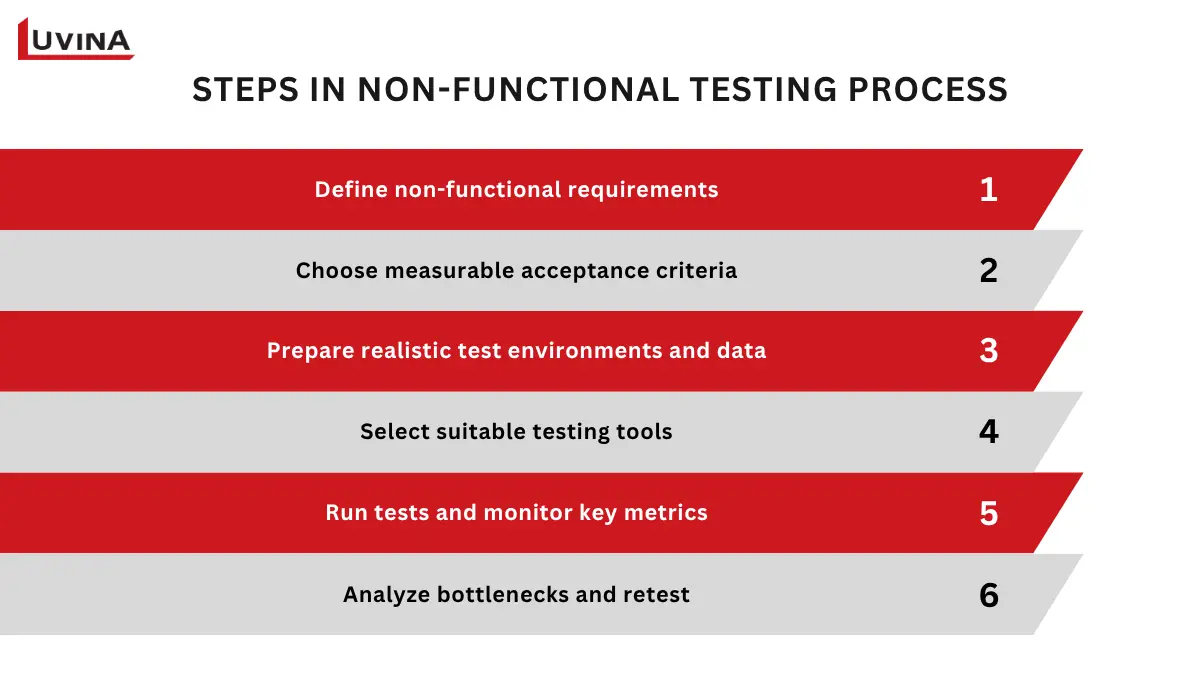
Six key steps in the non-functional testing process.
Step 1. Define Non-Functional Requirements
Identify the quality attributes the application must achieve, such as performance, security, reliability, scalability, or usability. These non-functional requirements should align with business goals, user expectations, and service level agreements (SLAs).
Step 2. Choose Measurable Acceptance Criteria
Translate each requirement into measurable targets. For example, define a maximum response time, minimum uptime, acceptable error rate, or required accessibility compliance level so testing results can be evaluated objectively.
Step 3. Prepare Realistic Test Environments and Data
Create a test environment that closely mirrors the production environment, including infrastructure, configurations, network conditions, and representative test data. Realistic environments produce more reliable and actionable results.
Step 4. Select Suitable Testing Tools
Choose tools based on the testing objectives. For example, use load testing tools to evaluate performance, security testing tools to identify vulnerabilities, and accessibility testing tools to verify compliance with accessibility standards.
Organizations that lack dedicated performance, security, or QA specialists often choose to outsource testing to access experienced teams and specialized tools. Explore the key benefits of QA outsourcing for organizations that need specialized testing expertise.
Step 5. Run Tests and Monitor Key Metrics
Execute the planned tests while monitoring metrics such as response time, throughput, error rate, resource utilization, and security findings. Collect sufficient data to analyze trends and validate whether acceptance criteria are met.
Step 6. Analyze Bottlenecks and Retest
Review the test results to pinpoint performance bottlenecks, stability issues, security risks, or usability problems. After implementing improvements, repeat the relevant tests to confirm that the issues have been resolved without introducing new defects.
Following a structured process helps teams detect quality issues early, reduce deployment risks, and ensure the software meets both functional and non-functional requirements before release.
When to Perform Non-Functional Testing
Non-functional testing should be performed throughout the software development lifecycle rather than only before deployment. Running the right tests at the right time allows teams to identify potential issues early and reduce production risks.
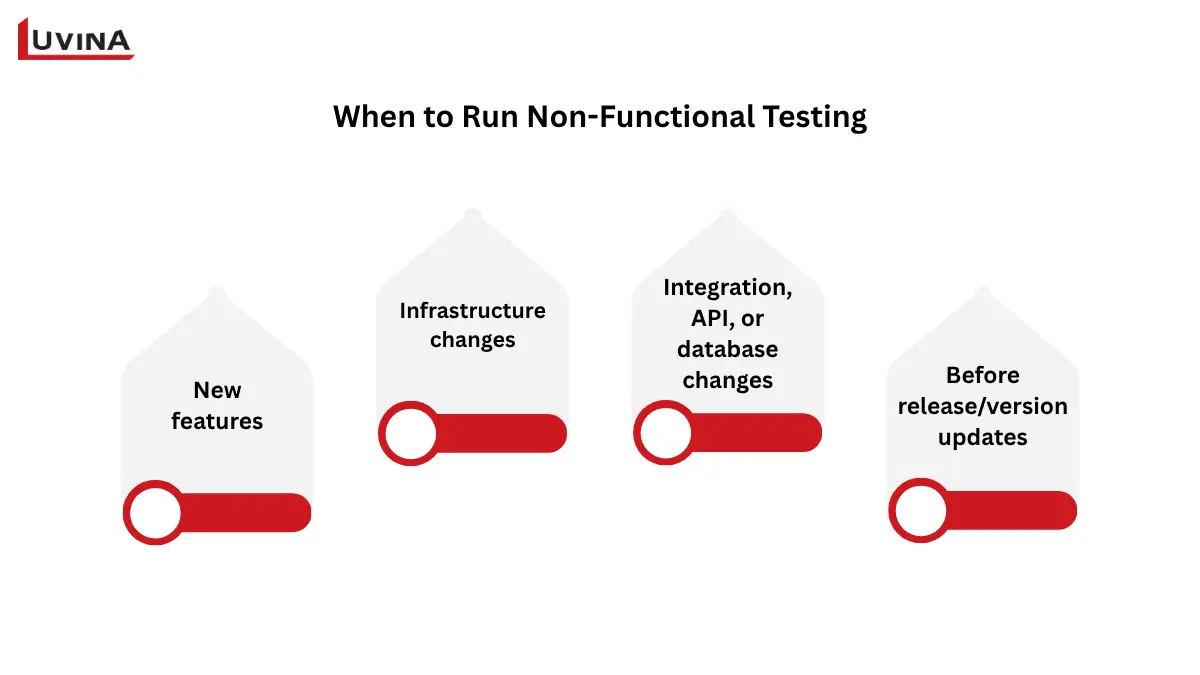
Key stages for performing non-functional testing
- New features: Validate that new or changed functionality meets performance, security, reliability, and usability expectations.
- Infrastructure changes: Re-evaluate the application after changes to servers, cloud environments, network architecture, or deployment configurations.
- Integration, API, or database changes: Verify that updates to external services, APIs, or databases do not negatively affect system performance or stability.
- Before release/version updates: Confirm that the application continues to meet non-functional requirements before deployment.
Performing non-functional testing at these key stages enables teams to identify risks before they reach production, maintain consistent software quality, and deliver a more reliable user experience.
Non-Functional Testing Types With Examples
Understanding real-world scenarios makes it easier to see how different types of non-functional testing are applied in practice. The following examples illustrate how organizations use non functional testing to validate software quality before deployment.
| Testing Type | Example |
| Performance testing | An e-commerce platform verifies that its website can support 10,000 concurrent users during a Black Friday promotion while maintaining acceptable response times. |
| Load testing | A banking application confirms it can process 500 simultaneous transactions with an average response time of less than 2 seconds under normal peak workloads. |
| Security testing | A login system validates that it rejects SQL injection attempts, enforces rate limiting, and blocks brute force attacks to protect user accounts. |
| Usability testing | Five first-time users are asked to complete the checkout process without assistance. The goal is for all participants to finish the task within 3 minutes while encountering minimal usability issues. |
| Accessibility testing | An online portal verifies that users can navigate the entire website using only a keyboard and that all content is compatible with screen readers in accordance with WCAG guidelines. |
| Reliability testing | A payment processing service demonstrates 99.9% uptime over a continuous 30-day period while maintaining stable performance and availability. |
Examples of common non-functional testing types in real-world software projects
Although each testing type focuses on a different quality attribute, they all contribute to the same goal of delivering reliable, secure, and high-performing software. Selecting the right combination of non-functional testing types depends on the application’s business requirements, technical architecture, and user expectations.
Common mistakes to avoid
Even with a well-planned testing strategy, common mistakes can reduce the effectiveness of non-functional testing and increase the risk of production issues. Avoiding the following pitfalls helps ensure more reliable and actionable test results.
- Defining vague non-functional requirements: Requirements such as “the system should be fast” or “the application should be secure” are difficult to validate. Instead, define measurable targets, such as maximum response time, minimum uptime, or specific security and accessibility standards.
- Starting testing too late: Waiting until the final stages of development leaves little time to identify and resolve performance, security, or scalability issues before release.
- Using unrealistic load assumptions: Testing with workloads that do not reflect actual user behavior may produce misleading results. Base test scenarios on expected traffic patterns, transaction volumes, and business usage.
- Testing in an environment that differs from production: Differences in infrastructure, configurations, or data can significantly affect test accuracy. Whenever possible, use a production-like environment for non-functional testing.
- Skipping baseline metrics: Without baseline measurements, it is difficult to determine whether performance or reliability has improved or degraded after changes.
- Ignoring monitoring after release: Non-functional testing should not end at deployment. Continuous monitoring helps detect performance degradation, availability issues, and security risks that may only appear in production.
Avoiding these common mistakes improves testing effectiveness and reduces the risk of production issues, makes more informed decisions, and maintains software performance and reliability throughout the application lifecycle. Organizations that adopt a quality-first mindset typically achieve better software quality. See how Japanese quality standards help build consistent QA practices.
FAQs
1. What is non-functional testing?
Non-functional testing evaluates the quality attributes of software – how well it performs rather than what it does. It tests characteristics like speed, security, usability, and reliability that aren’t captured by functional test cases.
2. What does non-functional testing include?
Non-functional testing includes performance, load, stress, scalability, security, reliability, recovery, availability, usability, accessibility, and compatibility testing.
3. What are the main types of non-functional testing?
The main types can be grouped into four categories: performance, reliability and recovery, security, and usability, accessibility, and compatibility testing.
4. What is the difference between functional and non-functional testing?
Functional testing verifies whether software functions as expected, while non-functional testing evaluates whether it meets quality requirements such as performance, security, reliability, and usability. Both are essential for production-ready software.
5. What are non-functional testing techniques?
Common non-functional testing techniques include benchmarking, profiling, load simulation, penetration testing, A/B usability testing, and fault injection.
Conclusion
Non-functional testing ensures software quality beyond functional correctness by evaluating critical attributes such as performance, security, reliability, scalability, and usability. Together with functional testing, it helps ensure an application is not only working as expected but also ready for real-world use.
Beyond improving technical performance, non-functional testing helps organizations reduce operational risks, protect business continuity, and deliver a more consistent customer experience. Achieving these outcomes requires clear testing strategies, appropriate tools, and experienced QA professionals who can validate software against real business requirements.
If your organization is looking to improve software quality while optimizing QA resources, partnering with an experienced testing provider can make a significant difference. Learn how to choose the right partner in Luvina’s guide to software testing outsourcing companies.
Resources
- https://www.w3.org/WAI/standards-guidelines/wcag/
- https://learn.microsoft.com/en-us/azure/well-architected/performance-efficiency/
READY TO START A PROJECT?
Our experts are eager to explore your needs.

Read More From Us?
Sign up for our newsletter
Read More From Us?
Sign up for our newsletter