




Stress Testing Software: How to Plan, Run, and Measure


McKinsey claims that 70% of the software utilized by Fortune 500 fModern software seldom breaks because of missing features; rather, it becomes too challenging to modify. Teams often lag as products increase in complexity due to disorganized logic, duplicated code, and outdated architectures that are no longer suited for new demands. The Stripe Developer Coefficient Report indicaMany failures do not come from functional bugs but from systems being pushed beyond their capacity. According to a global IT outage survey by LogicMonitor, 96% of IT leaders reported experiencing at least 1 outage in the past 3 years, with performance and capacity issues among the leading causes. This is why stress testing software has become a critical practice.
In this article, we will explore what is stress testing in software testing, how to plan, run, and measure stress testing effectively.
What is Stress Testing in Software Testing?
According to Wikipedia, stress testing (sometimes called endurance testing, fatigue testing, or torture testing) is “a software testing activity that determines the robustness of software by testing beyond the limits of normal operation.“
Before they lead to actual issues, stress testing software helps to reveal system flaws. The principal aims comprise:
– Making certain the system does not fail under high usage
– Confirming the system’s capacity to bounce back following a failure
– Data correctness is confirmed even under pressure.
– Finding possible security flaws, data corruption, and hardware problems that could show under maximum usage circumstances.
During a stress test, testers simulate scenarios like a sudden spike in users, large data volumes, or extreme traffic. By doing so, they can detect bottlenecks, memory leaks, performance degradation, and other potential failures.
Stress Testing vs. Load Testing vs. Performance Testing
Different testing types are intended for testing of software reliability during varying scenarios and therefore differ from one another. Although stress testing software is conducted with extreme scenarios, load testing and performance testing include expected scenarios. The following table compares how the three types of testing differ.
| Test type | Purpose | Key metrics | Example scenario |
| Performance testing | Measures system speed, stability, and responsiveness under normal conditions | Response time, throughput, resource usage, error rates | Application handles 10,000 daily users purchasing tickets |
| Load testing | Evaluates system performance under the expected peak load | Concurrent users, average response time, error % | 100,000 users try to buy tickets simultaneously for a popular event |
| Stress testing | Pushes the system beyond normal limits to find breaking points | Max load, failure points, recovery time | 1 million users attempt to buy tickets at the same time; monitor for crashes or slowdowns |
A short comparison table of stress testing, load testing, and performance testing
When to use each:
- Run testing of run performance throughout development to track stability and responsiveness.
- To confirm anticipated peak performance, execute load tests before go-live or high-traffic times.
- To make sure the system can handle high user demand and recover quickly, schedule stress testing software before significant events like Black Friday discounts, concert ticket launches, or elections.
Why Stress Testing Matters for Software
Software, even very well-optimized, can behave unpredictably under heavy load. This is why guaranteeing systems stay resilient and dependable depends on extreme load testing.
Imagine thousands of consumers purchasing concert tickets simultaneously; or millions of shoppers touring an e-commerce site during a significant discount like Cyber Monday,… These surges can result in crashes, sluggish load times, aborted transactions, or inventory problems in the absence of adequate testing. Before release, a stress test application lets developers identify these flaws and make needed fixes.
Primary advantages of stress testing software:
– Makes certain that even under overloaded conditions, the system keeps working flawlessly.
– Confirms that good communications are shown and that failures are handled well.
– Confirms that contingency planning lets the system quickly rebound from breakdowns.
– preserves network, database, and server uptime and performance.
– Lowers downtime, avoids urgent problem solving, and safeguards income and brand image.
Early detection of bottlenecks, performance problems, and possible failures by stress testing capacity-breaking-point testing increases resilience, maximizes infrastructure, and readies systems for real-world problems.
Types of Stress Tests in Software
Not all stress tests target the same risks or system layers. Depending on what you want to validate – servers, applications, transactions, or extreme edge cases – different approaches are used. The sections below outline the most common types of stress testing:
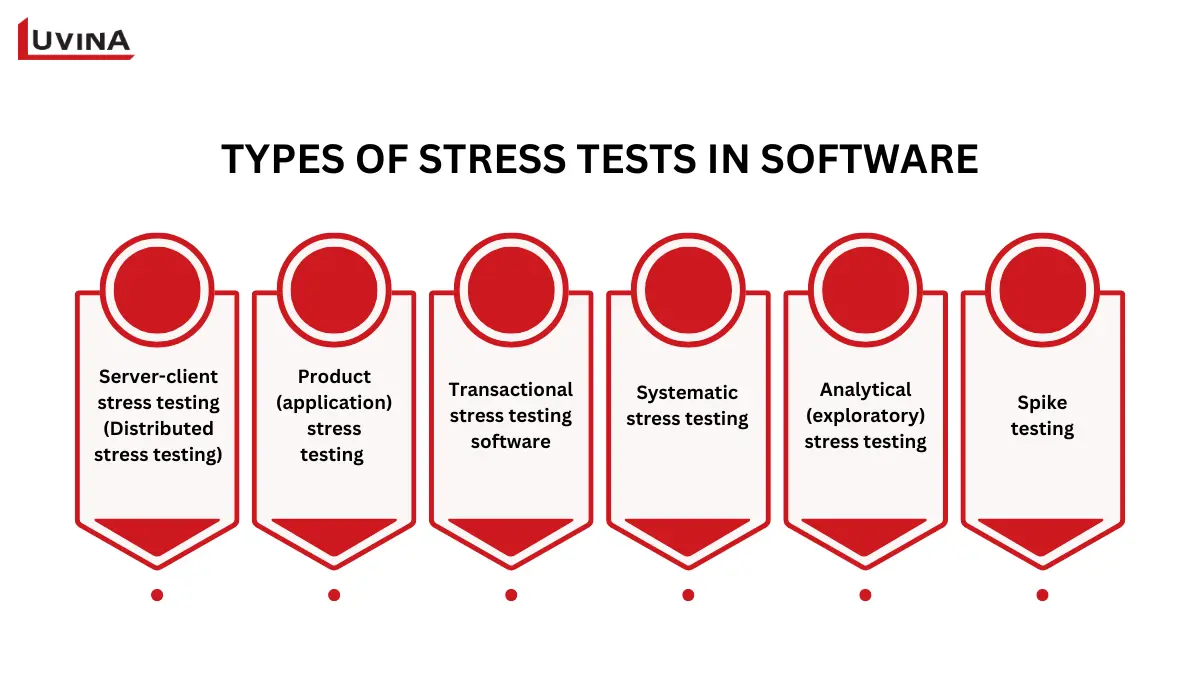
Stress testing can be divided into these six types
Server-client stress testing (Distributed stress testing)
Server-client stress testing assesses a server’s handling of simultaneous requests from several clients. This method mimics a great number of dispersed users submitting requests concurrently to gauge server stability and robustness.
Thousands of virtual users try to log in, make requests, or simultaneously access resources during a conventional server stress test. The aim is to verify that the server can handle high concurrency without crashing, slowing down considerably, or losing connectivity.
Product (application) stress testing
Product stress testing focuses on a single software product and its internal behavior under heavy load. It is mainly used to identify issues related to data locking, network delays, and performance bottlenecks within the application itself.
Running several simultaneous operations at once could test a database-driven application. This enables teams to confirm that the program is responsive and consistent even under peaks of actual usage.
Transactional stress testing software
Transactional stress testing examines how transactions perform under extreme load when multiple systems interact. It typically involves one or more transactions between different applications and is used to fine-tune and optimize system behavior.
In an e-commerce environment, this type of testing may simulate thousands of transactions per minute between the payment gateway and order management system. Stress testing software at the transaction level helps ensure reliability, scalability, and error-free processing during peak demand.
Systematic stress testing
Every several systems operating on the same server undergo organized stress testing. It aims to spot instances where the workload of one program conflicts with or overrides that of another.
In communal settings, where many systems vie for the same resources, this kind of testing is particularly helpful. Parallel processing helps reveal data conflicts, resource contention, and the performance degradation it causes.
Analytical (exploratory) stress testing
Analytical stress testing exposes unexpected or improbable scenarios to reveal hidden flaws. Though rare in actual life, these situations can have severe consequences should they happen.
Simulation of a database going offline while thousands of users are active, or a sudden rise of traffic resulting from an unanticipated viral event, abound in examples. This form of stress testing software helps teams understand how systems behave in extreme and unpredictable situations.
Spike testing
Spike testing is a specialized form of stress testing where the load increases sharply within a very short time. The system may be pushed to its maximum capacity – or briefly beyond it – to observe how it reacts and recovers.
This approach is useful for applications that experience sudden traffic bursts, such as ticket sales or flash promotions. It verifies whether the system can absorb abrupt load spikes without failure.
6-Step Process of Stress Testing in Software
When it adheres to a defined and reproducible approach, stress testing is most useful. The following workflow shows how to run stress tests.
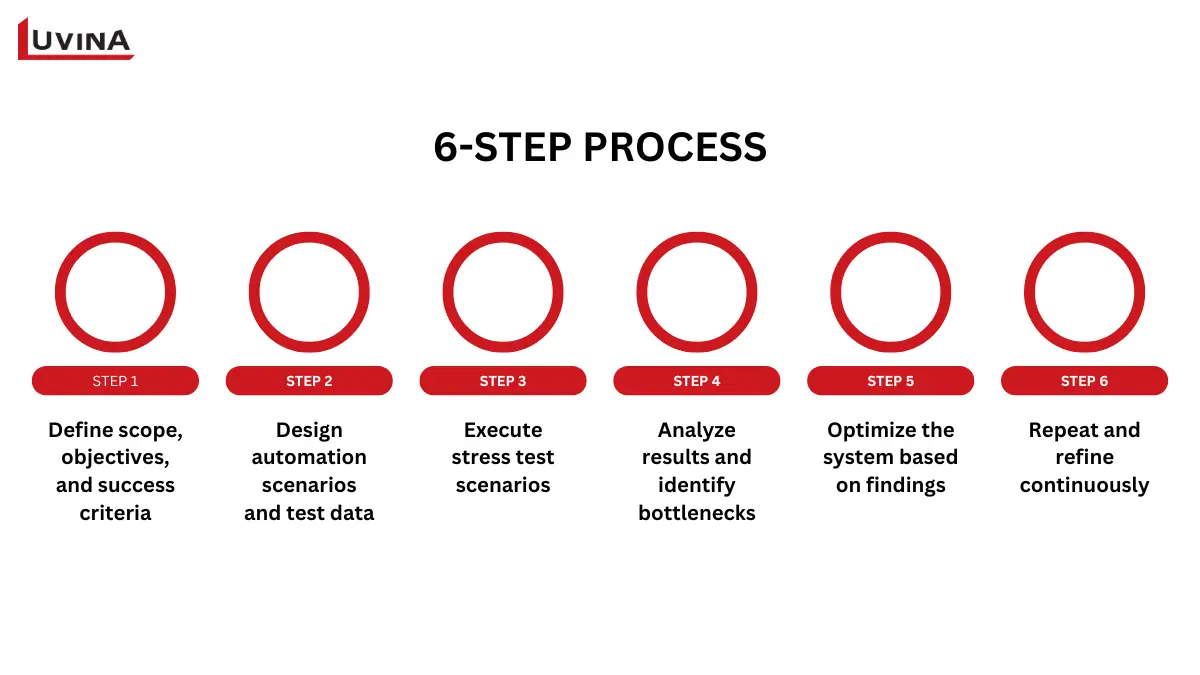
Stress testing implementation process
Step 1: Define scope, objectives, and success criteria
Planning comes first. This phase stresses knowing the system and precisely delineating what the stress test must demonstrate. Teams first compile system data, including database configurations, network capacity, server specs, and any currently operating traffic patterns. This knowledge sets realistic testing circumstances in context.
The system is then examined to grasp how the current performance is under the best use. Clear stress testing software objectives are established depending on this study. Often including non-functional criteria like handling a specified amount of concurrent customers while maintaining acceptable response times, these objectives sometimes feature particular performance metrics and threshold values.
Step 2: Design automation scenarios and test data
Automation situations are developed to simulate the specified stress settings once goals are unambiguous. Scripting user actions like logging in, exploring material, or finishing transactions is part of this phase. To guarantee the test reflects real usage patterns, the scripts have to represent expected workloads and load levels.
Test data reading is equally crucial. Data volume, variety, and complexity should match production as closely as feasible. User profiles, transaction logs, and inventory information all have to be honest. The stress testing software environment should also mimic production infrastructure in terms of hardware, software, and network configurations.
Step 3: Execute stress test scenarios
The load is progressively increased during this phase to see how the system reacts under increased pressure. Performance indicators, including error rates, CPU usage, memory consumption, and reaction time,s are always monitored.
Every stress testing software produces logs and papers recording system behavior throughout execution. Understanding performance patterns and locating places where deterioration or failure takes place depends on these records.
Step 4: Analyze results and identify bottlenecks
Analysis of results turns raw data into insights. During execution, performance measures gathered are analyzed and contrasted with set criteria and thresholds. This contrast aids in spotting discrepancies, mistakes, and performance thresholds. Teams seek underlying reasons for slowdowns or crashes, including CPU saturation, network restrictions, or sluggish database searches. At this point, thorough checking is important.
Step 5: Optimize the system based on findings
Optimizing starts once bottlenecks are detected. Improvements are given top priority according to impact; attention is first turned to problems most seriously affecting stability or performance. This might entail altering network settings, server resources, or database query tuning.
Meeting or surpassing the initial stress testing goals is the aim. The system is re-evaluated once modifications are put into effect to confirm that performance goals are met. At this point, groups usually stress test application parts separately to verify that certain repairs produce the expected results under load.
Step 6: Repeat and refine continuously
Over time, systems develop, user behavior shifts, and workloads expand. For this reason, stress testing software should be treated as an iterative process. Tests are run every optimization cycle to verify enhancements and guarantee reliable performance. As new hazards become evident, test cases and workloads are updated.
Top Tools for Stress Testing Software
Each meant to fit diverse testing needs, team abilities, and system architectures, the market presents a wide selection of answers. The table below presents the most often used software stress testing software.
| Tool | Scope | Key features | Best for |
| LoadRunner | Enterprise performance and stress testing | Advanced load simulation, deep monitoring, detailed reports | Large-scale, mission-critical systems requiring precise performance benchmarks |
| Apache JMeter | Open-source, Java-based testing tool | Flexible protocol support, strong community, load and stress testing | Cost-effective system resilience testing for web services and APIs |
| NeoLoad | Web and mobile performance testing | Cloud testing, CI/CD integration, and high user scalability | Agile teams testing web/mobile apps with continuous delivery |
| Stress Tester | Lightweight stress testing software | Minimal scripting, visual result analysis | Quick stress tests with low setup complexity |
| LoadNinja | Browser-based load and stress testing | Codeless testing, real browser metrics | Realistic user behavior testing without scripting |
| WebLoad | Unified performance and stability testing | End-to-end analysis, performance + integrity validation | Verifying system stability under sustained stress |
| SmartMeter | GUI-based automation testing tool | No-code test creation, automated, detailed reports | Teams prioritizing usability and fast reporting |
Some useful tools for stress testing
You should center on ease of use, scalability, technology compatibility, depth of reporting, and general cost-effectiveness while assessing instruments for stress testing applications. The right decision is determined not just by system complexity but also by how effectively the tool fits into your current testing process and long-term performance objectives.
Key Metrics to Measure in Stress Testing
When running stress testing software, metrics provide concrete evidence of how a system behaves as it approaches and exceeds its limits. The table below summarizes the right software performance testing metrics to track when running peak traffic simulation, grouped by performance, response behavior, and failure patterns for easier analysis.
| Group | Metric | What does it show? |
| Load and throughput | Pages per Second | Number of pages the system can handle per second during stress testing of software execution |
| Transactions per Second | Count of successful and failed transactions per second under extreme load | |
| Throughput (Bytes/sec) | Amount of data processed per second when the system is stressed | |
| Concurrent users | The maximum number of simultaneous users supported by stress testing software scenarios | |
| Response time | Page response time | Time required to fully load a page under stress conditions |
| Hit time | Average time to retrieve a single resource (page or image) | |
| Transaction response time | End-to-end latency of business transactions during stress testing of software | |
| Server response time | The time the server takes to respond as the load increases | |
| Resource usage | CPU utilization | CPU consumption level when the system approaches its limits |
| Memory utilization | Memory usage and early signs of leaks during stress execution | |
| Database response time | Query execution delay under high concurrency | |
| Failures and errors | Failed connections | Number of client connections rejected during stress testing software |
| Failed transactions | Transactions that fail due to overload or timeouts | |
| Failed system attempts | System-level failures, such as broken requests or blocked operations | |
| Error rate | Frequency of application errors and exceptions | |
| Failed rounds | Incomplete or unsuccessful stress test cycles |
The performance of stress testing software can be measured using these metrics
Common Challenges and Best Practices
Although it could be practically difficult and degrade correctness if not properly managed, stress testing is essential for confirming system stability under extreme circumstances. The most often encountered obstacles teams have when using stress testing software are listed below, along with the best methods to handle each problem.
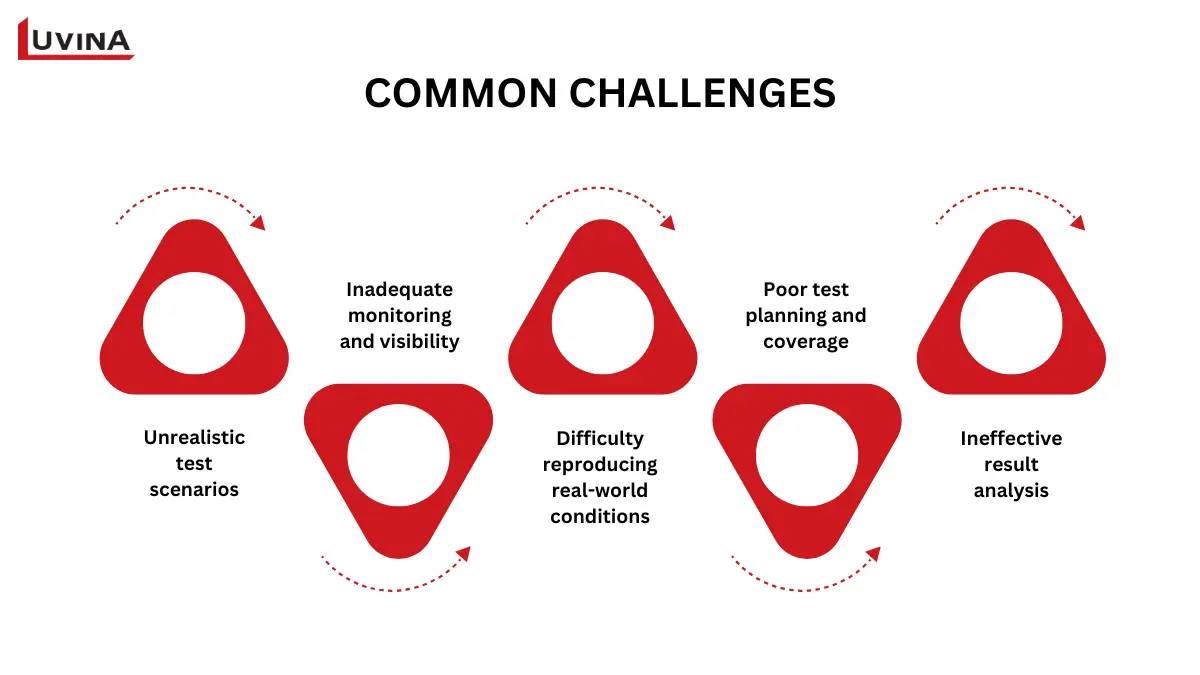
The biggest challenges in stress testing an application
Unrealistic test scenarios
Many stress tests underrepresent actual user behavior. Often too simple, repeating, or isolated, scenarios fall short of matching real-world circumstances.
Best practice: Create test scenarios based on actual consumption patterns. Include peak-load behaviors, varied traffic flows, and several user roles. A good stress test application should mimic how consumers engage with the system during events like sales launches or unexpected traffic spikes.
Inadequate monitoring and visibility
Teams could overlook important performance indicators like slow descents, resource depletion, or quiet failures under stress performance if they are not correctly monitored.
Best practice: During stress testing software runs, employ thorough monitoring and logging solutions. Monitor response times, error rates, CPU, memory consumption, and database performance in real time to enable quick detection of bottlenecks and aberrant behavior.
Difficulty reproducing real-world conditions
Hardware, network configuration, or data size can set test environments apart from production, therefore generating deceptive results.
Best practice: Arrange a test environment quite similar to production. Arrange as much as feasible infrastructure, network latency, and scaling guidelines.
Poor test planning and coverage
Uncovered tests might leave important parts untested. Concentrating on only one process, like checkout or login, could mask deficiencies in other domains.
Best practice: Before testing, establish precise goals, success metrics, and scope. Cover all essential system parts and user journeys.
Ineffective result analysis
Without appropriate analysis, gathering data makes it difficult to give priorities to solutions or identify underlying causes.
Best practice: Evaluate test results against established criteria. Find points of failure, look into root causes, and direct best optimization efforts on the most influential problems. Treat stress testing as an ongoing process; after changes, re-test to confirm results.
Conclusion
Validating how systems react under harsh and unexpected conditions depends on stress testing software, a very crucial technique. Stress testing enables businesses to expose underlying bottlenecks, avoid expensive downtime, and preserve user experience throughout traffic surges or failure scenarios when done correctly.
For teams without internal knowledge or resources, collaborating with knowledgeable software testing outsourcing companies can greatly enhance overall test accuracy, speed, and quality results. Contact Luvina right now for professional assistance if you want to improve your system resilience and confidently carry out thorough stress testing!
Resources
- https://www.roboticsandautomationmagazine.co.uk/news/manufacturing/60-of-uk-manufacturers-expect-major-software-outages-as-testing-lags.html
- https://en.wikipedia.org/wiki/Stress_testing_(software)
- https://www.geeksforgeeks.org/software-testing/stress-testing-software-testing/
- https://qase.io/blog/stress-testing-software/
- https://www.blazemeter.com/blog/performance-testing-vs-load-testing-vs-stress-testing#performance-testing-vs-load-testing-vs-stress-testing
- https://teamhub.com/blog/understanding-stress-testing-in-software-development/
READY TO START A PROJECT?
Our experts are eager to explore your needs.


Read More From Us?
Sign up for our newsletter
Read More From Us?
Sign up for our newsletter