




What Is Vibe Coding and Why It Matters in 2026


Vibe coding is an AI-driven development approach where developers describe intent in natural language, and AI generates executable code, enabling faster prototyping and iterative development.
Vibe coding reflects a new way of building software – less about rigid syntax, more about flow, creativity, and collaboration with AI. But what is vibe coding, and why does it matter now more than ever?
In this article, we’ll break down the concept of vibe coding, how it works, and why it’s becoming a key mindset for developers in 2026.
What Is Vibe Coding?
“Vibe coding is a fresh take in coding where users express their intention using plain speech and the AI transforms that thinking into executable code.” – IBM
Instead of manually coding line by line, developers guide AI tools through prompts, conversations, and feedback to generate, refine, and even debug applications. This approach shifts the role of developers from “coding” to “directing”.
The term “what is vibe coding” was introduced by Andrej Karpathy in early 2025, marking a turning point in software development. So, why is it called vibe coding? The name comes from the idea of working in a creative “flow” or “vibe” rather than focusing on rigid syntax. You express intent in plain language, experiment quickly, and iterate based on feedback. This creates a more intuitive and less structured development experience, where speed and creativity come before perfection. In practice, vibe coding often follows a “build first, refine later” mindset, aligning closely with agile principles like rapid prototyping, iterative development, and continuous feedback loops.
At the same time, vibe coding does not replace human thinking. While AI can generate code and automate repetitive tasks, it still relies on human input for direction, creativity, and decision-making. Developers remain essential in defining goals, validating outputs, and ensuring the final product meets real-world needs.
How does vibe coding work?
To understand what is vibe coding, it helps to see it in action. Vibe coding relies on a tight, iterative conversation between you and an AI assistant. Here’s how a typical workflow unfolds:
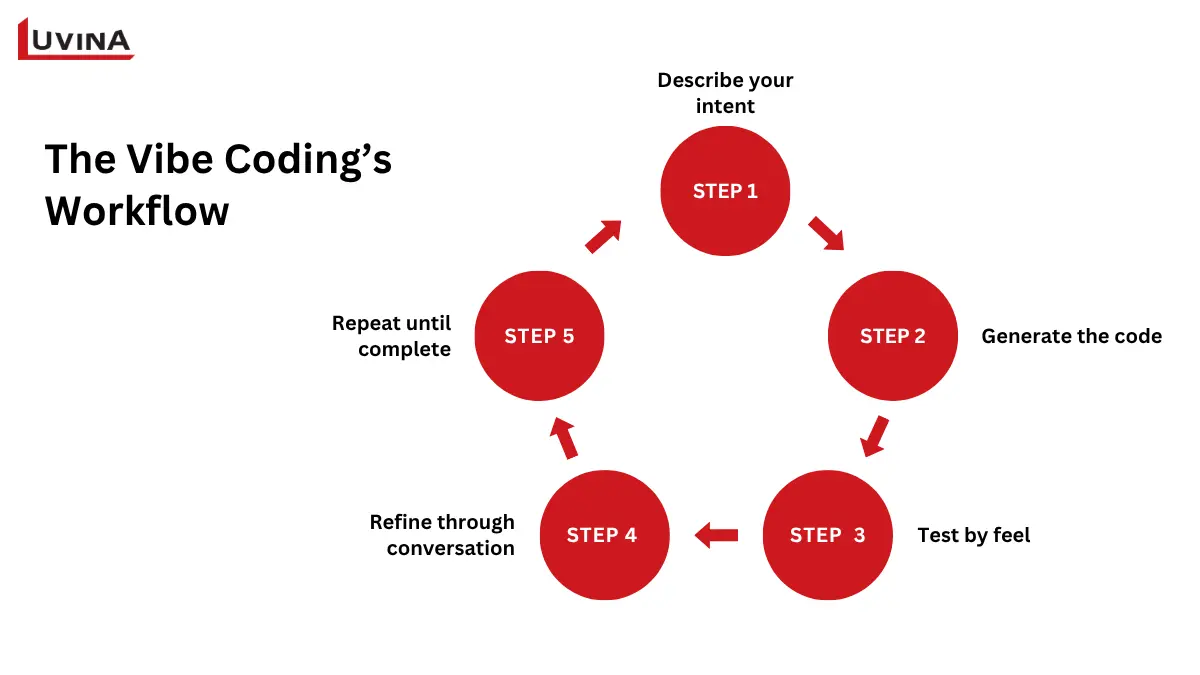
The vibe coding process essentially consists of these 5 steps
Step 1: Describe your intent
You begin by explaining what you want to achieve in plain language. For example, you might say: “Create a Python function that reads a CSV file and returns a sorted list of names.” This initial description serves as your prompt.
Step 2: Generate the code
The AI assistant, often a model like GPT-4 or a specialized code AI, translates your prompt into executable code. It draws on its extensive training to produce a first draft that meets your request. Essentially, the AI acts like an “autocomplete on steroids,” creating multiple lines of code at once. If your prompt asks to sort a list, it might generate a Python function that uses built-in sorting methods. This stage demonstrates one of the key strengths of what is vibe coding: rapid prototyping powered by AI.
Step 3: Test by feel
Once the code is generated, you run it to see if it behaves as expected. Errors are part of the process, but AI-assisted debugging makes troubleshooting much easier. You can copy error messages and ask the AI to explain or fix them. This interactive loop allows you to validate functionality without needing deep technical expertise.
Step 4: Refine through conversation
If the code needs adjustments, like adding error handling or improving formatting, you provide new instructions. The AI iterates on the previous code, refining it step by step. You might ask it to remove duplicates, optimize performance, or format outputs more cleanly.
Step 5: Repeat until complete
This loop of describing, generating, testing, and refining continues until the code meets your needs. Each cycle builds on the last, creating a fluid development process.
Vibe Coding vs. AI-Assisted Coding
Understanding what is vibe coding becomes clearer when you compare it with traditional AI-assisted coding. While both methods involve AI in software development, their approaches, speed, and learning requirements are quite different. Traditional AI-assisted coding acts like a skilled assistant: it helps you write code faster, catches mistakes, and requires solid programming knowledge. Vibe coding flips this approach: developers describe what they want in plain language, and the AI generates the code, handling technical details and letting creativity lead.
Here’s a concise comparison:
| Vibe coding | Traditional AI-assisted coding | |
| Input method | Describe ideas in plain language | Write prompts or code snippets |
| Control over code | Moderate; AI interprets intent | High; developer specifies structure and syntax |
| Speed | Fast initial output, moderate debugging | Slower start, less debugging |
| Best use cases | Prototypes, experimentation, creative projects | Production-ready apps, complex systems |
| Skill requirements | Natural language skills, prompt engineering, and basic coding | Strong programming fundamentals, debugging, and architecture knowledge |
| Learning curve | Gentle | Steeper |
| Precision vs. creativity | Creative, less precise | Precise, predictable |
Comparison between vibe coding and traditional AI-assisted coding methods
For beginners, traditional AI-assisted coding is generally safer, as it teaches foundational programming while assisting in code creation. However, for creative experimentation or rapid prototyping, vibe coding is ideal. Many developers now combine both: using vibe coding to brainstorm and prototype quickly, then switching to traditional AI-assisted methods for production-ready code.
Choosing between them depends on your project goals, timeline, and comfort level with coding.
Vibe Coding Tools
If you’ve ever wondered what is vibe coding, the key is in the platforms that make it possible. These vibe coding tools below let anyone – from complete beginners to seasoned developers – turn ideas into software by speaking in plain language while AI translates those ideas into code.
| Tool | Starting point | Skill level | Coding approach | Key feature |
| Gemini Code Assist | Existing project/file | Intermediate – advanced | Low-code/ AI-assisted | In-editor AI help that writes, explains, and tests code in context |
| Gemini CLI | Terminal-based development | Intermediate – advanced | Low-code/ AI-assisted | Open-source CLI agent enabling “vibe-style” iterative coding directly in the terminal |
| Google Antigravity | Complex engineering tasks | Beginner – advanced | Agent-first/ Autonomous | Orchestrates AI agents across editor, terminal, and browser for autonomous workflows |
| Agent Development Kit (ADK) | Custom autonomous agents | Advanced/ expert | Code-first/ Agentic | Framework for building multi-agent systems; perfect for production-grade AI-assisted projects |
| GitHub Copilot/ Copilot X | Code editor | Beginner – advanced | AI-assisted/ Vibe coding | Translates high-level prompts into full functions and offers chat guidance for debugging; a classic example of modern vibe coding in practice |
| Google AI Studio | Quick idea or concept | Beginner | No-code/ Low-code | Generates a full app from a single prompt; ideal for first experiments in what is vibe coding |
| Replit AI/ Ghostwriter | Cloud IDE | Beginner – intermediate | No-code/ AI-assisted | Lets users describe entire apps and instantly generate front-end, back-end, and database setup |
| OpenAI ChatGPT | Conversational interface | Beginner – intermediate | AI-assisted/ Vibe coding | Use natural language to generate code snippets, troubleshoot errors, and even execute tasks with plugins like Code Interpreter |
| Cursor (AI Code Editor) | Project files | Intermediate – advanced | AI-assisted/ Vibe coding | Handles project-wide edits, multi-step instructions, and refactoring with context awareness |
| Claude (Anthropic) | Long documents/ code files | Intermediate – advanced | AI-assisted | Excellent for generating and reviewing long files or structured code with a large context understanding |
| Amazon CodeWhisperer | IDE integration | Intermediate – advanced | AI-assisted | Provides suggestions, automates repetitive code, and supports integration with existing workflows |
| Tabnine | IDE integration | Beginner – advanced | AI-assisted | Autocomplete and AI-powered code suggestions across multiple languages |
Some useful tools for performing vibe coding
These tools collectively illustrate how what is vibe coding can be applied across skill levels and project types. Beginners can quickly prototype apps with Google AI Studio or Replit AI, while advanced developers and data scientists might prefer Gemini CLI, ADK, or agent-first tools for complex tasks.
What are the risks of vibe coding?
While vibe coding makes development faster and more accessible, it also introduces risks that are often overlooked, especially when projects move beyond simple prototypes. These risks can have serious consequences if not managed carefully.
Security vulnerabilities
AI-generated code can include insecure patterns (SQL injection, weak auth, unsafe file handling).
Non-technical users may miss these issues, making production apps risky without review.
Technical debt
Prioritizing speed often leads to poor structure and unnecessary code. This creates long-term issues when scaling, updating, or integrating systems.
Skill erosion
Over-reliance on AI can weaken core programming skills. Without fundamentals, it becomes harder to detect bugs or guide AI effectively.
The “Vibe coding hangover.”
Fast builds can lead to slow maintenance later. Teams may face debugging issues, hidden bugs, and difficulty understanding the codebase after launch.
Is vibe coding replacing developers?
As the industry evolves, a common question emerges: Is vibe coding the future of software development? The answer is not entirely clear yet. Some experts see it as a major paradigm shift, while others remain cautious about its long-term dominance. There is also a middle ground, where traditional coding continues to exist as a specialized “craft,” while a large portion of software becomes AI-generated.
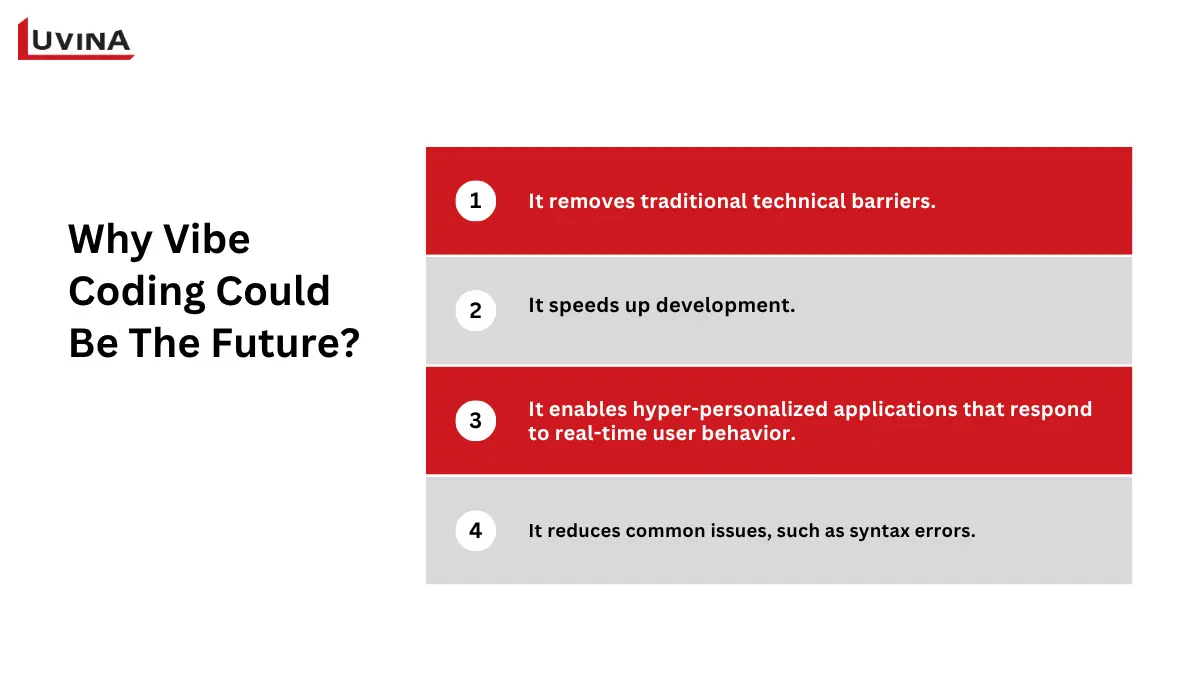
What is vibe coding, and why could it be the future of software development?
What is vibe coding? It represents a move toward more intuitive and natural interactions with technology. This signals a future where coding becomes less about syntax and more about communication.
Several emerging technologies are accelerating this transformation. AI-powered coding assistants are already turning natural language into functional code. At the same time, spatial computing and VR are opening the door to immersive development environments where users can build software in 3D spaces. Looking further ahead, concepts like brain-computer interfaces (BCI) could allow users to generate code through thought alone, while emotion-aware systems may adapt applications dynamically based on user intent and mood.
There are also clear reasons why vibe coding is gaining momentum:
– It removes traditional technical barriers, enabling non-developers to build applications without deep programming knowledge.
– It significantly speeds up development, reducing both time and cost.
– It enables hyper-personalized applications that respond to real-time user behavior, improving engagement and experience.
– It reduces common issues like syntax errors.
However, even with these advantages, what is vibe coding does not replace the fundamentals of good software development. Principles like system architecture, security, scalability, and maintainability remain essential, and may become even more important in an AI-driven environment.
Vibe coding is likely not a complete replacement for traditional development, but rather a powerful addition to it.
>>> Read more: Impact of AI on software development
The Adoption Data Is Real
Vibe coding is already being used in real projects across different levels. Looking at what is vibe coding in practice, the adoption is happening from individual developers to enterprise teams, with clear productivity gains along the way.
Developer adoption
At the individual level, developers and even non-coders are building real, usable products with AI tools.
Justin Lai, an educational technologist, created a plywood cutting visualizer using Claude, a simple but useful tool that calculates material usage instantly.
Michael Lembo, a product manager, used Lovable to build a full portfolio website, even integrating a chatbot to answer visitor questions.
Marketers are also leveraging vibe coding. Tim Metz built an SEO calculator using Cursor as a lead generation tool, directly supporting business goals.
Many creators follow a similar pattern: start with conversational AI tools like ChatGPT or Claude to shape ideas, then move to tools like Cursor or Lovable to refine and ship.
Enterprise adoption
At the enterprise level, teams are starting to integrate vibe coding into real workflows. A common pattern is using AI tools for rapid prototyping, then refining the output before production. For example:
Andy Keil and Kyle Ledbetter built Dreambase by combining Lovable, v0, and Cursor – starting with rapid prototyping, then refining before production. This same workflow is now used to support enterprise clients.
Similarly, Luvina applies vibe coding to deliver MVPs in just 7 days. By automating much of the coding process, teams can focus more on solution design and business impact instead of manual implementation.
This shift highlights how what is vibe coding is being embedded into real delivery pipelines, not just experimentation.
Productivity impact
The biggest impact of vibe coding is on productivity. In controlled tests, developers using Copilot completed tasks 55% faster. AI adoption in software development continues to rise. From the 2025’s survey of Statista, 88% of respondents said that regular AI use is in at least one business function, reinforcing the shift toward AI-assisted workflows. This shift is exactly what what is vibe coding represents: moving from writing code to maximizing impact.
Vibe Coding Limitations
While the benefits are clear, understanding what is vibe coding also means recognizing where it falls short. Despite its speed and accessibility, this approach still faces several technical and real-world challenges that limit its effectiveness in more demanding scenarios. Here are the key limitations to consider:
– It struggles with complex or highly customized technical requirements.
– The generated code often needs significant optimization to meet performance standards.
– It is not well-suited for distributed systems that require strong architecture and advanced engineering practices.
– Debugging can be difficult because AI-generated code may lack clear structure and consistency.
– Maintenance becomes challenging when the codebase is not well-organized or fully understood by developers.
– Updating applications can be time-consuming if the original logic is unclear or poorly structured.
– Security risks are significant, as AI-generated code may bypass proper reviews and include hidden vulnerabilities.
What the Future Actually Looks Like
After understanding what is vibe coding, instead of spending days building from scratch, developers can now go from an idea to a working prototype in just a few hours. More importantly, specifications are no longer static. They evolve through continuous interaction with AI. This makes requirements clearer before coding even begins, reducing friction later on.
As you go deeper into what is vibe coding, this iterative, AI-assisted thinking becomes the core of the workflow.
– Turn ideas into prototypes extremely quickly
– Build multiple versions of a product at the same time
– Use AI to draft, review, and refine specifications continuously
– Switch between AI tools depending on the task
– Iterate rapidly through small prompts instead of large rewrites
– Automate repetitive tasks and large-scale refactoring
– Learn new technologies faster with AI guidance
Debugging and improvement are also more dynamic. Developers rely on AI to analyze errors, interpret logs or screenshots, and suggest fixes in real time. This makes iteration faster and less manual.
In this future, developers act less like traditional coders and more like orchestrators – guiding AI, making decisions, and refining outputs. That is the real meaning behind what is vibe coding: a shift from writing code to shaping outcomes through intelligent collaboration with AI.
FAQ
1. What Is Vibe Coding?
Vibe coding is a development approach where you use AI prompts to generate code instead of writing it manually. It focuses on speed and rapid iteration over deep code understanding.
2. Why Is It Called “Vibe Coding”?
Because developers guide the overall “vibe” (idea and flow) while AI handles the actual coding details.
Conclusion
Vibe coding is still at an early stage, but it is already changing how software is built. And understanding what is vibe coding early, along with its strengths and limitations, is a way to gain a competitive advantage. While others are still adapting, you can already use AI to build faster, experiment more, and optimize your workflow more effectively.
At Luvina Software, we help businesses integrate AI into development workflows while ensuring scalability, security, and maintainability.
Resources
- https://cloud.google.com/discover/what-is-vibe-coding
- https://www.ibm.com/think/topics/vibe-coding
- https://hackernoon.com/the-vibe-coding-hangover-what-happens-when-ai-writes-95percent-of-your-code
- https://steipete.me/posts/2025/the-future-of-vibe-coding
- https://zapier.com/blog/vibe-coding-examples/
- https://www.wearetenet.com/blog/github-copilot-usage-data-statistics
READY TO START A PROJECT?
Our experts are eager to explore your needs.


Read More From Us?
Sign up for our newsletter
Read More From Us?
Sign up for our newsletter