




Dynamics 365 vs SAP: Key Differences and Best Choice


You want to invest in a system that will quietly run every core operation of your business for the next 5-10 years. The catch? You only get one choice – Dynamics 365 vs SAP – and switching later is costly, complex, and disruptive. So where do the two biggest players stand? In this article, we’ll break down the real differences between these two giants, so you can move beyond the hype and confidently choose the ERP solution that actually fits your business.
What Is Microsoft Dynamics 365?
Microsoft Dynamics 365 is a cloud-based ERP platform. Unlike traditional ERP systems, Microsoft Dynamics 365 ERP integrates seamlessly with widely used Microsoft tools such as Excel, Teams, and Power BI, allowing users to work within familiar interfaces while gaining powerful business insights. Its modular structure allows companies to select only the applications they require, making it both flexible and cost-efficient.
In the ongoing comparison of Dynamics 365 vs SAP, Dynamics 365 often stands out for its ease of use and strong integration with the Microsoft ecosystem, providing an intuitive experience for teams across different departments.
What Is SAP?
SAP is a well-established ERP system designed to support large, global enterprises with complex operations. The platform provides a comprehensive suite of applications covering finance, supply chain management, human resources, and more, making it suitable for organizations with highly specialized processes.
Traditionally, SAP has been deployed on-premises, though cloud options are now available to enhance flexibility and scalability. SAP’s structured architecture and mature ecosystem make it a reliable choice for enterprises seeking a powerful ERP solution to efficiently manage extensive, diverse operations.
Dynamics 365 vs SAP: Side-by-Side Overview
To make an informed ERP decision, it’s important to see how Dynamics 365 vs SAP compare across key specifications, from cost and implementation time to usability and industry fit. The table below provides a clear, side-by-side overview of both platforms, highlighting their strengths and differences.
| Category | SAP | Microsoft Dynamics 365 |
| Cost | High implementation cost | Lower implementation cost |
| Implementation and stabilization | ~12-18 months | ~6-14 months |
| Customization and usability | Low customization, standard features are sufficient for most users | High customization, more user-friendly and perceived as more reliable |
| Integration and reporting | Limited 3rd-party integration, embedded reporting/BI | High 3rd-party integration, built-in reporting + Power BI integration |
| Core ERP Functions | CRM, SCM | Built-in CRM, SCM |
| Strengths and ecosystem | Strong partner network, resource diversity, large market share | Strong partner network, resource diversity, large market share, native integration with Office 365, Power BI, and Dynamics CRM |
| Best for (industry) | Manufacturing, big pharma, chemical, and distribution | Chemical, pharmaceutical, biotech, retail, consumer goods, distribution, manufacturing, financial, government |
Overview comparison table: Dynamics 365 vs SAP
Feature-by-Feature Comparison
By examining core features: financial management, supply chain, CRM, HR, and business intelligence, we can see how each platform meets the unique needs of different organizations.
When comparing Dynamics 365 vs SAP, Microsoft Dynamics 365 often stands out for its flexibility, ease of use, and seamless integration with other Microsoft tools. SAP, on the other hand, excels in large-scale operations requiring robust, enterprise-grade functionality.
While both platforms are powerful, they are built for fundamentally different types of organizations.
SAP is designed for enterprises that prioritize control, depth, and highly specialized processes.
Dynamics 365, on the other hand, is built for businesses that value flexibility, faster deployment, and integration across modern digital tools.
Understanding this difference is key to making the right long-term ERP decision.
Below is the detailed comparison table:
| Feature | SAP | Microsoft Dynamics 365 |
| Financial management | Advanced treasury, multi-ledger accounting, and compliance tools for large enterprises. | AI-driven insights, predictive cash flow, accounts payable/receivable, and general ledger, integrate with Power BI. |
| Supply chain and manufacturing | Strong global supply chain support, advanced MRP, and manufacturing workflows for automotive, aerospace, and other complex industries. | End-to-end supply chain for distribution, retail, light manufacturing, production planning, quality control, IoT, and AI integration, often faster to deploy in Dynamics 365 vs SAP. |
| CRM and customer experience | Relies on SAP C/4HANA for CRM, often requiring separate licensing. | Built-in native CRM modules for Sales, Marketing, and Customer Service, tightly integrated with the platform. |
| HR and talent management | Core HR, payroll, recruiting, onboarding, performance management. | Core HR, benefits, leave management, talent acquisition, employee development, performance tracking; highly flexible and user-friendly, standing out in Dynamics 365 vs SAP comparisons. |
| Business intelligence and reporting | SAP BW/4HANA, SAP Analytics Cloud, enterprise-grade reporting, predictive analytics. | Power BI integration, interactive dashboards, real-time analytics, customizable reports, intuitive interface. |
Similarities and differences in the features of the 2 platforms
What this means in practice:
For organizations with complex global supply chains, SAP’s depth provides stronger control and standardization.
For businesses prioritizing speed and adaptability, Dynamics 365 allows faster adjustments without heavy system reconfiguration.
AI & Automation Capabilities: Copilot vs. SAP Business AI
Artificial intelligence and automation are key aspects to compare between Dynamics 365 vs SAP, as they’re rapidly transforming ERP systems. Both platforms aim to reduce manual tasks, improve decision-making, and integrate AI into core operations, but they take different approaches in scope, flexibility, and usability.
Microsoft Dynamics 365 leverages Copilot, an embedded AI assistant across modules. Microsoft Copilot focuses on general productivity within the Microsoft 365 ecosystem, supporting tasks like drafting emails in Outlook, analyzing data in Excel, or managing meetings in Teams. It also integrates with Power Automate for workflow automation, making AI accessible across multiple Dynamics 365 modules, including finance and operations.
SAP relies on SAP Business AI (Joule) to enhance specialized business processes. It delivers context-aware assistance for deep, industry-specific tasks, such as HR workflow management, supply chain optimization, and finance operations. It requires add-ons and is still maturing in its capabilities, but it provides secure, real-time access to structured SAP ERP data.
Here’s a concise overview of their AI and automation capabilities in the context of Dynamics 365 vs SAP:
| Feature | Microsoft Dynamics 365 (Copilot) | SAP Business AI (Joule) |
| Focus | General productivity across Microsoft 365 apps (Word, Excel, Teams, Outlook) | Deep, context-aware assistance for SAP ERP, HR (SuccessFactors), supply chain, and finance |
| Best for | Drafting content, analyzing data, managing meetings, automating workflows | Complex business tasks like HR planning, purchase order checks, and supply chain optimization |
| Integration | Seamlessly works across Microsoft 365 and Dynamics 365 modules; can pull external data via Copilot Studio | Integrates within the SAP environment; increasingly connected with Microsoft 365 via Joule for cross-platform data access |
| Strengths | High familiarity. Most employees already use Microsoft 365; flexible, general-purpose AI | Secure, real-time access to structured SAP data; moving toward agentic AI for autonomous multi-step task execution |
| Automation support | Built-in workflow automation via Power Automate; AI-driven finance and operations assistance | Supports complex process automation in SAP modules; still requires add-ons for full AI functionality |
D365 and SAP use 2 different AI systems
Pricing & Total Cost of Ownership (TCO)
Pricing (no-follow) is a critical factor when comparing ERP solutions, and Dynamics 365 vs SAP shows clear differences in cost structure, scalability, and total investment over time.
Microsoft Dynamics 365 uses a modular subscription model, allowing organizations to pay only for the applications they need. This approach provides predictable costs and a lower entry barrier, making it especially appealing for mid-market businesses.
In contrast, SAP pricing is typically more complex, depending on the number of users, selected modules, required infrastructure, and customization. SAP implementations often involve higher upfront costs and longer deployment cycles, which can increase the total cost of ownership for smaller organizations.
Businesses evaluating Dynamics 365 vs SAP should consider not only the initial subscription or license fees but also maintenance, customization, and long-term operational costs.
| ERP platform | Pricing model | Starting price (Per user/month) |
| Dynamics 365 Business Central | Subscription (Cloud) | $70 – $100 |
| Dynamics 365 Finance | Subscription (Cloud) | $180 |
| Dynamics 365 Supply Chain Management | Subscription (Cloud) | $180 |
| SAP Business One | License + maintenance | $94 |
| SAP S/4HANA Cloud | Subscription (Cloud) | $1,000+ |
Comparison of the pricing models of the 2 ERP platforms
Implementations: Timelines & What to Expect
ERP implementation is the process of turning a system into a working engine for your business. When evaluating modern ERP platforms, the timeline is not just about speed, but also about complexity, flexibility, and how much change your organization can handle at once.
While timelines vary depending on scale and complexity, the difference between these two platforms lies in how they approach deployment: modular vs. large-scale transformation.
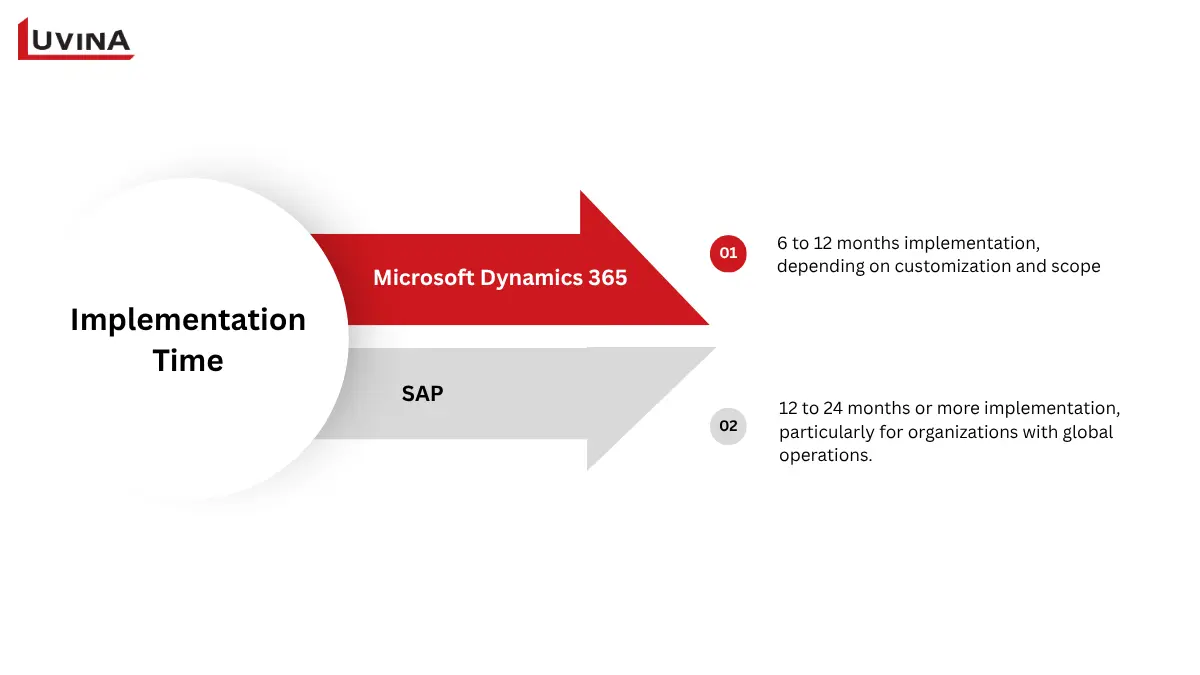
Both D365 and SAP require time for implementation
Microsoft Dynamics 365 implementation
In the context of Dynamics 365 vs SAP, Microsoft Dynamics 365 stands out for its faster and more flexible implementation approach. Built on a cloud-first, modular architecture, it allows businesses to deploy specific modules, such as finance, supply chain, or sales, independently and expand over time.
Most implementations take 6 to 12 months, depending on customization and scope. This phased rollout reduces risk and allows businesses to start seeing value earlier. Because the system is cloud-based, integration and updates are also simpler, helping organizations adapt quickly without heavy technical overhead.
SAP implementation
SAP implementation is typically a larger and more complex project, especially for enterprises deploying SAP S/4HANA. These projects often require extensive customization, data migration, and process re-engineering across multiple departments and regions.
As a result, implementation timelines usually range from 12 to 24 months or more, particularly for organizations with global operations. SAP’s strong legacy in on-premises systems and its deep customization capabilities mean businesses often rely heavily on technical consultants throughout the process.
>>> Read more: SAP maintenance management system
Deployment Options: Cloud, On-Premise, Hybrid
While both platforms now support cloud, on-premise, and hybrid models, they are built with very different priorities. Microsoft Dynamics 365 is designed to push businesses toward cloud adoption, while SAP offers more layered deployment options to support complex enterprise environments.
Understanding this difference is essential when evaluating Dynamics 365 vs SAP for long-term scalability and IT strategy.
Microsoft Dynamics 365 deployment
Microsoft Dynamics 365 is strongly positioned as a cloud-first solution, built on Microsoft Azure. The platform is designed for speed, scalability, and minimal infrastructure management, making it easier for businesses to deploy and expand without heavy IT involvement.
Deployment options include:
– Cloud (primary model): Hosted on Azure with automatic updates, built-in security, and high scalability
– On-premise: Available for organizations needing full infrastructure control, though less commonly used
Hybrid: Allows part of the system to run on-premise while leveraging cloud capabilities for flexibility
This approach enables faster rollout and easier system evolution over time.
SAP Deployment
When analyzing Dynamics 365 vs SAP, SAP stands out for offering a wider range of deployment environments, reflecting its legacy in on-premise systems and its focus on enterprise-level flexibility.
SAP can be deployed on:
– Public cloud: Runs on shared infrastructure managed by providers like AWS, Azure, or Google Cloud
– Private cloud: Dedicated cloud environment for a single organization, offering more control and isolation
– On-premise: Fully managed within the company’s own infrastructure, ideal for strict compliance and control requirements
– Hybrid: Combines cloud and on-premise systems, supporting complex and phased transformation strategies
Industry Fit: Which ERP Works Best in Your Sector?
Both platforms – Dynamics 365 vs SAP – serve a wide range of industries, but they excel in different environments.
– SAP is often chosen for industries with highly complex, large-scale operations
– Microsoft Dynamics 365 is preferred in sectors that value flexibility, integration, and faster adaptability.
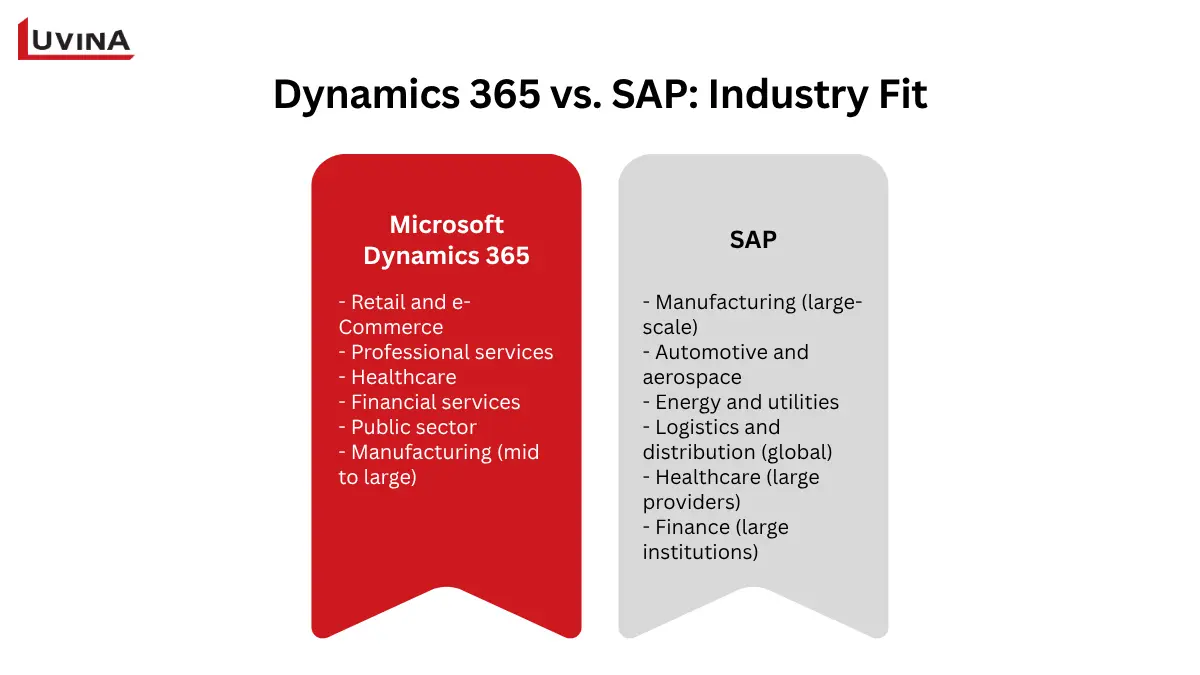
Each platform is best suited for a specific industry
Microsoft Dynamics 365
Microsoft Dynamics 365 is widely adopted across industries that require agility, integration, and strong customer engagement.
– Retail and e-Commerce: Unified commerce, personalized customer experience, and flexible inventory management
– Professional services: Strong integration with Microsoft 365 and project management tools for daily operations
– Healthcare: Patient engagement, collaboration tools, and integration with Microsoft Cloud for Healthcare
– Financial services: AI-driven insights, financial reporting, and scalable compliance tools
– Public sector: Flexible deployment, case management, and citizen service capabilities for organizations of all sizes
– Manufacturing (mid to large): Streamlined operations, resource planning, and customizable processes
SAP
When evaluating Dynamics 365 vs SAP, SAP stands out in industries that demand deep functionality, strict compliance, and the ability to manage highly complex global operations. Its strength lies in handling scale, data volume, and specialized processes.
Best-fit industries include:
– Manufacturing (large-scale): Advanced production planning, IoT integration, and Industry 4.0 capabilities
– Automotive and aerospace: Complex supply chains and precision manufacturing workflows
– Energy and utilities: Large infrastructure management and regulatory compliance
– Logistics and distribution (global): Strong transportation and supply chain optimization
– Healthcare (large providers): Advanced analytics, compliance, and integration with specialized systems
– Finance (large institutions): Deep financial management, risk analysis, and regulatory reporting
| Industry | Best choice |
| Manufacturing | Both |
| Retail and e-Commerce | Dynamics 365 |
| Professional services | Dynamics 365 |
| Healthcare | Dynamics 365 |
| Large-scale logistics | SAP |
| Public sector | Dynamics 365 |
Summary table of industry fit for Microsoft Dynamics 365 and SAP
Dynamics 365 vs SAP by Company Size
In ERP comparison, company size often directly shapes the decision. Smaller businesses tend to prioritize cost and simplicity, mid-sized companies focus on flexibility and faster rollout, while large enterprises require depth, control, and the ability to manage complex global operations.
| Company size | Best choice | Key strengths | Complexity | Implementation time |
| Small (1-250) | SAP Business One | Strong finance and inventory management | Low to moderate | <3 months |
| Mid-market (251-1,000) | Dynamics 365 (Business Central/ Finance and Ops) | Fast deployment, flexible, cloud-first | Moderate | 4-6 months |
| Enterprise (1,000+) | SAP S/4HANA | Deep customization, advanced logistics, global scalability | High | 6-12+ months |
Choosing D365 or SAP also depends on the company size
Migrating from SAP to Dynamics 365: What to Know
In many Dynamics 365 vs SAP scenarios, companies decide to migrate when their current setup becomes too complex to maintain or too rigid to scale. With Dynamics 365, businesses can unify tools like Microsoft 365, Power BI, and Azure into one ecosystem, reducing manual work and improving efficiency. At the same time, cloud deployment helps lower infrastructure costs while enabling faster updates and better accessibility.
So, what should you actually prepare before making the switch? Below are the key things to keep in mind to ensure a smooth migration process in any Dynamics 365 vs SAP transition:
– Assess business processes to define clear migration goals
– Review existing SAP customizations and integrations to avoid compatibility issues during migration.
– Clean and standardize data to ensure a smooth transition and reduce errors.
– Choose the right migration approach (trickle, big bang, or synchronization) based on risk level and company size.
– Plan timeline, budget, and resources early to prevent delays and cost overruns.
– Map and test data in small batches before full migration to catch issues early.
– Configure workflows and integrations to match business needs in Dynamics 365, considering the Dynamics 365 vs SAP feature differences.
– Train users properly and monitor system performance after go-live to ensure long-term success.
Which ERP Should You Choose?
Choosing an ERP system is a critical decision, but many organizations make mistakes that lead to delays, higher costs, or poor system fit. Common mistakes when choosing an ERP include:
– Involving too many stakeholders, causing unclear priorities and slow decision-making
– Starting without a clearly defined scope or understanding of business needs
– Experiencing ERP fatigue from too many demos and vendor options
– Focusing only on software while ignoring the importance of the implementation team
– Underestimating the total cost of ownership beyond initial pricing
Avoiding these pitfalls is the first step toward making a smarter ERP decision. Once you have a clear understanding of your needs, priorities, and constraints, the next question becomes more straightforward: which solution is actually the right fit for your business?
To make the best decision between Dynamics 365 vs SAP, find the answer to these questions before deciding:
– What is your current Microsoft vs. SAP footprint?
– How complex are your operations and IT requirements?
– What is your budget and timeline for ERP implementation?
– Which functions (finance, supply chain, HR, CRM) are most critical?
– Does the platform scale with your growth plans and future integrations?
The answer to the above questions will help you build a decision framework when choosing Dynamics 365 vs SAP.
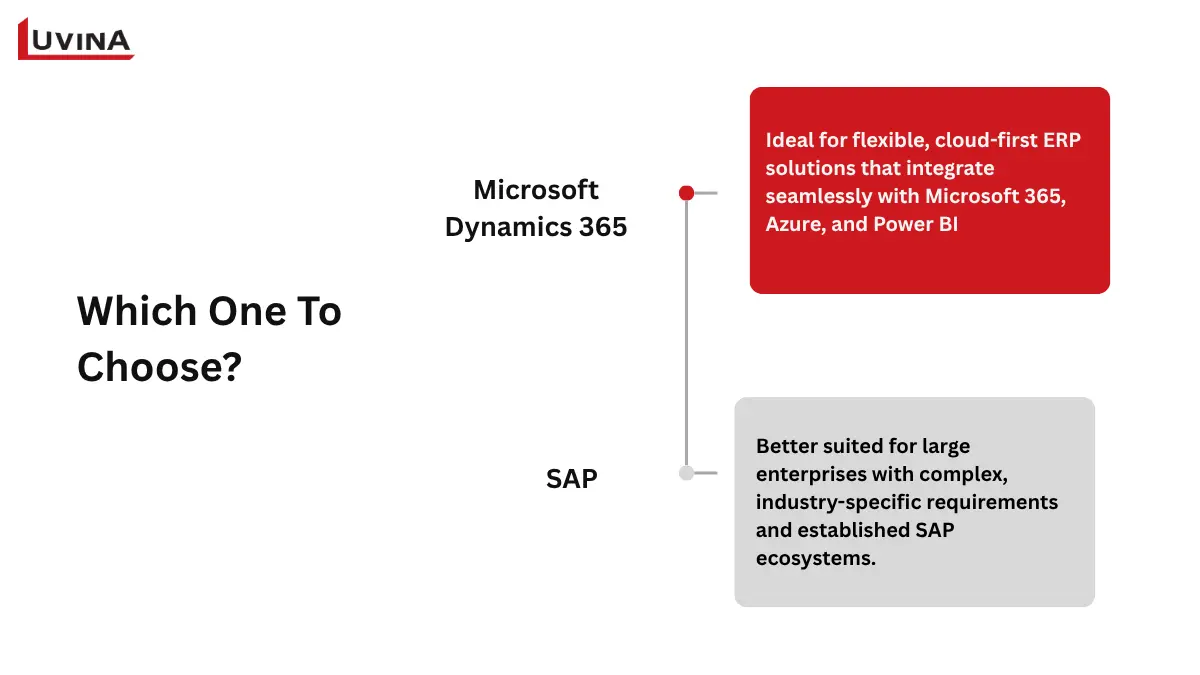
Each platform is suited to a specific usage need
When to choose Microsoft Dynamics 365?
Microsoft Dynamics 365 is ideal for flexible, cloud-first ERP solutions that integrate seamlessly with Microsoft 365, Azure, and Power BI. It suits businesses that need:
– Easy integration with existing Microsoft tools
– A flexible, modular platform that scales as the company grows
– Faster implementation and lower upfront costs
– Built-in AI automation and analytics
– Strong ERP-CRM synergy
When to choose SAP?
SAP is better suited for large enterprises with complex, industry-specific requirements and established SAP ecosystems. Companies considering Dynamics 365 vs SAP may select SAP when they need:
– Deep customization for global supply chains or manufacturing processes
– Extensive industry-specific modules
– Robust enterprise-level process management
– A large internal IT team to support system complexity
– Alignment with other SAP products and long-term enterprise strategy
FAQ
1. What is the main difference between Dynamics 365 and SAP?
Dynamics 365 is more flexible, user-friendly, and ideal for SMEs, with easy integration with Microsoft apps. SAP is suited for large enterprises, offers deep functionality, supports most third-party apps, but has a complex UI and a steeper learning curve.
2. Is Dynamics 365 cheaper than SAP?
Yes, Dynamics 365 usually costs less for SMBs and mid-market firms.
3. Can Dynamics 365 replace SAP for large enterprises?
Yes, especially for enterprises prioritizing flexibility, faster deployment, and integration with Microsoft tools.
4. Which is easier to use – Dynamics 365 or SAP?
Dynamics 365 is more intuitive; SAP requires more training.
5. Which ERP is better for manufacturing companies?
SAP excels in large-scale manufacturing with complex processes and global operations. Dynamics 365 works well for mid-sized manufacturers needing flexibility and easier customization.
Conclusion
The right ERP system fits smoothly into your existing workflows and grows with your business. We hope this article has helped you understand the key differences and considerations in the Dynamics 365 vs SAP debate.
Choosing between Dynamics 365 and SAP is not just about features; it’s about aligning technology with your long-term business strategy.
At Luvina, we help organizations evaluate, implement, and optimize ERP systems using both Microsoft Dynamics 365 and SAP. based on real operational needs, not just vendor comparisons. With 20+ years of experience delivering ERP solutions across manufacturing, finance, and retail, Luvina understands the real trade-offs behind each platform.
Talk to our experts to get a tailored ERP recommendation for your business.
Resources
- https://erpsoftwareblog.com/2025/08/dynamics-365-vs-sap/
- https://www.erpresearch.com/blog/en-us/blog/sap-vs-dynamics#industry-fit
READY TO START A PROJECT?
Our experts are eager to explore your needs.


Read More From Us?
Sign up for our newsletter
Read More From Us?
Sign up for our newsletter