




What Is OpenClaw? A Beginner’s Guide to the AI Agent Platform (2026)


As AI agents evolve beyond chatbots, tools like OpenClaw are redefining how automation works at a system level.
But what is OpenClaw exactly, and how is it different from traditional AI tools like ChatGPT or copilots?
More importantly, can businesses actually use it in real-world workflows?
This guide explains OpenClaw in simple terms, covering how it works, how to install it, and when it makes sense to use it.
What Is OpenClaw?
If you’re wondering, “What is OpenClaw?”, OpenClaw is an open-source personal AI agent that runs locally on your machine, acting as a bridge between large language models (LLMs) and the tools, data, and apps you use every day. The simplest way to understand it is this: instead of just answering questions like a chatbot, it can actually do things (reading, writing files, running scripts, controlling a browser,…) within a secure local environment.
OpenClaw AI vs Traditional Chatbots: Key Differences
Most AI tools today follow a simple pattern: you ask a question, and the system generates a response. That’s how traditional chatbots like ChatGPT are designed to work. However, if you’re exploring what OpenCLAW is, the key difference lies in how it moves beyond this one-step interaction model.
Instead of just responding with text, OpenClaw AI is built as an autonomous assistant that can orchestrate tools, execute multi-step workflows, and maintain context over time. It runs continuously rather than stopping after a single reply, allowing it to handle more complex, real-world tasks. For example, while a chatbot can help you draft an email based on copied input, OpenClaw can directly access your local data, generate the draft based on your past writing style, and even send it without requiring manual steps in between.
Another major distinction is where and how the system operates. Traditional chatbots run on external servers, meaning your data is sent out for processing. In contrast, OpenClaw runs on your own machine (or VPS), giving it direct access to local files, system commands, and internal services. This not only expands what it can do but also changes how privacy and customization are handled. You can modify its logic, integrate proprietary tools, and control how memory works, something that is not possible with closed, hosted AI systems.
Here’s a quick comparison:
| Traditional AI Chatbots | OpenClaw | |
| Core function | Generate text responses | Execute actions + generate responses |
| Operation model | Single prompt => single reply | Continuous, multi-step workflows |
| Environment | Runs on external servers | Runs locally on your machine |
| Data access | Limited, requires manual input | Direct access to local files and systems |
| Memory | Session-based, limited context | Persistent memory across interactions |
| Customization | Restricted to platform features | Fully customizable (open-source) |
| Intergration | API-based, limited control | Deep integration with local and external tools |
What is OpenClaw, and what is the difference between OpenClaw AI and traditional AI chatbots
The OpenClaw History
OpenClaw started as Clawdbot in November 2025, briefly became Moltbot, and finally adopted its current name. If you’ve ever wondered what OpenCLAW is, its origins reveal a rapid rise from a simple prototype to a viral open-source AI agent.
The creator, Peter Steinberger, previously founded PSPDFKit, a PDF developer toolkit used worldwide. After selling the company and taking time off to recover from burnout, he returned to AI out of curiosity, not a business plan. The first OpenClaw prototype was built in just one hour using Markdown documentation, LLMs like Claude and Gemini, and Playwright for browser automation. This early test confirmed that AI could act autonomously, not just respond to prompts – laying the foundation for OpenClaw AI.
Since then, Steinberger has continued shaping the project while relocating to the U.S., embracing a “full-time open-sourcerer” role in the AI community. OpenClaw Github now operates as a local orchestration layer, giving AI agents direct access to your files, apps, and tools, and supporting complex multi-step workflows.
For anyone still asking what OpenCLAW is, its history shows how a personal experiment became a global phenomenon.
How OpenClaw Works: Architecture Explained Simply
If you’ve ever wondered what OpenClaw is, think of it as a local AI orchestration system. Its architecture is 3 core components: the gateway, skills, and channels.
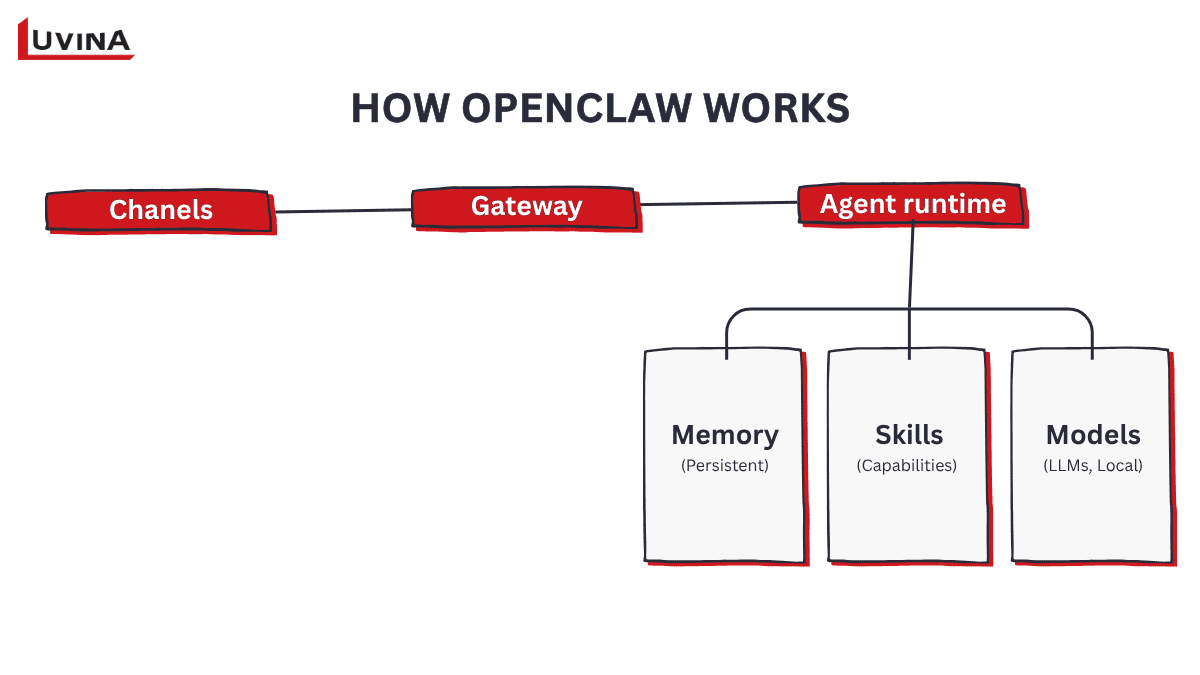
Simple diagram illustrating OpenClaw workflow
1. The Gateway
This is the central control layer, running continuously on your machine. It manages session routing, authentication, and state persistence, acting as the “nervous system” for all agent activity. When a message or command enters, the Gateway ensures it reaches the right agent runtime with full context, keeping your AI operations secure.
2. Skills
Skills are modular capabilities that teach OpenClaw how to perform tasks. Each Skill is a folder containing a SKILL.MD file with instructions, examples, and tool configurations. Skills can be bundled, workspace-specific, or installed from ClawHub. By reading these instructions, the agent knows exactly how to execute a task, whether it’s monitoring a server, sending emails, or interacting with APIs. The way Skills empower the agent highlights another facet of what is OpenClaw – it’s more than a bot, it’s an intelligent executor of tasks with customizable behaviors.
3. Channels
Channels connect the agent to the platforms you already use: WhatsApp, Telegram, Discord, Slack, Signal, or even CLI and native apps. Each channel is independent, allowing customized workflows, security policies, and continuous operation. The agent runtime interprets your intent, executes tools if needed, updates memory, and sends the response back through the same channel.
The data flow is straightforward yet powerful: a message enters through a channel, the Gateway validates and routes it, the Agent Runtime assembles context from memory and session history, invokes the chosen model (Claude, GPT, Gemini, or local models), executes tools or scripts if needed, and delivers a response. State and memory updates persist locally, giving OpenClaw a continuity that traditional chatbots lack.
Supported AI Models and Platforms
OpenClaw supports a wide variety of AI models and platforms, giving users the flexibility to choose the right tool for each task. This section makes it clear for the definition of What is OpenClaw: it’s not tied to a single model or ecosystem.
Below are the primary AI models and platforms supported by OpenClaw AI:
| Provider | Example model | Best use cases |
| Open AI | GPT | General AI tasks, automation |
| Anthropic | Claude | Reasoning, detailed responses |
| Gemini | Multimodal workflows | |
| Moonshot AI | Kimi | Long-context and coding tasks |
| MiniMax | MiniMax | Fast, short responses |
| Qwen | Qwen | Alternative AI capabilities |
| Github Copilot | Copilot | Coding and developer workflows |
| OpenRouter | Aggregated | Switching between multiple providers |
AI models supported by OpenClaw
About supported platforms, OpenClaw requires Node.js 22 or later and works best in environments that support sandboxing and full filesystem access.
| Platform | Native support | Minimum RAM | Recommended setup |
| macOS (Intel & Apple Silicon) | Yes | 4 GB | macOS 14+ (Sonoma) with Docker Desktop |
| Linux (Ubuntu/Debian) | Yes | 1 GB | Ubuntu 22.04 LTS / 24.04 LTS |
| Windows 10/11 | No (WSL2 needed) | 8 GB | WSL2 + Ubuntu + Docker Desktop |
| Raspberry Pi OS (ARM64) | Yes | 4 GB | Pi 5 with USB SSD & 2 GB Swap |
What platforms are needed to run OpenClaw?
OpenClaw usage examples
Understanding what OpenClaw is becomes much easier when you see it in action. This platform is designed to adapt to a wide range of tasks, from personal productivity to professional workflows, all while running locally and securely. Below are practical examples across different user types.
1. For personal productivity
Many users start with daily automated summaries sent via Telegram or WhatsApp. OpenClaw aggregates data from Google Calendar, weather APIs, RSS feeds, or GitHub activity, then delivers a concise briefing. This is more than a simple notification; it’s context-aware, highlighting what matters most.
For sensitive documents, OpenClaw can act as a local language model assistant. It reads, summarizes, and answers questions about contracts, financial records, or research files without sending any data externally.
– Morning summaries at scheduled times with prioritized tasks.
– Trending AI tweets, top news stories, and personalized reflections.
– Combines multiple sources into a single digest under 150 words.
– Private handling of proprietary documents.
– Mimics hosted AI assistants but keeps everything on your hardware.
This approach answers the question of what is OpenClaw for individuals: it’s a personal assistant that organizes, filters, and delivers actionable information without opening multiple apps.
2. For developers and technical users
Developers use OpenClaw to manage coding workflows, automate debugging, and even handle pull requests through chat.
– Kick off Claude Code or Codex sessions remotely
– Run tests, capture errors via webhooks, and resolve issues autonomously
– Build monitoring skills or custom trackers without writing code
Advanced users often leverage Nemoclaw NVIDIA GPUs for faster local AI model execution. OpenClaw can also draft specs from casual brainstorming, creating ready-to-use files when you return from a walk. Here, what is OpenClaw becomes tangible as a persistent assistant that handles technical heavy lifting.
3. For non-technical users
OpenClaw simplifies creative and daily-life tasks with automation pipelines:
– Content production: Multi-agent pipelines generate research, scripts, and visuals.
– Second brain: Capture ideas, notes, or links via text, then retrieve them instantly.
– Smart home control: Manage lights, thermostats, or environment settings contextually.
– Health tracking: Daily briefings on sleep, recovery, and activity.
– Financial alerts: Track earnings, crypto sentiment, and investment thresholds.
– Shared household automation: Convert messages into actionable tasks for everyone.
What is OpenClaw for general users? A versatile assistant that reduces friction, automates repetitive tasks, and integrates seamlessly into daily life.
4. For teams and businesses
OpenClaw scales to collaborative and professional contexts:
– Email and task management: Categorize inboxes, draft replies, schedule tasks, and maintain Kanban boards.
– Web automation: Fill forms, scrape data, and navigate websites automatically.
– SEO and content pipelines: Research, draft, and optimize content with minimal manual effort.
– Custom workflow skills: Build repeatable routines specific to team or company processes.
Is OpenClaw Suitable for Businesses?
OpenClaw offers powerful automation potential, but it isn’t designed as a traditional enterprise platform. Its open-source, community-driven nature allows it to interact with local systems, messaging, emails, and calendars, making it capable of executing real tasks. However, this same flexibility comes with risks: third-party skills aren’t centrally vetted and can run code with the host user’s permissions, creating possible security vulnerabilities. Companies considering it should weigh these risks carefully before adopting it for core operations.
– OpenClaw can be suitable in controlled scenarios like internal automation, development workflows, or privacy-sensitive data processing.
– Openclaw is less suitable for enterprise-grade systems, regulated industries, or situations requiring large-scale, fully governed deployments.
Understanding what is OpenClaw and implementing it with structured governance, risk management, and strategic planning is essential to turn its capabilities into genuine business value without exposing the organization to unnecessary threats.
How to Install OpenClaw: Step-by-Step Guide (2026)
Before diving into setup, it’s important to understand what is OpenClaw and why installation matters. There are several ways to install it, depending on your technical comfort level and intended use. Whether you’re a beginner, developer, or contributor, this guide covers the most common methods.
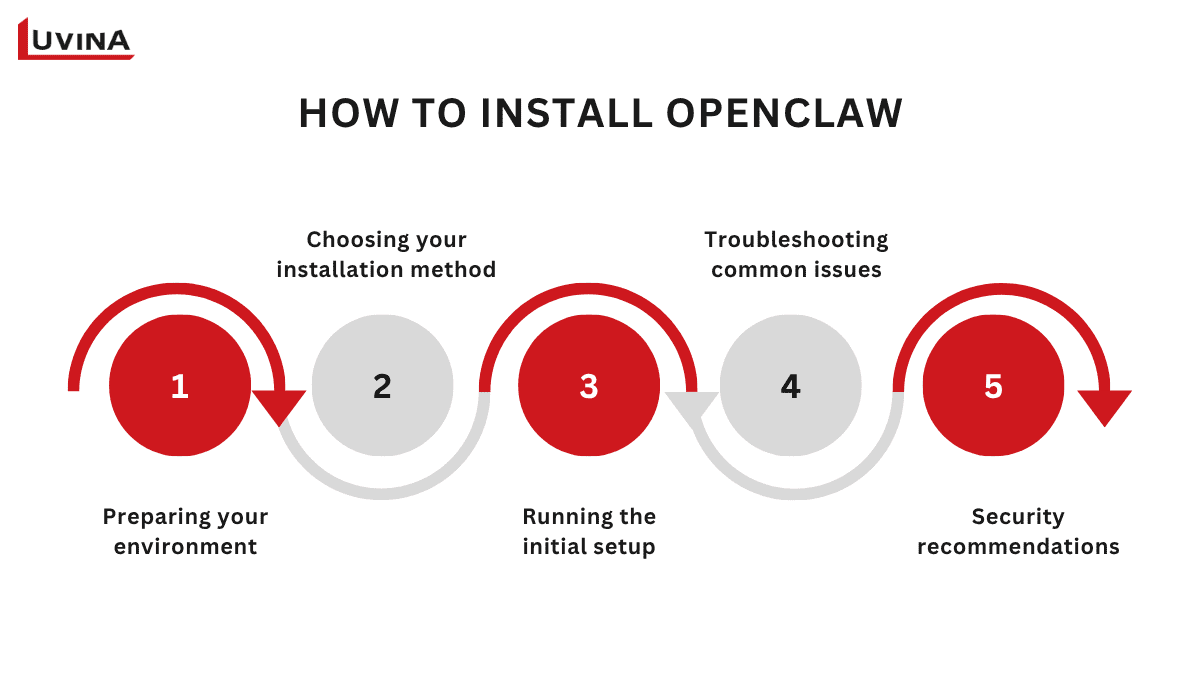
Guide to installing OpenClaw step by step
Preparing your environment
To ensure a smooth OpenClaw install, make sure your system meets these requirements:
– Node.js 22 or higher (node –version)
– Minimum 1 GB RAM (4 GB recommended for stable builds)
– macOS, Linux, or Windows via WSL2
– Port 18789 available for the Control UI
For VPS deployments with less than 2 GB RAM, allocate a 4 GB swap file to prevent memory issues during installation:
sudo fallocate -l 4G /swapfile
sudo chmod 600 /swapfile
sudo mkswap /swapfile
sudo swapon /swapfile
Choosing your installation method
OpenClaw supports multiple installation paths, each suited to different users.
1. Official installer script (recommended for beginners)
This is the fastest and easiest option. It detects your OS, verifies Node.js, and launches the onboarding wizard automatically:
curl -fsSL https://openclaw.ai/install.sh | bash
You can also download the script first, inspect it, then run bash install.sh if you prefer more control.
2. NPM/ PNPM global install (recommended for developers)
Ideal for systems running multiple Node.js apps:
npm install -g openclaw@latest
openclaw onboard –install-daemon
The –install-daemon flag registers OpenClaw as a background service on Linux (systemd) or macOS (launchd), keeping your agent always-on. This demonstrates another angle of what is OpenClaw: a persistent AI assistant operating continuously in the background.
3. From source (for contributors / advanced users)
Clone the repository and run the Docker setup:
git clone https://github.com/openclaw/openclaw
cd openclaw
./docker-setup.sh
Docker isolates OpenClaw for security and reproducibility. Ensure volume ownership is correct:
sudo chown -R 1000:1000 ~/.openclaw
4. Cloud deploy (no local setup)
For users who prefer a fully hosted experience, OpenClaw can run in the cloud without touching local resources, providing a remote operational agent.
Running the initial setup
After installation, run the onboarding wizard (openclaw onboard) to configure:
– Select your model provider: OpenClaw supports Anthropic Claude, OpenRouter, Google Gemini, and local models via Ollama.
– Connect messaging platforms
+ For Telegram, create a bot via @BotFather and approve pairing: openclaw pairing approve telegram <CODE>
+ For Discord, create an app, enable Message Content intent, invite the bot, and allowlist your user ID.
Troubleshooting common issues
Most problems during OpenClaw install fall into a few categories:
– Gateway not responding => run openclaw gateway restart and verify API keys
– Port 18789 blocked => find the process with sudo lsof -i:18789
– Access not configured => rerun pairing commands
– Docker EACCES errors => fix with chown
Use OpenCLAW Doctor for automated health checks, and OpenCLAW logs follow for live debugging.
Security recommendations
Running OpenClaw exposes a local gateway with high privileges. Reduce risks by:
– Running inside Docker or a dedicated VM
– Enabling explicit consent mode (exec.ask: “on”)
– Granting only read-only access to sensitive directories initially
– Securing the Control UI with Tailscale to restrict public access
Treat your OpenClaw instance like a long-running, privileged system. Monitor it, protect credentials, and expand usage gradually. This completes the final answer to what is OpenClaw: a persistent, controlled AI agent that integrates into your system securely, ready to automate and enhance your workflows.
>>> Read more: Top applications of generative AI
How Much Does OpenClaw Cost?
When evaluating what is OpenClaw, it’s important to understand that the software itself is completely free under the MIT license. All costs come from infrastructure and AI model usage. Many users assume “open source” means zero cost, but running OpenClaw requires servers to stay online and API calls to external models for automation.
Hosting and infrastructure
OpenClaw requires a continuously running server or VPS. Costs depend on server specifications and reliability:
| Server tier | Specs | Typical monthly cost | Best for |
| Entry-level | 1-2 vCPU, 2-4 GB RAM | $5-$10 | Personal projects, light automation |
| Mid-range | 2-4 vCPU, 8 GB RAM | $10-$20 | Small teams, multiple workflows |
| High-performance | 4+ vCPU, 16+ GB RAM | $20-$40+ | Browser automation, multi-agent setups |
Examples of hosting and infrastructure costs
Daily backups, failover, and high uptime SLAs can raise costs, but for most users, a basic $5-$15 VPS is sufficient.
AI model and token usage
This is where costs vary most. Each automation step consumes tokens from external LLMs. For example:
| Model | Input cost/ 1M tokens | Output cost / 1M tokens | Category |
| GPT-4o-mini | $0.15 | $0.60 | Budget |
| Llama 3.1 8B | $0.05 | $0.08 | Budget |
| Claude Haiku 4.5 | $1.00 | $5.00 | Mid-tier |
| GPT-4o | $2.50 | $10.00 | Mid-tier |
| Claude Opus 4.5 | $5.00 | $25.00 | Premium |
Examples of AI models and token usage costs
A typical interaction with 1,000 input tokens and 500 output tokens costs $0.00045 on GPT-4o-mini versus $0.0075 on GPT-4o. Heavy multi-step workflows can reach $50–$150/month in API spend alone.
Monthly cost by usage
Here’s a snapshot of typical monthly expenses for different user tiers, combining hosting and AI token usage:
| Usage tier | AI calls/month | Hosting cost | AI token cost | Total monthly cost |
| Personal | Under 5000 | $5-$10 | $1-$6 | $6-$13 |
| Small business | 5000-10000 | $7-$15 | $15-$35 | $25-$50 |
| Scaling teams | 10000-50000 | $10-$20 | $35-$80 | $50-$100 |
| Heavy automation | 50000+ | $15-$25 | $80-$150+ | $100-$200+ |
Example table of monthly costs when using OpenClaw
Personal users running light automations, daily summaries, or email triage with budget models like GPT-4o-mini can comfortably stay under $13/month. Small businesses using mixed AI models for lead processing, content generation, or CRM tasks often spend $25-$50/month. Scaling teams or heavy automation setups with multi-agent workflows and browser steps may reach $100-$200/month or higher. Understanding what is OpenClaw in the context of AI consumption helps manage these costs efficiently.
By planning carefully and choosing models wisely, even teams with complex automation can control expenses while maximizing value. Some tips to reduce cost:
– Route tasks by model tier: Send simple prompts to budget models, reserve premium models for complex workflows.
– Monitor token usage weekly: Set hard limits and alerts at 50%, 75%, and 90% thresholds.
– Enable prompt caching: Reuse common instructions to reduce repeated token consumption by up to 90%.
– Use cost-reduction tools to redirect queries to cheaper models; running local models eliminates API costs.
– Audit automations regularly: Disable unused workflows to prevent runaway charges.
Is OpenClaw Safe?
When it comes to what is OpenClaw, safety depends largely on how you set it up and what permissions you grant. OpenClaw is designed to be a highly capable automation agent, which means it can interact deeply with your system, messaging platforms, and external APIs. While this makes it powerful for productivity and multi-agent workflows, it also introduces potential security risks that users need to understand.
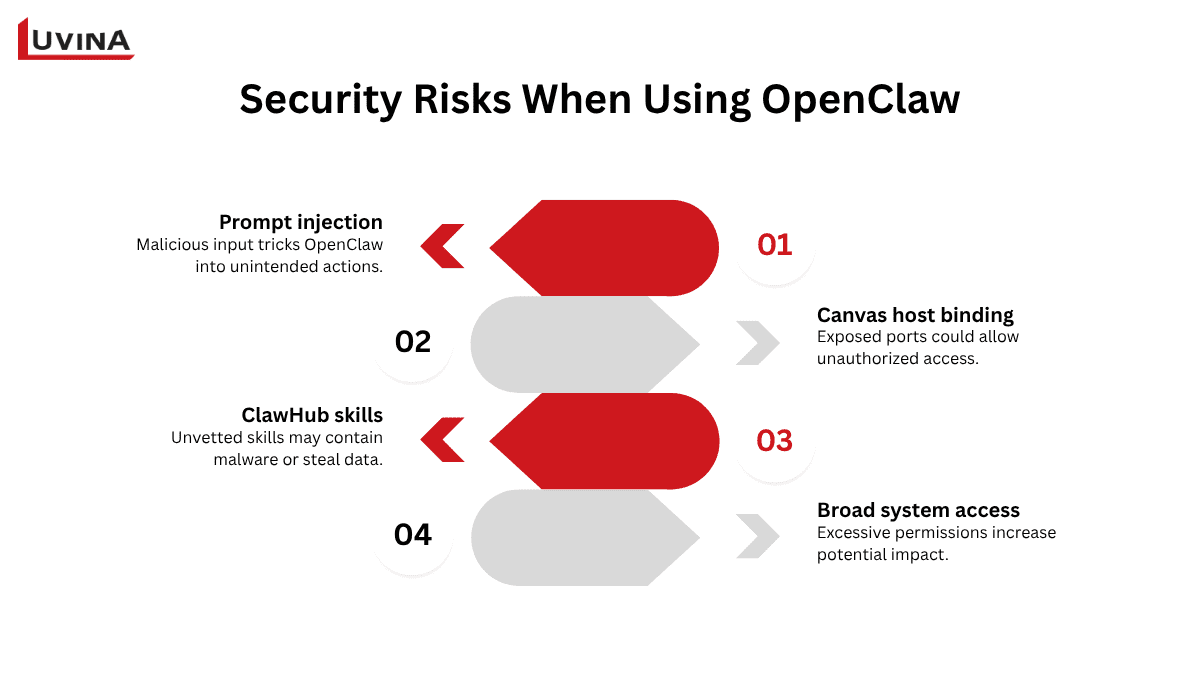
Be aware of OpenClaw’s security risks
Prompt injection
Malicious input from web pages, documents, or messages can trick OpenClaw into executing unintended actions, like exposing sensitive data or running unsafe commands. Validating inputs and enabling consent mode reduces this risk.
Canvas host binding
By default, OpenClaw’s local ports may be exposed. Without proper firewall or network restrictions, attackers could access the control interface. Binding the host only to localhost or a private network helps contain this threat.
ClawHub skills
Installing unvetted skills is like running code from an unknown source. Malicious or poorly written skills could disable security software, steal credentials, or compromise files, so skill vetting and limited permissions are essential.
Broad system access
Granting OpenClaw full system permissions increases potential damage if an issue occurs. Restricting access to only necessary directories and files keeps your environment safer while still allowing automation.
Is OpenClaw Still Actively Maintained?
Yes, what is OpenClaw remains actively maintained and supported. The project continues to receive updates from both its core maintainer, Steinberger, and a growing community of contributors, ensuring the software stays compatible with new platforms and features.
OpenClaw has over 2,000 community contributions, reflecting continuous improvements and bug fixes. Regular community events, like meetups in San Francisco and Vienna, show strong engagement from users and developers alike, signaling that the project is alive, evolving, and reliable for long-term use.
FAQ
1. What is OpenClaw in simple terms?
A self-hosted AI agent that runs on your machine, connecting chat platforms like WhatsApp or Discord to perform tasks automatically.
2. Is OpenClaw free?
Yes, the software is free and open-source, but hosting and AI usage costs apply.
3. What AI models does OpenClaw support?
Supports GPT-4o, GPT-4o-mini, Claude Haiku & Opus, Llama 3.1, Google Gemini, and local models via Ollama.
4. How do I install OpenClaw?
You can install via Official Installer Script, npm/pnpm global install, from source, or deploy on the cloud – pick based on your needs.
5. Is OpenClaw the same as Moltbot or Clawdbot?
Yes, OpenClaw, Moltbot, and Clawdbot are the same open-source, self-hosted autonomous AI agent project.
6. Is OpenClaw safe?
It can be if you isolate it, vet skills, monitor activity, and keep it updated. Treat it like a powerful script on your machine.
7. Where is the OpenClaw GitHub repository?
It’s hosted on GitHub under the OpenClaw organization.
8. What happened to OpenClaw’s founder?
Steinberger joined OpenAI in February 2026 to lead the development of next-generation personal agents.
Conclusion
OpenClaw shows the power and complexity of running a personal AI agent on your own machine. Understanding what is OpenCLAW means recognizing both its potential and its responsibility. Success with OpenClaw depends on informed setup, careful monitoring, and disciplined use. For those willing to manage it, OpenClaw turns a simple chatbot into a capable, proactive assistant, but only if treated with respect and oversight.
Exploring AI agents like OpenClaw is just the first step.
If you’re looking to apply AI automation in a scalable, secure, and business-ready way, Luvina can help you design and implement the right solution for your needs.
Talk to our experts to explore how AI can transform your operations.
Resources
- https://skywork.ai/skypage/en/openclaw-ai-alternatives-trends/2038592534137802753
- https://dev.to/sarvar_04/what-is-openclaw-a-self-hosted-ai-assistants-311j
- https://fortune.com/2026/02/19/openclaw-who-is-peter-steinberger-openai-sam-altman-anthropic-moltbook/
- https://ppaolo.substack.com/p/openclaw-system-architecture-overview?open=false#%C2%A7how-openclaw-works-high-level-overview
- https://skywork.ai/skypage/en/openclaw-operating-systems-ecosystem/2037086363388219392
- https://blog.promptlayer.com/how-to-install-openclaw-step-by-step-guide-formerly-clawdbot-moltbot/
- https://www.sentisight.ai/how-much-openclaw-cost-per-month/
READY TO START A PROJECT?
Our experts are eager to explore your needs.

Read More From Us?
Sign up for our newsletter
Read More From Us?
Sign up for our newsletter