




Sanity Testing in Software Testing: Definition, Process, and Key Comparisons


In modern software development, even a minor code change can introduce unexpected issues. Running a full regression test after every small update is not always practical, especially in fast-moving Agile environments. As part of an effective software testing life cycle, QA teams need a faster way to determine whether a recent change is ready for deeper testing.
This is where sanity testing in software testing becomes valuable. It provides a quick confidence check after minor changes and helps teams decide whether a build is ready for the next stage of testing. In this article, you’ll learn what sanity testing is, when to use it, how it differs from smoke and regression testing, and the best practices for applying it effectively.
What Is Sanity Testing?
According to IBM, sanity testing is a fast and agile way to check that existing functionality hasn’t been impaired by the addition of relatively minor changes or bug fixes. Its purpose is to verify that the affected functionality works correctly before additional testing begins. Instead of validating the entire application, it concentrates only on the area impacted by the recent change.
Sanity testing helps QA teams save time and testing effort. If a quick check reveals that a recent fix does not work as expected, the build can be returned to developers immediately. This prevents teams from spending hours on a full regression cycle for a build that is not ready.
Several characteristics distinguish sanity testing from other testing approaches.
- Narrow scope: It focuses only on the modified functionality or related components.
- Fast execution: Most sanity tests can be completed within minutes instead of hours.
- Typically unscripted: Testers rely on their understanding of the application rather than following a formal test script.
- Usually performed manually: Although some checks can be automated, manual execution remains the most common approach for small changes.
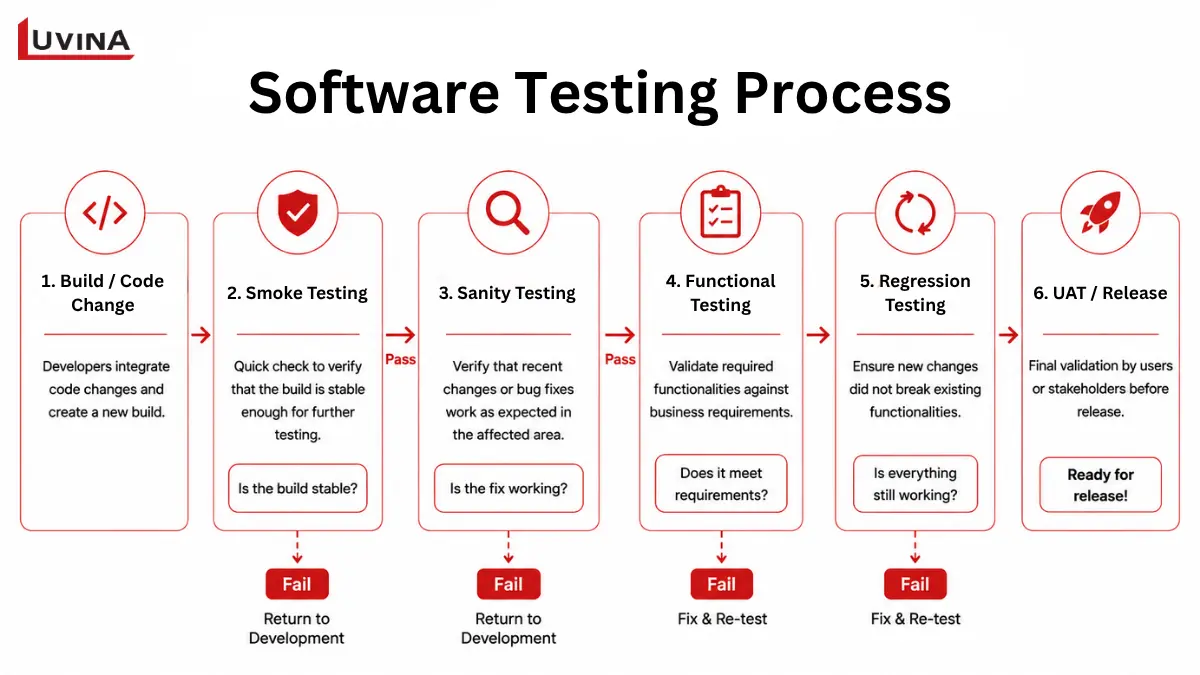
Where Sanity Testing Fits in the Software Testing Process
Within the software testing lifecycle, sanity testing is usually performed after a build has passed smoke testing. Once the targeted functionality is verified, the team can decide whether the build is ready for a full regression testing cycle.
How Sanity Testing Is Performed
Sanity testing can be performed either manually or through automation, depending on the project’s requirements, release frequency, and testing strategy. While manual execution remains common for small changes, automated sanity testing is increasingly adopted in modern DevOps and CI/CD environments to accelerate software delivery.
Manual Sanity Testing
Manual sanity testing is commonly used when validating small code changes or newly implemented features. Instead of following a comprehensive test script, testers focus on the affected functionality and closely related components.
Manual sanity testing is often preferred when:
- The code change is small and isolated.
- The feature is still evolving.
- Quick feedback is required.
- Automated tests are not yet available.
Automated Sanity Testing
Automated sanity testing executes a predefined set of sanity checks whenever a new build is deployed. Rather than relying on manual verification, automated scripts quickly confirm that recent changes work as expected before broader testing begins.
Automation becomes more valuable when:
- The same sanity checks are executed repeatedly.
- The application follows frequent release cycles.
- CI/CD pipelines require rapid validation after every build.
- Stable features need consistent verification across multiple releases.
Manual vs. Automated Sanity Testing
Both approaches have their strengths. Manual sanity testing offers flexibility for new or changing functionality, while automated sanity testing improves speed and consistency for repetitive validation. Many QA teams combine both methods to achieve faster feedback without sacrificing testing quality.
When to Perform Sanity Testing
Sanity testing is performed after small code changes when QA teams need to verify that the affected functionality works as expected quickly. It helps determine whether the build is stable enough for more comprehensive testing.
Common scenarios include:
- After a minor bug fix: Confirm that the reported issue has been resolved without checking the entire application.
- After a small feature enhancement: Verify changes that affect a limited module or a specific workflow.
- When time is limited: Perform a quick validation when a full regression cycle is not practical.
- Before regression testing: Ensure the targeted functionality is stable before investing time in broader testing.
- At the end of an Agile sprint: Validate recent changes before a sprint demo, release candidate, or full QA cycle
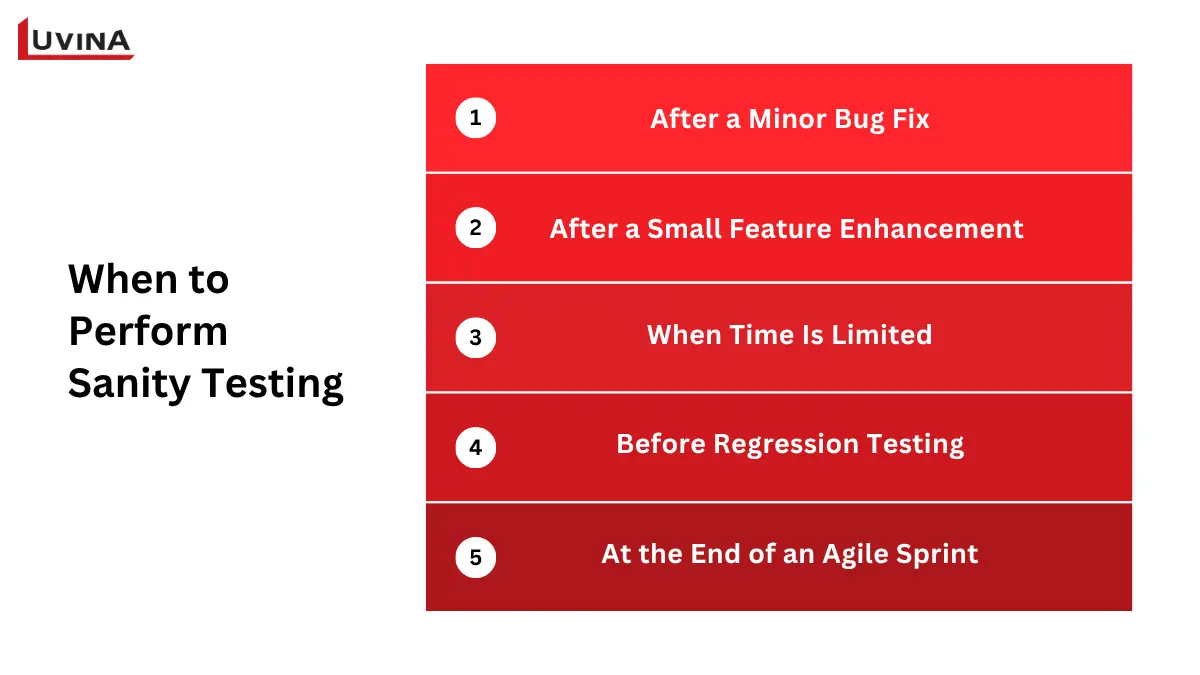
Common Scenarios for Performing Sanity Testing in Software Testing
Sanity Testing vs. Smoke Testing: Key Differences
Although both sanity testing and smoke testing are quick validation techniques, they serve different purposes. Smoke testing checks whether a new build is stable enough for testing, while sanity testing verifies that a specific change works correctly after a minor update.
| Criteria | Sanity Testing | Smoke Testing |
| Scope | Narrow. Focuses only on the changed functionality or related modules. | Broad. Covers the application’s critical functions at a high level. |
| Timing | Performed after a minor bug fix or feature enhancement. | Performed after a new build is deployed to the test environment. |
| Goal | Verify that the recent change works as expected. | Verify that the build is stable enough for further testing. |
| Performed by | Typically QA engineers or testers familiar with the changed feature. | Usually QA engineers. It may also be automated in CI/CD pipelines. |
| Test Script | Often unscripted in practice, although some organizations maintain lightweight scripted sanity test cases. | Often scripted and commonly automated. |
| Passes Before | Full regression testing or additional functional testing. | Sanity testing, functional testing, or regression testing. |
Comparison Between Sanity Testing and Smoke Testing
Smoke testing is wide but shallow. It quickly checks whether the overall build is usable for testing. In contrast, sanity testing is narrow but more focused. It validates only the functionality affected by a recent change.
Both testing types act as quality gates. Smoke testing gates the build, while sanity testing gates the specific feature before the team commits more time to comprehensive testing.
Regression Testing vs. Sanity Testing: Key Differences
After a code change, QA teams often need to choose between sanity testing and regression testing. The right choice depends on the scope of the change and the level of confidence required.
While sanity testing is widely used in software development, it is not formally defined in the ISTQB Glossary. In contrast, ISTQB defines regression testing as testing performed to detect unintended side effects caused by changes, making it one of the industry’s standardized testing terms.
| Criteria | Regression Testing | Sanity Testing |
| Scope | Broad. Covers existing functionality across the application. | Narrow. Focuses only on the changed functionality and related areas. |
| Depth | Comprehensive. Includes extensive test coverage. | Targeted. Verifies only the affected feature. |
| Timing | Performed after code changes when broader validation is required. | Performed after minor fixes or small enhancements. |
| Duration | Usually takes hours or days, depending on the size of the application. | Usually completed within minutes or a few hours. |
| Goal | Ensure existing functionality continues to work after changes. | Confirm that the recent change works as expected. |
Comparison Between Regression Testing and Sanity Testing
In short, sanity testing gives a quick check after a minor change, while regression testing delivers broader quality assurance across the application.
A successful sanity test helps teams decide whether a build is ready for deeper validation, but only regression testing can verify that existing functionality remains stable.
Smoke vs. Sanity vs. Regression Testing
Each testing method has a distinct role in the QA process. The following comparison highlights when smoke, sanity, and regression testing should be used.
| Criteria | Smoke Testing | Sanity Testing | Regression Testing |
| Scope | Broad. Covers critical functions across the application. | Narrow. Focuses on the changed functionality. | Broad. Covers existing functionality throughout the application. |
| Timing | Performed after a new build is deployed. | Performed after a minor fix or feature enhancement. | Performed after code changes when broader validation is required. |
| Depth | Shallow. Verifies that the build is stable. | Focused. Verifies the affected feature in more detail. | Comprehensive. Validates that existing functionality still works. |
| Duration | Minutes. | Minutes to a few hours. | Hours to days, depending on the application size. |
| Scripted | Usually scripted and often automated. | Usually unscripted. | Typically scripted. |
| Automation Suitability | High. Commonly integrated into CI/CD pipelines. | Moderate. Often performed manually, but can be automated for repetitive scenarios. | High. Frequently automated to improve test coverage and efficiency. |
Comparison of Smoke Testing, Sanity Testing, and Regression Testing
Smoke testing, sanity testing, and regression testing each have a different role. Smoke testing verifies that a build is ready for testing, while sanity testing validates recent changes. Both can be viewed as focused forms of regression testing, but they do not replace a full regression test when broader validation is required.
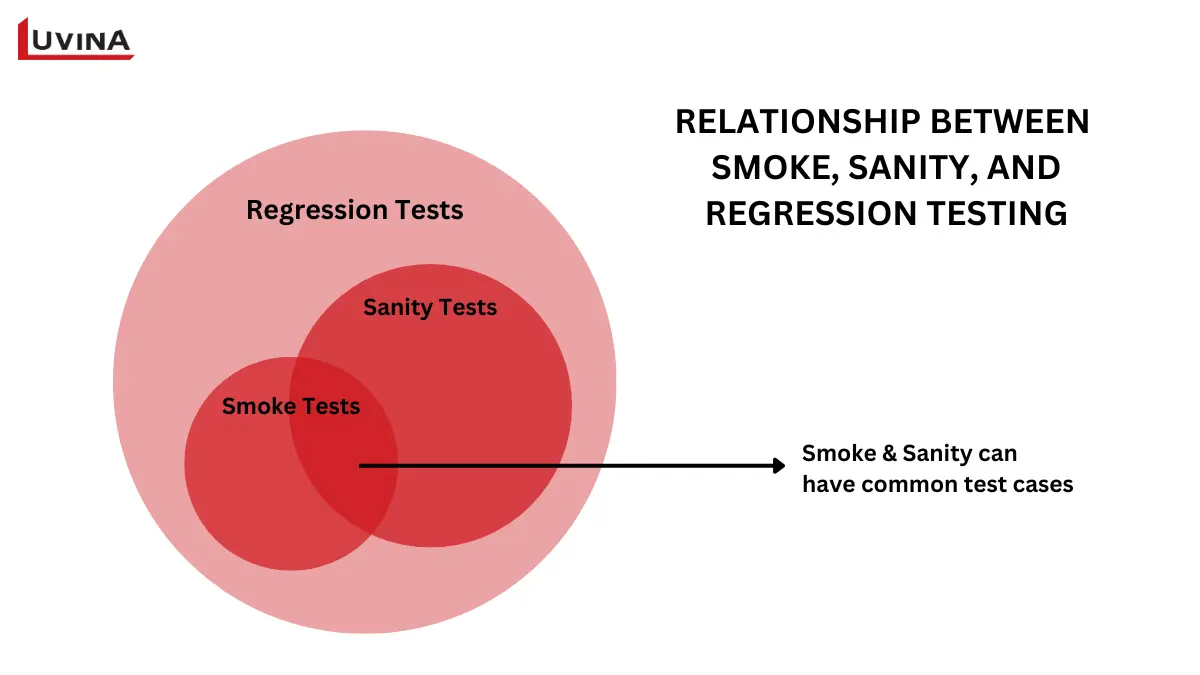
Comparison of Smoke Testing, Sanity Testing, and Regression Testing Scope
How to Perform Sanity Testing: Step-by-Step Process
Sanity testing follows a simple and focused workflow. Instead of testing the entire application, QA teams validate only the functionality affected by a recent change. The following steps help ensure the process is both efficient and consistent.
Step 1. Review the Build and Change Details
Start by reviewing the latest build and the documented bug fix or feature enhancement. Understanding what has changed helps define the scope of the sanity test.
Step 2. Identify the Affected Module
Determine which module or functionality has been modified. Focus only on the impacted area and any closely related components that could be affected by the change.
Step 3. Execute Targeted Checks
Run a small set of test cases or perform unscripted checks on the affected functionality. The goal is to confirm that the reported issue has been resolved and the feature behaves as expected.
Step 4. Verify Related Functionality
Check adjacent functions that may have been influenced by the code change. This helps identify unintended side effects without performing a full regression test.
Step 5. Record the Result
Document the outcome of the sanity test. If the checks pass, the build can move on to regression testing or other planned testing activities. If they fail, return the build to the development team for further investigation and fixes.
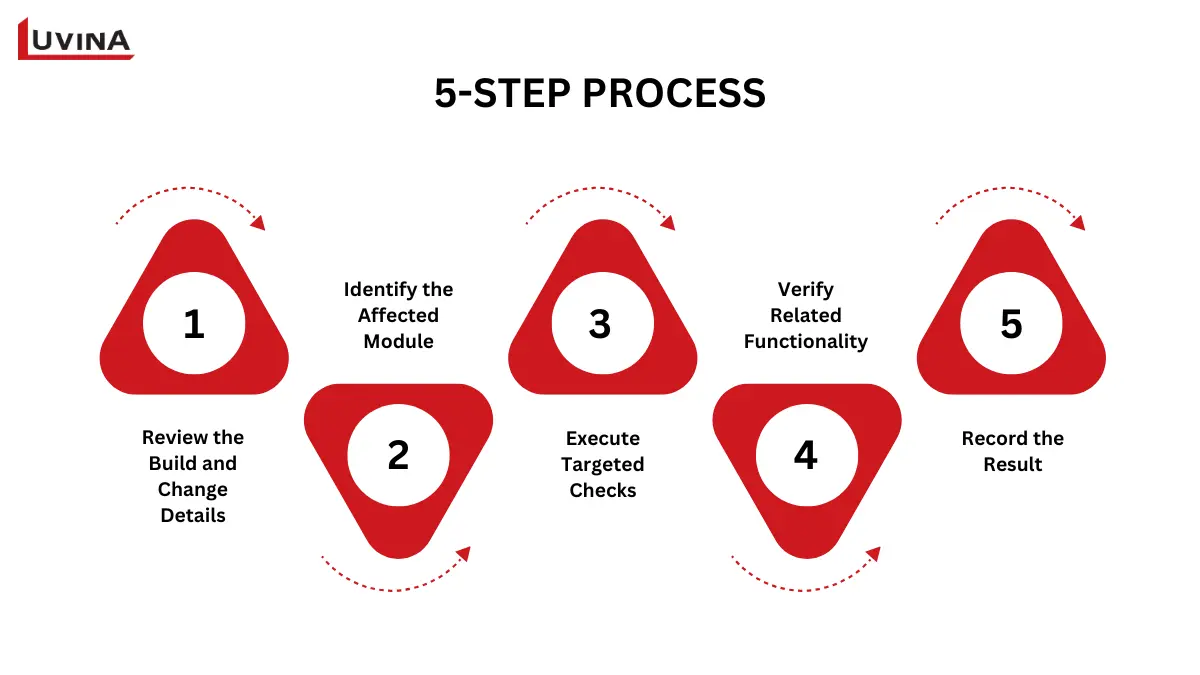
5-Step Sanity Testing Process in Software Testing
Best Practices for Effective Sanity Testing
Following a few best practices can help QA teams perform sanity testing more efficiently and reduce the risk of overlooking issues.
- Review release notes before testing.
- Focus on impacted modules only.
- Validate dependent functionality.
- Keep sanity checks lightweight.
- Escalate failed sanity tests immediately.
These best practices become even clearer when applied to real testing scenarios. The following examples show how sanity testing is used in different situations.
Sanity Testing Examples
The following examples illustrate how sanity testing is applied in real software development projects. In each case, the goal is to verify only the recent change instead of testing the entire application.
Example 1. Checkout Total Calculation
A developer fixes a bug that causes the shopping cart to display an incorrect total after a discount is applied. During sanity testing, the QA engineer verifies that the cart total is calculated correctly across several common scenarios, such as applying a discount, updating item quantities, and removing products from the cart.
Example 2. Date Picker UI Fix
A minor UI issue prevents users from selecting a date correctly. The sanity test confirms that the date picker opens as expected, allows users to select a date, and submits the selected value successfully. Other unrelated UI components are not included in the test.
Example 3. API Endpoint Fix
An API endpoint is updated to resolve an issue with invalid responses. The QA engineer sends several representative requests and verifies that the endpoint returns the expected status codes and response data. Additional API endpoints are excluded from the sanity test because they are outside the scope of the change.
Advantages and Limitations of Sanity Testing
Like any testing approach, sanity testing has both strengths and limitations. Understanding these helps QA teams decide when it is the right choice and when broader testing is still required.
Advantages
Sanity testing offers several benefits, especially for projects with frequent code changes and tight release schedules.
- Fast to execute: Most sanity tests can be completed within minutes or a few hours.
- Saves testing effort: It identifies obvious issues before the team spends time on a full regression cycle.
- Flexible: Testers can perform targeted checks without creating formal test scripts.
- Cost-effective: It helps avoid unnecessary regression testing on builds that are not ready for comprehensive validation.
Based on Luvina’s experience delivering QA services for enterprise software projects, defining a clear testing scope is one of the most important factors for effective sanity testing. QA teams should verify only the changed functionality and closely related components. Expanding the scope too far reduces the speed advantage of sanity testing and gradually turns it into an informal regression test.
Limitations
Despite its benefits, sanity testing should not be used as the only testing strategy.
- Limited coverage: It verifies only the changed functionality. Defects in other parts of the application may go undetected.
- Less repeatable: Because sanity testing is often unscripted, results may vary between testers.
- Cannot replace regression testing: Passing a sanity test does not guarantee the stability of the entire application.
- Depends on tester experience: The quality of the test largely relies on the tester’s understanding of the affected functionality.
FAQs
1. What is sanity testing in software testing?
Sanity testing is a focused testing method performed after minor code changes or bug fixes. It verifies that the affected functionality works correctly before more comprehensive testing begins.
2. What is the difference between sanity testing and smoke testing?
Smoke testing checks whether a new build is stable enough for testing. Sanity testing verifies that a specific bug fix or feature change works as expected. Smoke testing comes first, while sanity testing focuses on the changed functionality.
3. What is the difference between sanity testing and regression testing?
Regression testing validates existing functionality across the application after code changes. Sanity testing checks only the affected functionality. Sanity testing can be considered a subset of regression testing.
4. Is sanity testing scripted or unscripted?
Sanity testing is usually unscripted. Testers rely on their knowledge of the application to verify the affected functionality instead of following formal test cases.
5. When should sanity testing be performed?
Sanity testing should be performed after minor bug fixes or small feature enhancements. It is also useful when teams need quick feedback before starting regression testing.
Conclusion
Sanity testing is a fast and focused way to verify that a recent bug fix or small feature update works as expected. It helps QA teams identify issues early and decide whether a build is ready for more comprehensive testing. However, it should not replace regression testing, which validates the stability of the entire application after code changes.
A simple rule to remember is this: smoke testing gates the build, sanity testing gates the feature, and regression testing gates the release. Using each testing type at the right stage helps improve software quality while reducing unnecessary testing effort.
If you are looking to strengthen your QA process, explore Luvina’s Software Testing Services or learn more about Regression Testing to build a more effective testing strategy.

Luvina’s ISTQB Gold Partner certification reflects its QA commitment
Resources
- https://www.browserstack.com/guide/sanity-testing
- https://www.atlassian.com/continuous-delivery/software-testing/types-of-software-testing
- https://www.geeksforgeeks.org/software-engineering/differences-between-sanity-testing-and-smoke-testing-software-engineering/
- https://learning.postman.com/docs/tests-and-scripts/write-scripts/test-scripts/
- https://glossary.istqb.org/en_US/search?term=regression%20testing&exact_matches_first=true
READY TO START A PROJECT?
Our experts are eager to explore your needs.

Read More From Us?
Sign up for our newsletter
Read More From Us?
Sign up for our newsletter