




Your AI Agent Needs More Than a Model: A Readiness Checklist


An AI agent creates business value only when the data, workflows, integrations, permissions and operating model around it are ready.
Many teams find this out after the demo. The agent resolves a customer complaint in front of the leadership team, or matches an invoice to a goods receipt in seconds. Everyone nods. A pilot starts in a sandbox and it works. Then the project meets real systems. The agent cannot see live inventory, quotes a policy that expired last quarter, or IT will not let it write to the ERP. Months pass, and the pilot never reaches production.
The numbers show the same gap. In a Q2 2026 Gartner survey of more than 2,000 CIOs and technology executives, 71% said their organizations expect to deploy agentic AI within 12 months. Only 21% said they currently have agentic AI governance capabilities in place. Both figures come from the same survey.
Picking a model is the easy part. Whether your business is AI agent ready depends on five layers around it: data, workflow, integration, permissions and operating model. This article goes through each one, then ends with a short checklist so you can see which layer is weakest.
Why the Model Is Only One Part of an AI Agent
An AI agent gets work done. That difference explains most of what goes wrong after the demo.
An AI agent has four working parts:
- Model: reads the request and decides what to do next.
- Tools and APIs: let the agent act in other systems.
- Memory: holds context, such as a customer’s history or the step it just completed.
- Control loop: lets the agent plan, act, check the result and try again.
Only the model does the reasoning. The other three parts are what let the agent finish a task. We cover the basics of agentic AI in our article on applications of generative AI.
| Chatbot | AI agent | |
| What it does | Returns text. A person decides what to do with it. | Acts inside your systems on its own. |
| When it is wrong | Someone reads a bad answer. | A refund goes to the wrong account, a record is overwritten, or a client gets a non-compliant email. |
How a chatbot and an AI agent differ when something goes wrong
Choosing a model is a necessary decision, and it is also the easiest one to revisit. Teams swap models as better ones appear, usually after re-running their tests. The layers around the model are harder to change. Cleaning data, redesigning a process and integrating with the ERP can take months. Agreeing on access rules and ownership takes time too. Those layers decide whether the agent works in your business.
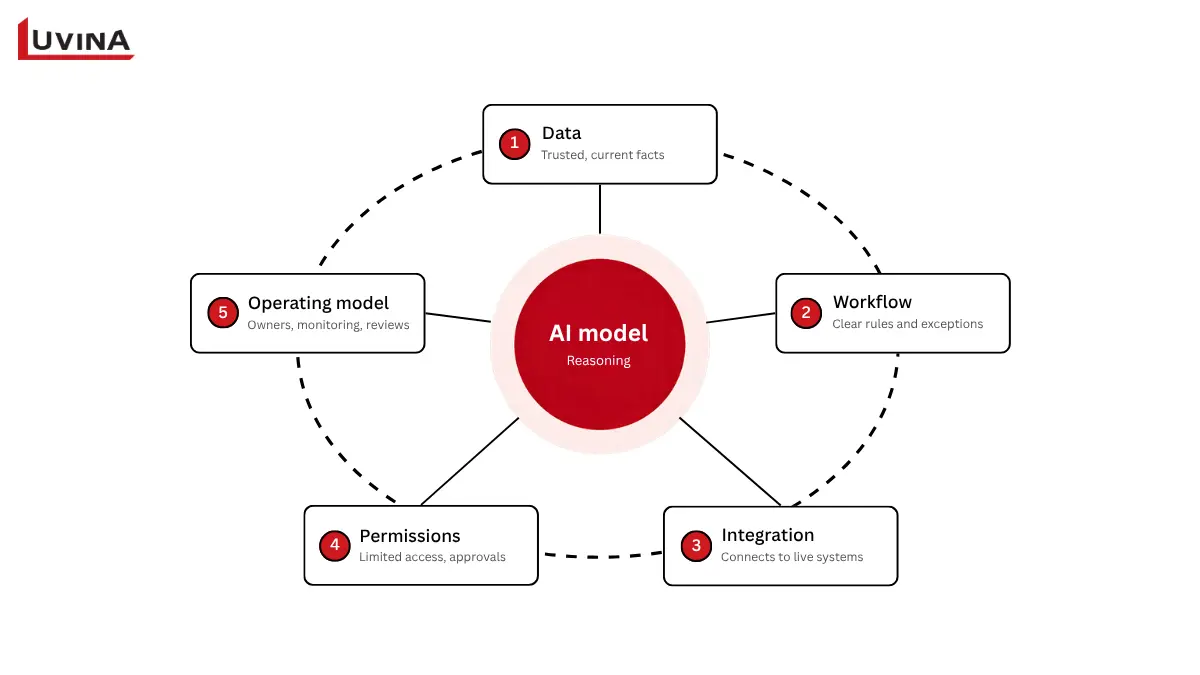
An AI agent works inside five layers
The Five Layers Your AI Agent Depends On
Five layers decide whether an AI agent works in daily operations. The table lists them, and each one gets its own section. Being AI agent ready does not mean all five are perfect on day one. It means you know which ones your first workflow depends on.
| Layer | Question to answer | What happens when it is missing |
| Data | Can the agent reach data that is correct, current and trustworthy? | The agent gives wrong or outdated answers. |
| Workflow | Are the process, decision rules and exceptions clearly defined? | The agent automates a process that was already broken. |
| Integration | Can the agent read from and write to real systems? | Results sit outside the process, and staff re-enter them by hand. |
| Permissions | What can the agent do, how far, and who approves? | Unintended actions and security risk. |
| Operating model | Who is responsible for monitoring and measuring it? | The pilot never reaches production, and nobody owns the result. |
The Five Foundational Layers of an AI Agent
1. Data: Can the Agent Find Facts It Can Trust?
Two systems report two different stock numbers for the same SKU. An AI agent that reads from both has no way to know which one is right, and that is a data-layer problem.
The data layer decides whether the agent answers from your current business records or from whatever it happens to find. Having data is not the same as being able to use it. The agent needs a live connection to the system of record, definitions that mean the same thing in every department, and a named person who keeps the source current.
Illustrative scenario, not a reported client result. A support agent tells a client the return window is 30 days. The policy changed to 14 days last quarter, but the knowledge base still holds the old page. The answer is fast, polite and wrong.
A real project. A Singapore-based recycling enterprise operating in five countries ran its finance on Excel files, and the numbers differed from one regional office to the next. Luvina moved it onto a single cloud ERP. According to the case study, payment and administrative processing time fell by 70%. That was an ERP project, not an AI agent project, but it shows the groundwork an agent needs first: one system of record that every region agrees on. See the ERP project for a Singapore recycling enterprise.
What to check
- Which system is the system of record for each type of data the agent uses?
- Who updates it, and how often?
- How much delay is acceptable before an answer counts as out of date?
2. Workflow: Is the Process Clear Enough to Hand Over?
Ask three employees to handle the same request and you may get three different methods. That is a sign the workflow is not ready for an AI agent.
An AI agent needs rules to follow: decision thresholds, a path for exceptions, and clear points where a person approves. Automating a process nobody has defined only produces mistakes faster. In many cases the better move is to redesign the process first, then add the agent, instead of placing it on top of the old way of working.
Illustrative scenario, not a reported client result. An agent matches purchase invoices to goods receipts. Most pairs match. The real work sits in the exceptions, such as a price difference or a partial delivery. If nobody wrote down how much variance is acceptable, the agent will either reject everything or approve everything.
What to check
- Is the process documented, and does the document match what people actually do?
- What are the most common exceptions, and which steps need a person to approve?
- What number will tell you the agent is succeeding?
3. Integration: Can the Agent Act Inside Your Systems?
Watch what happens after the AI agent gives its answer. If staff copy it from one screen and retype it into the ERP or CRM, the integration layer is missing.
An AI agent earns its keep when it can read from and write to the systems where work happens. Reading and writing are different kinds of access with different risks, so plan them separately. Legacy systems often have no stable API, which means a workaround is needed before the agent can do anything useful. The agent also needs rules for errors, retries and logging. Gartner’s June 2025 forecast noted that integrating agents into legacy systems can be technically complex, can disrupt workflows and can require costly changes.
Illustrative scenario, not a reported client result. A maintenance agent drafts a correct work order, but the ERP accepts entries only by manual input. A planner types in every one, and the time saved is close to zero.
What to check
- Which systems must the agent connect to, and does each one have a stable API?
- Does the agent only read, or does it also write?
- When a call fails, does the agent retry, alert someone or stop?
4. Permissions: What Is the Agent Allowed to Do?
A weak permissions layer shows up when nobody can say for sure what the agent is able to see or change.
The core principle is least privilege: the agent gets only the access its task needs, and nothing more. In practice this means separate credentials for the agent instead of a shared admin login, approval for high-value actions, audit logs, and defenses against prompt injection, where hidden instructions in an email or document try to steer the agent. Approval by a person before an action runs is called human-in-the-loop.
For companies in Singapore, the IMDA published its Model AI Governance Framework for Agentic AI on 22 January 2026. It is voluntary guidance built around four areas: assessing and bounding risks up front, keeping humans accountable, applying technical controls and processes, and enabling end-user responsibility. It works well as a checklist.
Illustrative scenario, not a reported client result. An agent handles expense claims using a shared finance login. That login can approve anything, so the agent can too.
What to check
- Which account does the agent use, and what can that account reach?
- Which actions must a person approve first?
- Is every action logged where someone can review it?
5. Operating Model: Who Owns the Agent After Launch?
The pilot ends, the person who built it moves to another team, and the AI agent keeps running with no owner. That gap belongs to the operating-model layer.
An AI agent needs a business owner who answers for outcomes and a technical owner who keeps it running. It also needs quality monitoring, scheduled reviews, incident handling, cost control and user training. Most pilots skip these because they feel like extra work while the demo is still going well. They matter most a few months later, when the agent has to keep up with changing policies, new products and new exceptions. When AI work stalls because it never reaches real processes, that is also one of the signals we cover in 5 Application Modernization Signals.
Illustrative scenario, not a reported client result. An agent runs well for three months. Then a policy changes, and its answers drift. Nobody reviews its output on a schedule, so the errors run for weeks before a customer complains.
What to check
- Who steps in when the agent is wrong?
- Who tracks quality, and how often?
- What result would make you pause or stop the agent?
AI Agent Readiness Checklist
Pick the one workflow you would hand to an AI agent first, then answer the ten questions below about it. Mark Yes only if the answer is true today, not if it is planned for next quarter.
| # | Layer | Question |
| 1 | Data | Do you know which system is the source of truth for the data this agent will use? |
| 2 | Is that data updated often enough for the task, and does a named person own it? | |
| 3 | Workflow | Is the process documented, including its most common exceptions? |
| 4 | Have you decided which steps need a person to approve? | |
| 5 | Integration | Do the systems the agent needs have stable APIs or another reliable way to connect? |
| 6 | Is there a plan for what happens when a connection fails? | |
| 7 | Permissions | Does the agent have its own credentials, limited to what the task needs? |
| 8 | Is every action the agent takes logged and open to review? | |
| 9 | Operating model | Are a business owner and a technical owner named? |
| 10 | Do you know what result would make you pause or stop the agent? |
AI agent readiness checklist
How to read your result
Count your Yes answers. This is a qualitative guide, not a formal or technical scoring system.
- 0 to 3 Yes: The groundwork is not there yet. A pilot now would likely stall at the first real system. Start with the layer where you answered No most often.
- 4 to 7 Yes: A small pilot is realistic. Choose a workflow where your Yes answers cover what it needs, and close the remaining gaps while it runs.
- 8 to 10 Yes: You can run a pilot with human oversight. Keep checking the operating model after launch, because that is where agents drift.
Two No answers in the same layer tell you where to work first. If a No lands on permissions, deal with it before anything else, since it carries the most risk.
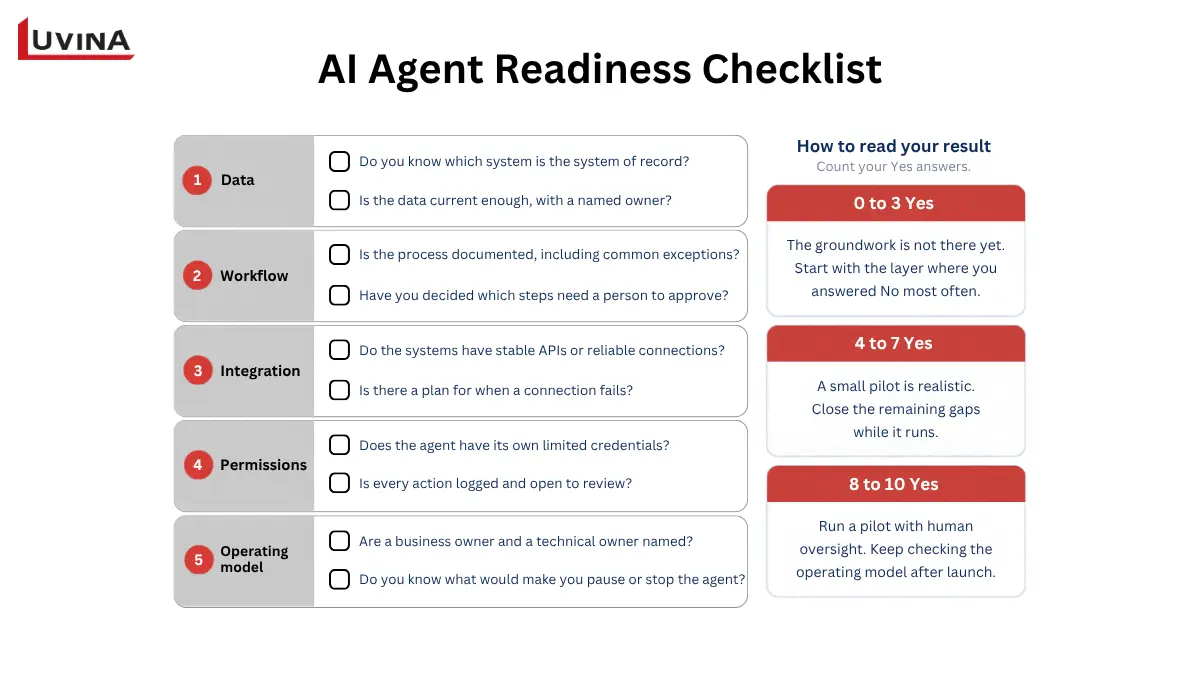
Ten questions across five layers show if your first workflow is AI agent ready
How to Start: Pick One Bounded Workflow
You do not need all five layers at full strength before you begin. You need to know which layers one workflow depends on, and whether they are good enough for that scope. The smallest change that produces a business result is usually the right place to start.
- Pick one workflow with a clear scope. Look for a process with enough volume to matter and moderate risk if something goes wrong, such as invoice matching or first-line support questions. Avoid anything where a single wrong action is costly or hard to undo.
- Map the data and systems it touches. List every source the agent will read and every system it will write to. Most gaps show up here, before anyone builds anything.
- Define permissions and approval points. Decide what the agent may do on its own and what needs a person’s sign-off, such as payments above a set amount.
- Run a pilot with a human-in-the-loop review. A person reviews the agent’s actions first. Note where reviewers have to step in, because each correction points to a weak layer.
- Measure with business metrics set in advance. Pick a few numbers before the pilot starts, for example handling time, error rate and cost per case. Without a baseline, nobody can say whether the agent helped.
- Expand one step at a time. Add volume, a new case type or write access in small increments, and review the results after each one.
Starting small also shows you which layer needs work first. A pilot on invoice matching might reveal that the data is fine, but nobody has defined the exceptions. Finding that out in a pilot costs far less than finding the same gap after a company-wide launch.
Build, Buy or Partner? What to Ask Before You Choose
There are three routes to an AI agent. Which one fits depends on how deeply the agent has to work inside your systems and how much engineering capacity you have today.
| Route | Fits when | Watch for |
| Buy a ready-made agent | Your need is common, such as meeting notes or standard customer support. | Limited connection to your own systems, and less control over where data goes. |
| Build a custom agent | You need deep integration or must use proprietary data. | You need in-house engineers to run it after launch, not only to build it. |
| Partner with an outside team | You lack the skills or time internally. | Business rules and know-how should stay with you, with clear documentation at handover. |
Three ways to get an AI agent
Whichever route you take, put these five questions to any vendor or partner:
- How does the agent connect to my systems, and which ones?
- How is its access controlled, and can I limit it to what the task needs?
- Where does my data go, and who can see it?
- Who monitors the agent after launch, and how are problems handled?
- Does this product act on its own, or is it a chatbot with a new label?
The last question matters because some products are sold as agents without acting like real agents. The practice is sometimes called agent washing. Ask for a live demo where the product completes a task inside a test copy of your system, not a slide that describes one.
An AI agent is not always the answer. If a process follows fixed steps with clear rules and predictable inputs, rule-based automation is simpler, cheaper and easier to audit. An agent earns its place when the work involves judgment, varied inputs or exceptions that rules cannot cover. A good advisor will tell you when you do not need one.
FAQs
What does an AI agent need besides a model?
An AI agent needs five things around its model: trusted data, a clear workflow, integration with real systems, defined permissions and an operating model with named owners. The model reasons, and these layers let the agent do the work safely inside your business.
Why do AI agent pilots fail to reach production?
Pilots often stall because they were built in a sandbox and never connected to the real environment. Common causes are outdated data, an undefined process, no way to write into core systems, unclear permissions and no owner after launch. The model is seldom the main obstacle.
How do I know if my company is ready for an AI agent?
Pick one workflow and test it against the five layers: data, workflow, integration, permissions and operating model. If you can answer yes to most of the questions in our ten-question readiness checklist for that workflow, a small pilot with human oversight is realistic. Where you answer no, fix that layer first.
Do I need to modernize my legacy systems before using AI agents?
Not before a first pilot, and not all of them. For the workflow the agent will handle, the systems involved must be reachable through a stable API or a workable alternative. Modernize only what blocks that workflow. A full migration before a first pilot usually delays results without showing whether the agent is useful.
What should an AI agent be allowed to do on its own?
An AI agent should start with low-risk, reversible actions, such as drafting, looking up records or sorting requests. Require a person’s approval for anything costly, hard to undo or involving sensitive data, such as payments above a set amount. Give the agent only the access its task needs, and widen it as the results build trust.
Conclusion
The model sets what an AI agent can do. Everything around it decides whether the agent does that work in your business. You do not need to fix everything at once. Take one workflow, answer the ten checklist questions, and start where your No answers cluster.
Is your AI agent ready to work inside your business, or only to impress in a demo?
If you want a second opinion, talk to Luvina. We can look at one workflow with you, see which layers need work first, and scope a pilot that fits.
Resources
READY TO START A PROJECT?
Our experts are eager to explore your needs.

Read More From Us?
Sign up for our newsletter
Read More From Us?
Sign up for our newsletter