




5 Application Modernization Signals Businesses Should Watch


Applications can become a business constraint even when they run without downtime or errors. The warning signs show up in the business first: stalled growth, slow change, manual spreadsheet workarounds, unreliable reports, and AI pilots that never reach real workflows. Spotting them early lets leaders fix the bottleneck with targeted application modernization instead of a costly rebuild.
Your Applications May Be Limiting the Business, Even If They Still Work
A software system that experiences zero downtime, reports no critical bugs, and completes daily operational runs without throwing errors is easy to label a success. Yet, for many growing enterprises, some of the most damaging technology friction occurs despite apparent operational stability. Applications that run reliably on paper are often quietly constraining the business in practice.
The core challenge stems from a fundamental divergence: software remains static while market demands evolve. As companies scale, they expand into new sales channels, introduce complex product tiers, automate cross-departmental handoffs, and require instant visibility into performance metrics. Leaders increasingly expect their core systems to support real-time decisions and integrate naturally with emerging automation and artificial intelligence workflows.
A common misconception among business leaders is that application modernization is a reactive exercise, something triggered only by critical system outages, severe security vulnerabilities, or an official vendor End-of-Life (EoL) announcement. Waiting for these extreme triggers is a costly strategy. Long before an application fails technically, its architectural constraints begin acting as a drag on commercial execution, inflating operational costs and stalling strategic initiatives.
Recognizing when core software transitions from an operational asset into a business constraint requires looking beyond IT uptime metrics. Leadership must monitor five distinct operational signals:
- Growth is becoming disproportionately expensive and complex to support.
- The organization cannot adapt to market changes or new opportunities fast enough.
- Employees rely on manual workarounds and spreadsheets to bridge functional gaps.
- Decision-makers lack access to timely, trusted business intelligence.
- AI and advanced automation initiatives remain isolated for pilots, unable to reach core operational workflows.
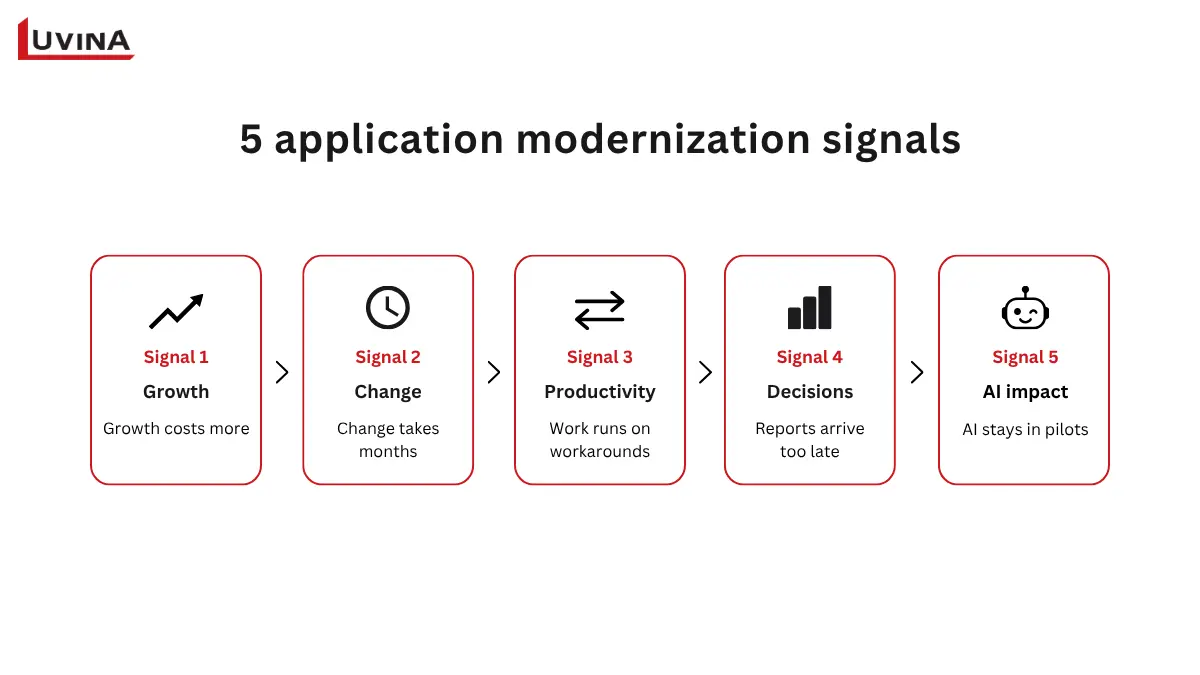
By shifting focus from system maintenance to business outcomes, executive teams can identify when application limitations are quietly suppressing growth and take targeted, proactive action before competitiveness is lost.
Signal 1: Growth Is Becoming More Expensive and Difficult to Support
Growth should let the business lean on its core applications for speed and efficiency. It should never mean bending processes or building manual workarounds around them.
Observable Business Symptoms
- Disproportionate Effort for Routine Expansion: Entering a secondary geographical market, launching a new product tier, or onboarding a high volume of new customers requires significant time, budget, and custom engineering hours.
- Constant Requests for Custom Modifications: Operations, sales, or finance teams frequently flood IT with change requests just to execute basic, repeatable business growth tasks.
- Transaction Bottlenecks: Processing increased order volume leads to system slowdowns, requiring manual intervention or temporary system freezes to clear queues.
Commercial & Operational Impact
When routine growth demands extraordinary technical heavy lifting, the commercial consequences compound quickly:
- Slower Market Expansion: Competitors seize market share while your teams wait for application modifications.
- Escalating Cost-per-Transaction: Marginal operating costs increase with volume rather than decreasing, eroding profit margins.
- Compounded Operational Complexity: Every quick-fix patch added to accommodate short-term expansion makes future updates progressively more expensive and risky.
Potential Technical Root Causes
It is important to view technology as a possible contributing factor rather than issuing an immediate technical diagnosis. When applications resist growth, the underlying causes often include:
- Rigid Monolithic Architecture: Core business logic is tightly bundled, making it hard to scale individual functions independently.
- Accumulated Technical Debt: Years of ad-hoc customizations, hardcoded business logic, and skipped framework upgrades have made the system brittle.
- Scalability Limitations: Database designs or server architectures built for smaller datasets cannot handle modern enterprise throughput.
Sustainable business growth should leverage core enterprise applications to gain speed and efficiency—it should never require teams to repeatedly bend operational processes or build manual workarounds around rigid software.
Signal 2: The Business Cannot Respond to Change Fast Enough
When market conditions shift, regulatory requirements update, or customer preferences pivot, the business must adapt quickly. If your strategic pivots are consistently bottlenecked by release cycles and IT limitations, your applications are actively holding you back.
Observable Business Symptoms
- Months, Not Weeks: Launching a basic feature, altering an internal workflow, responding to customer feedback, or meeting a new compliance requirement takes months of planning rather than weeks of execution.
- Fear of Deployment: Even minor modifications trigger lengthy, manual testing cycles and excessive cross-departmental coordination due to a pervasive fear of inadvertently breaking unrelated functions.
- Feedback Paralysis: The business collects valuable market and user feedback but cannot technically implement the necessary changes fast enough to capitalize on those insights.
Commercial & Operational Impact
The inability to match the speed of the market carries a heavy commercial penalty. It results in sluggish time-to-market, delayed enterprise innovation, and reduced overall responsiveness. Ultimately, the customer experience suffers as users wait for updates that competitors with modern, flexible operational cores have already deployed.
Potential Technical Root Causes & Pragmatic Solutions
While business leaders feel the operational friction, the underlying technical realities often involve tightly coupled system components, fragile integrations, limited automated testing, or compounding technical debt.
However, a complete, automatic rewrite into microservices is rarely the mandatory cure. Depending on the specific application’s state, the most effective response might simply be:
- Refactoring: Cleaning up existing code without changing its external behavior.
- Modularization: Breaking off highly changed features into independent modules.
- Test Automation: Building robust automated testing to eliminate the “fear of deployment.”
- Re-platforming or Re-architecture: Moving to a cloud environment or altering the structural design only where the current application truly blocks required capabilities.
When the pace of technology change consistently lags the pace of business change, the application landscape is no longer just an administrative tool; it is an active barrier to enterprise competitiveness.
Signal 3: Employees Spend Too Much Time Working Around Systems
You hire top talent to execute strategy, serve customers, and drive innovation. Yet, when enterprise applications lack essential functionality or fail to communicate with one another, highly paid professionals are quietly forced into administrative roles. They become the manual bridge between disconnected systems.
Observable Business Symptoms
- Heavy Reliance on “Excel Ops”: Staff regularly export raw data to spreadsheets to perform basic calculations, format reports, or merge datasets because the core application cannot do it natively.
- “Swivel-Chair” Integration: Employees waste hours manually copying and pasting information from one application interface directly into another.
- Shadow IT and Unofficial Trackers: Teams maintain their own side-databases to reconcile conflicting records or track processes that the central system cannot handle.
- Key-Person Dependency: Critical operational processes depend entirely on one or two key individuals; employees who hold the undocumented knowledge required to navigate and bypass the system’s flaws.
The Spreadsheet Nuance
To be clear: spreadsheets are not inherently bad. They remain exceptional tools for financial modeling and ad-hoc analysis. However, spreadsheets become a glaring red flag when they are used as permanent manual workarounds to compensate for missing capabilities within multi-million-dollar core systems.
Commercial & Operational Impact
Relying on manual workarounds severely damages operational efficiency. In daily operations, fragmented application landscapes force skilled workers into repetitive data entry, fundamentally eroding the ROI of human capital.
The immediate business impacts include:
- Wasted Capacity: Valuable resource bandwidth is continuously diverted from revenue-generating projects to manual administrative overhead.
- Avoidable Human Errors: Manual data entry inevitably leads to “fat-finger” mistakes, creating downstream compliance or fulfillment issues.
- Fragile Operations: If the employee who maintains the unofficial workaround leaves the company, the entire process breaks down.
- Slower Service Delivery: Customers suffer longer wait times because internal teams are busy wrestling with internal software.
People should spend their time serving customers, solving complex problems, and improving operations, not acting as “human middleware” to connect disjointed applications.
Signal 4: Leaders Cannot Get the Information They Need to Make Timely Decisions
An enterprise moves only as fast as its executive team can make informed decisions. In a healthy technology environment, data flows seamlessly to provide a unified view of the business. However, when core applications are outdated or disconnected, leadership is forced to make strategic decisions based entirely on delayed historical data.
Observable Business Symptoms
- Manual Consolidation: End-of-month reporting is an exhausting exercise that requires finance and operations teams to manually stitch together data extracts from multiple, disconnected systems.
- Dueling Spreadsheets: Strategic meetings frequently derail into arguments over which department numbers are “correct,” rather than focusing on what the numbers mean.
- Blind Spots in Operations: Management lacks real-time visibility into critical business drivers, such as current inventory levels, cash flow status, or shifting customer behaviors across channels.
The Crucial Distinction: Data Availability vs. Data Usability
A common trap is confusing data availability with data usability. The raw data almost certainly exists somewhere within the organization’s servers. The problem is that it is trapped in data silos. Information may be technically available, but it remains incredibly difficult to access, combine, trust, and ultimately act without heavy IT intervention.
Commercial & Operational Impact
When executives cannot trust their dashboards, the operational impacts are severe:
- Delayed Strategic Decisions: Opportunities are lost because verifying the data takes too long.
- Missed Market Patterns: Disconnected data obscures emerging consumer trends or operational inefficiencies until they become actual crises.
- Inconsistent Customer Experiences: When sales, support, and marketing applications do not share a single customer record, clients receive fragmented, contradictory service.
- Blocked Automation: You cannot automate complex business workflows if the underlying data inputs are unreliable or delayed.
Potential Technical Root Causes & The Governance Nuance
The technical culprits usually point to disconnected applications, weak system integration, inconsistent data definitions across departments, and poor access logic for operational data.
Application modernization plays a vital role here by replacing rigid legacy structures with modern APIs that establish true interoperability. However, leaders must understand a crucial nuance: modernizing an application connects the pipes, but it does not purify the water. Application upgrades must work in tandem with strict data governance to ensure that once the data flows freely, it is accurate, secure, and uniformly defined.
When leadership cannot get a reliable, holistic view of the business in time to act confidently, the application landscape is often part of the problem.
Signal 5: AI Initiatives Cannot Move from Experiment to Business Impact
A proof-of-concept AI demo can easily impress the boardroom by successfully generating predictive insights or drafting rapid responses. But an impressive demo is functionally useless if the surrounding enterprise processes and applications remain unready to absorb it.
Observable Business Symptoms
- Manual Data Preparation: Teams spend weeks manually extracting, cleaning, and formatting data just to feed the AI model because automated pipelines do not exist.
- Quarantined Pilots: AI initiatives remain permanently isolated in “innovation labs” or sandbox environments, never interacting with live customer transactions.
- Disconnected Outputs: Employees are forced to read AI-generated recommendations on one screen, then manually re-enter those decisions into the core ERP or CRM system.
- Deployment Stalls: The organization proves that an AI model works, but the leap to widespread operational use stalls indefinitely due to security, compliance, or system limitations.
The Contrast: Experimentation vs. Operational Workflow
There is a significant structural gap between an isolated experiment and an operationalized asset.
An isolated experiment is simple: Human Prompt => AI Model => Text/Data Output.
A true operational workflow looks entirely different: Core Enterprise Data => Application Logic => AI Engine => Human Review/Decision => Action Triggered in Core Business System.
The Reality of AI-Ready Applications
Building AI-ready applications requires much more than an API key. It demands robust AI integration where models have secure, low-latency access to trusted operational data. Moving from pilot to production necessitates strict data governance, workflow redesign to include clear human oversight, and legacy application modernization to ensure your architecture can safely ingest AI outputs. In fact, bypassing legacy system migration often leaves AI initiatives stranded, unable to trigger subsequent business actions.
In practice, while generative AI experimentation is near-universal, translating these pilots into measurable financial impact strongly correlates with a modernized application architecture that can seamlessly route data to and from the models.
AI value depends on more than the model. It also depends on whether your applications and processes can put its outputs to work.
Many leaders assume AI integration fails due to model limitations. In our technical assessments at Luvina, we frequently find the opposite: the AI model works fine, but the legacy core lacks the APIs and data flows needed to trigger automated actions within daily business workflows.
Modernization Options: Fix the Business Constraint, Not Just the Technology
One of the biggest hurdles to initiating change is the assumption that legacy application modernization automatically requires a massive, high-risk “rip-and-replace” overhaul of the entire IT landscape. A successful application modernization strategy focuses on eliminating specific operational bottlenecks rather than adopting new technology for its own sake. The approach should be surgical, tailored directly to the business problem at hand. Often, organizations partner with specialized application modernization services to evaluate which path minimizes risk while maximizing business value.
The Spectrum of Intervention
Depending on the state of the application and the exact nature of the business constraint, leaders have several distinct paths forward:
- Integrate: If the core application still reliably performs its primary function but operates in a silo, the answer is to build modern APIs or middleware to improve connectivity and data flow with other systems.
- Refactor or Modularize: If certain features require constant updates while the rest of the application is stable, developers can clean up the code (refactor) or decouple those high-demand features into independent modules, vastly improving maintainability and the speed of change.
- Replatform or Rehost: If on-premises infrastructure is causing downtime or limiting scale, lifting the application into a cloud environment, often with minor configuration tweaks, can address the business need for stability and scalability.
- Rearchitect or Replace: When the underlying design is fundamentally flawed, obsolete, or structurally incapable of supporting new requirements (like operational AI), the system must be entirely redesigned or swapped out for a modern SaaS alternative.
Evaluating the Right Path
To avoid costly over-engineering, leadership and IT must collaboratively assess these options against a holistic set of criteria:
- Business Value & Urgency: How quickly do we need this fixed to capture market share or stop revenue leakage?
- Cost & Risk: Can the business tolerate the disruption of a full replacement, or is a phased refactoring safer?
- Technical Demands: What are the strict requirements for scalability, seamless integration, data usability, robust security, and future AI adoption plans?
The golden rule of modernization is to choose the smallest effective intervention that resolves the current business constraint without blocking future technical needs.
Self-Assessment: Is Your Application Landscape Becoming a Business Constraint?
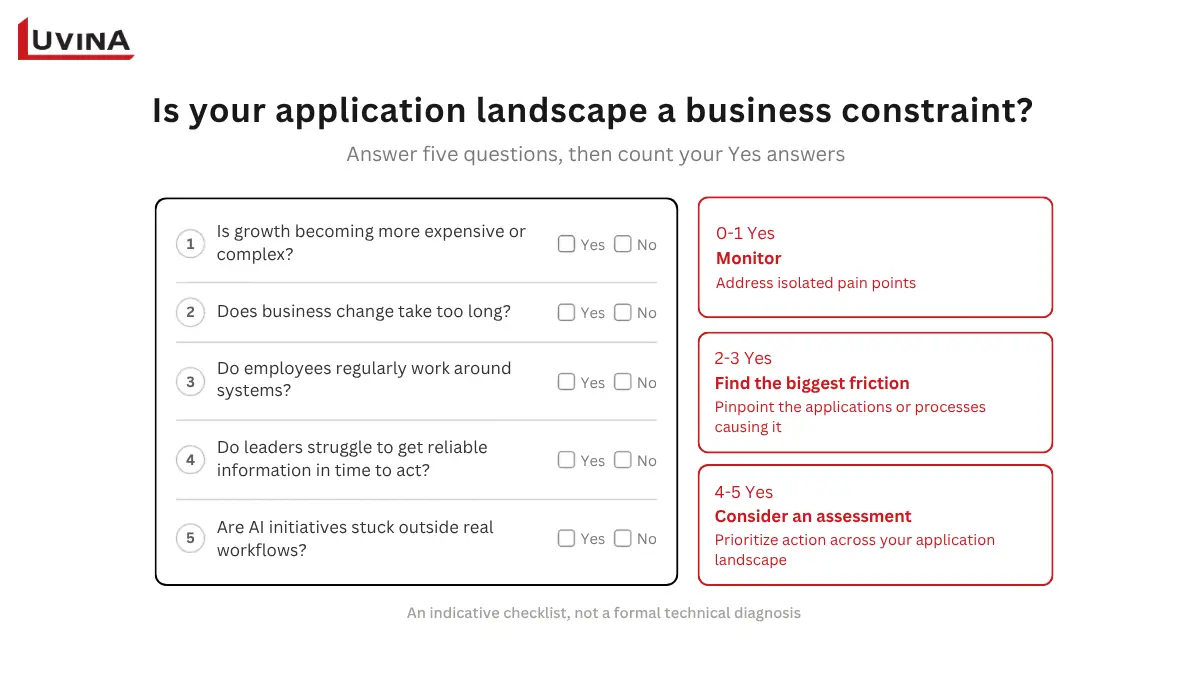
To determine whether your technology is actively hindering your enterprise strategy, evaluate your current operational environment against these five critical questions:
- Is growth becoming disproportionately expensive or complex? (Are you forced to hire more administrative headcount simply to support scaling operations?)
- Does business change take too long? (Do new features, workflow adjustments, or compliance updates require months of IT coordination instead of weeks?)
- Do employees regularly work around systems? (Are skilled workers heavily reliant on spreadsheets, manual data entry, or unofficial processes to bridge gaps between disconnected apps?)
- Do leaders struggle to access reliable information in time to act? (Does management lack a unified, trustworthy view of business data precisely when strategic decisions must be made?)
- Are AI initiatives stuck outside real workflows? (Do AI experiments succeed in isolated sandboxes but fail to integrate into daily, operational business processes?)
Scoring Your Landscape
Tally your “Yes” answers to gauge the urgency of your modernization needs:
- 0–1 “Yes”: Monitor the situation. Your application landscape is generally healthy; address isolated pain points as they naturally arise.
- 2–3 “Yes”: Friction is accumulating. Identify exactly which specific applications or business processes are creating these bottlenecks and explore targeted modernization (such as refactoring or integration).
- 4–5 “Yes”: Strategic constraint identified. Consider initiating a structured, enterprise-wide application landscape assessment to prioritize immediate modernization actions before technical limitations further degrade competitiveness.
This checklist is intended as an indicative business diagnostic to guide executive conversations, not a formal technical or architectural assessment.
Next Steps: How to Modernize Without Rebuilding Everything
Addressing application constraints requires a structured, business-first approach rather than an immediate plunge into coding. To resolve operational bottlenecks effectively and minimize disruption, leaders should follow these six strategic steps:
- Start with Business Outcomes: Begin by identifying exactly where enterprise growth, speed to market, workforce productivity, executive decision-making, or AI deployment is being actively constrained.
- Map the Applications and Processes Involved: Thoroughly document the current state. Identify system dependencies, critical integrations, data flows, manual employee workarounds, and all business-critical functions tied to the constraint.
- Prioritize by Impact and Feasibility: Do not replace systems simply because they are old. Rank modernization initiatives based on business impact, urgency, cost, risk, and operational feasibility rather than age alone.
- Select the Appropriate Intervention: Match the solution to the specific problem. Choose whether to integrate, refactor, replatform, rearchitect, migrate, or entirely replace the application.
- Define Measurable Outcomes and Modernize Incrementally: Establish clear success metrics (KPIs) before starting. Execute changes in phased, manageable increments where practical to deliver value quickly and reduce operational risk.
- Reassess After Implementation: Modernization is not a deployment event; it is a business objective. Review the results post-launch to confirm that the targeted business constraint has actually improved.
Conclusion: The Real Warning Sign Is When Technology Limits Business Progress
An application that boots up without errors every morning is not necessarily a success. True enterprise value is measured by operational agility and strategic alignment, not just server uptime. A software system can remain perfectly functional technically while becoming entirely unfit for the business’s future direction.
The real warning signs of obsolete technology manifest in the boardroom and on the balance sheet, long before they appear in the IT ticketing system. When growth becomes disproportionately expensive to support, when organizational change moves too slowly, when skilled employees are forced to act as human middleware, when data silos paralyze timely decision-making, and when AI remains trapped in isolated experiments, your application landscape has become a barrier to progress.
Ultimately, executive leadership must look critically at their operational core and ask one defining question:
Are your applications enabling the business you want to build, or making it harder to get there?
Identify where your current applications are slowing growth, creating operational friction, or limiting AI adoption. Explore practical application modernization options based on your business priorities.
READY TO START A PROJECT?
Our experts are eager to explore your needs.

Read More From Us?
Sign up for our newsletter
Read More From Us?
Sign up for our newsletter