




AI for Small Businesses: Practical Uses, Tools and How to Start


AI for small businesses mostly comes down to four jobs: drafting emails, answering routine customer questions, summarizing meetings and sorting invoices. The software does the first pass. A person checks it.
Many SMEs are already trying this. Singapore SME AI adoption rose from 14.5% to 23.4% in 2025, according to IMDA’s Singapore Digital Economy Report 2026; In Australia, 43% of SMEs reported some level of AI use between December 2025 and February 2026, based on the National AI Centre’s tracker. The two surveys use different definitions, so don’t compare the figures directly.
You don’t need AI everywhere. This guide helps you pick one task, test it safely and decide what to do next.
How can small businesses use AI?
Small businesses can use AI to take the first pass at repetitive work, like drafting a reply, sorting invoices or summarizing a meeting. A person then checks the output before anything is sent or saved.
It usually comes in two forms:
- General-purpose AI assistant. You type a request and get an answer. Paste three bullet points, ask for a customer email, and you get a draft.
- Built-in AI feature. The AI sits inside software you already use, such as an accounting tool that suggests expense categories or an email platform that drafts replies.
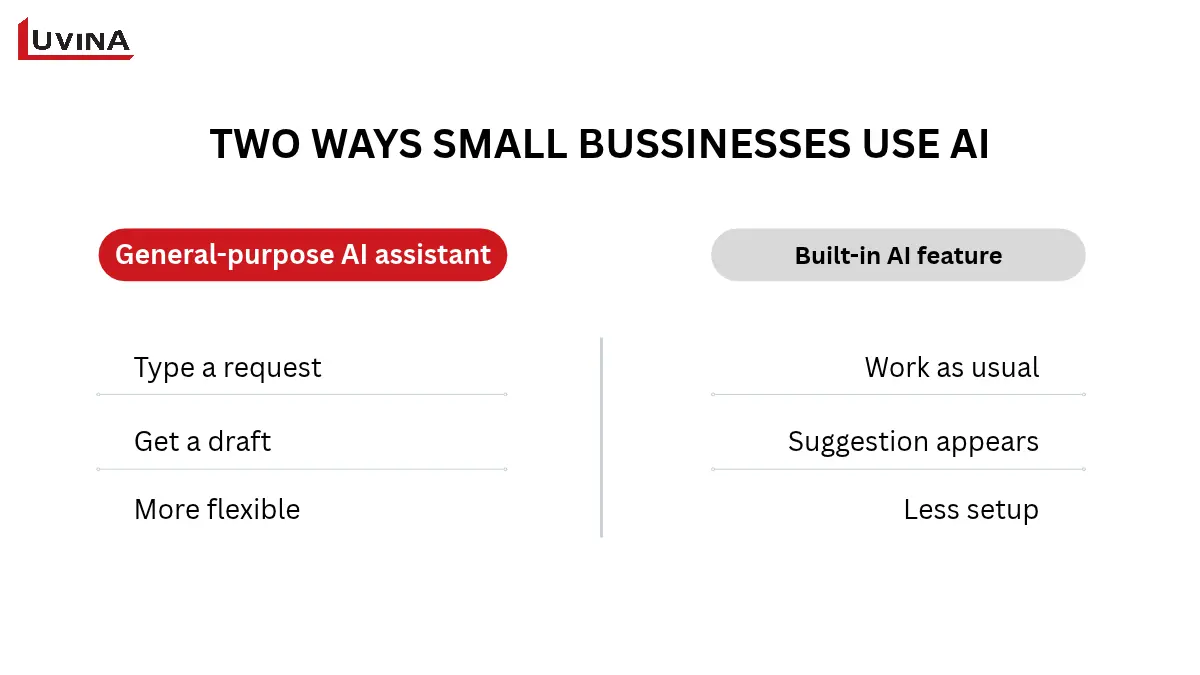
An assistant is more flexible. A built-in feature needs less setup because the data is already in the system.
The upside is less time spent on first drafts and repeat tasks. The catch is accuracy. AI can sound sure of itself and still get a name or a figure wrong.
That’s the general picture. The clearest way to see where AI fits is to look at real tasks, so here are six small businesses that handle every week.
AI for small businesses examples by task
These practical AI use cases for small business owners are hypothetical, so they are not measured results. Each one shows what goes in, what comes out, who checks it and one limit to watch.
| Business task | Example workflow | Human check | Starter option and complexity |
| Marketing | Draft a product email from approved product facts | Marketer checks claims, tone and links | General AI assistant, low |
| Customer support | Draft replies to common enquiries from an approved FAQ | Staff review replies and handle complaints | Assistant or help-desk built-in feature, low to medium |
| Sales | Summaries consented meeting notes and draft a follow-up | Account owner corrects details, approves sending | Assistant or CRM built-in feature, low to medium |
| Administration | Turn non-sensitive meeting notes into action items | Attendees confirm owners and deadlines | General AI assistant, low |
| Finance | Suggest invoice or expense categories | Bookkeeper checks before records are posted | Accounting software feature, medium |
| Operations and inventory | Review sales and stock data for patterns | Owner validates data and assumptions before ordering | Spreadsheet or inventory software feature, medium |
Illustrative AI workflows for small businesses
In each row, the AI produces a first version and a person decides what happens next. Let’s look at how that plays out, starting with the two tasks closest to revenue.
Marketing and sales
Marketing and sales are practical starting points because many tasks involve recurring communication and structured information.
Marketing: a product launch email
Say a retailer is launching a new line of ceramic mugs. The owner pastes the approved product sheet into an AI assistant and asks for a friendly launch email.
- Input: the approved product sheet (size, material, care instructions, price)
- Output: a draft email and a few subject line options
- Checked by: the marketer
- Watch for: invented features, such as “dishwasher safe” when the sheet never says so
The draft saves the blank-page time. The marketer’s check keeps the email honest.
Sales: a follow-up after a discovery call
The same pattern works after a sales call. A five-person B2B software team records a call with everyone’s consent, and the account owner gives the transcript to an assistant. The workflow looks like this:
- Input: consented call notes or transcript
- Output: a summary, next steps and a draft follow-up email
- Checked by: the account owner
- Watch for: wrong names, figures or promises, such as a delivery date the client never agreed to
A follow-up that goes out with a wrong commitment is worse than a late one, so the review step is not optional.
Customer support and administration
Customer support and administration offer other opportunities to reduce repetitive drafting and note-taking.
Customer support: replies to routine questions
A small travel agency gets the same questions again and again: visa processing times, cancellation terms, booking changes. An assistant drafts replies from the agency’s approved sources of information. In practice:
- Input: the customer’s question plus the approved FAQ
- Output: a draft reply
- Checked by: a staff member reads every draft, and complaints or refund disputes go straight to a person
- Watch for: an out-of-date FAQ produces out-of-date replies, so one person owns it and updates it when a policy changes
The quality of the answers depends on the quality of the source document. Online stores can take this further with a chatbot, which we cover in our guide to AI chatbot for ecommerce customer support.
Administration: Monday meeting notes
Internal admin follows the same logic, only with less risk to customers. A 12-person design studio holds a planning meeting every Monday. The owner pastes non-sensitive notes into an assistant and asks for actions with owners and deadlines. Here is the breakdown:
- Input: non-sensitive meeting notes
- Output: a list of actions with owners and deadlines
- Checked by: each attendee confirms their own lines before anything reaches the task board
- Watch for: tasks assigned to the wrong person, or deadlines nobody mentioned
Keep salaries, client contracts, and personal data out of the notes altogether. The confirmation step takes a minute and saves an argument on Wednesday.
Finance and operations
Finance and inventory tasks involve business records and decisions, so outputs need closer verification.
Finance: invoice categories
Many accounting packages now suggest a category for each incoming invoice, such as software, office supplies, or travel. This suits a business with around 50 invoices a month, mostly from repeat suppliers. The workflow runs like this:
- Input: incoming invoices
- Output: suggested categories
- Checked by: the bookkeeper, before records are posted
- Watch for: unusual invoices are more likely to be misfiled
AI is not an accountant or a tax adviser. Any question about tax treatment goes to a qualified person.
Operations and inventory: slow movers and stock-outs
Stock data is the last example, and the one that needs the most judgement. A distributor of kitchen equipment exports twelve months of sales and stock figures. An AI tool, or the inventory software’s built-in feature, flags slow-moving items and likely stock-outs:
- Input: twelve months of sales and stock data
- Output: flagged slow movers and possible stock-outs
- Checked by: the owner validates the data and assumptions, such as last spring’s promotion, before ordering
- Watch for: forecasting needs enough history
A product launched two months ago, or demand that swings week to week, won’t give reliable signals to forecast the demand of a whole year. In those cases, the owner’s own knowledge counts for more than the forecast.
Across all six tasks, the pattern is the same: a clear input, a first draft from the AI and a named person who checks it. Before you pick a tool for your own first task, it helps to know what the free options can and can’t do.
Free AI tools for small business and how to choose
You may want to try a free plan before paying for anything, and that is a sensible way to start. Four tools cover most first tasks, from drafting text to making a simple visual.
Free AI tools compared by task
The table matches each tool to the work it handles well, plus what to check before you rely on it.
| Tool | Good for | Limits to check | Privacy check |
| Claude Free | Writing, summarizing, document analysis | Usage limit resets on a rolling session window, no fixed count | Data-sharing and training settings for your account |
| ChatGPT Free | Drafting, summarizing, brainstorming | Uploads, images, voice and data analysis are limited | Data and training settings for your account |
| Gemini free tier | General assistance, especially for Google account users | Usage limit refreshes on a schedule, no fixed count | Data use settings for your account |
| Canva Free | Visuals and short copy | AI access is limited, no stated count | Brand and customer data inside designs |
Free AI tools compared: best use, limits and privacy checks
Limits and features differ by account, country and date. Open each official plan page (Claude, ChatGPT, Gemini and Canva) before you commit a task to a tool. And until your team has approved a tool, keep confidential and personal data out of it.
A free or low-cost AI tool does not always mean a low-cost workflow. When comparing options, consider the full cost of use, including subscriptions, staff training, time spent reviewing and correcting outputs, integration with existing systems, and ongoing maintenance. These costs can become more significant as usage grows or the workflow becomes more complex.
Checklist for choosing an AI tool
Run any tool, free or paid, through these seven questions:
- Fit for task: does it do the one job you need?
- Quality: are the outputs good enough that reviewing them takes little time?
- Cost: what are the free-tier limits, and what does ongoing use cost in full?
- Security and data handling: where does your data go, and can you switch off training on it?
- Permissions: who on your team can use it, and what can it access?
- Integration: does it work with the software you already use?
- Adoption: is it accessible, and will your staff actually use it?
Owners often ask which is the best AI for small business marketing. No single tool wins across the board. Pick by task: one tool for email drafts, another for visuals, another for summarizing customer feedback.
How to start using AI in your small business
Cost and know-how are what hold most small firms back. In Singapore, 44.9% of firms name high implementation costs and 42.4% a lack of in-house expertise as constraints to AI adoption, according to MOM’s 2026 report on AI adoption among firms. A small, measured pilot keeps both in check.
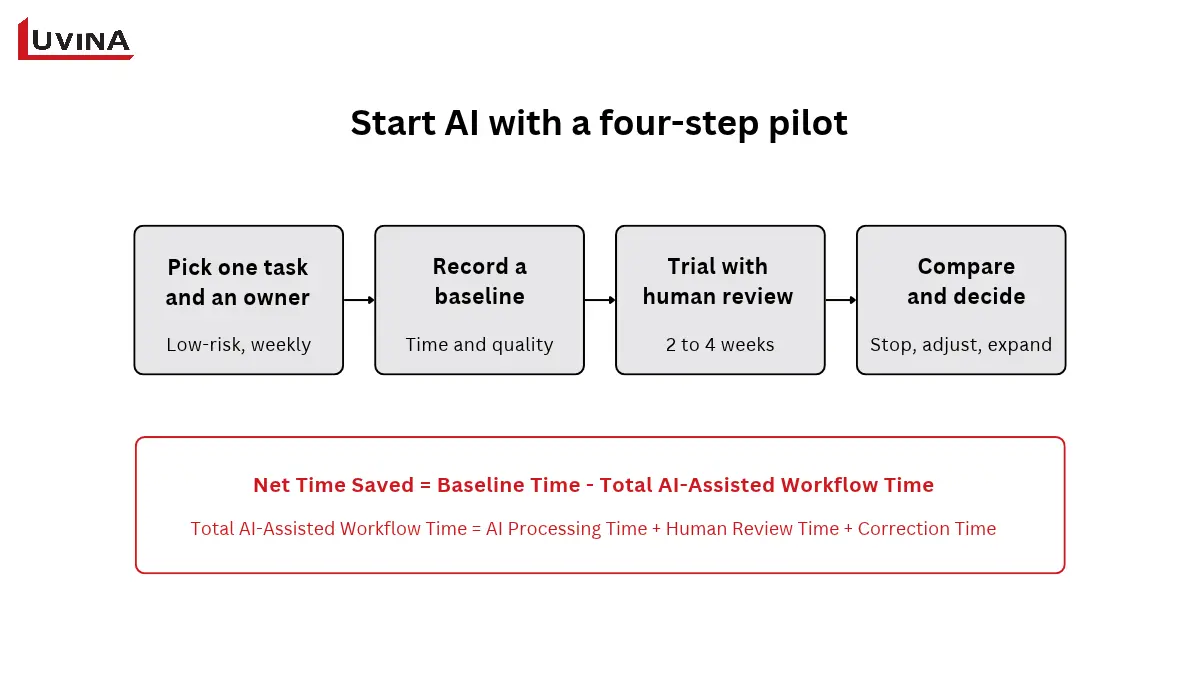
- Pick one low-risk recurring task and an owner. Choose work that repeats every week and does little harm if it goes wrong, such as drafting quotation emails or summarizing the weekly team meeting. Name one person to run the pilot and answer for the result.
- Record a baseline. Before using AI, note how long the task takes by hand, how often it comes up and how good the output is. Ten manual runs give you a fair starting point.
- Trial it on approved or synthetic data, with human review. Run the pilot for two to four weeks. Use approved or made-up data, and have a person check every output before it is used.
- Compare and decide. Put the pilot results next to your baseline. Then stop, adjust the setup or expand to a similar task.
Measure the whole workflow, including review and fixes, because that is where the time often goes. For any small business AI automation, the core calculation is:
Net time saved = baseline time minus AI workflow time, including review and corrections
The scorecard below turns that into something you can fill in during the pilot.
| Metric | How to record it |
| Baseline time per task | Average of 5 to 10 manual runs |
| AI workflow time | Prompting plus review and correction |
| Net time saved | Baseline time minus AI workflow time |
| Error rate | Errors found in review, per 10 outputs |
| Adoption | Staff still using it after 4 weeks |
| Total operating cost | Tool fees, staff time, training and maintenance where applicable |
| Decision | Stop, adjust or expand |
Pilot scorecard for a single AI task
That is also how to measure ROI of AI in a small business. Set the net time saved against tool fees and the labor spent on review, and let your own numbers decide the next step.
What are the risks of using AI in a small business?
The risks change from one use case to the next. A wrong word in an internal meeting summary costs little. A wrong figure in a customer quote costs much more. So the level of oversight should match the harm a mistake could cause.
Trust is the first hurdle for many owners. In Australia, around 65% of SMEs not yet using AI cite either distrust in AI decision-making or strong preference to keep humans in control of their business processes, according the National AI Centre’s tracker. The concern is reasonable, and a few habits go a long way. The table lists four risks, what each looks like in practice and who should own the fix.
| Risk | What can go wrong | Safeguard | Owner |
| Over-reliance | Plausible but wrong advice, less independent scrutiny | Compare key recommendations with original evidence and professional judgement | Business owner |
| Insufficient monitoring | Workflow fails when data, instructions or conditions change | Sample outputs, track errors and complaints, pause outside agreed limits | Workflow owner |
| Publishing without fact-checking | Invented facts, quotes, statistics or sources | Verify claims against primary sources, check links, editor approves | Content editor |
| Privacy, bias, security | Sensitive inputs exposed, biased outputs | Approved tools, limited data and access, review consequential decisions | Owner or IT lead |
Main AI risks for small businesses
Every row has a named owner for a reason. When “the team” is responsible, nobody is. A workflow that ran well in March can drift by June if a price list changes or a supplier is replaced, and only someone who is assigned to look will notice.
Start with the safeguards on the high-impact tasks, such as anything customers see or that touches money. Lighter checks are fine for low-stakes work.
How can AI agents help small businesses?
AI agents can help small businesses complete multi-step tasks by using permitted tools and information to work toward a defined goal. Unlike a general AI assistant that mainly responds to prompts, an agent may take actions across connected systems, depending on its permissions and approval settings. Here is what an agent is, what it might do for you and what to set up first.
What is an AI agent?
An AI agent uses tools and information it has been given permission to access, then works through several steps toward a goal. Some agents act with a degree of autonomy. What they can do, and how approvals are set up, depends on the product.
An AI assistant for small business owners works differently. It answers one request at a time and waits for the next. An agent isn’t always the better pick either. For many tasks, a simple AI tool or a rule-based automation does the job with less risk.
Two illustrative workflows
Both examples are hypothetical. In each one, a person decides what actually goes out.
- Customer service: the agent pulls the approved FAQ, drafts a reply and flags unusual requests for a staff member. A person reviews the draft before it is sent.
- Administration: the agent summarizes approved meeting notes, suggests actions and drafts follow-up emails. A staff member checks recipients, details and deadlines before any message or task is created.
The agent prepares the work and the person approves it.
Controls to set before granting access
Agents bring risks of their own:
- A wrong output can trigger actions across several connected tools.
- Hidden instructions in a document or email can steer an agent. This is called prompt injection.
- Permissions set too wide can expose data or allow actions nobody intended.
Put these controls in place before you hand over access:
- Start with a narrow, low-risk task.
- Grant only the permissions it needs, and feed it approved data.
- Require human approval before sending, publishing, changing records or spending money.
- Log every action and review the log.
- Set limits on spending and on the number of actions.
- Keep a way to stop the agent and undo its actions where possible.
For more detail, read NIST’s guidance on human oversight and monitoring and Singapore’s Model AI Governance Framework for Agentic AI, published by IMDA in January 2026 and updated in May 2026. Even with these controls, agents are not fully autonomous, they are not always right and they don’t replace your staff. You can find more AI insights from Luvina on our blog.
Create a simple AI policy for your small business
A small business AI policy should define which tools employees can use, what data they can enter, who checks AI-generated outputs and how issues are reported. It does not need to be lengthy; a short, practical policy that employees understand and follow is a useful starting point.
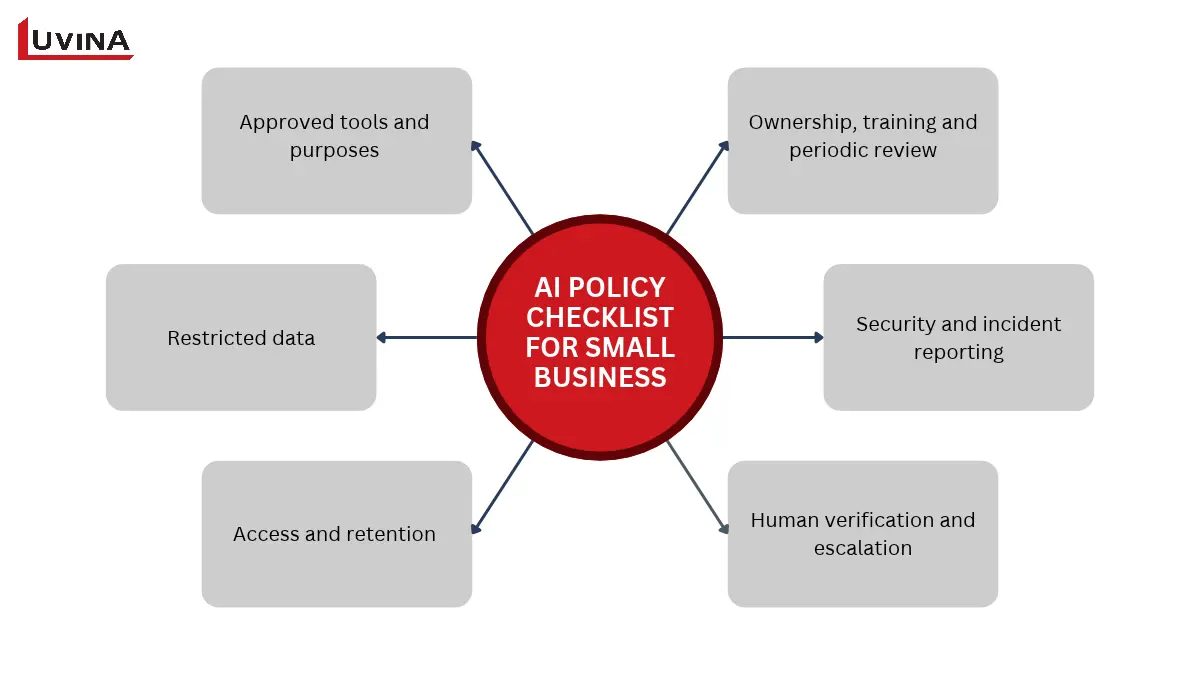
Here is how to create an AI policy for a small business, in six points:
- Approved tools and purposes. List which tools staff may use and for which tasks, such as a general assistant for first drafts but not for client contracts.
- Restricted data. Name what stays out of AI tools: customer personal data, financial records, contracts and anything under NDA.
- Access and retention. Say who can use each tool, make sure they sign in with company accounts rather than personal ones, and set how long outputs and chat history are kept.
- Human verification and escalation. Require a person to check AI output before it reaches a customer, and say who to ask when something looks wrong.
- Security and incident reporting. Define what counts as an incident, such as pasting customer data into an unapproved tool, and who to tell straight away.
- Ownership, training and periodic review. Name one policy owner, brief new staff and review the policy on a set schedule, because tools and settings change quickly.
For the privacy side, read the OAIC guidance on AI products in Australia.
Legal obligations depend on your country, your organization, your activities, and the data you handle. Treat this checklist as a starting point, not a legal compliance template, and get advice where you need it.
When should you consider an integrated or custom AI solution?
A small business should consider an integrated or custom AI solution when off-the-shelf tools cannot support a recurring workflow, connect to the required business systems or meet specific data and access-control requirements. If an existing tool already meets the needs, there is no reason to build a more complex solution.
So, when should a small business build a custom AI solution? Usually when a repeated workflow runs into the limits of ready-made tools. Consider integration or custom work if:
- The workflow depends on several different systems you already use, such as an ERP, a CRM and an inventory database.
- You need access controls, for example staff seeing only the records they are allowed to see.
- You want the AI to answer from your own knowledge base, like product manuals or internal procedures.
- Security has to be designed in from day one, with measures such as encryption, audit logs and clear rules on where your data is stored and processed, saving a lot of time cleaning the the mess and avoiding the risks you got scaling without a proper technical system.
- Your business holds intellectual property, such as proprietary designs, source code or client data, and you need to make sure it is not used to train an AI model you don’t control.
- The value of solving the problem clearly outweighs the added complexity.
Before any build, get these points clear:
- Requirements: the exact task, its inputs and its outputs.
- Data readiness: whether your data is accurate, accessible and in usable shape.
- Evaluation: how you will judge whether it works.
- Security and maintenance: who protects it and keeps it running.
- Total cost: build, hosting, support and staff time, not just the first invoice.
Luvina is a Vietnamese software company with hands-on experience delivering custom software and AI integration projects for clients across APAC. If you have a workflow that off-the-shelf tools can’t handle, talk to our team about AI integration and custom software, and we can work through your options together.
FAQs
How can small businesses use AI?
Small businesses can use AI for first drafts, summaries, sorting and pattern spotting in routine work. Start with one repeatable task, such as quotation emails, and have a named person check every output. Measure the time saved before you add a second task.
What are practical examples of AI in a small business?
Common examples include drafting product emails, replying to routine customer questions, summarizing meeting notes, suggesting invoice categories and flagging slow-moving stock. Each still needs a human check. The examples above show the input, output and reviewer for each one in detail.
What free AI tools can small business owners use?
Small business owners can start with free plans or limited free AI features from tools such as Claude, ChatGPT, Gemini and Canva. Their limits and features vary by account, country and date, so read each official plan page before you start. Keep confidential and personal data out until your team approves the tool.
Which AI tools are best for small business marketing?
There is no single best tool. Choose by the marketing task: one for email drafts, another for visuals, another for summarizing customer feedback. Test each on non-confidential material, and have a marketer check claims and tone before anything is published.
Does a small business need an AI policy?
Yes, if staff use AI at work, a short written policy is worth having. One page covering approved tools, restricted data and who checks outputs is enough to start. Legal obligations depend on your country, organization and data, so seek advice where needed.
Conclusion
You don’t need a big plan to get started with AI. Pick one task, have a person check every output and measure the time saved against your baseline. If the results justify it, you can add a second task, or consider something more integrated. Many small businesses will find that off-the-shelf tools are enough.
If you’d like a second opinion on where AI fits in your workflow, talk to the Luvina team.
Resources
- https://www.imda.gov.sg/assets/8e4d9951-bc53-4612-80ba-77ee4feaa6da
- https://www.ai.gov.au/news-and-insights/blog/ai-adoption-insights-december-2025-february-2026
- https://www.mom.gov.sg/newsroom/press-releases/2026/0430-adoption-of-ai-among-firms
- https://genai.owasp.org/llmrisk/llm01-prompt-injection/
- https://airc.nist.gov/airmf-resources/airmf/3-sec-characteristics/
- https://www.imda.gov.sg/
- https://www.oaic.gov.au/privacy/privacy-guidance-for-organisations-and-government-agencies/guidance-on-privacy-and-the-use-of-commercially-available-ai-products
READY TO START A PROJECT?
Our experts are eager to explore your needs.

Read More From Us?
Sign up for our newsletter
Read More From Us?
Sign up for our newsletter