




ERP Software for Small Manufacturing Businesses: How to Choose the Right Fit


Your spreadsheet has 12 tabs now, and purchasing, accounting, and production status each live in a different place. That work, until late shipments and stock discrepancies start piling up.
The right ERP depends on how you manufacture, your data readiness, and your team’s capacity to implement and support it. This guide takes you through that decision step by step: assess readiness, define your requirements, choose the right ERP approach, and then build a shortlist worth testing.
When Do Small Manufacturers Start Needing an ERP System?
The trigger is not a specific headcount or revenue level. It is whether your current tools can still handle the complexity of your operations reliably:
- Recurring stockouts or excess inventory
- Staff re-keying the same order into multiple tools
- Production status that is difficult to verify without checking the shop floor
- BOM changes that don’t reach purchasing in time
- Job costs that are only clear after the order has shipped
- Traceability gaps that make it difficult to investigate quality issues or customer complaints
ERP is not always the right next step. If your product line is simple and better process discipline or a cleaner spreadsheet would solve most of these problems, a full ERP system may be more than you need right now.
Worth knowing which layer solves your problem:
- MRP plans materials and production schedules
- ERP connects that planning with finance, purchasing, inventory, and sales
- MES tracks shop-floor activity in real time
MRP focuses on material and production planning, while ERP connects those processes with finance, purchasing, inventory, and sales. MES focuses on real-time shop-floor execution. A small manufacturer may need one layer or a combination, depending on how its operations are structured.
| Signal | Improve current stack first | Need ERP now |
| Order volume | Low, manageable by hand | Growing, hard to track manually |
| Data flow | One or two disconnected tools | Scattered across many tools |
| BOM changes | Rare, easy to communicate | Frequent, causing errors |
| Job costing | Rough estimates acceptable | Need accurate cost per job |
| Traceability | Not required | Required for audits or contracts |
Readiness check: ERP now vs. fix current tools
Define Your Manufacturing Requirements Before Comparing Products
Before comparing products, define what your operation actually needs. Without this step, it is easy to compare feature lists rather than solve the operational problems that led you to look for ERP in the first place.
Start With Your Manufacturing Mode
Your manufacturing model determines which ERP capabilities matter most. A making-to-stock shop plans to demand forecasts. A job shop handling one-off or project-based work will typically need more flexibility in routing and project-level costing.
| Manufacturing mode | What matters most |
| Make-to-stock | Demand forecasting, inventory accuracy |
| Make-to-order | Quoting speed, flexible BOMs, job costing |
| Job-shop / project | Routing flexibility, project-level costing |
| Batch / process | Formula control, batch traceability |
| Regulated production | Full traceability, audit trail, compliance reporting |
How manufacturing modes affect ERP requirements.
If your production also depends on design data, CAD files, or frequent engineering changes, that’s a separate layer worth mapping too. Take a look at how PLM software for manufacturing fits before you finalize your ERP requirements.
Map the Workflow, Data, and Exceptions That Matter
Pick one representative order and trace it end to end:
Quote/order → BOM & routing → purchasing → work order → quality → delivery → actual cost
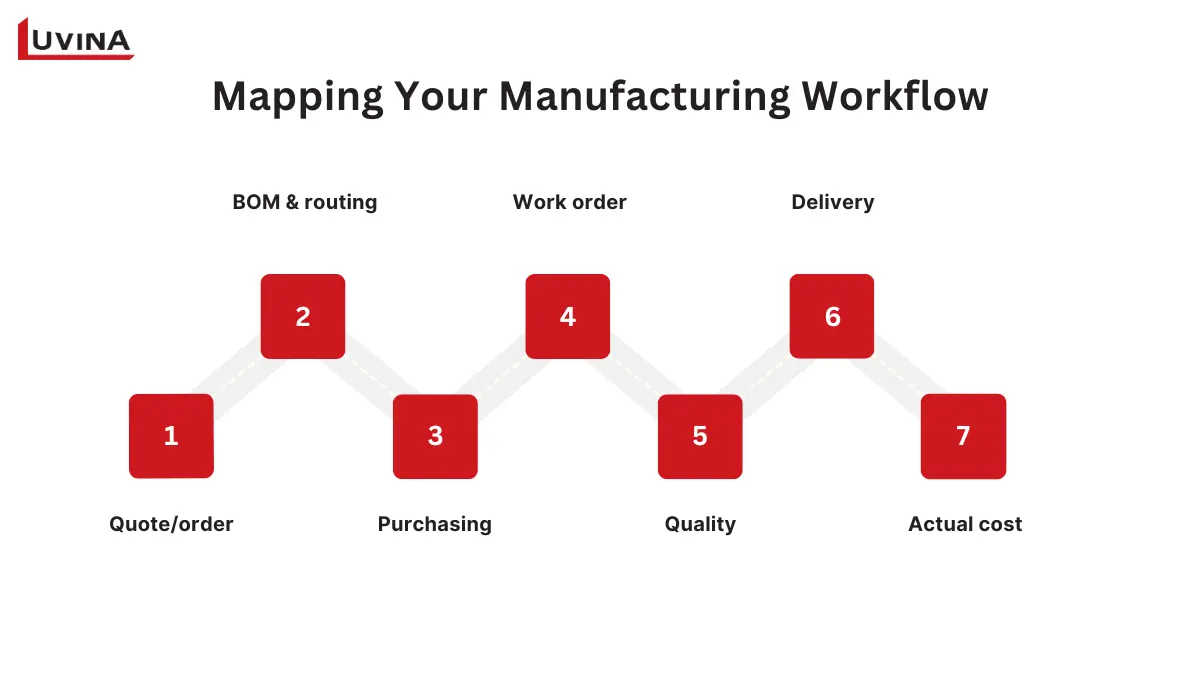
Where Manufacturing Workflows Typically Break
That flow looks clean on paper. In practice, it breaks in specific places:
- Rush orders that skip the normal queue
- Material substitutions mid-production
- Subcontracting steps outside your own floor
- Rework that needs to be tracked and costed
- BOM revisions that don’t reach purchasing in time
If BOM revisions and engineering changes happen often in your shop, ERP selection for complex engineering workflows covers criteria specific to that setup.
Define Your Minimum Viable ERP Scope
Not every requirement needs to be launched on day one. Sort them into 3 buckets:
- Must-have now: Required for day-to-day operations
- Keep and integrate: Already works well in your current system but needs to connect to ERP
- Later-stage: Nice to have once the core is stable
To sort your own requirements into these buckets, start from the functional areas ERP typically covers:
| Area | What it covers | When you need it now vs. later |
| Production planning and work orders | Scheduling jobs, tracking work orders from creation to completion | Need it now if production status is a guess. Can wait if your order volume is still low enough to track by hand |
| Inventory, purchasing, and suppliers | Stock levels, reorder points, purchase orders, supplier records | Need it now if you’re seeing stockouts or excess inventory. Can wait if inventory is simple and rarely fluctuates |
| Costing, finance, and order visibility | Job costing, order status, linking production cost to actual spend | Need it now if you only find job costs after shipping. Can wait if margins are consistent and easy to estimate |
| Quality, traceability, and reporting | Tracking defects, lot/batch history, compliance reporting | Need it now if customers or regulators require traceability. Can wait if your product isn’t regulated and quality issues are rare |
| Integrations with accounting, CRM, e-commerce, CAD/PLM, or MES | Connecting ERP to the tools you already run | Need it now if data re-entry across systems is a daily problem. Can wait if you only run one or two other tools |
Core ERP functional areas for small manufacturers
Choose the Best ERP Software for Small Manufacturing Business: Hosting Model and System Strategy
Choosing an ERP path involves two separate decisions: where the system runs and how the software is sourced and customized. SaaS, on-premises, hybrid, commercial, open-source, and custom approaches can be combined in different ways, so they should not be treated as one list of alternatives.
| Option | Pros | Cons |
| SaaS / cloud | Fastest to deploy, vendor handles infrastructure and updates | Ongoing subscription cost, limited to vendor’s configuration options |
| Self-hosted / on-premises | Full control over data and integrations | Higher upfront cost, your team owns upgrades and maintenance |
| Hybrid | Keeps sensitive data on-prem while running core system in cloud | More complex to manage than a single environment |
| Commercial ERP | Vendor-supported, faster to implement, predictable roadmap | Less flexibility, tied to vendor’s release cycle |
| Open-source ERP | No license fee, full customization, no vendor lock-in | Requires internal or partner capacity for hosting and support |
| Custom ERP / extensions | Fits distinctive workflows a standard product can’t | Highest build and maintenance effort, longest to deliver |
Hosting model and system strategy: pros and cons
The right fit depends on your team’s IT capacity, data sensitivity, and how much you want to manage yourself versus hand off to a vendor.
SaaS / Cloud ERP
- Fit: fastest to deploy, infrastructure managed by the vendor, can go live within weeks depending on scope and data readiness
- Trade-offs: ongoing subscription cost, limited to the vendor’s configuration options, data sits on the vendor’s servers, release cadence is out of your hands
- Best for: small teams without dedicated IT staff who want to move fast
On-Premises or Self-Hosted ERP
- Fit: greater control over security, data residency, and internal integrations
- Trade-offs: your team owns upgrades, backups, and daily maintenance; higher upfront cost
- Best for: businesses with existing technical capacity, or workloads with strict data control needs
Open-Source ERP
- Fit: access to and freedom to modify the source code (within the terms of its open-source license), no vendor lock-in, highly customizable
- Trade-offs: you (or a partner) handle implementation, hosting, integration, and ongoing support
- What “free” means: An open-source ERP may have no software license fee, but hosting, configuration, migration, integration, support, and maintenance still require time or money. Free open-source ERP is rarely a zero-cost path; it shifts costs from licensing to implementation, hosting, support, and maintenance.
- Best for: teams with technical capacity, or a partner, who value flexibility over convenience
Custom ERP or Custom Extensions
- When it’s worth considering: distinctive workflow logic, unusual pricing rules, or legacy integrations that don’t fit a standard product
- Reality check: a full custom build is rarely necessary. Extending an existing ERP with custom modules or workflows is usually lower risk, faster to deliver, and easier to maintain than building from scratch
- Where this comes up most: connecting an ERP to older systems still running critical processes. That’s where legacy software modernization often enters the conversation, since modernizing what’s already there can solve the problem without a rebuild
Hybrid Approach
- What it means: keep the tools already working (accounting, CRM, e-commerce, CAD/PLM) and add a manufacturing core or integration layer to connect them
- Best for: businesses that don’t want to replace everything at once, or have existing systems that would be costly or disruptive to replace
| Criteria | What to check |
| Process uniqueness | Standard workflow → commercial ERP. Unusual logic → custom extensions |
| Internal IT capacity | Limited → SaaS, or outsource to an implementation partner. Strong → on-premises or open source |
| Integration landscape | Many existing tools → hybrid. Clean slate → any path works |
| Budget / TCO | Lower upfront → SaaS. Existing infrastructure and IT resources on hand → self-hosted can lower long-term cost |
| Implementation speed | Need it fast → SaaS. Time to build right → custom or on-premises |
How to choose between ERP paths
A Practical Shortlist of ERP Options for Small Manufacturers
Once you have defined your manufacturing mode, priority requirements, and preferred ERP path, you can build a more focused shortlist. Before looking at names, use these criteria to filter:
- Does it support your manufacturing mode (make-to-order, job-shop, batch, etc.)?
- Does it match your preferred hosting model and system strategy from the previous section?
- Can it integrate with the tools you’re keeping?
- Does the vendor or partner offer support in your region?
- Is the pricing structure workable at your order volume?
No single option below is the best ERP for small manufacturing businesses across the board. The most reliable way to assess fit is to test each shortlisted option against your own workflow, ideally in a demo or pilot.
6 ERP Options Worth Shortlisting for Small Manufacturers
| Product | Likely fit | Validate in demo |
| MRPeasy | Small discrete manufacturers with straightforward production planning needs | Can it handle your BOM complexity and order volume at scale? |
| Katana | Product businesses combining production with multi-channel sales | Does it integrate cleanly with your existing sales channels? |
| Odoo | Businesses looking for a broader modular ERP ecosystem | How much configuration is needed before it fits your workflow? |
| ERPNext | Teams with technical capacity looking for an open-source, extensible ERP | Who handles hosting, updates, and supports long-term? |
| Microsoft Dynamics 365 Business Central (Premiun Plan) | Businesses already using Microsoft products that want finance and operations in one broader platform | Does it cover your specific manufacturing mode out of the box? |
| Acumatica Manufacturing Edition | Growing manufacturers with broader operational needs than a basic system | Is the pricing model workable as you scale? |
ERP options by likely fit
This is a starting point, not a final answer. For a deeper look at how these and other systems compare, ERP solutions for manufacturing breaks down the broader landscape beyond just small manufacturers.
How to Build and Test Your ERP Shortlist
Building a shortlist takes six steps, from mapping your workflow to comparing total cost. Testing it right means bringing your own scenario into every demo instead of relying on the vendor’s script.
6 steps to a working shortlist
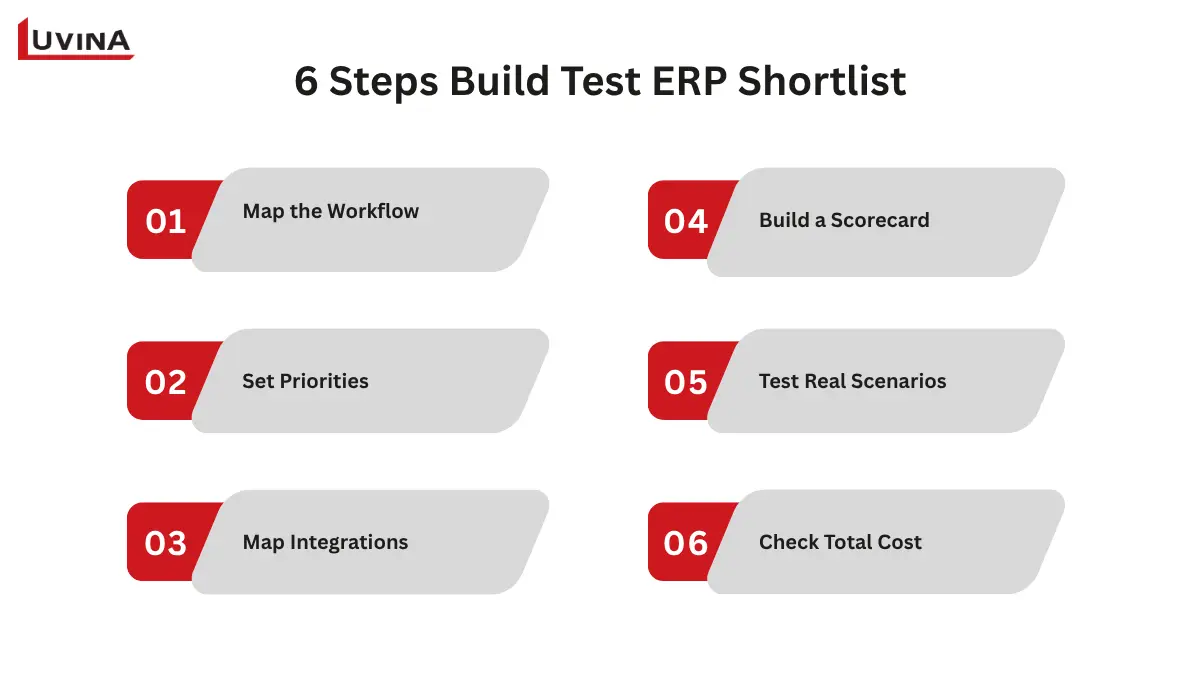
Build your ERP shortlist in 6 steps
- Map one end-to-end workflow. Pick a real order and trace it from quote to delivery. This becomes your test case for every demo.
- Define must-have vs. later. Sort requirements into what breaks operations today versus what can wait. A shortlist built around too many features is harder to justify when budget and implementation effort are reviewed.
- Identify integrations and data owners. List every system the ERP needs to talk to (accounting, CRM, e-commerce) and who owns that data internally. Documenting this upfront also makes vendor discussions more productive.
- Build a weighted scorecard. Score each option against your must-have, not against a generic feature list taken from vendor websites. Weight the criteria that matter most to your workflow.
- Test a real scenario in demo or pilot. Ask the vendor to demonstrate your workflow rather than relying only on a standard product demo. Bring your own workflow and watch how the system handles your actual exceptions: rush orders, BOM changes, subcontracting.
- Compare total cost and implementation support. License fees are only one part of the total cost. Add setup, training, data migration, and ongoing support to see what you’re really paying for.
Questions worth asking in every demo
- Can you show this running our exact workflow, not a generic example?
- What happens when a BOM changes mid-production?
- How long does implementation typically take for a team of our size?
- What’s included in support after go-live, and what costs extra?
- Who owns our data if we switch systems later?
- Can you walk us through a demo for a company of similar size, in our industry?
Clear, specific answers to these questions give you better evidence for comparing vendors and validating implementation fit.
Plan a Phased Implementation, not a Big-Bang Rollout
ERP systems are tightly integrated, so moving everything at once means one failure can cascade, and reverting once live is often no longer realistic. A phased rollout keeps that risk contained, letting your team learn and fix problems before they touch the whole operation.
A practical implementation framework
- Start with one facility or workflow, ideally the one with the clearest process and most motivated team.
- Clean core master data first. Item codes, BOMs, customer and vendor records. Messy data just moves the mess into the new system.
- Prioritize day-one integrations, usually accounting and inventory, and let the rest follow once the core is stable.
- Train daily users, not just the project team. They’re the ones who’ll spot gaps between the configured workflow and shop-floor reality.
- Run acceptance testing on your real workflow, the one from your demos, before calling it done.
- Keep go-live support active for a few weeks, when most real issues surface.
- Expand in measured steps once the first workflow is stable.
Timelines vary: a single-facility job shop moves faster than a multi-site operation with several manufacturing modes. For the full step-by-step breakdown, see the ERP implementation life cycle.
FAQs
1. When does a small manufacturing business need an ERP system?
You need ERP once your current tools can’t keep up: recurring stockouts, manual re-keying across systems, unreliable production status, or job costs you only discover after shipping. If your product line is simple and a cleaner spreadsheet still works, you may not need one yet. The real trigger is workflow complexity, not company size.
2. What is the difference between ERP, MRP, and MES?
MRP plans materials and production schedules. ERP connects planning with finance, purchasing, inventory, and sales in one system. MES tracks what’s happening on the shop floor in real time. When planning, finance, purchasing, inventory, and operations need to work from connected data, ERP provides the broader integration layer.
3. Is SaaS or on-premises ERP better for a small manufacturer?
Neither is universally better. SaaS generally reduces infrastructure responsibilities and can be faster to deploy, while on-premises gives the organization more control over infrastructure and data but requires greater internal responsibility for upgrades and maintenance.
4. Can a small manufacturing business use free or open-source ERP?
Yes, in the right condition. An open-source ERP may have no software license fee, but hosting, configuration, integration, migration, support, and maintenance still have costs.
5. What is the best ERP software for a small manufacturing business?
Start with your requirements, then build a shortlist based on manufacturing workflow, system strategy, integrations, budget, and implementation capacity. Test shortlisted options against your actual workflow before deciding.
Conclusion
Choosing ERP for a small manufacturing business is less about finding the platform with the longest feature list and more about finding the right fit for how the business operates. It comes down to how your business actually plans, makes, moves, costs, and reports its products. Once those requirements are clear, it becomes much easier to evaluate platforms against the needs of the business.
Need help mapping your ERP requirements, integrating legacy systems, migrating data, or extending workflows? Contact Luvina to talk about what your setup needs.
READY TO START A PROJECT?
Our experts are eager to explore your needs.

Read More From Us?
Sign up for our newsletter
Read More From Us?
Sign up for our newsletter