




PLM vs ERP Differences and How to Choose


PLM vs ERP comes down to what each system owns. Product lifecycle management (PLM) controls product definitions and changes, such as which revision of a part is approved. Enterprise resource planning (ERP) coordinates business resources such as purchasing, inventory, production planning, and finance. Manufacturers may use both when engineering and operations need to share approved information. The right starting point is the process causing the costliest errors.
This article helps you decide which capability to prioritize first. It also follows one approved component change from engineering into production, so you can see where the handoff tends to break.
PLM vs ERP at a Glance
Put simply, PLM defines the product, and ERP supplies it. PLM holds the approved product definition and tracks changes to it. ERP holds what it takes to build and ship that product: materials, orders, stock and cost.
| Dimension | PLM | ERP |
| Main question | What is the approved product definition, and how is it changing? | What resources and transactions are required to supply and deliver them? |
| Primary scope | Product data and lifecycle processes | Business operations and resource planning |
| Typical users | Engineering, product development, quality, manufacturing engineering | Purchasing, planning, inventory, operations, finance |
| Typical records | Specifications, product structures, revisions, approvals | Purchase orders, stock records, production orders, costs |
| BOM role | Controls product structures and changes; may manage several BOM views | Uses production BOMs for planning, procurement and costing |
| Change control | Coordinates impact assessment and release | Applies approved changes to operational records; capabilities vary |
| Success measures | Release accuracy, change cycle time | Stock accuracy, planning performance, transaction accuracy |
PLM vs ERP compared by scope, users, records, BOM role and change control
Read the table for typical responsibilities, not fixed rules. A revised pump component shows the split: PLM decides whether the new revision is approved, and ERP decides when to buy it, what to do with old stock and what it costs. Modules also differ between vendors. Some ERP software already includes engineering change functions, as Microsoft documents for Dynamics 365 Supply Chain Management, so compare the two by the workflow they support, not by their labels.
What PLM and ERP Manage
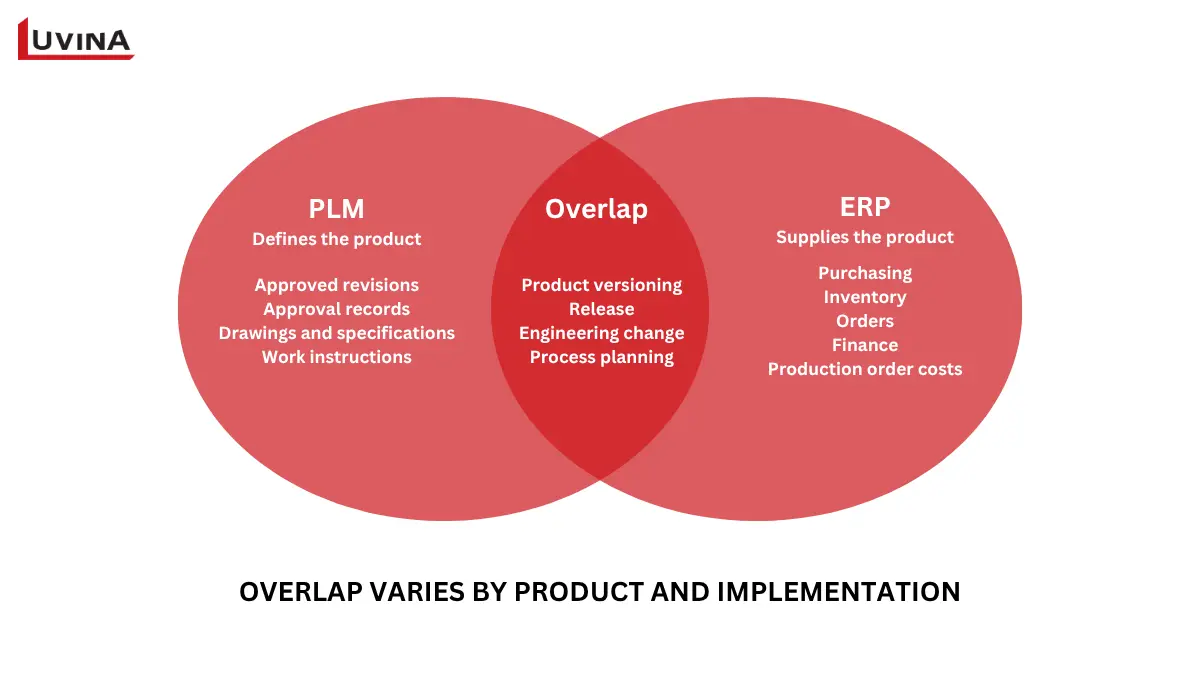
What PLM and ERP manage, and where they overlap
What PLM Manages
Product lifecycle management controls product information and the decisions behind it, from development through later changes, service and retirement (SAP). Take an approved component revision. PLM holds the revision itself, its approval record, and the drawings, specifications and work instructions that change touches.
What ERP Manages
Enterprise resource planning covers purchasing, inventory, orders and finance, plus manufacturing planning where the suite includes it (Oracle). Take a production order. ERP works out which materials it needs, whether they are in stock, and what the order will cost.
Where PLM and ERP Overlap
The boundary is not clean. Some ERP suites include product versioning, release and engineering change functions, and Microsoft documents them for Dynamics 365. PLM reaches the other way too, into manufacturing process planning, as PTC’s Windchill documentation shows.
So, the label on the system settles very little. The better test is practical: can the modules you already own handle the change, configuration and collaboration workflows your teams need? For smaller teams with simple products, the answer may be yes, and our guide to PLM software for small business covers that case.
How PLM and ERP Systems Work Together
PLM and ERP work together when approved product information moves into operational planning at the right time, and when relevant production information can inform later decisions. A transfer is not simply an export file. Teams need to agree which records are authoritative, what triggers a release, how the receiving system validates the update, and what happens if the transfer fails.
Follow One Component Change into Production
Illustrative scenario: a pump manufacturer approves a replacement shaft seal. The steps below are an example of how the handoff can work, not a customer’s result.
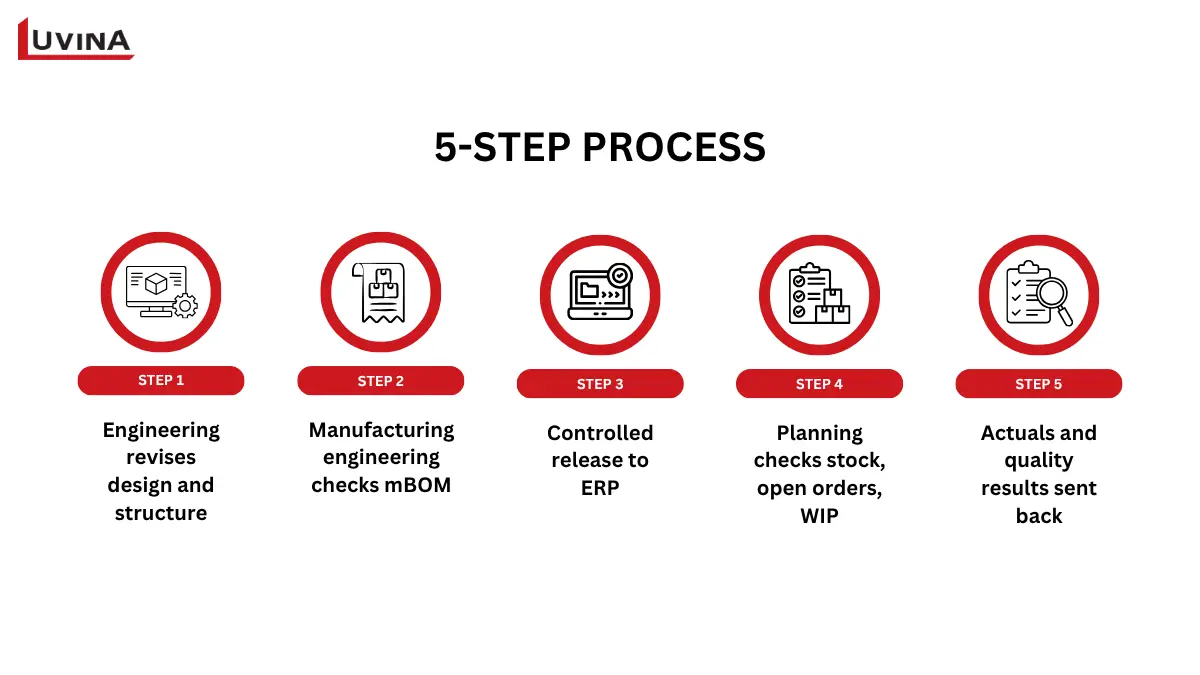
How an approved shaft seal change moves from PLM to production
1. Engineering revises the design
The engineering team updates the part definition and product structure. The change process identifies affected drawings, documents, and assemblies, then records the required approval.
2. Manufacturing engineering checks the impact
The team reviews whether the change affects the manufacturing bill of materials (mBOM), assembly method, tooling, or work instructions. The mBOM may be managed in PLM or in another agreed system.
3. Approved information is released to ERP
The approved revision and relevant records move to ERP under agreed release and effectivity rules. A saved design edit should not automatically trigger a production change.
4. Planning and purchasing manage the changeover
Before production switches, teams check old stock, open purchase orders, lead times and work in progress. The approved revision and production changeover may take effect on different dates.
5. Operational information feeds back
ERP, a manufacturing execution system (MES) or a quality application may return actual consumption, production and quality results. The implementation should define which information returns, where it goes, and who acts on it.
Define Ownership and the Production Changeover
The engineering bill of materials (eBOM) describes the product as designed. The manufacturing bill of materials (mBOM) describes the structure of production needs, including relevant parts, quantities and plant-specific details. They serve different purposes, and their system of record varies by company.
| Information | Illustrative owner | What the handoff must specify |
| Engineering revision and approval | Engineering in PLM | Part ID, revision, approval state, effectivity |
| Manufacturing BOM | Manufacturing engineering in the agreed system | Transformation rules, assembly quantities, plant applicability |
| Stock and purchasing status | Operations in ERP | Availability, open orders, handling of affected stock |
| Production and quality feedback | ERP, MES or quality application | Relevant actuals and traceable links to product and revision |
Illustrative data ownership between PLM, ERP, MES and quality systems
Approval and production changeover may occur on different dates. Settle these points before the first transfer:
- Existing stock: what happens to parts of the old revision.
- Open work orders: which ones move to the new revision.
- Confirmation: How does ERP confirm that each update arrived.
- Terms: What does “effective” and “released” mean in your system, since vendors use them differently.
- Process manufacturers: formulas and recipes may replace assembly BOMs, but the same ownership questions apply.
For the full rollout process, see our PLM implementation guide.
Which to Prioritize First: PLM or ERP
Start with the process causing the most serious errors. The right choice changes if both systems already work well and the real problem is the handoff between them.
| Main bottleneck | Priority to assess | Decision condition |
| Outdated designs, unclear cross-team approvals | PLM capability | Product or change complexity exceeds current controls |
| Stock, purchasing, planning or financial visibility | ERP capability | Operating records are fragmented or unreliable |
| CAD files and engineering versions only | PDM or current tools | A broader PLM rollout may be premature for a narrow scope |
| Both systems work, but rekeying or mismatches persist | Integration and governance | Review ownership and release rules before replacing platforms |
| Poor shop floor visibility or traceability | MES or existing execution module | Validate execution needs separately from product definition |
| Simple products, adequate controls | Improve the current setup | Defer new software until a defined gap justifies it |
What to Prioritize Based on Your Main Bottleneck
Can ERP replace PLM? It depends on how deep your product change workflows go.
- ERP may be enough when: its versioning and engineering change functions cover your approval, revision and BOM workflows.
- PLM is worth assessing when: engineering collaboration, product configuration or lifecycle traceability go beyond what your ERP modules support.
Before committing, weigh these factors:
- Product complexity: number of parts, variants, and BOM levels.
- Change frequency: how often revisions are released.
- Sites and users: how many plants and teams touch product data, where those plants are located, and which currencies, local tax rules and user languages the systems must support.
- Current modules: what your existing ERP or PDM already covers.
- Data readiness: how clean parts and BOM records are.
- Integration needs: which records must move between systems.
Data readiness deserves extra weight, because unclean part and BOM records can limit any PLM or ERP investment. Trương Văn Hải, Luvina’s Director of Digital Transformation, made a related point at BizTech 2026: data, processes and system connectivity decided whether a new technology delivers value.
Compare total cost of ownership, not license price alone: licensing, migration, integration, training, administration and upgrades. Once the system’s role is clear, the next step is platform evaluation, covered in our PLM software for manufacturing guide.
What to Define Before Integrating PLM and ERP
Integrating PLM with ERP works best when both teams agree on the rules before any data moves. Six points to settle, then test them on one product family.
| Area | What to define |
| Ownership | The business owner and source system for each record and field |
| Mapping | Part identifiers, revisions, units, BOM structures and required fields |
| Release rules | Approval states, effectivity, validation in the receiving system, and who confirms acceptance |
| Recovery | How failed updates become visible, who resolves them, and how to avoid duplicate records when a transfer is retried |
| Changeover | What an old inventory, open purchase orders and work in progress are handled |
| Pilot | A new item, a revised BOM and a rejected transfer, tested with one product family |
Six Things to Agree Before Connecting PLM and ERP
Then check whether approved changes arrive correctly and whether users still re-enter the same data. Three measures help:
- Release-to-availability time: how long an approved change takes to become usable in ERP.
- Transfer exception rate: how often a transfer fails or needs manual correction.
- Incorrect revision incidents: how often production uses the wrong revision.
Set targets from your own baseline, not from a generic benchmark.
Luvina has published work on BOM and document management with Aras, including a planned-versus-actual material comparison and document controls. It is relevant experience with BOM data and document control, not a documented PLM-to-ERP integration. See the BOM and document management case study for details.
PDM, MRP and MES: How They Fit
PDM, MRP and MES are related to PLM and ERP, but each has a different primary responsibility. Their boundaries can vary by software suite.
| System | Primary responsibility | Example record or output |
| PDM | Organize and control engineering data | CAD file, drawing revision, release status |
| PLM | Govern product definition and lifecycle change | Approved product structure, change record |
| ERP | Coordinate operational resources and transactions | Purchase order, stock balance, production order |
| MRP | Calculate material requirements and timing | Planned supply based on demand, BOMs and stock |
| MES | Coordinate and record production execution | Work in progress, actual consumption, quality records |
PDM, PLM, ERP, MRP and MES by Primary Responsibility
PDM vs PLM vs ERP
PDM controls engineering data, while PLM governs the product beyond the files. ERP sits on the operations side and replaces either.
- PDM: Manage CAD files, drawings, and revisions.
- PLM: Add change approval, product structures, and impact checks across teams.
- ERP: Handle purchasing, stock and production orders.
Our PLM vs PDM comparison covers engineering data in more depth.
ERP vs MRP vs PLM
MRP is a calculation inside the supply process. It stands for material requirements planning and should not be confused with MRP II.
- MRP: uses demand, BOMs, inventory and planning parameters to work out what to buy or make, and when.
- ERP: commonly includes MRP in manufacturing modules.
- PLM: Governs the product definition that MRP relies on.
PLM vs ERP vs MES
Each system has a different stage, from product definition to shop floor. Boundaries vary by product, and adding MES does not mean replacing PLM or ERP.
- PLM: Governs product definitions.
- ERP: Coordinate resources.
- MES: Manage production execution and feedback.
FAQs
1. What does FDE stand for in software engineering?
FDE stands for forward deployed engineer. It is a software engineer who works with a customer to adapt, integrate and deploy software for operational problems. Some employers write the title as forward deployed software engineer, or FDSE.
2. Is a forward deployed engineer the same as a software engineer?
Not quite. An FDE is a type of software engineer, and both write production code. The difference is focus: an FDE works on customers’ operational problems and deployment needs, while a product software engineer builds capabilities many customers share. Neither role is more technical than the other.
3. Does a forward deployed engineer need to work onsite?
Not always. Working close to a customer can mean regular workshops, shared channels, or occasional visits, depending on the engagement. Role descriptions differ, so check location and travel expectations in each one. Distributed teams should agree with collaboration windows up front.
4. How do you become a forward deployed engineer?
Start with solid software engineering fundamentals. Then look for work that involves integrations, production systems, and direct contact with customers, so you practice all three. Employers set their own requirements, and no single degree; certification or number of years applies to every role.
Conclusion
A forward deployed engineer is a software engineer who adapts, integrates, and deploys software for one customer’s problem. The role differs from a product software engineer in focus, not technical depth, and on AI projects it adds evaluation and monitoring. It fits best when requirements need to be discovered, and several systems must connect. For simpler work, standard configuration or a scoped feature is often enough.
Luvina takes the role seriously enough to train for it. The company started an internal FDE program in September 2026, and more than 20 colleagues are in the first cohort. They move from a bootcamp to shadowing to pair working on real problems, beginning with Luvina’s own projects. The goal is to build up to GenAI advisory and delivery for customers.
Luvina is a Vietnamese IT company specializing in custom software development and AI integration, with customers in Japan, Singapore and wider APAC. Its engineers work on projects where systems have to connect, and the requirements take some discovery. Not sure which delivery model fits yours? Discuss your software integration and delivery needs with Luvina.
READY TO START A PROJECT?
Our experts are eager to explore your needs.

Read More From Us?
Sign up for our newsletter
Read More From Us?
Sign up for our newsletter