




Best PLM Software for Manufacturing: 2026 Buyer’s Guide


Choosing the best PLM software for manufacturing depends on what your business actually needs. The right platform varies by manufacturing model, product complexity, CAD and ERP ecosystem, regulatory requirements, deployment needs, and implementation capacity. This guide compares leading PLM platforms with best fit, helping manufacturers identify the option that aligns with their product, processes, and technology environment.
At a Glance
- What PLM does: Connects product data, engineering changes, configurations, and lifecycle processes in one controlled environment.
- How to choose: Evaluate business fit, integrations, scalability, security, adoption, implementation requirements, and total cost.
- How this guide is scoped: This comparison focuses on discrete and complex manufacturing and evaluates platforms by best fit, not universal ranking. Product information was last reviewed in July 2026.
What is PLM software for manufacturing?
PLM software in manufacturing is a strategy and software layer for managing product information and processes from concept and design through production, service, and retirement. It gives manufacturers a structured way to control product data, coordinate changes, and maintain consistency across teams throughout the product lifecycle.
What does PLM manage?
A PLM system typically governs the information used to define and develop a product, including:
- Product data: parts, documents, CAD/ECAD files, requirements, and product structures
- Configuration data: revisions, product variants, and configurations
- Change processes: engineering change requests, change orders, approvals, and change history
- Quality and service data: quality records, compliance information, and product service information
Together, these capabilities create a controlled product record that teams can rely on as products evolve.
How PLM fits with other manufacturing systems
PLM sits within a broader manufacturing technology landscape. Each system has a different role in managing product information, business operations, production execution, or quality. Understanding these boundaries helps manufacturers avoid overlapping responsibilities and define a clear system of record ownership.
| System | Primary role | What it typically manages | Main users |
| PLM | Product lifecycle management | Product structures, BOMs, CAD data, revisions, configurations, engineering changes, requirements, and product records | Engineering, R&D, Product Management, Quality |
| PDM | Engineering data management | CAD files, drawings, documents, revisions, and engineering metadata | Engineering, Design |
| ERP | Enterprise resource planning | Procurement, inventory, costing, finance, orders, production planning, and supply chain transactions | Finance, Procurement, Operations, Supply Chain |
| MES | Manufacturing execution | Production orders, work instructions, shop floor activities, production tracking, and manufacturing performance | Production, Operations, Shop Floor, Quality |
| QMS | Quality management | Inspections, nonconformances, CAPA, audits, quality records, and compliance processes | Quality, Compliance, Manufacturing |
| CRM | Customer and commercial management | Customer information, sales activities, service interactions, and commercial processes | Sales, Marketing, Customer Service |
| ALM | Application lifecycle management | Software requirements, source code workflows, testing, releases, and software development processes | Software Engineering, Product Teams |
Roles of PLM and Related Manufacturing Systems
PLM as the product data backbone
PLM does not replace every system in the manufacturing IT environment. Instead, it establishes a single source of truth for product definition and lifecycle processes, while systems such as CAD, ERP, MES, QMS, and CRM continue to manage their own areas of responsibility.
This is where the digital thread becomes important. PLM connects product information and processes across these systems, allowing teams to trace how a design change affects manufacturing, quality, suppliers, or service.
For manufacturers pursuing digital transformation in manufacturing, this connected data flow can reduce information silos, improve traceability, and support better decisions across the product lifecycle.
When does a manufacturer need PLM software?
Manufacturers rarely decide they need PLM because they are missing a single feature. The need usually becomes visible when product information, engineering changes, and cross-functional workflows become difficult to control at scale. Several operational signals can indicate that existing processes or systems are no longer sufficient.
Signs you may need PLM
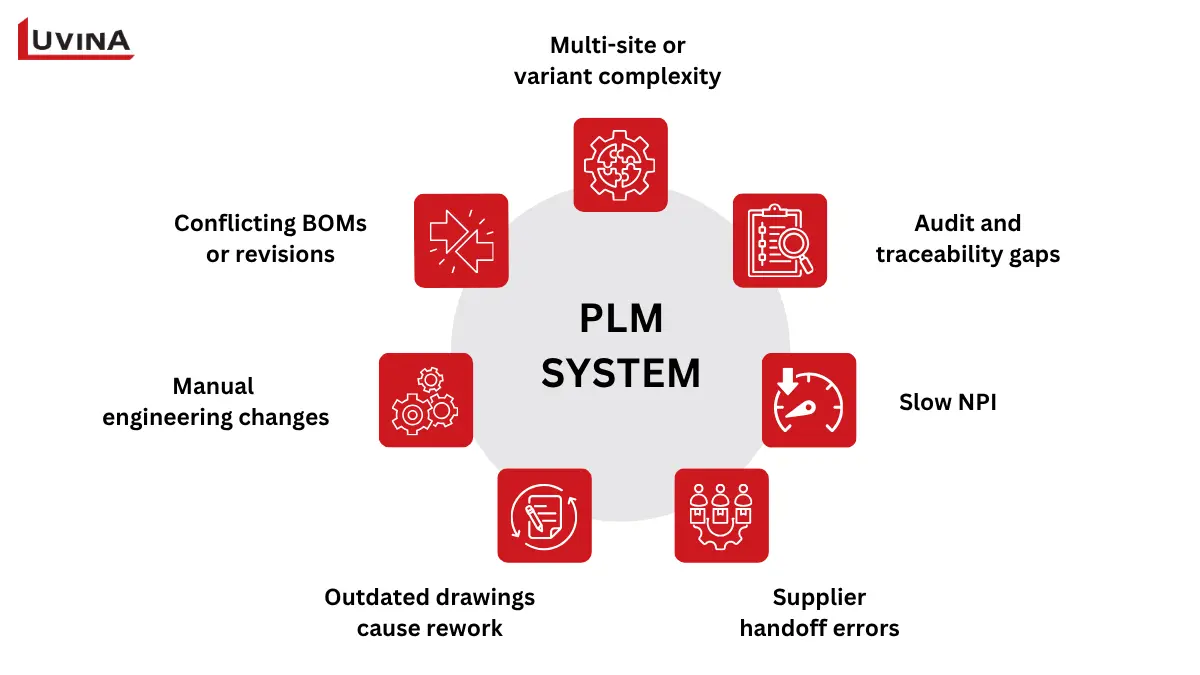
7 signs a manufacturer may need PLM software
- Conflicting BOMs or revisions: Different teams work from inconsistent product structures or outdated versions, increasing rework and releasing errors. A useful baseline KPI is the number of duplicate, obsolete, or conflicting records.
- Manual engineering changes: ECOs rely on email, spreadsheets, or disconnected approvals. Measure engineering change cycle time and approval turnaround.
- Outdated drawings cause rework: Production or suppliers receive superseded specifications. Track rework incidents and first-pass release quality.
- Supplier handoff errors: Product information is transferred manually or without clear revision control. Supplier response time and release errors can reveal the impact.
- Slow NPI: Moving from engineering release to production takes too long. Measure NPI cycle time and time between key release milestones.
- Audit and traceability gaps: Teams struggle to reconstruct who changed what, when, and why. Track audit findings and time required to retrieve product history.
- Multi-site or variant complexity: Growing product configurations make local spreadsheets and disconnected databases difficult to govern. Monitor change errors and configuration-related issues.
Discrete vs process manufacturing: Choose the right PLM category first
Not every manufacturing company needs the same type of PLM. Before comparing vendors, identify what defines your product, because that determines the data model, workflows, and capabilities your PLM needs.
| Manufacturing type | What defines the product? | PLM priorities |
| Discrete & complex | Parts, BOMs, revisions, configurations | Engineering changes, product structures, CAD, manufacturing handoff |
| Process & formulation | Recipes, formulas, ingredients, specifications | Formulation, compliance, specifications, regulatory data |
| Fashion & apparel | Styles, seasons, materials, colorways | Collection development, materials, sourcing, samples |
PLM priorities by manufacturing type
Match the PLM to your product model
- Discrete & complex manufacturing: Prioritize BOM and configuration management, engineering changes, CAD integration, revision control, and connections to manufacturing systems.
- Process manufacturing: Look for strong formulation, specification, ingredient, compliance, and regulatory capabilities. An engineering-centric PLM may leave critical workflows uncovered.
- Fashion & apparel: Focus on style development, seasonal collections, materials, colorways, sourcing, and sample management rather than engineering BOMs.
What this means for this guide
The vendor comparison below is optimized for discrete and complex-product manufacturers. If you operate in the process of manufacturing or fashion, use the relevant product model above to define your requirements first, then build a domain-specific shortlist. The right PLM is the one that matches how your products are defined, changed, approved, and brought to market.
What to look for in PLM software for manufacturing
A strong PLM shortlist should reflect how your organization creates, changes, releases, and maintains products. Instead of evaluating every feature equally, focus first on the capabilities that address your product model, existing systems, and operational priorities.
Core capabilities to evaluate
| Capability | What to evaluate |
| Product data & BOM management | Parts, documents, CAD files, product structures, revisions, variants, and configurations |
| Engineering change & configuration control | Change requests, approvals, impact analysis, revision history, and configuration control |
| CAD, requirements & ALM | Connectivity across CAD/ECAD, requirements, software development, and product records |
| ERP, MES, QMS & enterprise integration | Data flow and clear system of record boundaries across PLM, ERP, what is a manufacturing execution system (MES), QMS, suppliers, and service. Released product data should flow cleanly into ERP solutions for manufacturing without creating duplicate records. |
| Quality, compliance & traceability | Audit trails, regulatory requirements, access controls, data governance, and product history |
| Deployment & extensibility | Cloud or on-premises options, scalability, APIs, integration architecture, and customization |
| Usability & adoption | Role-based access, intuitive workflows, supplier collaboration, and support for different user groups |
| Implementation & ecosystem | Migration expertise, implementation partners, support, roadmap, customization approach, and TCO drivers |
Key PLM capabilities for manufacturing
Must have vs. context dependent
Must have for most manufacturers
- Controlled product data, BOMs, revisions, and configurations
- Engineering change workflows and traceability
- Role-based security and governance
- Integration capabilities and clear system of record boundaries
Context dependent
- Advanced configuration or variant management
- Cloud or on-premises deployment
- ALM and software lifecycle connectivity
- Supplier collaboration portals
- Extensive APIs and custom development
- Specialized compliance and quality capabilities
The goal is not to select the platform with the longest feature list. It is to identify the capabilities that directly support your product lifecycle and the systems already operating around it.
Best PLM software for manufacturing in 2026
PLM selection is a strategic decision that can shape product information, engineering processes, and downstream operations are managed.
The comparison below uses a best-fit approach for discrete and complex product manufacturers. Platforms were considered based on product data and BOM management, change and configuration control, engineering connectivity, enterprise integration, deployment, extensibility, usability, security, implementation ecosystem, and pricing visibility.
A vendor should make the shortlist because it fits the manufacturer’s product model and technology landscape, not simply because it has the largest feature set. A demo and representative pilot should be part of the selection process, especially for complex environments involving legacy data, multiple sites, or several systems of record.
PLM platforms at a glance
| Platform | Best fit | Manufacturing profile | Deployment | Ecosystem & integrations | Extensibility |
| Aras Innovator | Configurable, open PLM and complex modernization | Discrete, complex products | Flexible deployment | Broad enterprise integration | High |
| Siemens Teamcenter / Teamcenter X | Large scale, multi-site product environments | Complex discrete manufacturing | On premises and SaaS | Strong Siemens, CAD, manufacturing ecosystem | High |
| PTC Windchill / Windchill+ | Configuration heavy products and traceability | Complex discrete, regulated industries | On premises, cloud, SaaS | Strong PTC, CAD, ERP, ALM ecosystem | High |
| Dassault ENOVIA / 3DEXPERIENCE | Integrated design and product development | Complex discrete manufacturing | On-premises and cloud | Strong CATIA, SOLIDWORKS, 3DEXPERIENCE ecosystem | High |
| Autodesk Fusion Manage | Cloud-oriented mid-market adoption | Discrete and growing manufacturers | Cloud | Strong Autodesk design and manufacturing ecosystem | Configurable |
| Arena PLM & QMS | Cloud-first product and quality collaboration | High tech, electronics, medical devices | SaaS | CAD, ERP, MES, supplier and QMS connectivity | Configurable |
| Oracle Fusion Cloud PLM | Oracle-centric product and supply chain operations | Discrete and complex manufacturing | Cloud SaaS | Deep Oracle ERP, SCM and CX ecosystem | Configurable |
| SAP PLM capabilities | SAP-centric product and supply chain processes | Discrete and process manufacturing | Cloud and SAP enterprise environments | Strong SAP ecosystem | High |
Pricing visibility reflects how clearly vendors publish pricing information, not a judgment on total software cost
1. Aras Innovator
Best fit for: Manufacturers that need a configurable PLM platform for complex products, modernization, and integration across an evolving technology landscape.
Why it fits: Aras PLM / Aras Innovator combines a product data platform, PLM applications, and an embedded low-code development environment. Aras positions Innovator as an open and adaptable platform with flexible deployment options, making it relevant when standard workflows need to evolve with the business.
Core strengths
- Parts, BOMs, documents, CAD data, requirements, and change management
- Configurable data and process models
- Low code extension capabilities
- Digital thread and enterprise integration options
Trade-offs / watchouts: Its flexibility can increase the importance of solution architecture, governance, and implementation expertise. Buyers should validate how much configuration versus custom development their target processes require.
Deployment & integration: Aras supports flexible deployment and positions its platform for integration through APIs and connected applications.
Pricing visibility: Public pricing is limited. Aras does offer a Community Edition without a subscription license fee for evaluation, proof of concept, development, and certain small-scale use cases. It supports up to 50 named users and does not include some advanced collaboration and visualization capabilities. Enterprise requirements should be evaluated separately.
Further reading: See our Aras PLM review and comparison for a deeper evaluation.
2. Siemens Teamcenter / Teamcenter X
Best fit for: Large, complex, multi-site manufacturers, particularly those already invested in Siemens and NX technologies.
Why it fits: Teamcenter covers a broad PLM scope across product data, BOMs, change, manufacturing planning, quality, compliance, service, and product cost. Teamcenter X provides the same broader portfolio through Siemens-operated SaaS delivery.
Core strengths
- Broad enterprise PLM coverage
- Strong mechanical, electrical, and systems engineering support
- Enterprise BOM and manufacturing planning
- Multi-site and large organization support
- Siemens ecosystem integration
Trade-offs / watchouts: The breadth of the platform can make implementation and governance substantial. Buyers should define the required modules and rollout scope rather than attempting to deploy the entire portfolio at once.
Deployment & integration: Teamcenter is available across enterprise deployment models, while Teamcenter X provides SaaS tiers operated by Siemens. Its higher tier includes enterprise integration, manufacturing planning, quality, compliance, service, and product cost capabilities.
Pricing visibility: Pricing is undisclosed across all Teamcenter X tiers. Siemens offers a 30-day trial for evaluation. Teamcenter X plans and pricing
3. PTC Windchill / Windchill+
Best fit for: Manufacturers managing complex configurations, strong traceability requirements, and PTC or Creo-centered engineering environments.
Why it fits: Windchill provides product data, BOM, change, quality, manufacturing process, and service engineering capabilities across the lifecycle. Windchill+ extends these capabilities through SaaS delivery.
Core strengths
- Multi CAD product data management
- eBOM, mBOM, and service BOM management
- Configuration and change control
- Manufacturing process planning
- Enterprise and regulatory use cases
Trade-offs / watchouts: Organizations with extensive legacy customization should assess migration effort carefully, particularly when moving to SaaS. PTC notes that large-scale data migration and integration design may require partner involvement.
Deployment & integration: Windchill supports on-premises and cloud options. Windchill+ provides SaaS delivery with integrations across CAD, ERP, ALM, and other systems.
Pricing visibility: Enterprise pricing is generally quote-based.
4. Dassault Systèmes ENOVIA / 3DEXPERIENCE
Best fit for: Manufacturers seeking deep integration between product development, engineering collaboration, and the Dassault Systèmes design ecosystem.
Why it fits: ENOVIA operates within the 3DEXPERIENCE platform and connects product data, processes, people, suppliers, and product configurations. Its positioning is particularly relevant for organizations already standardized around CATIA, SOLIDWORKS, or broader Dassault Systèmes workflows.
Core strengths
- Product and configuration management
- Engineering collaboration
- Virtual twin and model-based workflows
- Supplier and value network connectivity
- Integrated 3DEXPERIENCE environment
Trade-offs / watchouts: The platform is most compelling when its broader ecosystem aligns with the organization’s engineering and product development strategy. Validate the required roles, applications, licensing structure, and integration of boundaries before committing.
Deployment & integration: ENOVIA is delivered through the 3DEXPERIENCE platform, which natively supports both on-premises and cloud deployment options.
Pricing visibility: Pricing depends on roles, applications, and deployment requirements and is generally quote-based.
5. Autodesk Fusion Manage
Best fit for: Cloud-oriented mid-market manufacturers that want PLM closely connected to Autodesk design and manufacturing workflows.
Why it fits: Fusion Manage provides configurable cloud PLM for product data, workflows, collaboration, and change management. Autodesk also positions Fusion as a connected environment spanning CAD, CAM, CAE, electronics, data management, and manufacturing.
Core strengths
- Cloud-based deployment
- Configurable workflows
- BOM and change management
- Strong Autodesk ecosystem connection
- Accessible collaboration across product teams
Trade-offs / watchouts: Manufacturers with highly complex enterprise PLM requirements should validate whether the available process depth, integration architecture, and governance capabilities match their operating model.
Deployment & integration: Fusion Manage is cloud-based, with API connectivity to systems such as PDM, ERP, and CRM.
Pricing visibility: Autodesk provides clearer product and plan information than many enterprise PLM vendors, although the final cost depends on the required configuration and services.
6. Arena PLM & QMS
Best fit for: Cloud-first high-tech, electronics, medical device, and other regulated product companies that need strong product and quality collaboration.
Why it fits: Arena combines PLM and QMS on a cloud platform, connecting product records, engineering changes, quality processes, suppliers, and compliance activities. Its product scope is particularly aligned with distributed product teams and regulated environments.
Core strengths
- Product records, BOMs, documents, and changes
- Integrated QMS
- Supplier collaboration
- Regulatory and compliance workflows
- Cloud native architecture
Trade-offs / watchouts: Arena is purpose-built around modern product organizations, particularly high-tech and regulated products. Manufacturers with very broad enterprise PLM or highly specialized engineering requirements should test its depth against their scenarios.
Deployment & integration: Arena is SaaS based and supports connections to ERP, CAD, MES, suppliers, and other systems through APIs and integration capabilities.
Pricing visibility: Arena promotes a subscription-based SaaS model and describes predictable pricing, although buyers should request a commercial proposal for their specific scope.
7. Oracle Fusion Cloud PLM
Best fit for: Manufacturers standardizing product development and commercialization within the Oracle Fusion Cloud ERP and SCM ecosystem.
Why it fits: Oracle Fusion Cloud PLM connects product data and lifecycle processes with Oracle ERP, SCM, and related enterprise applications. Its capabilities cover product structures, BOMs, requirements, changes, quality workflows, variants, and configuration models.
Core strengths
- Strong Oracle ecosystem alignment
- Product data and BOM governance
- Requirements and change management
- Quality and compliance workflows
- Product configuration capabilities
Trade-offs / watchouts: Its strongest value proposition comes when Oracle is already central to the enterprise architecture. Companies with heterogeneous systems should validate integration requirements rather than assuming native ecosystem alignment will eliminate integration work.
Deployment & integration: Oracle delivers PLM as part of its Fusion Cloud environment and connects product lifecycle activity with ERP, SCM, manufacturing, quality, and sales processes.
Pricing visibility: Oracle generally requires a commercial discussion for enterprise PLM pricing.
8. SAP PLM capabilities
Best fit for: SAP-centric manufacturers that want product development, compliance, costing, and supply chain processes connected within the SAP environment.
Why it fits: SAP’s PLM capabilities connect product development with the digital supply chain, supporting product definition, development, compliance, and lifecycle processes. SAP Integrated Product Development is delivered as a SaaS solution and supports discrete and process manufacturing scenarios.
Core strengths
- Strong SAP ecosystem integration
- Product development and engineering processes
- Product data synchronization
- Compliance and sustainability support
- Connection to supply chain processes
Trade-offs / watchouts: SAP PLM capabilities span multiple products and deployment contexts, so buyers should define exactly which capabilities and applications are required. The evaluation should focus on the target operating model rather than the SAP brand alone.
Deployment & integration: SAP provides cloud-based product development capabilities with integration across its broader supply chain environment.
Pricing visibility: Enterprise pricing is generally quote-based and depends on the selected SAP products, users, and implementation scope.
How to use this comparison
These platforms should be treated as shortlist candidates, not final recommendations. The strongest fit on paper can still fail when applied to real product data and workflows.
Before selecting a platform, run a scenario-based demo or pilot using representative:
- Multi-level BOM and configuration
- Engineering change and approval workflow
- CAD or ECAD data
- EBOM to MBOM handoff
- Supplier collaboration process
- ERP, MES, or QMS integration
- Legacy data migration sample
- Role-based access and audit requirements
The objective is to test whether the platform can support your product model, processes, integrations, and governance requirements with an acceptable implementation burden. Vendor demonstrations should therefore be evaluated against the same scenarios and scoring criteria rather than comparing feature lists alone.
How to choose the right manufacturing PLM: A five-step framework
Choosing a PLM platform should start with your operating model, not a vendor feature list. A structured evaluation helps teams compare platforms on business fit, technical compatibility, implementation risk, and long-term value.
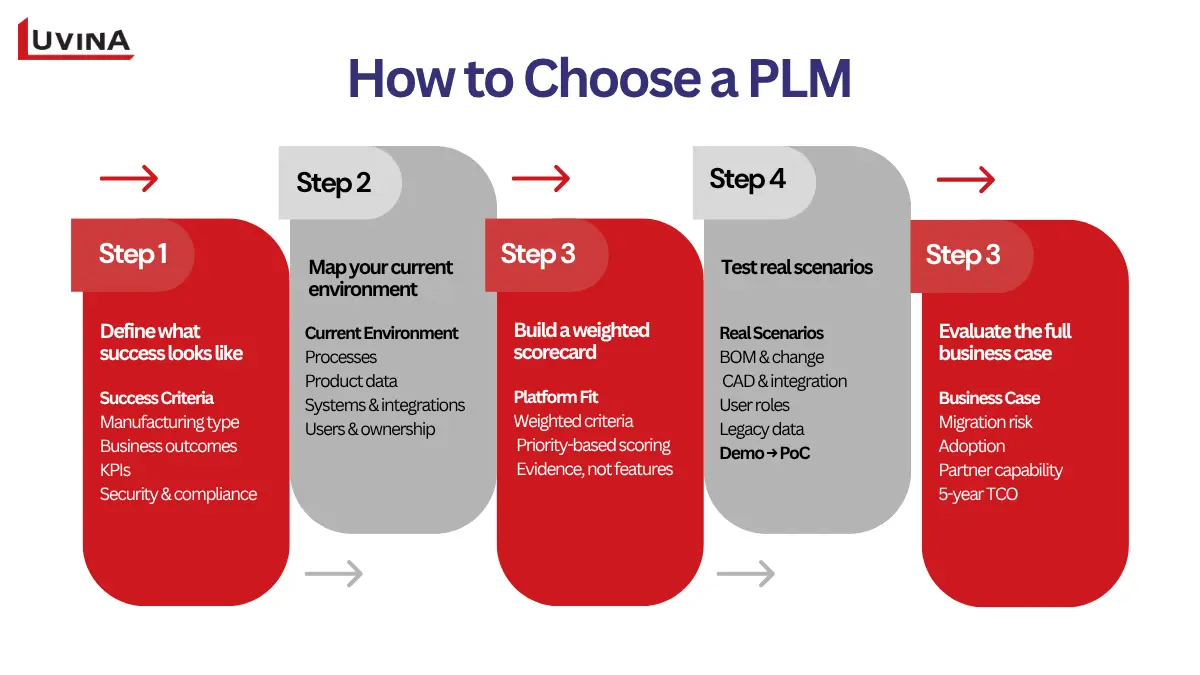
5 Steps to Choose the Right PLM
Step 1: Establish requirements and baseline KPIs
Start by establishing the scope and outcomes you expect from PLM.
- Clearly define problems your business is facing, and features required for a PLM system to handle those needs.
- Identify your manufacturing type, product complexity, and key product lifecycle challenges.
- Define measurable business outcomes, such as shorter ECO cycles, faster NPI, fewer release errors, or better traceability.
- Set baseline KPIs before evaluating vendors, so improvements can be measured later.
- Document non-negotiable security, compliance, and data governance requirements.
This creates the criteria against which every platform should be evaluated.
Step 2: Map your current environment
Next, document how product information moves through the organization today.
Map:
- Current product development and change processes
- Parts, BOMs, documents, CAD data, and other product information
- Systems of record across PLM, CAD, ERP, MES, QMS, and related applications
- Existing integrations and data flows
- Major process bottlenecks and manual work
- User groups, responsibilities, and governance owners
This step often reveals requirements that are difficult to see from a software demo alone.
Step 3: Build a weighted scorecard
Create a scoring model that reflects your priorities. Do not give every capability the same weight.
For example, a manufacturer with complex product variants may assign greater weight to configuration management and change control. A regulated manufacturer may prioritize traceability, security, and compliance.
Score each shortlisted platform against the same criteria. Record both the score and the evidence supporting it. This makes the decision easier to explain internally and reduces the influence of vendor presentation quality.
Step 4: Test real scenarios
A product demo should show how the platform handles your workflows, not just its standard features. For critical requirements, run a proof of concept using representative data to uncover integration, usability, migration, and configuration issues.
Suggested vendor demo and proof-of-concept scenarios:
| Scenario | What to validate |
|---|---|
| Engineering change across a multi-level BOM | Impact, approvals, audit trail, and downstream handoff |
| EBOM to MBOM reconciliation | BOM alignment with revision and configuration context |
| CAD to ERP integration | CAD data connection and release to ERP or a test endpoint, including integration with a custom manufacturing execution system |
| Cross-functional access | Appropriate access for engineering, quality, purchasing, suppliers, and shop-floor users |
| Legacy data migration | Validation, error handling, data lineage, and rollback |
This gives the team consistent evidence for comparing shortlisted platforms and identifying implementation risks early.
Step 5: Evaluate the full business case
Before contracting, look beyond software capabilities and license costs. Compare the implementation approach and the resources required to make the platform successful.
Assess:
- Migration risk: Data quality, legacy customization, cleansing, and cutover complexity
- Adoption plan: Training, change management, user experience, and stakeholder ownership
- Partner capability: Industry experience, integration skills, migration expertise, and support model
- Product roadmap: Future capabilities and alignment with your technology strategy
- Five-year TCO: Software, implementation, integration, migration, infrastructure, support, and internal resources
The best PLM choice is the platform that delivers the strongest fit and business case, not necessarily the one with the most capabilities. A disciplined evaluation also gives stakeholders a clear basis for moving from shortlist to implementation.
Evaluate Your Business Needs First
The best PLM for your business depends on more than the platform’s feature set. Start with the way your organization designs, changes, manufactures, and supports products. Then consider how the PLM will fit into your existing technology landscape and future architecture.
Match the platform to your operating environment
Use your business context to narrow the shortlist:
| Business scenario | Prioritize | Validate before selection |
| Complex and configurable products | BOMs, configurations, revisions, engineering changes, and traceability | Whether complex product structures can be managed without excessive customization |
| Large, multi-site manufacturing | Scalability, centralized governance, multi-site collaboration, and configuration control | Whether product information and processes remain consistent across locations |
| CAD-centric engineering | CAD/ECAD connectivity, engineering data, and product structures | How effectively design data moves into controlled product records and downstream workflows |
| ERP-centric organization | PLM to ERP integration, product release, and clear data ownership | Which system owns each data object and how changes are synchronized |
| Highly regulated products | Compliance, approvals, audit trails, security, and traceability | Whether the platform can provide the required evidence throughout the product lifecycle |
| Legacy PLM modernization | Data migration, integration, process redesign, and phased rollout | Whether historical data and configurations can be migrated without disrupting operations |
| Cloud first or mid-market environment | Usability, SaaS deployment, APIs, and implementation simplicity | Whether the platform provides enough flexibility for future requirements |
Your existing ecosystem matters, but it should not decide alone
A manufacturer already invested in a particular CAD or ERP ecosystem may benefit from strong native connectivity. It can reduce integration effort and make adoption easier. However, choosing PLM solely because it matches an existing technology stack can create problems later.
Evaluate the platform across five broader dimensions:
- Product data: Can it provide reliable control over parts, BOMs, documents, revisions, configurations, and other product information?
- Processes: Can it support your actual change, approval, release, and collaboration workflows?
- Integration: Are systems of record boundaries clear across CAD, PLM, ERP, MES, QMS, suppliers, and service systems?
- People: Can different user groups adopt the platform without creating unnecessary process friction?
- Architecture: Can the solution scale with new products, sites, integrations, regulatory requirements, and business changes?
Shortlist first, validate second
Once you identify the platforms that match your environment, use scenario-based demos and proof of concept to test the shortlist. Give each vendor the same representative of BOM, engineering change, supplier workflow, integration requirement, and user roles.
Pay particular attention to areas where the platform looks strong on paper but may require significant customization in practice. Also assess migration complexity, implementation of partner capability, training requirements, and long-term support.
The right choice is ultimately the platform that provides the strongest balance of product fit, process support, integration, adoption, security, and long-term maintainability. Your existing CAD or ERP ecosystem should support that decision, not override it.
PLM implementation and legacy migration roadmap
A PLM implementation should be treated as a business and data transformation project, not simply a software deployment. The roadmap should connect process design, product data, integrations, user adoption, and governance from the beginning.
Six phases of a PLM implementation
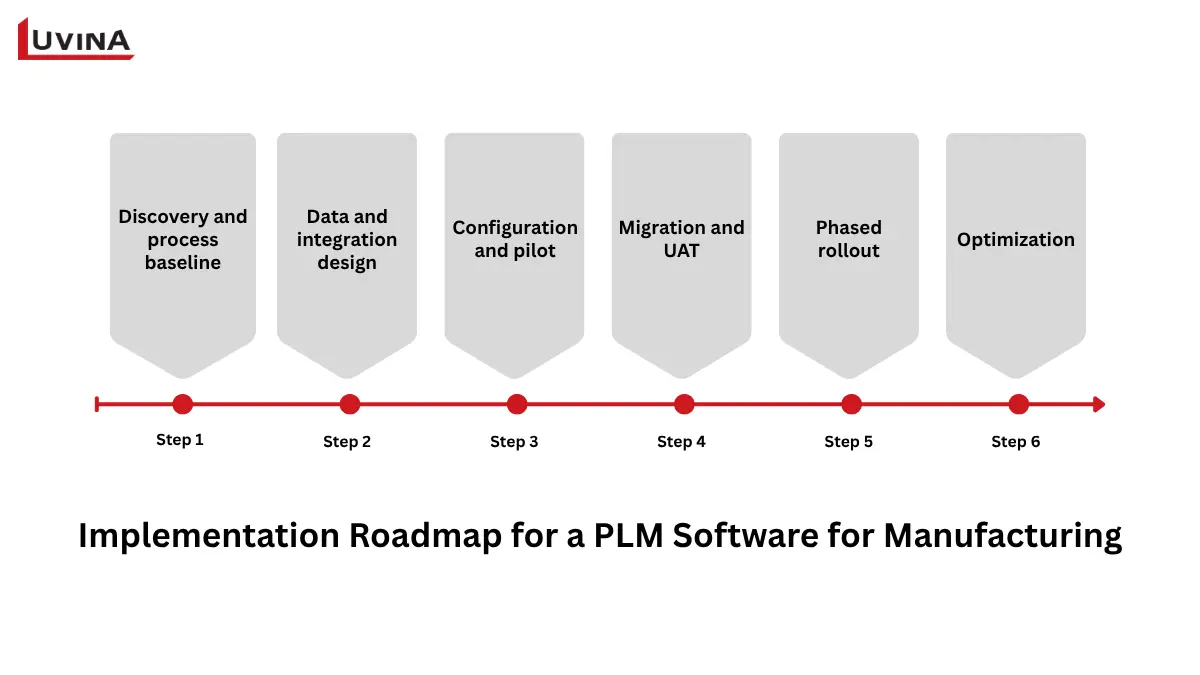
PLM Implementation: 6 Key Phases
Phase 1. Discovery and process baseline
Document current workflows, product data, systems, users, pain points, and ownership. Establish baseline KPIs so the impact of the new PLM can be measured.
Phase 2. Data and integration design
Define the target data model, taxonomy, system of record boundaries, and integration architecture.
- Profile legacy data quality and identify duplicates or obsolete records.
- Establish canonical IDs, naming conventions, and product taxonomies.
- Define interface contracts between PLM, CAD, ERP, MES, QMS, and other systems.
Phase 3. Configuration and pilot
Configure core workflows and security based on agreed requirements. Start with a representative pilot rather than attempting to cover every business process at once.
Phase 4. Migration and UAT
Cleanse and migrate representative legacy data. Use realistic user acceptance testing to validate workflows, integrations, permissions, reporting, and data integrity before production deployment.
Phase 5. Phased rollout
Roll out the solution by site, product line, business function, or process. Prepare users through role-based training and establish a clear cutover and rollback plan.
Phase 6. Optimization
Monitor adoption, system performance, data quality, and business KPIs after launch. Use the results to refine workflows, integrations, governance, and future rollout plans.
Key risks and controls
| Risk | Control |
| Poor data quality | Data profiling, cleansing, validation, and migration rules |
| Over customization | Clear configuration principles and governance |
| Unclear ownership | Defined data owners and process responsibilities |
| Integration scope creep | Agreed interface contracts and integration boundaries |
| Weak testing | Representative UAT and scenario-based validation |
| Low adoption | Role-based training, change management, and user feedback |
Measure the outcome
Track both operational improvements and adoption after implementation. Useful metrics include:
- ECO cycle time
- First pass release quality
- Duplicate or obsolete records
- Time required to find current product data
- Rework rate
- User adoption
- Supplier response time
- Time to value
These measures create a baseline for continuous improvement and help determine whether the PLM investment is delivering the expected business value.
How Luvina supports PLM implementation and modernization
PLM implementation often requires more than a platform configuration. Manufacturers also need to adapt to workflows, integrate product information, and address gaps in legacy processes.
Luvina’s experience includes a manufacturing project supporting leading Japanese SI companies and end users in the automotive, electronics, and energy sectors. In the BOM and document management with Aras Innovator project, Luvina used Aras Innovator to address challenges in material tracking, document management, machinery management, and data lifecycle management.
Using Aras Innovator, Luvina:
- Developed a function to compare planned and actual materials before production.
- Customized document management with version control and user-specific access rights.
- Developed POC functions for machinery management.
- Built information and document management capabilities for multiple facilities.
The engagement covered technical consulting, requirements definition, POC development, design, development, testing, release, maintenance, and operations.
The solution improved document version control, reduced material mix-ups, and made machinery information easier to manage.
Luvina is an Aras partner supporting manufacturers with PLM implementation and modernization. If you are evaluating legacy migration, requirements, or PLM/ERP/MES’S integration, explore ours Aras PLM consultant services.
FAQs
What is PLM software for manufacturing?
PLM software in manufacturing manages product information and processes throughout the product lifecycle, from concept and design through production, service, and retirement. It provides controlled management of product data such as parts, BOMs, CAD files, revisions, configurations, changes, and related records. The right PLM scope depends on the manufacturer’s product complexity, processes, existing systems, and governance requirements.
What is the best PLM software for a manufacturing company?
The best PLM software is the platform that provides the strongest fit for a manufacturer’s products, processes, systems, and long-term architecture. There is no universal best option. Complex manufacturers may prioritize configuration and change management, while regulated organizations may place greater weight on traceability and compliance. Existing CAD or ERP investments should inform the decision but should not replace a broader fit assessment.
How is PLM different from PDM, ERP, and MES?
PLM manages product information and lifecycle processes, while PDM primarily focuses on engineering data and document control, ERP manages enterprise and business operations, and MES manages manufacturing execution. These systems have different responsibilities but often need to work together. A manufacturer should define a clear system of record boundaries before selecting or integrating PLM with its existing technology environment.
What features should manufacturers look for in PLM software?
Manufacturers should look for product data and BOM management, revision and configuration control, engineering change workflows, CAD connectivity, integration capabilities, security, traceability, and scalable deployment. The priority depends on the organization. A company with complex product variants may need deeper configuration capabilities, while a regulated manufacturer may place greater emphasis on compliance, audit trails, and controlled access.
How much does PLM software cost, and how long does implementation take?
PLM software cost and implementation time vary significantly based on platform scope, users, deployment model, integrations, data migration, customization, and implementation complexity. Public pricing is often limited for enterprise PLM platforms, so unsupported cost estimates can be misleading. Manufacturers should evaluate software, implementation, migration, integration, training, support, and internal resources when estimating total cost and time to value.
Conclusion
There is no one-size-fits-all PLM software for manufacturing. The right choice depends on your product complexity, processes, existing CAD/ERP ecosystem, compliance requirements, and long-term architecture.
A strong selection process starts with clear requirements, measurable KPIs, and a shortlist based on business fit rather than feature count. Realistic demos and proof of concept testing can then help validate workflows, integrations, migration risks, and user adoption before implementation.
Whether you are adopting PLM for the first time, modernizing a legacy platform, or integrating PLM with ERP/MES, Luvina can support you from requirements and solution design through implementation, migration, integration, and ongoing support. Contact Luvina to discuss your PLM requirements.
Sources
https://www.ptc.com/en/success-paths/get-started-with-windchill-plus/develop/solution-development
READY TO START A PROJECT?
Our experts are eager to explore your needs.

Read More From Us?
Sign up for our newsletter
Read More From Us?
Sign up for our newsletter