




PLM Implementation: A Step-by-Step Guide to Planning, Executing, and Sustaining Your Rollout


PLM implementation is the process of deploying, configuring, integrating, and adopting a Product Lifecycle Management system across an organization. It includes process design, product data migration, system integration, testing, training, and rollout. A successful implementation aligns these technical activities with business processes, data governance, user adoption, and measurable operational outcomes.
A successful PLM implementation is rarely determined by the software alone. Projects often struggle when teams lack clear processes, defined ownership, reliable data, or a structured rollout plan. Getting the implementation right means knowing what to do at each stage, how timelines and costs change with project scope, and how to respond when issues emerge after go-live.
This guide breaks down an eight-phase roadmap, realistic implementation expectations, and a practical troubleshooting scenario to help you plan a more controlled and sustainable PLM rollout.
What Is PLM Implementation?
PLM implementation is the process of deploying, configuring, integrating, and adopting a product lifecycle management system across an organization.
It goes far beyond purchasing a PLM license or installing the software. Implementation includes:
- Migrating and cleaning legacy product data
- Integrating the system with ERP, CAD, and MES
- Reshaping how engineering, quality, and manufacturing teams actually work together
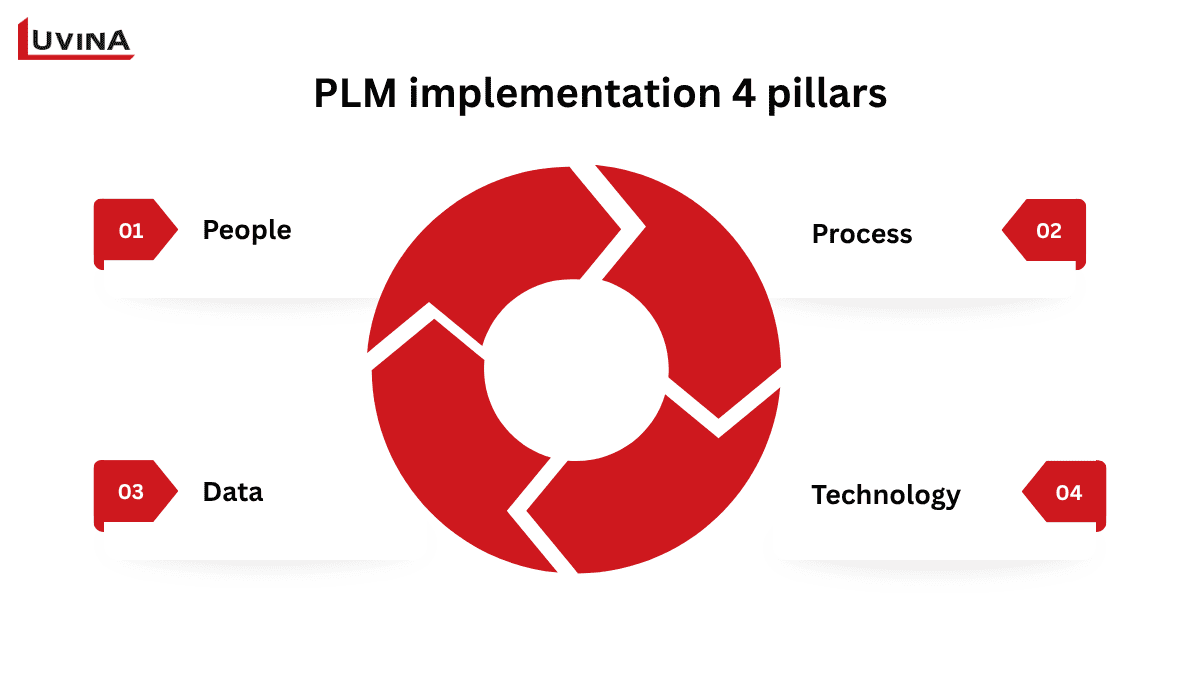
PLM implementation 4 pillars
While our guide to PLM software for manufacturing explores the platforms available, implementation is what determines whether the chosen system becomes the organization’s single source of product truth, or just another underused tool sitting on top of the same spreadsheets and email threads it was meant to replace.
Because it touches technology and process at once, it’s fundamentally a business change effort, not a software rollout.
Why a Structured Implementation Process Matters
A PLM project can become significantly more difficult when implementation is treated as a software deployment rather than a coordinated business initiative. Weak planning can lead to scope expansion, budget overruns, delayed milestones, and low user adoption, even when the underlying PLM platform is technically capable.
The Real Risk Is Often Organizational
PLM implementation connects product data with processes across engineering, quality, manufacturing, procurement, and IT. That makes organizational alignment just as important as technical execution.
Common issues include:
- Poor data governance: No clear rules for how product information is created, validated, maintained, or retired.
- Unclear process ownership: Teams may use the system differently because no one has clear responsibility for defining and enforcing the target workflow.
- Limited executive sponsorship: Without visible leadership support, implementation decisions can stall when they affect established processes or departmental priorities.
- Weak stakeholder alignment: Different teams may have conflicting expectations about what the new PLM environment should deliver.
These problems can increase project effort and delay the point at which the organization starts seeing value from its investment. Panorama Consulting’s research on PLM implementations highlights governance, planning, and organizational readiness as important factors in achieving successful outcomes.
Why a Structured Roadmap Matters
A structured roadmap makes dependencies easier to identify before they create downstream issues. For example, data quality needs to be addressed before migration, while integration requirements should be understood before system configuration is finalized. Training and change management also need to start early enough to prepare users for the new ways of working.
This approach also helps position PLM as part of a broader digital transformation strategy rather than an isolated IT project.
The following eight-phase roadmap brings these elements together into a practical implementation structure that manufacturing organizations can adapt to their own scope, systems, and business requirements.
The PLM Implementation Project Plan: An 8 Phase Roadmap
A successful PLM rollout needs more than a list of technical tasks. Each phase should have a clear purpose, defined ownership, and measurable output so the project team can move from business requirements to a stable production environment without losing sight of adoption and business value.
The roadmap below provides a practical structure that manufacturing organizations can adapt based on their product complexity, existing systems, data readiness, and deployment scope.
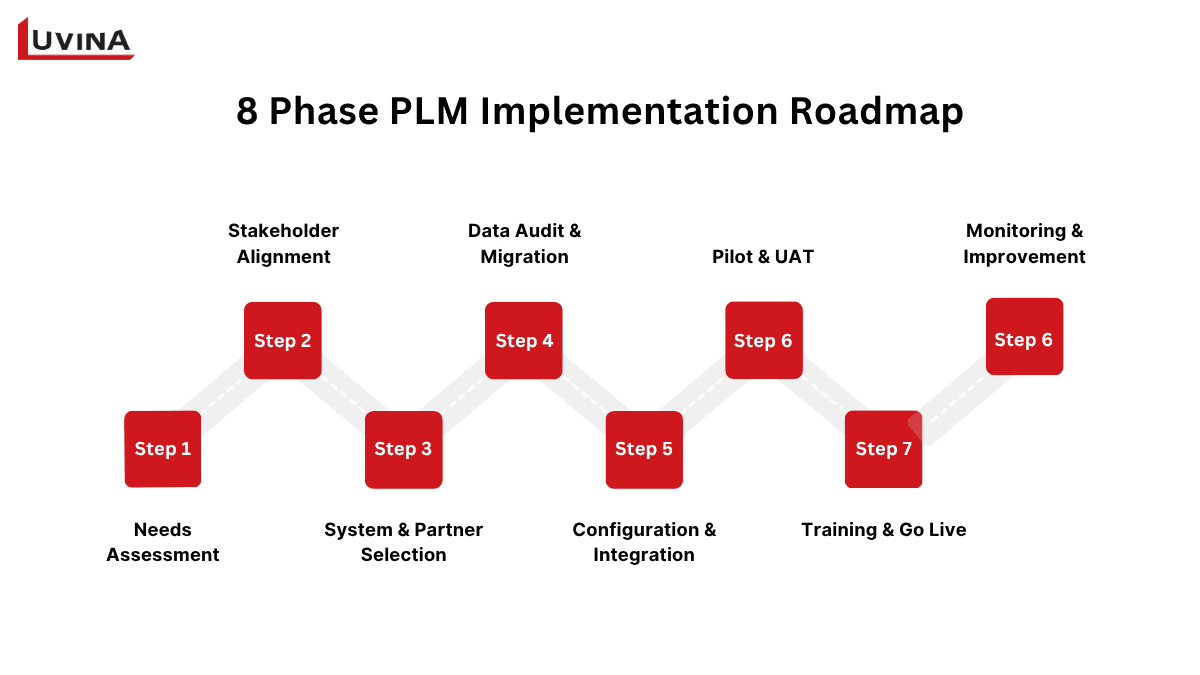
The 8 phase PLM implementation roadmap
| Phase | Key Activities | Deliverable | Typical Duration |
| 1. Needs Assessment & Business Case | Audit current tools/workflows; interview engineering, quality, manufacturing, IT; quantify pain points and expected ROI. | Business case + scope document | 2–4 weeks |
| 2. Stakeholder Alignment & Project Charter | Secure executive sponsor; form steering committee; define goals, KPIs, budget, and governance. | Project charter with sign-off | 1–2 weeks |
| 3. System & Partner Selection | Shortlist PLM platforms and implementation partners; run demos/RFPs against the requirements list. | Selected platform + signed SOW | 4–8 weeks |
| 4. Data Audit & Migration Planning | Inventory legacy data (CAD, BOMs, documents); assess quality; define cleansing rules and migration mapping. | Data migration plan | 3–6 weeks |
| 5. Configuration & Integration | Configure workflows, item/BOM structures, permissions; build integrations with ERP, CAD, and MES. | Configured environment + integration test results | 6–12 weeks |
| 6. Pilot & User Acceptance Testing | Run a single team/product line through real scenarios; log defects; validate against acceptance criteria. | Signed-off UAT results | 3–4 weeks |
| 7. Training & Phased Go-Live | Role-based training; cut over pilot group first, then roll out department by department or site by site. | Trained users + go-live checklist | 4–8 weeks |
| 8. Post-Go-Live Monitoring & Continuous Improvement | Track KPIs, run health checks, resolve support tickets, plan the next optimization release. | KPI dashboard + support/optimization backlog | Ongoing |
8-Phase Roadmap Table
Phase 1: Needs Assessment & Business Case
The first phase establishes why the organization needs PLM and what the implementation should achieve. Start by documenting current pain points across engineering, manufacturing, quality, and other teams that rely on product information.
Typical questions include:
- Where are product data and documents currently stored?
- Which processes depend on manual work or disconnected spreadsheets?
- Where do errors occur between engineering and manufacturing?
- Which business outcomes should PLM improve?
- How will success be measured after go-live?
Stakeholder mapping should happen at this stage rather than being postponed until the project is already underway. Identify decision makers, process owners, influencers, potential supporters, and groups that may be affected by changes to existing workflows.
The output should be a business case that connects the proposed PLM investment with measurable business objectives.
Phase 2: Stakeholder Alignment & Project Charter
Once the business case is established, the project team needs agreement on what will be delivered and how decisions will be made.
Create a project charter covering:
- Implementation scope and objectives
- Project governance and decision rights
- Roles and responsibilities
- Key milestones and dependencies
- Success metrics
- Communication and escalation processes
Different stakeholders also need different messages. Leadership may care about product development efficiency, risk reduction, and business impact. Engineering teams may need to understand how workflows and daily tasks will change. Manufacturing users may focus on how accurate product information reaches downstream operations.
A consistent message across these groups helps build alignment without forcing every stakeholder to evaluate the project from the same perspective.
Phase 3: System & Implementation Partner Selection
With requirements and governance established, the organization can evaluate PLM platforms and implementation partners against its actual operating environment.
The assessment should cover:
- Product and process complexity
- CAD and engineering tool compatibility
- ERP and MES integration requirements
- Data model and workflow flexibility
- Deployment and administration needs
- Vendor and partner capabilities
- Post-go-live support
The goal is to select a system that fits the organization’s processes rather than choosing the platform with the longest feature list. For example, some APAC manufacturers consider platforms such as Aras PLM when flexibility and an open architecture are important to their implementation strategy.
The implementation partner matters just as much as the software choice. Look for experience with similar manufacturing environments, integration capabilities, data migration, change management, and long-term support. The specific criteria for evaluating a partner are covered later in this guide.
Phase 4: Data Audit & Migration Planning
Data migration is often one of the most underestimated parts of a PLM project. Moving inaccurate or inconsistent information into a new environment simply transfers existing problems into a new system.
Begin with a data audit that identifies:
- Duplicate records
- Missing or inconsistent values
- Outdated product information
- Different naming and numbering conventions
- Incompatible file formats
- Relationships between parts, BOMs, documents, and revisions
Data profiling and validation tools can help teams identify anomalies and quality issues at scale before migration begins. From there, establish cleansing rules, standardize formats, define field mappings, and decide which historical records actually need to be migrated.
A clear migration strategy should also define who approves cleaned data and who owns data quality after the new PLM environment goes live.
Phase 5: Configuration & Integration
The implementation team can then configure the PLM environment around the approved processes and data model.
Configuration may include:
- Product structures and BOMs
- Document management
- Revision and version control
- Change workflows
- User roles and permissions
- Approval processes
- Reporting and dashboards
Integration is equally important when PLM needs to exchange information with systems such as ERP, CAD, or MES. Define which system owns each data element, what information needs to move between platforms, and when those exchanges should occur.
Avoid treating every existing process as something that must be replicated exactly. Where possible, use standard PLM capabilities and make customization decisions based on genuine business requirements.
Phase 6: Pilot & User Acceptance Testing
Before expanding the solution across the organization, test it with a controlled group of users and representative business processes.
A pilot should cover realistic scenarios such as creating a product structure, submitting an engineering change, approving a document, or synchronizing information with another enterprise system.
User acceptance testing should verify both technical behaviour and practical usability. Collect feedback on workflow clarity, data accuracy, permissions, system performance, and any steps that create unnecessary friction.
Issues identified here are generally easier and less costly to address than problems discovered after a broad rollout.
Phase 7: Training & Phased Go Live
Training should prepare users for the actual workflows they will perform, rather than simply showing them where features are located.
Role-based training can help different groups understand what changes in their daily work. Support materials such as online documentation, recorded sessions, and recurring webinars can reinforce the initial training and give users a reference point after launch.
A phased go-live can further reduce disruption. Organizations may launch by business unit, site, product line, or functional area depending on their operating model.
The implementation team should also establish a support process for questions and issues during the early adoption period. Support should include a clear escalation path, super-user support, issue triage, and feedback collection during the early adoption period.
Phase 8: Post-Go-Live Monitoring & Continuous Improvement
Going live is the start of operational use, not the end of the PLM project.
Monitor metrics that show whether the system is delivering the intended results. Depending on the implementation objectives, these may include workflow cycle time, change request turnaround, data quality, user adoption, or integration error rates.
The project team should also maintain an issue and improvement backlog so recurring problems can be addressed systematically rather than through one-off fixes.
A formal closure meeting can then review the project against its original objectives. Combine quantitative measures such as KPI and ROI results with qualitative feedback from users and process owners. This provides a clearer view of what worked, what needs improvement, and where the PLM environment should evolve next.
The next sections examine the timeline, cost drivers, and implementation barriers that can affect how these eight phases are planned and executed.
How Long Does PLM Implementation Take, and What Does It Cost?
The timeline and investment for a PLM implementation vary considerably depending on project scope, organizational complexity, data readiness, and the systems that need to connect with PLM. Instead of using a fixed estimate, it is more useful to look at implementation size and the factors that can expand the effort.
How Long Does a PLM Implementation Take?
For a focused rollout within a single business unit, implementation typically takes around 3 to 6 months. A multi-site or enterprise-wide program can take 12 to 18 months, particularly when multiple locations, workflows, legacy systems, and user groups are involved.
| Implementation scope | Typical timeline | What usually affects the duration |
| Single business unit | 3 to 6 months | Limited scope, fewer users, simpler integration landscape |
| Multi-site or enterprise | 12 to 18 months | Multiple locations, broader processes, complex integrations, larger data volumes |
Typical PLM implementation timeline by project scope
These durations are planning ranges, not cumulative project timelines. Several phases can overlap, particularly stakeholder alignment, data preparation, configuration, integration, and training. These ranges should be treated as planning benchmarks rather than fixed deadlines. A single business unit with poor quality legacy data or extensive customization may require more effort than a larger project with well-prepared data and clearly defined processes.
The timeline can also shift when requirements change during configuration, integration issues emerge during testing, or users need additional preparation before go-live. Defining scope and dependencies early helps the project team build a more realistic schedule.
What Drives PLM Implementation Cost?
There is no universal price for PLM implementation because the required effort depends on what the organization needs to change, connect, migrate, and support. The table below summarizes the main cost areas and what typically drives them.
| Cost area | What drives it |
| Data cleanup and migration | Volume of legacy data; number of duplicate, inconsistent, or poorly structured records; scope of validation and mapping work |
| System integration | Number and complexity of connections to ERP, CAD, MES, or other enterprise applications; development and testing effort |
| Customization | Extent of changes to standard PLM capabilities; ongoing maintenance created by custom workflows or fields |
| Users and locations | Number of licenses, sites, and business units covered by the rollout |
| Training | Scope of role-based training and volume of support materials needed |
| Infrastructure | Hosting, hardware, or cloud infrastructure required to run the platform |
| Project management and support | Effort to manage the rollout and provide post-go-live technical support |
Cost areas and what typically drives them
For this reason, organizations should build their budget around implementation scope and complexity rather than relying on a standard price range. A detailed project plan can help identify the major cost drivers early, making it easier to prioritize requirements and avoid unexpected expenditure later in the rollout.
Barriers to PLM Implementation (and How to Overcome Them)
Even a well-planned PLM rollout can face obstacles that affect adoption, data quality, integration, cost, or governance. Identifying these risks early allows teams to address them before they become expensive project issues.
PLM Implementation Readiness Checklist
1. Change Resistance
PLM can change familiar workflows and responsibilities, making some users reluctant to adopt the new system.
How to overcome it:
- Establish a change management framework with clear responsibilities.
- Use practical workshops based on real user scenarios rather than theory alone.
- Tailor communication to each stakeholder group.
- Provide ongoing support through documentation, recorded sessions, and webinars.
Key principle: Treat adoption as an ongoing workstream, not a one-time training activity.
2. Poor Data Quality and Migration
Duplicate records, inconsistent naming, missing values, and outdated documents can create problems during migration and reduce trust in the new environment.
How to overcome it:
- Audit legacy data before defining the migration scope.
- Use data observability tools to identify anomalies and duplicates.
- Standardize naming, numbering, and data entry rules.
- Assign ownership for data validation and ongoing quality management.
Key principle: Clean legacy data before migration and establish rules that prevent the same issues from recurring.
3. Integration Complexity
Connecting PLM with ERP, CAD, MES, and other systems creates dependencies around data ownership, formats, and timing.
How to overcome it:
- Assess the existing IT landscape before designing integrations.
- Define which system owns each critical data element.
- Prioritize business-critical integrations for the initial release.
- Test connections in stages rather than using a big bang approach.
Key principle: A phased integration strategy makes complex environments easier to test, troubleshoot, and expand.
4. Underestimated Scope and Cost
Scope can expand when teams try to reproduce every legacy workflow or customize the platform for too many exceptions.
How to overcome it:
- Set clear scope boundaries before configuration begins.
- Evaluate every customization against a specific business requirement.
- Use standard PLM capabilities where they meet the intended outcome.
- Apply formal change control to new requirements.
- Assess the effect of scope changes on cost, schedule, and maintenance.
Key principle: Customize for genuine business needs, not simply to preserve inefficient legacy processes.
5. Weak Executive Sponsorship and Data Governance
PLM affects multiple departments, so assigning ownership entirely to IT can create conflicts over workflows, data standards, and approval authority.
How to overcome it:
- Assign process owners before implementation begins.
- Define authority over critical product data and workflows.
- Establish an escalation path for cross-functional decisions.
- Keep executive sponsors involved in major scope and governance decisions.
Panorama Consulting’s research on PLM implementation highlights governance and organizational ownership as important factors in implementation outcomes. Clear accountability helps keep PLM aligned with business priorities rather than treating it as an isolated IT initiative.
Who Runs a PLM Implementation: Consultant vs. Implementation Engineer
A PLM implementation typically involves several roles, but two are especially easy to confuse: the PLM implementation consultant and the PLM implementation engineer. They work closely together, but their responsibilities are different. Understanding the distinction helps manufacturers build the right project team or evaluate what an implementation partner should provide.
The table below shows how their responsibilities differ and when each role becomes most important during the rollout.
| Role | Typical responsibilities | When the role is most important |
| PLM Implementation Consultant | Defines requirements, analyzes business processes, designs workflows, coordinates stakeholders, supports solution decisions, and helps manage implementation scope | Planning, process design, stakeholder alignment, and business validation |
| PLM Implementation Engineer | Configures the PLM environment, develops integrations, manages data migration tasks, troubleshoots technical issues, performs testing, and supports deployment | Configuration, integration, migration, testing, go-live, and technical support |
Key differences between PLM implementation consultants and engineers.
The consultant and engineer should work as complementary roles rather than separate functions. The consultant translates business requirements into an implementation approach, while the engineer turns that approach into a functioning technical environment.
For complex projects, both capabilities may be needed within the same implementation team. When evaluating a partner, manufacturers should therefore look beyond individual job titles and assess whether the team can cover process analysis, solution design, technical delivery, and post-go-live support.
PLM Implementation Monitoring and Troubleshooting: A Worked Example
Post go-live monitoring helps teams identify issues before they affect downstream operations. The example below shows how a manufacturing team can investigate a BOM synchronization problem between PLM and ERP using a simple Symptom → Diagnosis → Fix → Prevention framework.
Worked Example: BOM Data Is Out of Sync Between PLM and ERP
Imagine a manufacturer has completed its PLM rollout and integrated the new environment with its ERP system. Several weeks after go-live, production planners notice that some BOMs in ERP contain different component quantities from the approved versions in PLM.
1. Symptom: BOMs Do Not Match
The first warning appears in operational data rather than the PLM interface itself:
- PLM contains the latest approved BOM revision.
- ERP receives the BOM but shows an outdated quantity for one component.
- The discrepancy affects only certain product structures.
- Production users begin reporting inconsistencies between engineering and manufacturing records.
A KPI dashboard tracking BOM synchronization errors, integration failures, and revision mismatches can help determine whether the issue is isolated or part of a broader integration problem.
2. Diagnosis: Trace the Integration Flow
The team traces the affected BOM records through the integration process instead of immediately changing the product data.
The investigation finds that a field mapping configured during Phase 5: Configuration & Integration is sending the wrong PLM attribute to the corresponding ERP field. The issue affects BOMs containing a specific component type, which explains why it was not detected during the initial test scenarios.
The root cause is therefore an integration mapping error rather than incorrect engineering data.
3. Fix: Correct the Mapping and Validate the Data
The implementation engineer updates the mapping logic and tests it against representative BOM structures.
The team then:
- Identifies records that may have been affected.
- Corrects the affected ERP data through the approved synchronization process.
- Runs regression tests across different BOM structures and revisions.
- Confirms that the corrected values match the approved PLM records.
- Monitors synchronization results after the fix is deployed.
The consultant or process owner can then confirm that the corrected information supports the intended engineering and manufacturing workflow.
4. Prevention: Turn the Fix Into a Control
Resolving the mapping issue addresses the immediate problem, but the team should also examine why the error escaped testing in the first place.
Preventive actions could include:
- Adding the affected BOM scenario to the integration test library.
- Creating automated validation for critical PLM to ERP fields.
- Adding revision and quantity mismatch alerts to the monitoring dashboard.
- Documenting ownership for integration rules and data exceptions.
- Reviewing integration KPIs regularly after major PLM or ERP changes.
This example shows why post-go-live monitoring is an essential part of sustaining PLM. A dashboard can reveal the symptom, but tracing the root cause and strengthening the relevant controls is what prevents the same issue from recurring.
Illustrative PLM Implementation Example
Consider a Japanese industrial equipment manufacturer with engineering in Japan and production sites across APAC. Its product data is spread across CAD repositories, spreadsheets, shared folders, and ERP. Engineering changes are also managed through email, making it difficult to maintain consistent product information across locations.
From Fragmented Data to a Controlled PLM Environment
1. Define the initial scope
The company starts with one business unit and a limited product portfolio instead of attempting a full regional rollout immediately.
Priorities include:
- Centralizing product data and BOMs
- Standardizing engineering change workflows
- Improving data visibility between engineering and manufacturing
- Establishing clear data ownership
2. Run a controlled pilot
The team cleans and maps the required legacy data, configures core PLM workflows, and integrates PLM with ERP. Engineers and manufacturing users then test practical scenarios such as BOM creation, document approval, and engineering changes.
Issues found during the pilot are resolved before the solution is expanded.
3. Expand across APAC
Once the pilot meets its adoption and performance targets, the company rolls out PLM to additional sites. Core data structures and governance rules remain consistent, while local workflows are adjusted where necessary.
A central support model is also established to handle technical issues, data questions, and workflow improvements.
4. Establish a repeatable model
The result is more than a new PLM system. The manufacturer has a standardized approach for managing product information across locations, with clearer ownership and a rollout model that can be reused for future sites.
For companies managing similar multi-site projects, this is also where an external implementation partner can add value by providing specialized PLM expertise, technical delivery capacity, and ongoing support across different locations.
Choosing the Right PLM System and Implementation Partner
Choosing a PLM platform is only half of the decision. The implementation partner can have just as much influence on whether the system fits the organization, reaches adoption targets, and remains manageable after go-live.
Evaluate the PLM System Beyond the Feature List
A feature checklist can help narrow down options, but it should not be the main decision factor. A platform with extensive functionality may still be a poor fit if it does not align with the organization’s processes, data structure, or existing technology environment.
Consider these criteria:
- Process fit: Can the platform support current workflows, or can processes be improved without excessive customization?
- Integration capability: Can it connect effectively with existing ERP, CAD, MES, and other systems?
- Data management: Does it provide the structure and governance needed for product data, BOMs, documents, and revisions?
- Scalability: Can the system support additional products, users, business units, or sites as requirements grow?
- User adoption: Is the interface and workflow practical for the teams that will use it every day?
The right choice should reflect how the organization operates and where it needs to improve, rather than simply which platform has the most features.
Evaluate the Implementation Partner
The partner should be assessed against the same practical requirements as the PLM platform itself.
Look for:
- Relevant industry experience: Has the team implemented PLM for organizations with similar products, processes, or regulatory requirements?
- Technical capability: Can the team handle configuration, customization, data migration, and enterprise integrations?
- Change management expertise: Can they support users and process owners throughout the transition?
- Post-go-live support: Is there a clear model for troubleshooting, maintenance, optimization, and future enhancements?
- Regional delivery capability: For multi-site projects, can the partner coordinate effectively across countries, time zones, and local teams?
Panorama Consulting’s research suggests that implementation challenges are often connected to organizational and process issues rather than the technology alone. This makes practical implementation experience particularly important when evaluating potential partners.
Where Luvina Fits
For manufacturers looking for an Aras implementation partner in APAC, Luvina combines PLM delivery capabilities with experience supporting Japanese and regional manufacturing organizations. Luvina is an official Aras partner and can support organizations across areas such as PLM consulting, implementation, integration, and ongoing technical support.
The important point is not simply having access to a PLM platform. A suitable partner should be able to understand the business requirements behind the implementation, translate them into a workable solution, and remain involved when the system moves from project delivery into daily operations.
FAQs
1. What is PLM implementation?
PLM implementation is the structured process of deploying and adopting a product lifecycle management system. It includes configuration, product data migration and validation, integration with ERP, CAD, and MES, user training, and rollout. The goal is to make PLM a trusted source of product information across the organization rather than simply installing software licenses.
2. What are the main steps in a PLM implementation project plan?
A typical PLM implementation project plan covers eight stages: needs assessment and business case, stakeholder alignment, system and partner selection, data audit and migration, configuration and integration, pilot and user acceptance testing, training and phased go live, and post go live monitoring. Each stage should have a defined owner, deliverable, and decision point.
3. What is the biggest barrier to PLM implementation?
Change resistance and poor data quality are the most commonly cited barriers, and both tend to compound each other. These challenges become more difficult when organizations treat PLM as an IT deployment rather than a change to business processes. Early stakeholder involvement, clear process ownership, effective change management, and strong data governance can reduce these risks.
4. How long does a PLM system implementation take?
A focused implementation for a single business unit typically takes 3 to 6 months. A multi-site or enterprise-wide rollout can take 12 to 18 months, depending on the scope, integration requirements, data readiness, and level of customization. Project complexity generally has a greater impact on the timeline than company size alone.
5. What does a PLM implementation consultant do?
A PLM implementation consultant focuses on the business and process side of the project. They assess current workflows, gather requirements, help define the solution, coordinate stakeholders, plan the rollout, and support change management. The PLM implementation engineer handles more hands-on technical work, including configuration, integration, data migration, testing, and troubleshooting.
Conclusion
A successful PLM implementation requires more than selecting the right software. It involves aligning business processes, preparing product data, connecting existing systems, engaging stakeholders, and supporting users throughout the transition. Each implementation phase requires clear ownership, realistic planning, and measurable outcomes to keep the project on track and deliver lasting value.
By following a structured roadmap, manufacturers can reduce implementation risks, avoid unnecessary customization, improve adoption, and build a reliable product data environment that supports long-term growth.
Planning a PLM implementation? Contact Luvina to discuss your requirements and find the right approach for your organization.
READY TO START A PROJECT?
Our experts are eager to explore your needs.

Read More From Us?
Sign up for our newsletter
Read More From Us?
Sign up for our newsletter