




PLM Software for Small Business: A Practical Buyer’s Guide


Many small manufacturers still track drawings, design revisions, and BOMs across spreadsheets or scattered CAD folders. That approach works fine when products stay simple, but one wrong drawing release or one missed engineering change can throw off an entire production run.
This is where PLM (Product Lifecycle Management) comes in. Far from being reserved for large enterprises with deep pockets, PLM now comes in lighter, more affordable forms built for teams of just a few dozen people.
This guide covers whether you need PLM yet, how to choose between PDM, PLM, and ERP, and how to pick the right platform, plus guidance for teams in Singapore and Australia.
What Is PLM Software?
PLM (Product Lifecycle Management) is a system that keeps product data, design revisions, workflows, and engineering changes organized in one place, from the first concept sketch to the day a product gets retired. That’s a much bigger job than simply storing CAD files.
What PLM softwares do:
- Centralizes product data so every team works from the same source
- Tracks design revisions and keeps version history clear
- Manages engineering changes and approval workflows
- Connects engineering, production, and quality around one dataset
Why small manufacturers need it
Without a proper system, small teams run into the same problems again and again:
| Common issue | What it leads to |
| Outdated drawings still in use | Production builds the wrong version |
| BOM changes not tracked | Wrong parts ordered or assembled |
| Approvals stuck in email threads | Delayed releases, missed deadlines |
| Engineering and production on different files | Rework and miscommunication |
Common data management issues without PLM
Small business PLM vs. enterprise PLM
A small-business PLM implementation should be right-sized; this may mean a lightweight platform or a limited initial scope on a broader platform:
- Narrower scope, focused on the workflows small teams actually use
- Faster onboarding, often live in weeks instead of months
- If your operation is closer to a full manufacturing scale, a broader manufacturing product lifecycle management setup may be worth exploring too.
Does Your Small Business Actually Need PLM?
Not every small manufacturer needs PLM right away. The key is spotting whether your current setup is actually holding you back, or whether you’re simply not there yet.
| You’re ready for PLM if… | PLM may be premature if… |
| Multiple spreadsheets or CAD folders are hard to keep in sync | Your team has few users and very limited product-change complexity |
| Your ERP can’t track engineering versions | Your product rarely changes |
| Rework happens due to outdated BOMs | You have no change control process to digitize yet |
| Approvals rely on emails or verbal check-ins | A simpler PDM tool already covers your needs |
Signs you may need PLM vs. signs it’s too early
If most checks fall on the left, PLM is worth the investment. If they lean right, a lighter PDM setup may solve your immediate problem without the cost of a full PLM rollout.
PLM vs PDM vs ERP: What Should You Start With?
These three systems get mixed up constantly, and for good reason: they all touch product data at some point. The difference comes down to scope.
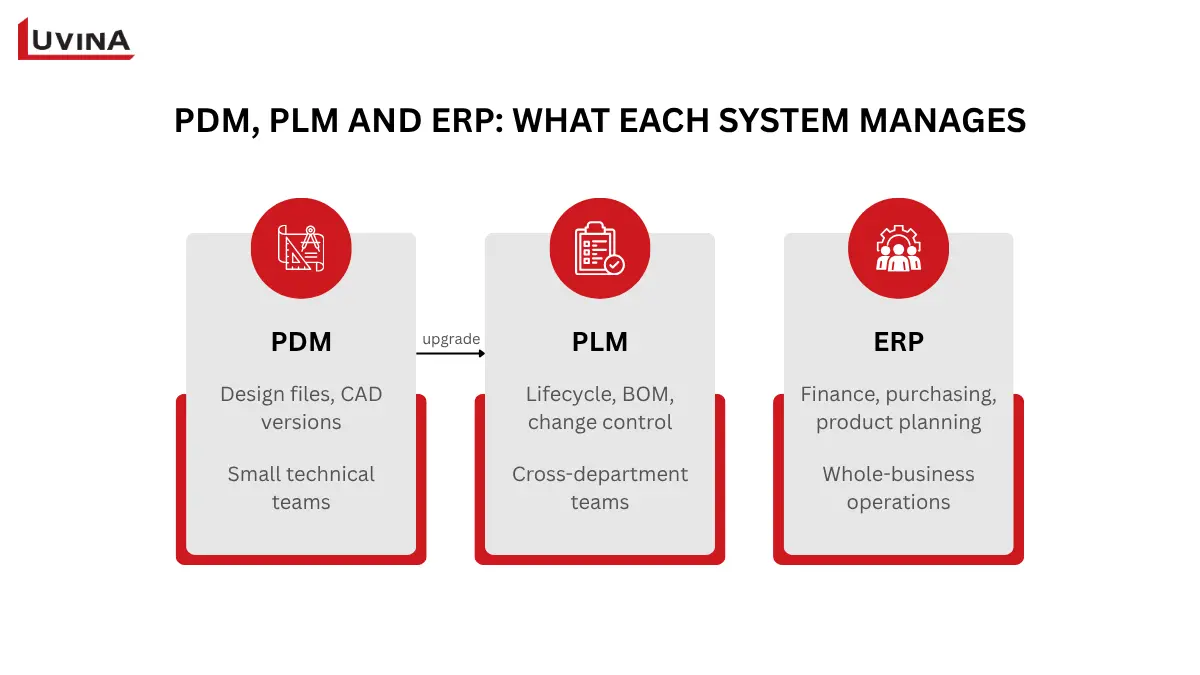
PDM vs PLM vs ERP at a glance
Some small manufacturers start with PDM to bring CAD data under control, then consider PLM as workflows become more complex and more departments need to be involved.
A quick way to decide:
- Only need to manage CAD files and design versions? Start with PDM.
- Need approval workflows, BOM management, or changes that span engineering, quality, and production? You need PLM.
- Need to plan and execute company resources like finance, purchasing, and production scheduling? That’s ERP territory.
For a closer look at how these systems compare, our PLM vs PDM and PLM vs ERP breakdowns go deeper into each one.
Key Features to Look for in PLM Software for Small Businesses
Not every PLM platform is built the same way, but a few core capabilities matter regardless of vendor. Here’s what to check for before signing anything.
| Feature | Why it matters |
| Centralized product data management | Keeps every team working from one accurate source instead of scattered files |
| Version control and revision tracking | Prevents outdated drawings or specs from reaching production |
| BOM management and collaboration | Makes sure parts, quantities, and changes stay accurate across departments |
| Workflow automation and approval processes | Cuts down on approvals stuck in email threads or verbal check-ins |
| CAD and business system integration | Connects design data with ERP or MES so nothing has to be re-entered manually |
| Reporting, dashboards, and analytics | Gives visibility into bottlenecks, change history, and team performance |
Core PLM features and why they matter
CAD and system integration tend to be the trickiest ones to get right, especially if your team already relies on a specific CAD tool or is planning to scale up later. If you’re weighing a platform with strong customization for this kind of setup, working with an Aras Innovator partner in Singapore is one route worth considering.
How to Choose the Best PLM Software for Your Small Business
There’s no single “best” PLM platform. The right choice depends on how your team works and what you actually need to control. Instead of chasing rankings, start by matching your situation to one of three common paths.
| Archetype | Best for | What to expect |
| CAD-native PDM route | Teams focused mainly on design files and revisions | Fast setup, tight CAD integration, limited cross-department workflow |
| Lightweight SaaS PLM route | Teams needing BOM and change management without heavy customization | Quick onboarding, subscription pricing, moderate flexibility |
| Configurable PLM route | Teams with complex products or deep engineering needs | Longer setup, higher investment, full control over workflows and integrations |
Three PLM archetypes for small businesses
If your team falls into the third category, with heavy engineering work and a need for deep customization, our guide on best PLM software for mechanical engineers breaks that path down further.
What to evaluate before committing
- Integration: Does it connect cleanly with your CAD tools and ERP, or will you need custom work?
- Governance: Can you control who approves what, and track who changed what?
- Onboarding speed: Will your team be productive in weeks, or months?
- Cost model: Subscription pricing is usually lighter upfront, while licensing can cost earlier but offer more control later. Either way, check who owns your data if you switch platforms down the line.
Questions to Narrow Your PLM Shortlist
Before comparing vendors, get clear on your own numbers:
- How many users need access?
- Roughly how many BOMs do you manage per month?
- Do you need ERP integration on day one?
- Will you be running multiple sites or locations?
Answering these first makes vendor conversations shorter and a lot more productive.
Plan a Right-Sized PLM Implementation
Choosing the right platform is only half the job. How you roll it out determines whether your team actually adopts it or quietly goes back to spreadsheets.
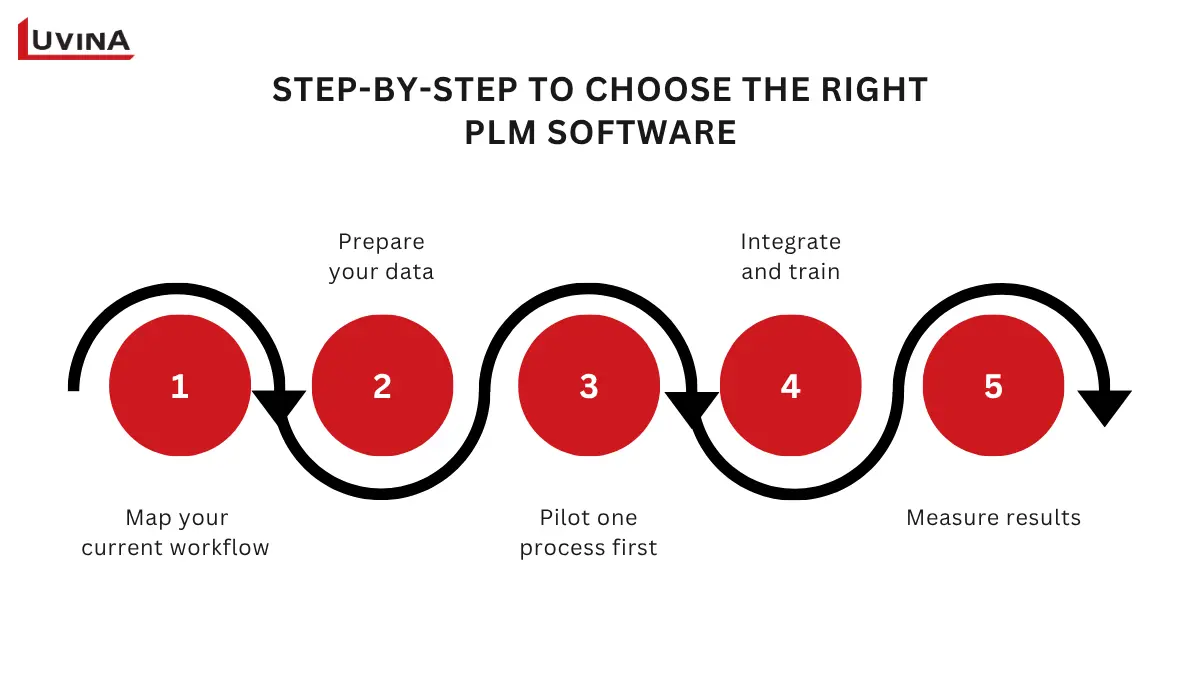
PLM software implementation steps small-business
Step 01: Map your current workflow
Document how data, approvals, and changes actually move today, before touching any software. This prevents buying features you don’t need or missing ones you do.
Step 02: Prepare your data
Clean up and organize existing product data before migrating. Bad data in means bad data out, no matter how good the platform is.
Step 03: Pilot one process first
Roll out your highest-priority workflow only, not everything at once. This lets your team adapt gradually and catch issues early.
Step 04: Integrate and train
Connect to your CAD or ERP systems and get your team comfortable with the new process.
Step 05: Measure results
Track adoption, cycle time, and error rates after go-live to confirm the rollout is actually solving the problem you started with.
A 30-60-90 Day Readiness Path
If you want a clearer timeline to work with, here’s how the 5 steps above typically map onto a 30-60-90-day path for a right-sized rollout.
Days 1-30: Map and prepare
Document your current workflow and start cleaning up product data. This is also when you should confirm your platform choice and finalize the scope for the pilot.
Days 31-60: Pilot and integrate
Roll out your highest-priority process to a small group first. Connect the core CAD or ERP integrations needed for that one workflow.
Days 61-90: Train, adopt, and measure
Extend the pilot to the rest of the team and run proper training. Track adoption, cycle time, and error rates to confirm the rollout is working before considering a wider scope.
For small businesses with a narrow scope, this pace is realistic on cloud-native SaaS platforms, especially without a dedicated implementation team. But treat it as a starting estimate, not a guarantee. Your actual timeline still depends on your data readiness, team size, and how much integration work is involved.
Choosing suitable implementation partner
Another way to keep costs down without cutting corners on quality is working with an implementation partner based in a country like Vietnam. The cost advantage is real. But the bigger draw for most teams is the technical depth that comes with it.
Vietnam has built a strong track record in enterprise software delivery. Its engineering teams have hands-on experience with PLM, ERP, and CAD system integration for manufacturers worldwide.
Luvina Software is one option worth exploring. It has years of experience delivering software and implementation projects for manufacturing and enterprise clients across Japan, Singapore, and the wider APAC region. That track record offers a right-sized way to get expert support without enterprise-level costs.
PLM for businesses in Singapore & Australia
PLM needs to look different depending on where your operation sits. Here’s what matters for teams in Singapore and Australia specifically.
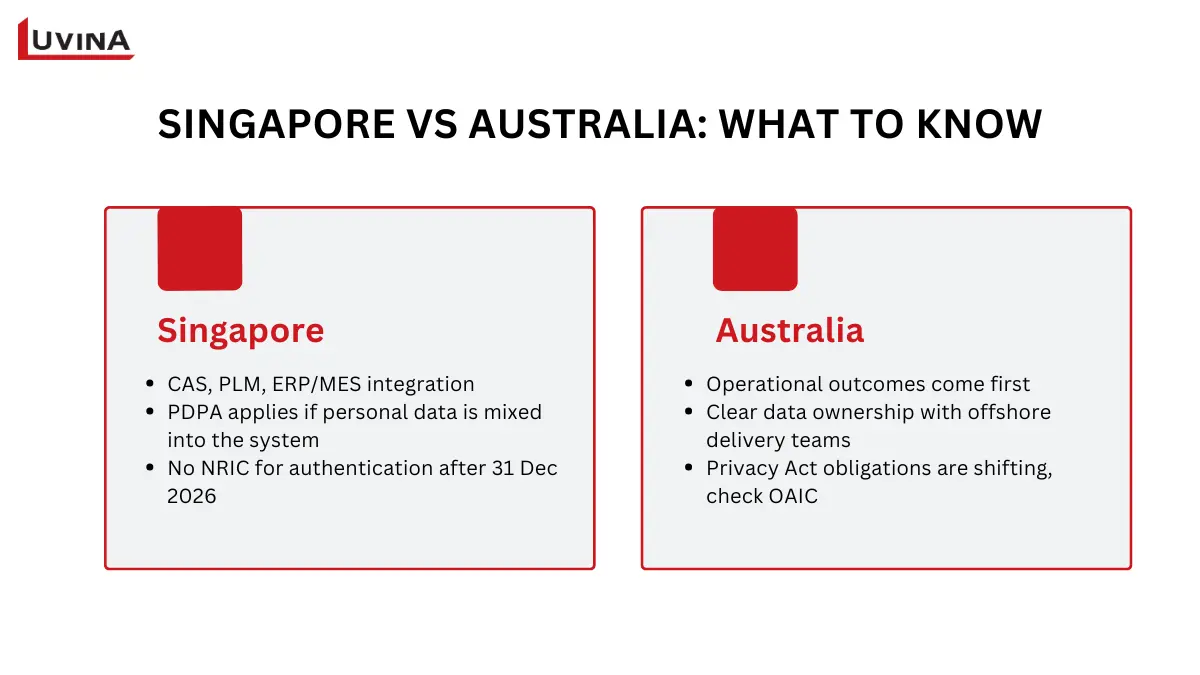
PLM Singapore & Australia localization checklist
Singapore
Singapore’s manufacturing sector is increasingly built around connected, high-precision production, closely tied to the country’s Industry 4.0 push. For teams operating in this environment, PLM needs to do more than manage BOMs.
- Integration matters most. PLM should tie CAD, PLM, and ERP or MES together so design changes flow straight into production without manual re-entry.
- Watch your data scope. If your setup stores personal data, such as employee or supplier contact information tied to approvals, that data falls under Singapore’s PDPA. Product data itself isn’t automatically personal data, but it’s worth checking if personal information gets mixed in.
- NRIC can no longer be used for authentication. As of February 2026, the PDPC requires all private organizations to stop using full or partial NRIC numbers for login or authentication by 31 December 2026, with enforcement starting the following January. If your PLM or approval workflow currently uses NRIC to identify or verify approvers, that setup needs to change before the deadline.
If you’re looking for a partner in this market, working with a PLM system provider in Singapore can help you navigate both the technical fit and the compliance side.
Australia
For Australian SME manufacturers, the priority tends to be operational outcomes: fewer errors, faster approvals, and a system that actually gets used.
- Governance matters as much as features. If you’re working with an offshore delivery team, be clear upfront on who owns the data, how documentation is handled, and what a proper handover looks like.
- Privacy obligations are shifting, not fixed. Since 1 July 2026, businesses providing AML/CTF designated services, such as accounting, legal, conveyancing, and real estate, fall under the Privacy Act regardless of turnover. A broader removal of the small business exemption has also been proposed, but it hasn’t been legislated with a confirmed date as of this writing. Don’t assume a blanket rule applies. Check current OAIC guidance for where your business actually stands.
Getting this right often starts before you even pick a platform. An IT consulting engagement for small businesses engagement can help assess your current workflow and systems first, so the PLM decision that follows is based on your actual needs.
When to Get Implementation or Modernization Help
Not every rollout needs outside help, but some situations are worth flagging early, before they turn into bigger problems down the line.
- Migrating from spreadsheets or legacy systems. Moving years of scattered product data into a proper PLM setup takes more than a simple import. Data needs to be cleaned, structured, and validated first, or the new system inherits the same mess.
- Deep integration or customization needs. If your PLM has to connect tightly with existing CAD tools, ERP, or MES, and your vendor’s out-of-the-box setup doesn’t cover it, that’s a sign to bring in extra support.
- Supporting an aging or legacy PLM. Systems that have been running for years often carry outdated configurations or unsupported customizations. Modernizing these takes specialized experience, not just a fresh install.
If any of this sounds like your situation, working with a team offering application modernization and legacy system maintenance is worth considering, provided their service scope actually covers PLM modernization specifically.
FAQs
1. What is PLM software for a small business?
It’s a controlled system for managing product data, design versions, workflows, and engineering changes across the entire product lifecycle, not just a place to store CAD files.
2. Does a small business need a PLM or PDM?
Choose PDM if you mainly need to control CAD files and design versions. Choose PLM if you need cross-functional governance over BOMs, changes, approvals, and lifecycle processes across departments.
3. How do PLM and ERP work together?
PLM manages the as-designed product definition and approved engineering changes. ERP then uses that released data to plan, purchase, produce, and fulfill orders.
4. What features should small businesses look for in PLM software?
Prioritize revision and release control, BOM and change management, role-based access, integration with CAD or ERP, fast onboarding, and a cost model that fits your budget.
5. How long does PLM implementation take for a small business?
Timeline depends on your scope, data readiness, and integration needs. Rather than expecting a fixed number, plan to pilot one governed workflow first before rolling out more broadly.
Conclusion
PLM isn’t about buying the biggest system on the market. It’s about matching the right tool to where your business actually stands today, whether that’s a lightweight PDM setup, a cloud-native PLM platform, or something more configurable as your product complexity grows.
Start by being honest about your readiness signals, map your current workflow before shopping for software, and pilot one process before rolling out everything at once. Get those steps right, and PLM stops being another tool your team tolerates. It becomes the system that actually keeps engineering, production, and every version of the truth on the same page.
Not sure where your business stands, or which system fits your current workflow? Talk to Luvina’s team to assess your product data and engineering change process before you commit to a platform.
READY TO START A PROJECT?
Our experts are eager to explore your needs.

Read More From Us?
Sign up for our newsletter
Read More From Us?
Sign up for our newsletter