




Aras PLM Server Requirements: Deployment Tips & Checklist


Your knowledge of the Aras PLM server requirements will assist with a successful and efficient deployment of Aras Innovator. This guide provides you with an overview of the minimum hardware and software specifications, as well as the various client configurations that you will use, plus provides insight into how to best deploy this solution via multiple network configurations and scenarios.
The information contained within the following section(s) will enable you to take full advantage of Aras Innovator’s capabilities while avoiding some of the more common mistakes associated with deploying a PLM solution.
Aras PLM Server Requirements: Minimum vs Recommended Hardware & Software Specifications
A properly built and configured infrastructure helps ensure that your system remains stable and enables you to grow and operate your enterprise deployments in an efficient manner. The ARAS PLM server requirements and the ARAS Innovator system requirements have been designed to meet customer expectations.
To ensure the successful implementation of the Aras Innovator application, IT Management needs to understand both sets of requirements in order to ensure that they set up an implementation successfully without negatively affecting the organisation’s performance.
There is a complete list of the minimum requirements to run Aras Innovator successfully located in the table below:
| Software/Hardware | Minimum Version |
| Visual Studio | Community 2019 / Enterprise 2019 / Professional 2019 |
| .NET Framework | 4.7.2 |
| C# | 7.1 |
| Aras Innovator | 12.0 SP8 – 12.0 SP18 |
Standard vs optimized system setup
For enterprises considering larger deployments or higher workloads, meeting or exceeding the recommended specifications ensures smooth operation and full utilization of ARAS PLM server requirements.
Modular Architecture: Database, Application, Vault & Conversion Servers
When planning an Aras Innovator deployment, understanding the modular architecture is the key to a smooth, scalable system. Each server role has a distinct function, and proper separation ensures your deployment meets ARAS PLM server requirements while delivering reliable performance.
In the sections below, we break down each component – database, application, vault, and conversion servers – highlighting their purpose, recommended specifications, and how they help your setup comply with ARAS PLM server requirements and ARAS Innovator system requirements.
Database server
All product-related information and its associated information are stored by a database server (the basis of the overall system). It allows quick and accurate access to the database via fast query response times. There must be an adequately sized (i.e., CPU/RAM/I/O capacity) database server that will provide the highest performance levels to meet the ARAS PLM server requirements and its users.
| Component | Minimum requirement | Recommended requirement | Notes |
| Database engine | Microsoft SQL Server 2019 | Microsoft SQL Server 2019/2022 | Compatible with Aras Innovator versions |
| CPU | 4 cores | 8 cores | Depends on user count |
| RAM | 16GB | 32GB | Enhances query performance |
| Storage | SSD 250 GB | SSD 500 GB | Dedicated to PLM data |
Database server specifications
Application (web) server
The application server handles the web interface, business logic, and user interactions. Keeping it separate helps meet the ARAS PLM server requirements by isolating compute and request loads from the Database server, improving reliability and scalability. This separation also aligns with ARAS Innovator system requirements for production environments.
| Component | Minimum requirement | Recommended requirement | Notes |
| OS | Windows Server 2019 | Windows Server 2022 | Supports .NET framework |
| CPU | 4 cores | 8 cores | Handles business logic and web requests |
| RAM | 16GB | 32GB | Depends on concurrent users |
| Storage | SSD 100 GB | SSD 200 GB | Stores cache and logs |
Application server minimum & recommended requirements
Aras PLM server requirements for Vault server
The vault server manages documents, CAD files, and attachments. A dedicated vault server reduces load on the database and application servers, meeting ARAS PLM server requirements for larger deployments or environments with heavy file usage.
| Component | Minimum requirement | Recommended requirement | Notes |
| Network | 1 Gbps | 10 Gbps | Ensures fast file access |
| CPU | 2 cores | 4 cores | Primarily for file I/O |
| RAM | 8GB | 16GB | Depends on file volume |
| Storage | SSD/HDD 500 GB | SSD 1 TB | Stores documents, CAD files |
Vault server setup
Conversion server
The conversion server handles background file conversion tasks (e.g., CAD to PDF). A dedicated conversion server ensures these operations do not impact other server roles, helping meet the ARAS PLM server requirements for deployments with many large files.
| Component | Minimum requirement | Recommended requirement | Notes |
| Network | 1 Gbps | 10 Gbps | Optimizes file transfer between vault and conversion |
| CPU | 4 cores | 8 cores | Runs background conversion jobs |
| RAM | 8GB | 16GB | Ensures fast processing of large files |
| Storage | SSD 100 GB | SSD 200 GB | Temporary storage during conversion |
Conversion server specifications overview
Scalability Considerations: How Many Users, How Much Data?
Using the scalable nature of ARAS Innovator, companies can include thousands of stakeholders, partners, and engineers around the world. So how many users can your Aras Innovator deployment comfortably support? How much data can it support before performance begins to fall off?
These are critical questions for any growing manufacturers. Planning with ARAS PLM server requirements in mind ensures that your system remains fast and reliable, even as user counts and data volumes increase.
User scalability
Aras Innovator is engineered to handle very high user counts, from a few hundred internal engineers to a global extended enterprise with thousands of partners. Understanding ARAS PLM server requirements for user load ensures smooth operation even during peak activity.
| Parameter | Minimum recommendation | Recommended setup | Notes |
| Concurrent users | 100 | 250,000+ | Verified through real-world benchmarks |
| Named users | 200 | 1,000,000 | Supports internal and external users |
| User types | Internal engineers | Extended enterprise | Includes partners and suppliers |
| Licensing | Open-source, no initial limit | Enterprise licensing | Depends on business model |
User capacity and license requirements
Aras PLM server requirements: Data volume considerations
Aras Innovator uses a data-centric approach to manage growing data volumes. Proper configuration of storage, I/O, and database servers ensures compliance with ARAS PLM server requirements and keeps the platform responsive at scale.
| Parameter | Minimum recommendation | Recommended setup | Notes |
| Storage | 500 GB SSD/HDD | 500 GB SSD/HDD | Depends on data volume and CAD files |
| Database | SQL Server 2019 | SQL Server 2019/2022 | Optimized per Aras recommendations |
| I/O subsystem | Standard disk | High-performance SSD/accelerator | Ensures fast read/write for large datasets |
| Growth capacity | Medium | High | Allows for user and data growth |
Data storage and performance recommendations
Client Configuration & Network Requirements
Proper client setup is essential to meet ARAS PLM server requirements and ensure smooth access. Key specifications for hardware, software, and network must follow ARAS Innovator net client configuration guidelines.
Client system requirements
| Parameter | Minimum recommendation | Recommended setup | Notes |
| Operating system | Windows 10 / 11, macOS 10.15 Catalina | Latest supported version | Compatible with Aras Innovator |
| Web Browser | Edge, Firefox 102 ESR, Chrome 122+ | Latest version | Supports modern web standards |
| Processor | 2.0 GHz | 3.0 GHz+ | Faster CPU improves responsiveness |
| RAM | 2 GB | 4 GB+ | Better multitasking |
| Free disk space | 80 MB | 200 MB+ | Includes cache and temp files |
| Monitor | 1024×768, 16-bit colour | 1920×1080, 24-bit colour | Better usability |
Client configuration details
Network requirements
| Parameter | Minimum recommendation | Recommended setup | Notes |
| Network protocol | Microsoft TCP/IP | Microsoft TCP/IP | Standard network protocol |
| Network adapter | Ethernet | Gigabit Ethernet | For faster data transfer |
| File system | NTFS | NTFS | Required for file access |
Network configuration details
Deployment Scenarios: Single Server, Multi-Tier, Multi-Site
Meeting ARAS PLM server requirements depends on selecting the best deployment strategy. The decision relies on company size, complexity, and whether operations run over several locations.
Single-server deployment
All PLM parts use one server. For small to medium-sized companies or firms in one location, this configuration works best. Though easy to set up and maintain, it has poor scalability and performance for big user bases. Although single-server deployments provide a good beginning, businesses should prepare to guarantee that future expansion matches ARAS PLM server requirements.
Multi-tier deployment
A multi-tier deployment breaks the PLM system into client, application, and database levels – each operating on different servers. By spreading the load, this architecture increases performance, security, and scalability. It is perfect for mid- to large-sized companies and makes individual-level maintenance and updates simpler. Matching a multi-tier design with ARAS PLM server requirements guarantees the system can effectively manage growing users and data.
Multi-site deployment
Global businesses with branches or partners in several locations benefit from multi-site deployments. Real-time data sharing and cooperation help to guarantee consistent data across all locations. Although this scenario adds cost and complexity, it lets international operations run smoothly and fulfils high-level ARAS PLM server requirements for enterprise-scale performance and reliability.
Performance & Best Practices for System Integration
To achieve top performance and seamless system integration, it is important to follow best practices that comply with ARAS PLM server requirements. These practices help ensure efficient, maintainable, and scalable implementations:
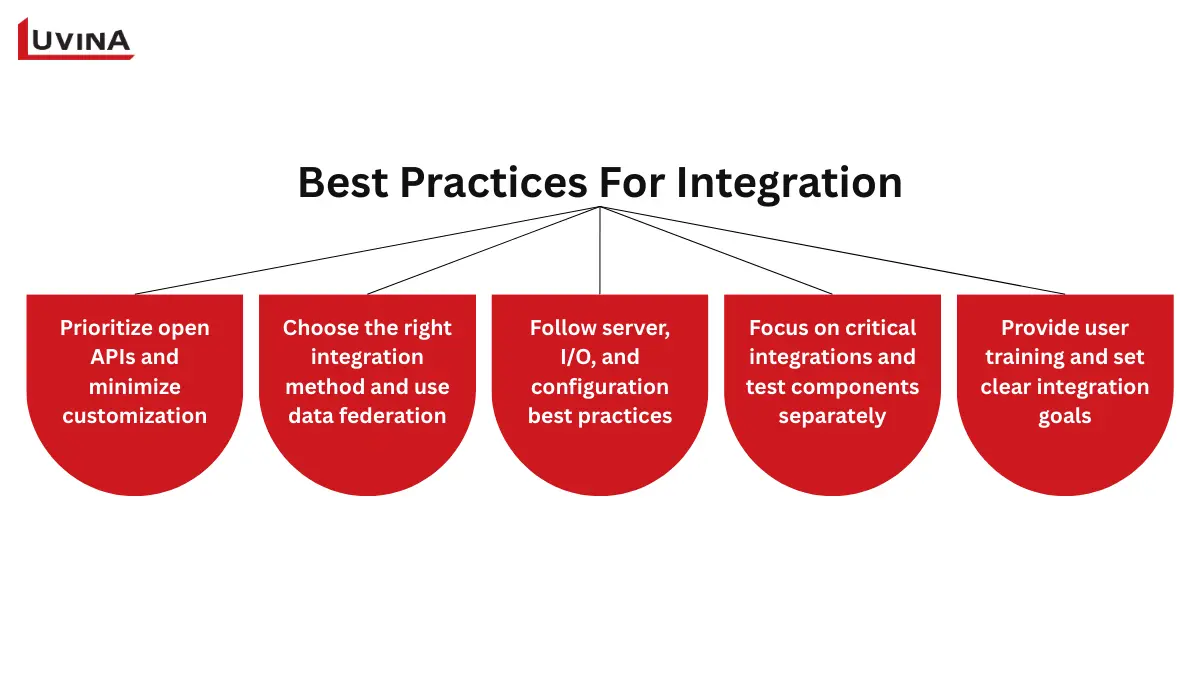
Keep these best practices in mind during integration and deployment
– Open APIs should be your primary consideration so that you can easily upgrade and maintain software in the future.
– Determine which integration method works best with each of your external systems.
– Use data federation services when possible to eliminate custom coding and make it easier to access data from multiple sources.
– Separate components when testing to obtain accurate and consistent results.
– Adhere to best practices related to server configuration and I/O to meet ARAS PLM server requirements.
– Limit the extent to which you customize your systems to improve scalability and interoperability.
– Concentrate on the most critical integrations first; they will support your most important business activities.
– Implement strong configuration management processes that enable you to manage your systems, products, and processes effectively.
– Enable users to adopt your systems by offering training for both administrators and end-users.
– Establish clear objectives that will inform the integration process and minimize reliance on manual processes.
Checklist for Outsourcing Partner
Selecting the right outsourcing partner is crucial for a successful Aras Innovator deployment. Use this simple checklist to make sure the partner can handle your project and follow ARAS PLM server requirements:
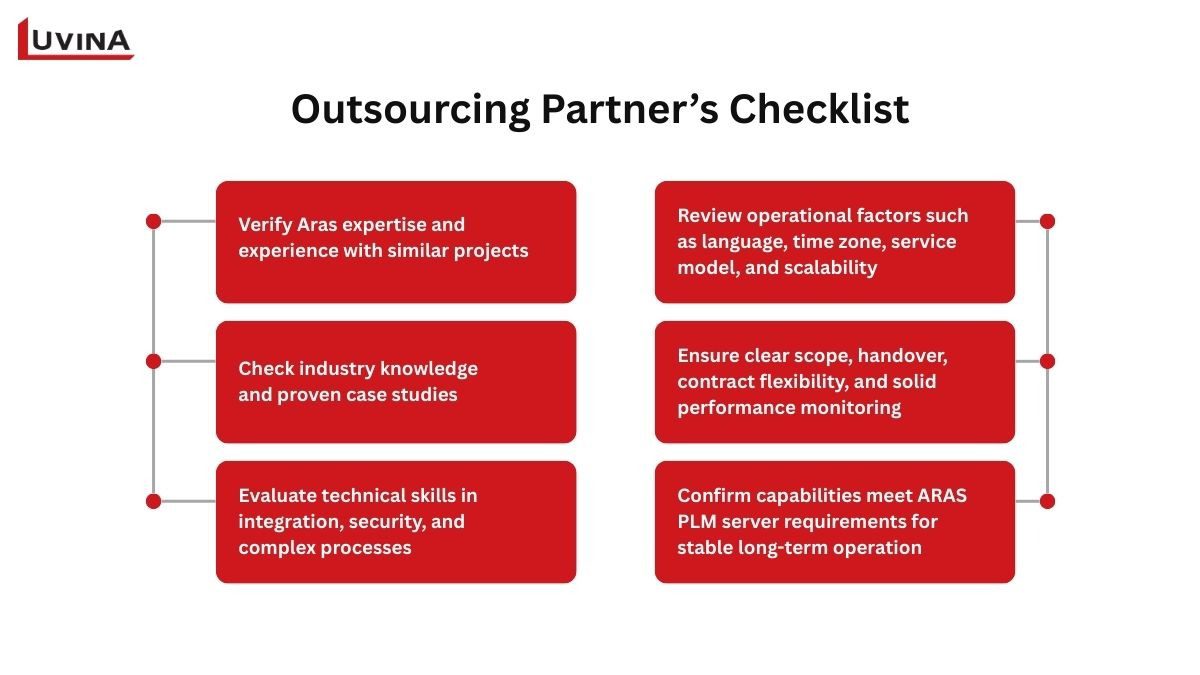
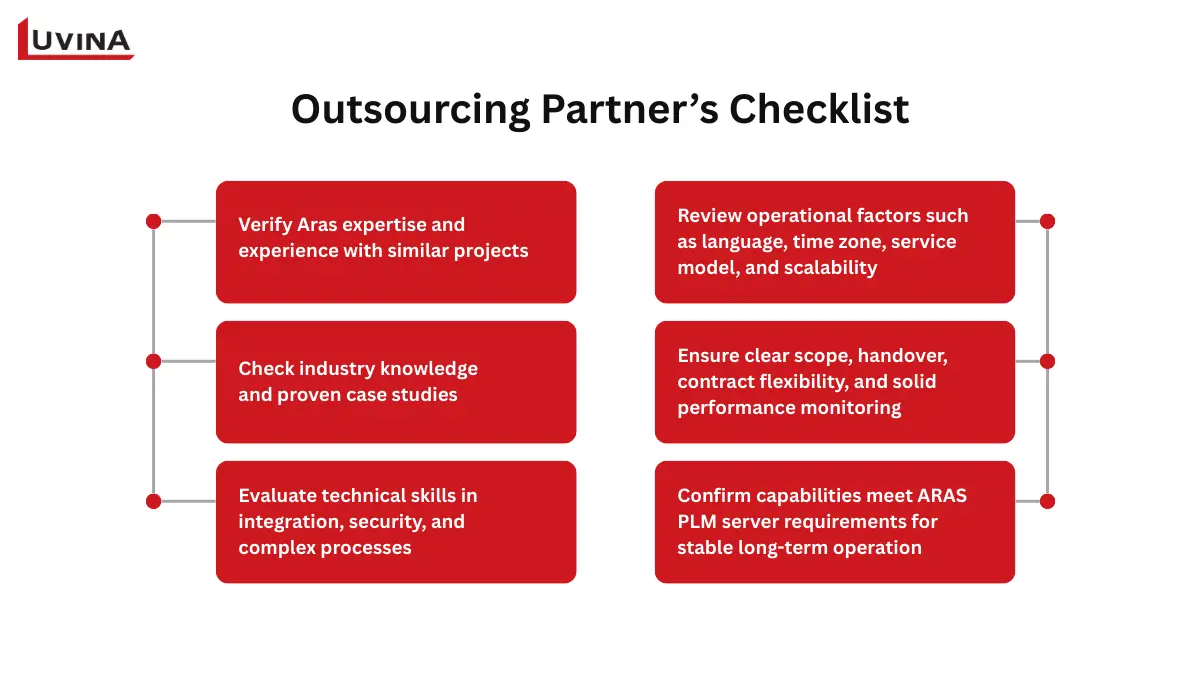
Some important notes when choosing an outsourcing partner
– Verify the partner’s Aras expertise, including partnership status and experience with similar implementations. For example, Luvina Software is a certificated partner in the Asia Pacific region of Aras Innovator with strong experience working with manufacturing and engineering enterprises.
– Assess their knowledge of your industry and review relevant success stories or case studies implementing ARAS PLM in reality.
– Assess technical features including integration, security, data transfer, and sophisticated process handling.
– Check operational variables including language support, time zone coverage, service models, and scalability relative to your company.
– Check for cultural and communication fit, which includes methods, quality assurance, emergency procedures, and openness.
– Establish a precise project scope with all deliverables, success criteria, and anticipated adaptations.
– Include project goals, milestones, system access, and essential contacts in a thorough knowledge transfer and handover plan.
– Review contractual agreements to guarantee flexibility, clearly defined SLAs, and obligations without pointless lock-ins.
– Create performance measurement techniques including scorecards, indicators, and corrective action procedures as needed.
– Ensure the partner’s capabilities align with ARAS PLM server requirements to guarantee system reliability, scalability, and long-term success.
Conclusion
The information we have provided covers ARAS PLM server requirements. Learning about these points will enable an organization to leverage the full capabilities of Aras Innovator, resulting in the construction of a stable, efficient solution customised to the organization’s requirements.
Another key factor for the successful implementation of an Aras PLM project is the choice of the appropriate software development partner. As an experienced IT outsourcing company with more than 20 years of experience and over 750 skilled developers who have completed numerous Aras PLM implementations, Luvina will ensure all of the necessary elements of the outsourcing “checklist” are met: to include Aras expertise, knowledge of the industry, technical capability, ability to scale, cultural and communication compatibility, and project management experience from scope to handoff.
If you would like to learn more about deploying the right Aras PLM and ERP solution for your organization, please contact Luvina today.
Resources
- https://www.aras.com/community/documentationlibrary/Test-Automation-Framework/1-48/Content/Test%20Automation%20Framework/Installation%20Guide/Software%20and%20Hardware%20Requirements.htm
- https://aras.com/wp-content/uploads/2024/06/Aras-Innovator-2024-Release-Installation-Guide.pdf
- https://aras.com/wp-content/uploads/2024/06/Aras-Innovator-2024-Release-Platform-Specifications.pdf
- https://aras.com/fr-fr/blog/the-results-are-in-aras-scales-to-1-million-users#:~:text=%E2%80%9CAras%20Innovator%20with%20SQL%20Server,test%20details%2C%20scenarios%20and%20analysis.
- https://aras.com/wp-content/uploads/2024/04/REPORT-Aras-Database-Server-Configuration-Best-Practices-for-Aras-Innovator-10.pdf?%3F%3F%3Futm_source=press%20release
https://aras.com/en/interoperability
READY TO START A PROJECT?
Our experts are eager to explore your needs.

Read More From Us?
Sign up for our newsletter
Read More From Us?
Sign up for our newsletter