




How Does RPA Work to Automate Workflows?


Every day, employees spend hours copying data, updating spreadsheets, moving files between systems, and handling repetitive admin work. It may look simple, but these small tasks quietly slow down entire business operations. So, how does RPA work to solve this problem? Instead of replacing people, Robotic Process Automation (RPA) uses software bots to handle rule-based tasks automatically, helping teams work faster and with fewer errors.
In this article, we will break down how RPA works behind the scenes, how software bots automate workflows step by step, and why more companies are using RPA to streamline operations across different industries.
How Does RPA Work?
Robotic Process Automation (RPA) is a technology that uses software bots to automate repetitive, rule-based tasks across digital systems and applications. Instead of replacing existing software, RPA mimics human interactions such as clicking, typing, copying data, and moving information between systems.
If you want to understand the fundamentals of the technology before exploring the workflow in detail, read our guide on What Is RPA?
RPA works by using software bots to imitate the way humans interact with digital systems. These bots can log into applications, copy and paste information, extract data, fill out forms, move files, or complete other repetitive tasks based on predefined rules.
To better understand how does RPA work, think of an RPA bot as a digital worker trained to follow instructions without interruption. A simple RPA bot workflow often follows this structure: record the human actions, define the workflow logic, test the automation, and deploy the bot into daily operations. For example, a bot can automatically open an invoice email, extract the required information, enter the data into an ERP system, and send a confirmation message without human intervention.
One of RPA’s biggest advantages is its ability to work across multiple systems, including legacy software that may not support modern integrations. RPA combines front-end UI interactions with APIs and back-end connections when needed, allowing bots to move data between unrelated applications smoothly. This is also one of the major differences in the discussion of RPA vs. traditional automation. Traditional automation scripts often depend more heavily on APIs, backend integrations, or custom coding.
The RPA Bot Lifecycle
Building an RPA bot is not simply about recording clicks and launching automation. Behind every successful deployment is a structured lifecycle that helps businesses identify the right processes, design efficient workflows, test automation reliability, and continuously improve performance over time. Understanding each stage also helps clarify how does RPA work in real business environments, where automation must operate accurately across multiple systems and changing workflows.
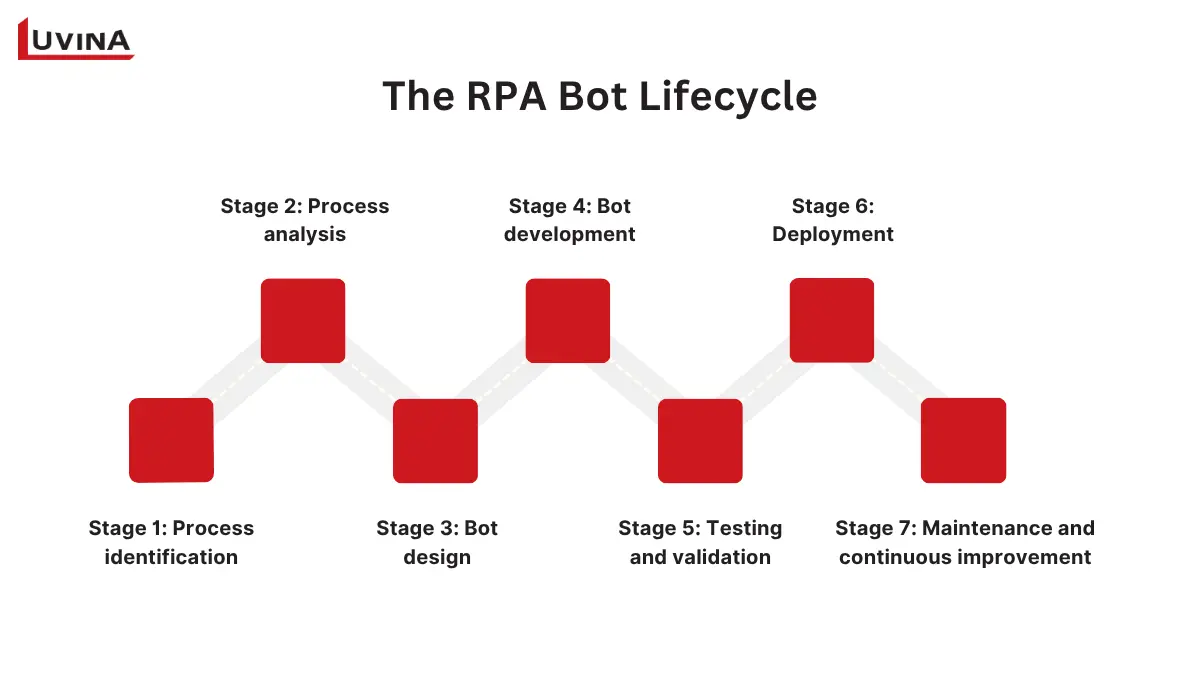
7 stages in the RPA lifecycle
Stage 1: Process identification
The lifecycle begins by identifying tasks that are suitable for automation. Businesses usually focus on high-volume, repetitive, and rule-based processes with structured data. Common examples include data entry, invoice processing, report generation, and file transfers.
To uncover automation opportunities, organizations often use process discovery, task mining, or process mining tools. These technologies analyze employee activities and workflow patterns to surface processes that consume large amounts of manual effort. At this stage, the goal is to find automation candidates that can deliver clear efficiency gains with minimal complexity.
Stage 2: Process analysis
After identifying potential automation candidates, teams move into detailed process analysis. Here, process architects examine the current workflow step by step, including decision points, dependencies, and exception scenarios. The “as-is” process is typically mapped visually to better understand how work moves across systems and users.
This stage also evaluates whether the workflow is technically feasible for automation and what business value it can generate. Teams gather operational requirements, identify bottlenecks, and estimate automation complexity before moving forward. For companies exploring how does RPA work beyond simple task automation, this phase is essential because it defines how bots will interact with real-world business processes.
Stage 3: Bot design
Once the analysis is complete, the bot design phase begins. Process architects and technical architects work together to create the workflow structure, define automation logic, and plan error-handling methods.
At this point, teams often create a Process Definition Document (PDD), which outlines every step the bot must follow. The PDD helps visualize the workflow in detail, including user actions, system interactions, business rules, and required tools. It also ensures alignment between automation goals and the organization’s broader digital transformation strategy.
This design stage determines which automation platforms, operating systems, and orchestration environments will support the digital workforce before development officially starts.
Stage 4: Bot development
During development, the automation workflow is translated into executable bot instructions. Developers review the PDD and create a Solution Design Document (SDD), which defines the future “to-be” automated process.
Using RPA tools, developers can either record user actions or hand-code workflows directly. They configure selectors, add business logic, define triggers, and build exception-handling scenarios to ensure the bot operates reliably. The final result is a software bot capable of completing tasks autonomously across different applications.
For many organizations, learning how does RPA work in practice, this is the stage where automation becomes visible. Human workflows are converted into repeatable digital actions that bots can execute consistently and at scale.
Stage 5: Testing and validation
This phase ensures the automation performs correctly under different scenarios and business conditions. Testing usually includes unit testing, integration testing, system testing, and user acceptance testing (UAT). Bots are first tested in pre-production environments to identify errors, performance issues, or workflow failures. If problems appear, the automation returns to the development stage for adjustments before testing resumes.
This validation process is critical because even small workflow errors can affect downstream business operations.
Stage 6: Deployment
After successful testing, the bot is deployed into production through centralized orchestration tools. Businesses can schedule bots to run at fixed times or trigger automation automatically based on events, such as incoming emails or newly uploaded files.
Once live, the digital workforce operates under the supervision of process controllers and automation teams. Many organizations implement a temporary “hyper-care” period immediately after deployment, where teams closely monitor bot performance and resolve early-stage issues quickly.
At this point, businesses gain a clearer picture of how does RPA work at scale. Bots begin interacting with multiple systems simultaneously, executing workflows continuously while reducing manual workload for employees. Communication channels, SLAs, and IT support structures are also established to maintain operational stability.
Stage 7: Maintenance and continuous improvement
Because bots depend heavily on application interfaces and system structures, even small UI changes can break automation workflows. Maintenance activities may include updating selectors, adjusting workflow logic, troubleshooting errors, or optimizing performance based on operational feedback.
Organizations also use monitoring tools to track bot efficiency, downtime, and ROI over time. Proactive change management plays an important role here, helping teams anticipate system changes before they disrupt automation processes.
RPA Architectures
Most RPA solutions follow a similar structure that connects workflow design tools, software bots, orchestration systems, and databases into one automation ecosystem. This architecture explains how does RPA work behind the scenes when businesses automate workflows across multiple systems and departments. The table below summarizes the key components commonly found in an RPA process flow enterprise architecture.
| Component | Main function | Key capabilities |
| Studio/ Designer | Builds automation workflows | Low-code designer, recorder, debugger, OCR support, drag-and-drop activities, reusable components |
| Robot/ Bot Runner | Executes automation tasks | Runs workflows on desktops, VMs, or containers; handles UI interactions, APIs, logs, and task execution |
| Orchestrator/ Control room | Manages and monitors bots centrally | Deployment, scheduling, monitoring, credential vault, queues, analytics, workload distribution |
| Database layer | Stores automation data | Keeps logs, queue items, configurations, execution history, and audit records |
Understand how does RPA work through its architecture
Major RPA vendors generally follow this same architecture with slightly different product names. For example, UiPath uses UiPath Studio, UiPath Robots, and UiPath Orchestrator as its three core components.
How A Bot “Reads” And “Interacts” With Applications: Selectors & OCR
For an RPA bot to automate tasks successfully, it first needs to understand what appears on the screen and where it should interact. This is one of the most important concepts behind how does RPA work in real business environments. Depending on the application type, bots may use selectors, OCR, image recognition, or other methods to locate buttons, fields, menus, and text inside digital systems.
Selectors: How bots identify UI elements
Selectors act like digital addresses that help bots locate specific user interface (UI) elements inside an application. Instead of visually scanning the screen like humans, the bot reads the underlying structure of the application and identifies elements through attributes such as IDs, names, classes, or XML paths. Different selector methods are used depending on the environment:
| Selector type | How does it work? | Use cases |
| CSS selector | Reads HTML and CSS structures to identify elements quickly | Best for modern web applications, where how does RPA work depends on stable UI structures |
| XPath | Navigates XML or DOM structures to locate elements | Useful for dynamic or complex web interfaces |
| Accessibility tree | Reads accessibility metadata from applications | Commonly used for desktop apps, VMs, and systems without a DOM |
| Image recognition | Detects visual patterns directly from the screen | Used when selectors become unstable or unavailable |
| Coordinates | Interacts based on fixed screen positions | Last-resort fallback method for unstable environments |
Information about several types of selectors
Among these methods, CSS selectors are usually preferred because they are lightweight, fast, and reliable for web automation. XPath provides more flexibility but can become heavier in large or highly dynamic interfaces. Accessibility trees are especially important in desktop environments where HTML structures do not exist.
Understanding these selector strategies helps explain how robotic process automation executes tasks with high speed and precision.
OCR: How bots read visual content
In some environments, bots cannot access application structures directly. This often happens in Citrix environments, virtual desktops, remote desktop sessions, or legacy software systems. In these cases, bots rely on OCR (Optical Character Recognition) and Computer Vision AI technologies.
OCR converts visible text on the screen into machine-readable data, while Computer Vision AI goes further by understanding the visual layout of applications like a human user. This approach is especially useful when traditional selectors fail or when applications run inside virtualized environments where UI metadata is inaccessible. It also expands how does RPA work in modern automation scenarios that involve dynamic interfaces, remote desktops, or image-heavy applications.
Compared to selectors, OCR and Computer Vision AI are usually slower and more resource-intensive because they rely on image processing and AI models. Performance can also be affected by screen resolution, font changes, display scaling, or unstable UI layouts. However, they provide much greater flexibility for automating environments where direct UI interaction is impossible.
OCR vs screen scraping
Although OCR and screen scraping are often grouped, they function differently.
OCR extracts text from screenshots or visual images using computer vision technology. Screen scraping, meanwhile, reads data directly from UI elements or DOM structures when the application allows access. Because it works with structured interface data instead of image pixels, screen scraping is usually faster and more accurate.
For businesses evaluating how does RPA work across different software environments, understanding this difference is important when selecting the right automation approach.
Modern RPA platforms rarely rely on only one detection method. Instead, they use a layered fallback strategy to improve automation reliability across multiple systems and environments.
A common detection hierarchy looks like this:
CSS → XPath → Accessibility → OCR → Image recognition → Coordinates
Bots first attempt to use stable selectors because they provide the fastest and most reliable interactions. If selectors fail, the automation falls back to OCR, image recognition, or coordinate-based methods. Coordinate automation is typically used only as a last resort because even small UI changes can break the workflow. This layered strategy gives businesses a much clearer understanding of how does RPA work at scale.
Queues & Exception Handling: The Control Plane Most Articles Skip
Most articles explain how bots automate tasks, but large-scale RPA depends heavily on the control plane behind the automation. This is where queues, retries, exception handling, and Human-In-The-Loop workflows keep operations running reliably across enterprise environments.
Queues help distribute work items dynamically across multiple bots instead of processing everything sequentially. This improves scalability, workload balancing, and processing speed. A typical queue lifecycle looks like this:
New → In progress → Completed/ Failed/ Retried
Retry logic is commonly used for temporary system failures such as timeouts, disconnected applications, or unstable infrastructure. If processing still fails after several attempts, the item can be escalated for manual review.
Enterprise RPA platforms also separate system exceptions from business exceptions because each requires a different response path. System exceptions are technical issues that may succeed after retrying, while business exceptions are caused by invalid data or failed business rules and usually require human intervention instead of repeated execution attempts.
Human-In-The-Loop (HITL) workflows are another important layer in modern automation. When bots cannot continue safely, they can assign tasks to employees for validation, correction, or approval before resuming the workflow automatically.
For businesses exploring how does RPA work in enterprise environments, orchestration and exception handling are just as important as the automation logic itself.
Attended vs Unattended vs Hybrid RPA: A Decision Framework
Not all RPA deployments operate the same way. Some bots work directly alongside employees, while others run fully autonomously in the background. Choosing the right model depends on how much human involvement the workflow requires, how processes are triggered, and how critical real-time decision-making is. Understanding these differences also gives businesses a clearer view of how does RPA work across front-office and back-office operations.
The table below provides an RPA attended vs unattended overview for the three main deployment models.
| Model | How it works | Trigger type | Runtime environment | Use case | Governance and cost |
| Attended RPA | Bots work alongside employees in real time | Manually triggered by users | Employee desktop | Contact centers, customer support, and real-time assistance | Lower infrastructure complexity, but harder to scale |
| Unattended RPA | Bots run autonomously without human involvement | Scheduled or event-triggered | Servers, VMs, cloud environments | Invoice processing, payments, and overnight batch operations | Higher scalability, centralized governance, 24/7 operations |
| Hybrid RPA | Combines attended and unattended automation | Both manual and automated triggers | Mixed environments | Claims processing, exception-heavy workflows | Balances scalability with human decision-making |
Comparison table of attended, unattended, and hybrid RPA
RPA is commonly used in front-office environments where employees need real-time support during customer interactions. Unattended RPA, meanwhile, focuses on fully autonomous execution. This model is widely used for back-office operations such as invoice posting, inventory updates, payment processing, and report generation. For businesses evaluating how does RPA work at enterprise scale, unattended bots are often the foundation for high-volume automation.
Many enterprises now combine both models into hybrid automation environments. In a hybrid workflow, unattended bots handle repetitive processing steps while attended bots or human employees manage exceptions, approvals, or customer-facing interactions. For example, an insurance claims workflow may automatically process standard claims overnight while routing unclear cases to employees for manual review before automation resumes.
This hybrid approach has become increasingly common because it combines the scalability of automation with human oversight. Rather than replacing employees entirely, hybrid RPA creates a collaborative workflow in which humans and digital workers work together more efficiently. As organizations continue expanding intelligent automation strategies, hybrid deployments provide another strong example of how does RPA work beyond isolated task automation.
Use Cases
Real-world applications also make it easier to understand how does RPA work when automation moves beyond simple data entry into larger operational workflows.
Invoice processing
Invoice processing is one of the most common RPA use cases in finance operations. Bots can monitor incoming emails, extract invoice information using IDP and OCR technologies, validate data against purchase orders, and push transactions into orchestrator queues for processing.
Once verified, the bot posts the invoice directly into the ERP system. If issues such as missing fields or mismatched amounts appear, the workflow automatically routes the transaction to a human employee for review instead of stopping the entire process. This workflow is a practical example of how does RPA work across finance systems that normally require heavy manual coordination.
Insurance claims processing
Insurance companies use RPA to automate rule-based claims handling processes. Bots can validate claim information, review supporting documents, and apply predefined business rules to decide whether a claim should be approved, escalated, or rejected.
Straightforward claims can move through the workflow automatically, while more complex or exception-based cases are transferred to human reviewers for manual assessment. This hybrid approach helps insurers process higher claim volumes more efficiently while maintaining compliance and decision accuracy.
Employee onboarding
Employee onboarding often requires HR teams to work across multiple systems manually, including Active Directory, email platforms, HRIS software, and expense management tools.
RPA automates these repetitive setup tasks by creating accounts, assigning permissions, generating onboarding documents, and triggering notifications automatically. In some organizations, automation has reduced onboarding cycles from 8–12 weeks to significantly shorter timelines while improving process consistency.
For businesses exploring how does RPA work across departments, onboarding workflows demonstrate how bots can coordinate activities between several enterprise systems simultaneously.
Logistics and supply chain operations
RPA is also widely used in logistics and supply chain operations where businesses manage large amounts of transactional data across multiple platforms.
Bots can automate shipment tracking, inventory updates, order validation, and status synchronization between systems. In some logistics workflows, processes that previously required 6–8 weeks were reduced to only 2–3 hours after automation deployment.
Many enterprises start with small automation pilots before scaling toward intelligent automation and AI-driven workflows.
Luvina helps businesses assess automation readiness, identify high-ROI processes, and build scalable RPA solutions across enterprise systems.
RPA vs Other Technologies
Different automation technologies solve different business problems. Some focus on backend integrations, some specialize in document understanding, while others automate user interactions directly through the interface. Comparing these technologies side by side makes it easier to understand how does RPA work within a modern enterprise automation stack.
| Comparison | RPA | Other technology | Best fit |
| RPA vs API | Works through the UI by mimicking human actions | APIs connect directly to backend systems | RPA fits legacy systems; APIs fit modern applications |
| RPA vs custom development | Faster deployment with low-code tools | Higher flexibility but longer implementation time | RPA is better for rapid workflow automation |
| RPA vs macros/scripts | Includes orchestration, governance, logging, and audit trails | Usually limited to isolated task automation | RPA scales better for enterprise operations |
| RPA vs IDP | Executes workflows and system actions | Extracts and understands document data | IDP reads documents; RPA processes the next actions |
| RPA vs AI agents | Rule-based execution with predefined logic | AI-driven reasoning and dynamic decision-making | RPA handles repetitive execution; AI agents handle adaptive workflows |
Pros and cons of RPA compared to other automation technologies
One important takeaway is that these technologies are increasingly used together instead of replacing one another. In many enterprise environments, APIs manage backend integrations, IDP extracts information from documents, AI agents handle reasoning tasks, and RPA bots execute actions across applications and systems.
This hybrid approach gives organizations a more complete picture of how does RPA work in modern automation ecosystems. Rather than operating as a standalone tool, RPA often serves as the execution layer that connects AI, document intelligence, APIs, and enterprise workflows into a unified automation process.
The Future Of Agentic Automation
AI agents are not replacing RPA. Instead, RPA is evolving into the execution layer that carries out tasks across enterprise systems while AI handles reasoning and decision-making. This shift is changing how does RPA work in modern automation environments.
A common enterprise pattern today is:
IDP → AI reasoning → RPA execution
For example, in invoice exception handling, IDP extracts invoice data, AI analyzes mismatches or unusual cases, and RPA bots update ERP systems, route approvals, or trigger notifications automatically.
The RPA bot workflow explained today is no longer limited to simple rule-based tasks. Modern automation combines AI agents, document intelligence, low-code RPA studios, and Human-In-The-Loop workflows into one connected ecosystem.
As automation becomes more autonomous, governance is becoming increasingly important. Organizations now need audit trails, approval controls, and human oversight to manage AI-driven decisions safely. This evolution provides another clear example of how does RPA work beyond traditional task automation.
Implementing RPA: Roadmap And CoE Governance
Successful RPA implementation requires more than building bots. Organizations also need governance models, security controls, approval processes, and operational ownership to scale automation safely. This operational structure plays a major role in how does RPA work effectively across enterprise environments.
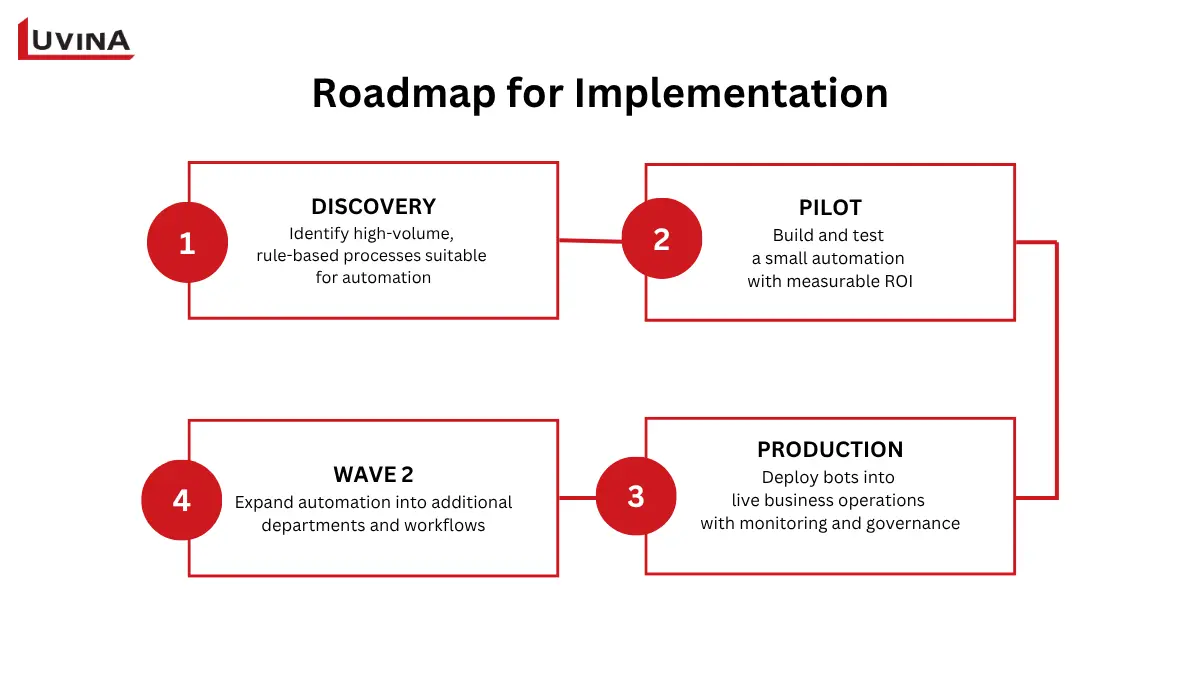
Key stages in the RPA implementation process
– Discovery phase: Identify high-volume, rule-based processes suitable for automation
– Pilot phase: Build and test a small automation with measurable ROI
– Production phase: Deploy bots into live business operations with monitoring and governance
– Wave 2 scaling phase: Expand automation into additional departments and workflows
As automation expands, many organizations establish a Center of Excellence (CoE) to standardize RPA governance. The CoE typically manages automation priorities, approval workflows, infrastructure standards, cost allocation, and operational support.
A mature CoE often includes several key roles:
– Business analysts to identify automation opportunities
– RPA developers to build workflows
– Solution architects to design scalable automation structures
– CoE leads to manage governance and roadmap execution
One major challenge in enterprise automation is “Shadow RPA,” where employees create unofficial bots outside centralized oversight. While these automations may solve short-term problems, they often create security risks, unstable workflows, and compliance issues because they operate without monitoring or governance controls.
Security and credential management are also critical. Enterprise RPA platforms usually store credentials inside secure vaults rather than embedding usernames and passwords directly inside workflows. This helps reduce unauthorized access risks while improving auditability and compliance.
For businesses evaluating how does RPA work at scale, governance failures are often a bigger risk than technical limitations. Many automation initiatives fail because organizations automate unstable processes, lack operational ownership, or deploy bots without long-term monitoring and change management strategies.
Measuring And Operating RPA Post-Deployment
Deploying bots is only the beginning of an RPA program. Long-term success depends on continuous monitoring, operational maintenance, and performance optimization. This operational phase gives organizations a clearer understanding of how does RPA work after automation moves into production environments.
RPA performance is usually measured using two groups of KPIs: operational and business.
| KPI type | Key metrics | Purpose |
| Operational KPIs | Bot uptime, throughput, exception rate, MTTR (Mean Time To Recovery) | Measure system stability and operational efficiency |
| Business KPIs | Cost savings, FTE capacity freed, cycle-time reduction | Measure business impact and ROI |
Key metrics for evaluating RPA performance
Operational monitoring focuses on whether bots are running reliably. High exception rates, unstable uptime, or increasing recovery times often indicate selector failures, infrastructure instability, or workflow changes inside target applications.
Business KPIs focus more on automation value. Organizations commonly track how many manual hours were eliminated, how much faster workflows operate, and how automation affects operational costs across departments.
Maintenance is another critical part of post-deployment operations. Since RPA bots depend heavily on application interfaces, even small UI updates can break selectors or workflows. Teams often need to update selectors, adjust logic, or retire obsolete bots when business processes change.
What happens when an RPA Bot Encounters an Error?
When an RPA bot encounters an error, the control plane determines how the issue should be handled based on the exception type. Temporary system exceptions — such as application crashes, network instability, or timeout issues — usually trigger retry logic so the bot can attempt the task again automatically.
Business exceptions follow a different path. These errors are caused by invalid data, missing information, or failed business rules, meaning retrying the same action will not solve the problem. In these cases, the item is often routed to a Human-In-The-Loop (HITL) workflow for manual validation or correction.
Most enterprise RPA platforms also generate logs, screenshots, and audit records whenever failures occur. This helps operations teams investigate root causes, monitor exception trends, and improve automation stability over time.
Understanding failure handling is another important part of how does RPA work in real production environments, where operational resilience matters just as much as automation speed.
FAQs
1. How does RPA work step by step?
RPA uses software bots to mimic human actions like clicking, typing, and moving data between systems to automate repetitive, rule-based tasks.
2. What is the difference between attended and unattended RPA?
Attended RPA works alongside employees and requires manual triggers, while unattended RPA runs automatically in the background without human involvement.
3. What does the orchestrator do in RPA?
The orchestrator is the central control platform that schedules, monitors, manages, and secures RPA bots and workflows.
4. Can RPA integrate with legacy systems?
Yes. RPA can automate legacy systems through the user interface without requiring major backend changes or API integrations.
5. Does RPA use APIs or UIs to interact with applications?
RPA mainly interacts through UIs like a human user, but modern platforms can also use APIs for faster and more stable automation.
6. How are OCR and screen scraping different?
OCR converts images into readable text, while screen scraping extracts data directly from the UI or displayed screen elements.
7. Why do some RPA projects fail?
Common causes include automating unstable processes, unclear goals, weak governance, and poor maintenance planning.
8. Can RPA replace AI agents?
No. RPA handles structured, rule-based tasks, while AI agents focus on reasoning, decision-making, and unstructured workflows.
9. What skills are needed to build an RPA bot?
RPA development typically requires process analysis, workflow design, automation logic, and basic technical or low-code platform skills.
10. Is RPA secure? What are the most common security risks?
RPA can be secure with proper governance, but risks include credential exposure, unauthorized bot access, and poor monitoring controls.
11. Can RPA work without APIs?
Yes. RPA was explicitly designed to work without APIs.
12. Does RPA require coding?
No. Most modern RPA platforms use low-code or no-code visual interfaces.
Conclusion
Modern RPA is no longer limited to simple task automation. Today, enterprise automation combines RPA, AI agents, OCR, APIs, and orchestration platforms into connected intelligent workflows. While AI handles reasoning and decision-making, RPA remains the operational layer that executes actions across enterprise systems reliably and at scale.
Ready to scale automation effectively? Partner with Luvina to build the right RPA roadmap for your business.
Resources
- https://www.ibm.com/think/topics/rpa
- https://cloud.google.com/discover/what-is-robotic-process-automation
- https://www.theknowledgeacademy.com/blog/rpa-architecture/
- https://www.techtarget.com/searchcio/tip/RPA-bots-Unattended-vs-attended-vs-hybrid
- https://www.blueprism.com/resources/blog/attended-vs-unattended-rpa/
READY TO START A PROJECT?
Our experts are eager to explore your needs.

Read More From Us?
Sign up for our newsletter
Read More From Us?
Sign up for our newsletter