




Managed Operations: What You Actually Get Beyond Support


Managed operations is an ongoing operating model built around ownership, monitoring, maintenance and continuous improvement, not just ticket resolution. The difference shows up on the day something breaks quietly.
Illustrative scenario, not a reported client result. Everything was green on the support report. Every ticket closed on time. The customer still could not check out, and nobody on the vendor side had noticed, because nobody had raised a ticket.
Gaps like this cost real money. In PagerDuty’s 2026 State of AI-First Operations survey asked 1,000 senior business, IT and development leaders about incident costs. 68% said a major IT incident costs their organization more than $300,000 per hour.
This article explains what you get beyond support, and seven questions to ask any provider before you sign.
Support and Managed Operations: What Is Different?
Support responds to problems that users report. That works only as long as users notice the problem first. Managed operations takes responsibility for the outcome, including problems nobody has reported yet.
The table puts the two models side by side. The biggest gap is in the first row: one model waits for a user to notice, the other looks first.
| Dimension | Ticket-based support | Managed operations |
| Starts when | A user reports a problem | Monitoring detects it before users do |
| Who owns it | Whoever handles the ticket | One party owns the outcome of the application or service |
| Maintenance | When requested | On a schedule (patches, updates) |
| Improvement | Outside scope | Part of the contract |
| Reporting | Ticket counts, response times | System health, repeat incidents, improvements made |
| Measure of success | Tickets closed fast | Fewer incidents, more stability |
How ticket-based support and managed operations differ across six dimensions
Ticket volume is a poor health check. In the same Splunk survey, 90% of technology leaders reported higher demand for customer support after an incident. A rising ticket count tells you something already failed. A quiet queue proves nothing either, as the opening scenario shows.
Support still has a job. A service desk that handles user requests stays useful, and managed operations adds the ownership, monitoring and scheduled care around it.
The Four Things You Actually Get
Managed operations comes down to four things: ownership, monitoring, maintenance and continuous improvement. Each one covers a gap that ticket-based support leaves open.
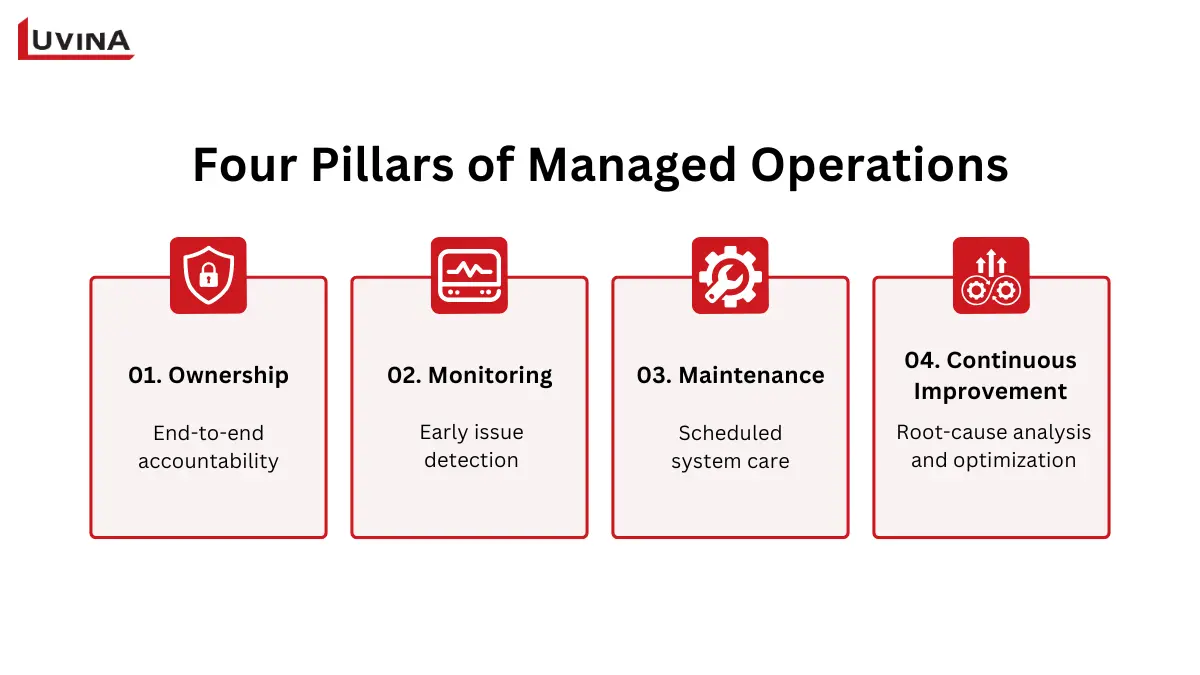
1. Ownership: Someone Owns the Outcome
The symptom: Something breaks, and three teams spend a day deciding whose problem it is.
What you get:
- One party owns the issue from detection to fix
- That ownership holds even when the fault sits between systems, where handoffs usually fail
Example (Illustrative scenario, not a reported client result): Payments fail between an ERP and a payment gateway. The ERP team says its logs are clean. The gateway provider says the transactions never arrived. With an owner in place, one person traces the full path and stays on it until customers can pay again.
Ask your provider: “Who owns an issue end to end when it spans several systems?”
2. Monitoring: Problems Found Before Users Find Them
The symptom: Your users are the first alarm.
What you get:
- Monitoring of the indicators that matter
- Alerts that reach the right person
- A reaction before users feel the impact
- A measurable reliability target, which engineers call a service level objective (SLO). The idea comes from Google’s SRE book.
Why detection speed matters: The same survey found that Global 2000 organizations face about 60 disruptions a year on average, and human error is the main source. When incidents are routine, finding them before customers do counts for more than hoping to avoid them.
Example (Illustrative scenario, not a reported client result): A security certificate is days from expiring. An alert reaches the named owner, who renews it the same afternoon. Without the alert, every customer would have seen a browser warning.
Ask your provider: “What do you monitor, and who is alerted at 2 a.m.?”
3. Maintenance: Routine Care, on Schedule
The symptom: A system gets ignored until it fails.
What you get:
- Patching, updates and housekeeping on a calendar
- The same care for older systems that nobody wants to touch
- The planned side of software maintenance, so fewer fixes arrive as emergencies
Real case: Luvina’s IT managed services case for a Japanese logistics company shows what scheduled care looks like on an older system:
- System: COBOL and DB2, maintained by Luvina since 2022
- Work: updates, security patches, bug fixes, changes driven by new business or regulatory needs
- Result: nearly 50 functions with no design specifications are now documented, which matters when COBOL skills are hard to find
Ask your provider: “What is patched and updated on a schedule, and what waits for a ticket?”
4. Continuous Improvement: The Part Support Contracts Skip
The symptom: The same fault comes back every quarter.
What you get:
- Root-cause analysis on repeat incidents
- An improvement list instead of repeated workarounds
- Regular reviews where you and your provider agree on priorities
Why root cause matters: In the same Splunk survey, only 38% of technology executives said their organizations consistently identify the root cause of a downtime incident. Without it, a fix may only treat the symptoms, and the fault can return.
Real case: Luvina’s ERP operations case for a global travel agency shows how a dedicated performance team turns improvement work into fewer support requests:
- System: a Dynamics AX 2012 R2 ERP used across APAC, Europe and the US, supported by Luvina since 2017
- Setup: a helpdesk team for branch requests, and a performance team that monitors, advises and carries out optimizations
- Result: performance-related support requests dropped by 90% after the optimizations. Fewer tickets, not just faster ones
Ask your provider: “How do recurring issues turn into fixes, and who decides priority?”
What a Month Looks Like
A month of managed operations is mostly quiet work that users never see. Here is how it might run for one business-critical application.
Illustrative scenario, not a reported client result.
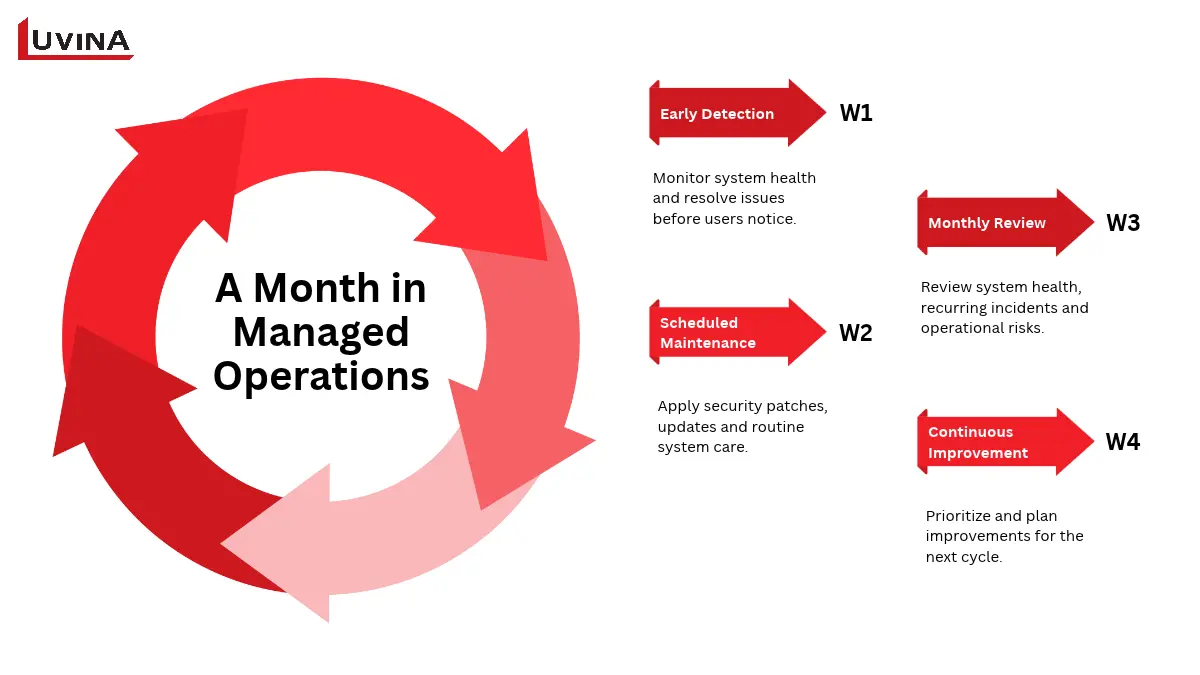
- Week 1: An alert is handled before anyone notices. Monitoring flags a slow database query on a Tuesday night. The on-call engineer fixes it before the morning shift starts. No user opens a ticket, so nothing appears in the support report.
- Week 2: A scheduled patch window. Security patches and updates go in during an agreed low-traffic slot. The business knows the date in advance, and nobody scrambles on a Friday afternoon.
- Week 3: The monthly review. You and your provider go through system health, incidents that came back and open risks. The conversation is about the system, not about ticket counts.
- Week 4: One improvement is chosen. A repeat issue from the review becomes a planned fix, with an owner and a place in the next cycle.
How to Tell Whether It Is Working
The best way to judge managed operations is by outcomes, not ticket counts. A service level agreement (SLA) is the written set of targets you and your provider agree on, and four measures show whether the work is meeting them:
- Availability against the agreed target: is the application up as often as the SLA says it should be?
- Repeat incident rate: do the same faults keep coming back?
- Time to detect versus time to resolve: who found the problem first, and how long did the fix take?
- Improvements completed: how many items from the improvement list were actually delivered?
If your provider can show these four, you can see the state of the system. If it can only show tickets closed, you cannot.
Reporting against an SLA is one place this becomes concrete. For a client in Japan, Luvina took full responsibility for producing the cloud operation and maintenance reports delivered to the end user. Every report met the SLA criteria for quality and on-time delivery. The scope covered the reporting only, not the cloud environment itself. Details are in this cloud operations reporting case with SLA compliance.
When You Do Not Need Managed Operations
Not every application needs managed operations. A small internal tool that rarely changes, holds low-risk data and has run quietly for years is usually fine with ticket-based support. Paying for ownership, monitoring and scheduled improvement on a system like that is money with little to show for it.
The picture changes when the application starts to matter more. Watch for these signs:
- Changes arrive more often, and each one carries risk
- New integrations tie the system to other applications
- The same incidents keep coming back
- The one person who really understands the system is about to leave
One of these signs is a reason to look again. Two or more usually mean ticket-based support is no longer enough.
Seven Questions to Ask Any Provider
These seven questions show quickly whether a provider owns outcomes or only closes tickets.
| Question | What a good answer sounds like |
| 1. Who owns an issue end-to-end? | One clear owner, even when the fault spans several systems |
| 2. What do you monitor, and who is alerted? | A specific list, with named people or roles receiving alerts |
| 3. What happens to a problem nobody has reported? | A defined way to detect and handle it without waiting for a ticket |
| 4. How do recurring issues get fixed? | Root-cause analysis, an improvement list, priorities set with you |
| 5. What do I see every month? | A report on system health, not only ticket counts |
| 6. How are changes and improvements prioritized and paid for? | A clear process with no cost surprises |
| 7. What happens if we leave? | Documentation, handover and access agreed from the start |
Seven questions to ask a provider
Pay attention to how specific the answers are. A provider that has done this before can name the owner, the alert list and the report format on the spot. If an answer stays general, the work probably is not defined yet.
How to Start
You can start with one application and one review cycle. There is no need to hand over everything on day one.
- Write down where you are today. Pull the tickets and incidents from the last few months for your most critical application. Mark which ones users reported first and which ones your own team caught.
- Define the scope and the owner. For that one application, agree on what is covered, who owns the outcome and who gets alerted. Put it in writing.
- Run it on that application only, then review. After one cycle, compare the results with step 1. Look at repeat incidents and at how many problems were found before users noticed. Then decide whether to extend.
If you want help scoping the first application, you can ask Luvina to review your current setup.
FAQs
What is the difference between managed operations and IT support?
IT support responds when a user reports a problem. Managed operations adds an owner for the outcome, monitoring that finds issues first, scheduled maintenance and a standing list of improvements.
Is managed operations the same as managed services?
Not quite. Managed services is the broad term for handing ongoing technology work to a provider. Managed operations describes how that work is run: one party owns the result, and success is measured by stability, not tickets closed. A managed services contract can follow either model.
Is managed operations just outsourcing?
No. Outsourcing describes where the work is done. Managed operations describes who is accountable for the outcome. Both can apply to the same engagement.
Can managed operations cover legacy systems?
Yes, when the provider has people who know the stack. Scheduled maintenance and monitoring matter even more for older systems, because few people inside the company may still understand them.
Conclusion
Support answers tickets, while managed operations owns the outcome. That is why one waits for a problem to be reported and the other looks for it first.
So here is a simple test for your current provider: does it report what it closed, or what it prevented?
If you are not sure of the answer, you do not need a large project to find out. Send us one critical application, and we will map who owns what today and where users find problems before anyone else does.
Resources
- https://www.splunk.com/en_us/blog/cio-office/ai-downtime-risks-resilience.html
- https://sre.google/sre-book/service-level-objectives/
- https://www.pagerduty.com/newsroom/2026-state-of-ai-first-operations/
READY TO START A PROJECT?
Our experts are eager to explore your needs.

Read More From Us?
Sign up for our newsletter
Read More From Us?
Sign up for our newsletter