




App Development Services for Small Business: A Practical Guide


App development services for small business cover the design, building, testing and ongoing upkeep of web, mobile and internal apps. A provider can take a project from a rough idea to a working product, or step in at one stage, such as testing or maintenance.
Most small-business apps fall into two groups. Customer-facing apps handle things like booking and ordering. Internal apps support the daily work behind the scenes, such as job tracking and inventory.
The right choice depends on your business problem, your users, your budget, and the tools you already use. This guide helps you decide whether to build an app at all, which route to take and how to assess a development partner.
What Are App Development Services for Small Businesses?
Business app development services are the work a provider does to turn a business need into a working web or mobile app. It covers planning, design, building, testing, release and support. Some businesses buy full packages. Others hire help for one stage only.
| Service | What it covers | What you may need to provide |
| Discovery and requirements | Workshops to define the problem, users and scope | Access to staff, current workflow, sample data |
| UX/UI design | Screen flows, prototypes, visual design | Brand assets, feedback on prototypes |
| Web or mobile development | Building the app for web, iOS, Android or a mix | Decisions on features and priorities |
| Integrations | Connecting to accounting, payment, CRM or booking tools | Account access, API details |
| Testing | Functional, device and security checks | Time for user acceptance testing |
| Deployment | Release to servers, cloud or app stores | Developer accounts, approvals |
| Maintenance and support | Fixes, updates, monitoring | A named contact and a support agreement |
Core components of an app development service
What a proposal includes varies from one provider to the next, so read the scope line by line. You also have a part to play. You will make decisions, supply content, run acceptance testing, and give user feedback. At Luvina, the deliverables are agreed with you and written into the contract. They can include source code, test reports, documentation, and compiled apps.
Does Your Small Business Need a Custom App?
Technology spending does not pay off equally for everyone. In CPA Australia’s 2026 Asia-Pacific Small Business Survey, 68% of Singapore small businesses said their 2025 technology investment improved profitability. In Australia, only 30% said the same. The survey does not explain this difference, but it highlights why businesses should look beyond adopting technology and focus on the problem they need to solve. Before investing in an app, define that problem, then consider the most suitable solution.
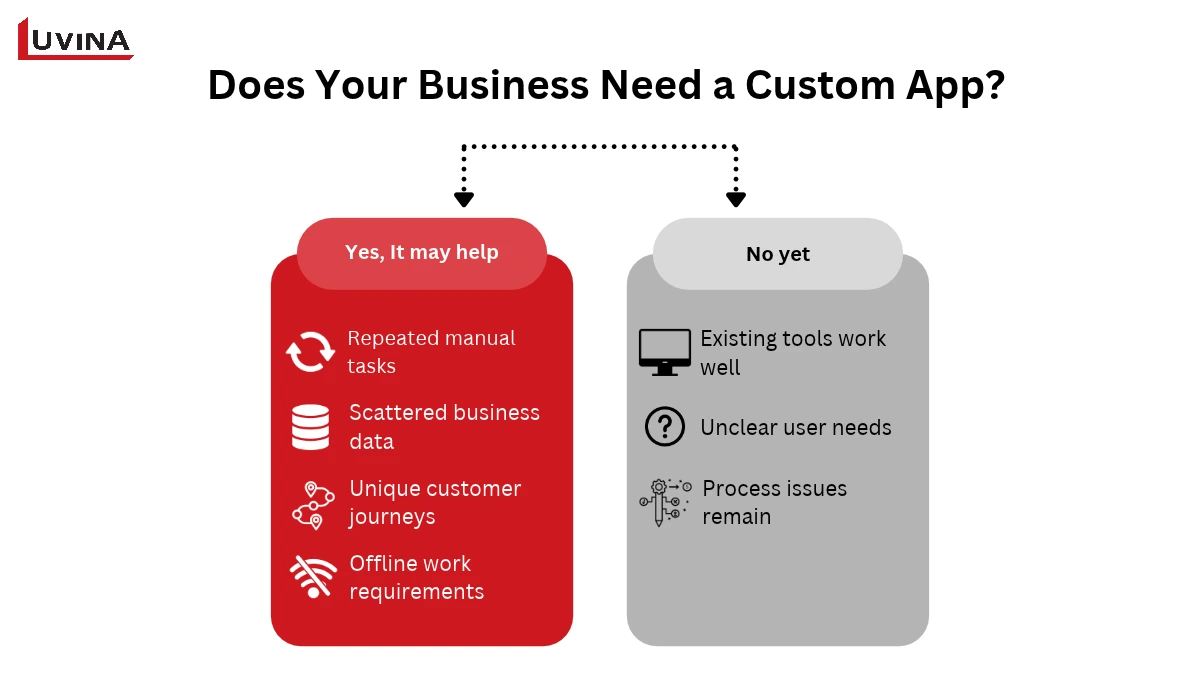
Signs a custom app may help
- Repeated manual tasks every day, such as retyping orders from email into a spreadsheet
- Data scattered across files and tools, so no one has the full picture of a customer or a job
- A customer journey that existing tools do not serve
- Field work or offline use, where staff need the app without a stable connection
Signs you may not need one
- A responsive website or existing software already covers the need
- Users and workflow are not yet clear
- The real problem is the process, and a new tool would only move it around
| Option | Best fit | Main limitation | Ownership and integration question |
| Off-the-shelf software | Standard needs such as booking, invoicing or CRM | Workflows must adapt to the tool | Can you export your data, and does it connect to your accounting or payment tools? |
| Low-code platform | Simple internal tools or a quick pilot | Limits on design, scale and complex logic | Who owns the app if you leave the platform? |
| Custom development | Unique workflows or a customer experiences no tool covers | Higher upfront effort and ongoing maintenance | Do you receive source code, documentation and account access? |
App options for small businesses compared
Small Business App Development Examples
These scenarios are illustrations to show how to scope a first release. They are not Luvina client results. Each one starts with a problem a small team deals with every week, then narrows the app down to the few functions that solve it and one number you can check after launch.
| Scenario | Problem | First-release functions | Existing system to connect | Success metric |
| Appointment booking and reminders | Staff take bookings by phone and message, and no-shows are common | Online booking, calendar sync, SMS or push reminders, reschedule option | Existing calendar and payment tool | Booking completion rate, No-show rate |
| Field job updates and photos | Technicians report jobs at the end of the day, so invoices are delayed | Job list, status updates, photo upload, customer sign-off, works offline | Job management or accounting software | Time from job completion to report |
| Inventory and order status | Staff reconcile stock and orders across spreadsheets | Stock count by scan, low-stock alert, order status view | ERP, e-commerce store or spreadsheets | Time spent reconciling records |
Three app scenarios for small businesses
What the first release leaves out
A first release only works if it stays small. Here is what each scenario above leaves out for now, and why.
- Appointment booking: For a small business, booking app development can start with a single journey: a customer goes from “I want a slot” to a confirmed, reminded appointment. Loyalty points, promo codes and in-app chat can wait until the completion rate shows people use the booking flow.
- Field job updates: For field operations, a mobile app needs to work where staff do their jobs. A technician in a basement or on a remote site cannot wait for a signal to log a job, so offline use stays in. Route planning, parts ordering and timesheets come later, once job reports reach the office the same day.
- Inventory and order status: Scan-based counts, low-stock alerts and an order status view fix the reconciliation problem first. Supplier portals and demand forecasting can wait. Connecting the app to the existing ERP or online store matters more than adding extra features. Without that integration, businesses may end up maintaining duplicate stock records, making reconciliation even more difficult.
Three different businesses, one pattern: a clear problem, a small first release, and a metric to check afterwards. Here is how a project moves through those steps.
What Does an App Development Project Involve?
The small business app development process from idea to launch usually runs in four steps. Each step has a part for you and a part for the provider.
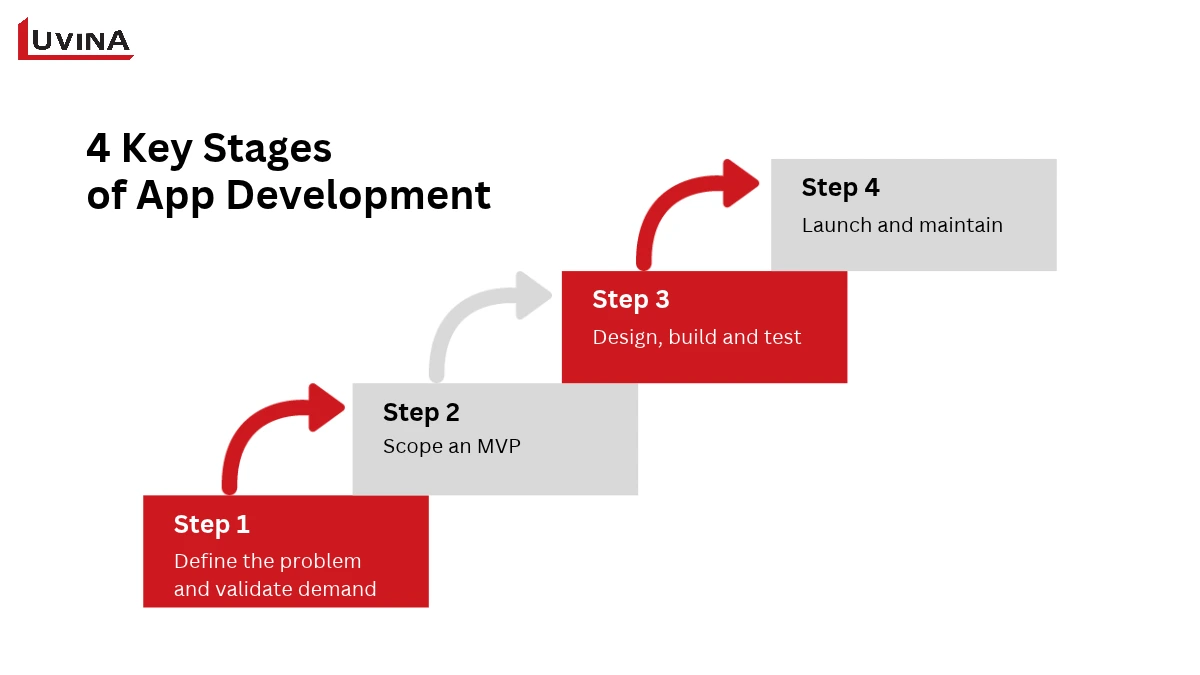
Define the problem and validate demand
Start with one user, one workflow, and one outcome. Who uses the app, what do they do today, and which number should improve? A booking app, for example, might aim to cut no shows. If you are unsure the idea will hold up, Luvina can help you validate your app idea with a proof of concept before you commit to a full build.
- What you do: Describe the current workflow, share sample data, and name the success metric.
- What the provider does: Interviews staff and users, maps the workflow and tests the riskiest assumption first.
Scope an MVP
A minimum viable product (MVP) is the smallest version that solves the core problem. Pick the main user journey, list the systems it must connect to, and decide who can see or change what. Everything else goes on a deferred list.
- What you do: Rank the features and approve both the scope and the deferred list.
- What the provider does: Breaks the journey into features, estimates the effort and flags integration and permission risks.
Design, build and test
Put a clickable prototype in front of real users before development goes far. Agree the acceptance criteria early, so both sides know what “done” means. Security and device testing are coming next. The OWASP Mobile Application Security project publishes a verification standard and a testing guide that gives providers a common baseline to test against. Baseline is only a starting point. What else you need depends on your project and your business, such as the kind of data the app handles and any rules that apply to your industry.
- What you do: Try the prototype, give feedback, and run acceptance testing.
- What the provider does: Builds in short cycles, tests functions, devices and security, and fixes defects.
Launch and maintain
A web app can often go live without app-store publication. A mobile app needs a developer account for each store. The Apple Developer Program is an annual paid membership, and Google Play publishing runs through Play Console under Play policies and target API level requirements. Check before you fix a launch date. After release, someone has to watch crashes, fix bugs and train staff.
- What you do: Own the store accounts, confirm your apps are registered and name an internal contact.
- What the provider does: Handles the release, monitoring, fixes and updates under a support agreement.
How Much Do App Development Services Cost?
How much does a small business app cost to develop? There is no single figure, because the price follows the scope. Two apps that look alike on screen can differ widely once you count integrations, security and running costs.
What moves the price
- Complexity: user roles, screens and business rules
- Platforms: web, iOS, Android or a mix
- Design effort: a standard interface or custom UX
- Integrations: connections to accounting, payment or CRM tools
- Data migration: moving and cleaning old records
- Security requirements: logins, permissions and testing
- Team size and location: who builds it and where
Build cost is only part of the bill. For small business owners, keeping a project affordable depends on a tight first release and a clear view of running costs. The worksheet below separates what you pay once from what keeps coming. Fill it in with quoted amounts.
| Cost category | Initial build | Recurring | Questions to ask the provider |
| Discovery and design | Yes | No | What deliverables do I receive at the end? |
| Development and testing | Yes | No | Is testing included in the quote? |
| Integrations and data migration | Yes | Sometimes | Which third-party fees apply? |
| Hosting and cloud | No | Yes | Who holds the account? |
| App store and subscription fees | Sometimes | Yes | Who pays, and who owns the developer’s account? |
| Maintenance and support | No | Yes | What is the response time and what does it cover? |
| Change requests | Sometimes | Sometimes | How are changes priced and approved? |
Lifecycle cost worksheet for an app project
The total cost of an app goes beyond the initial development quote. Small businesses should also account for ongoing hosting, third-party subscriptions, maintenance, security updates and the internal time needed to manage the app. These costs vary by solution and usage, so ask providers to identify recurring fees and responsibilities before signing a contract.
Before you compare totals, check each proposal against this list:
- Same scope across all proposals
- Itemized price by phase or feature
- Assumptions and exclusions written out
- Change request process and rates
- Recurring costs listed separately from build cost
Luvina works with six engagement models. For a first app release, three of them are the most relevant because they are priced around the project itself: a fixed amount for a defined scope, payment for the work actually done, or a mix of both.
| Model | How it works | Suits |
| Fixed price | Price agreed for a defined scope | Well-defined first release |
| Time and material | Pay for time and resources used | Scope that may change |
| Hybrid | Fixed price for the core, time and material for changes | Projects with a clear core and uncertain extras |
How app projects are priced
The other three are built around the team rather than a single project: staff augmentation adds people to your existing team, a dedicated development team works only for you, and an offshore development center (ODC) provides an offshore team that operates as an extension of your development capacity.
To get a number you can plan around, ask Luvina for a project-specific estimate. Bring your problem, your users, and the tools you already use.
How to Choose the Best App Development Service for Your Business
How to choose an app developer for a small business comes down to evidence and terms. A polished pitch tells you little. Ask for proof, ask how the work will run, and read the contract terms before you compare prices.
Track record
- Relevant work you can verify: a live app, case study or demo from a similar field or workflow
- Client references: two contacts you can call, and ask what went wrong as well as what went well
Delivery
- Discovery and communication: who you speak to each week, how questions get answered and whether the provider challenges your scope
- Technical fit and integration: experience with the tools you already run, such as your accounting software or booking system
- Schedule and milestones: dates tied to deliverables you can review
Quality and security
- Security and testing practices: what gets tested, on which devices and who signs off
- Handover and post-launch support: documentation, training and a support period with a named contact
Commercial terms
- Itemized price: broken down by phase or feature
- Change control: how a new request is priced and approved
- IP and source-code ownership: who owns the code and design files when the project ends
- Access to accounts and data: your name on the hosting, app-store and analytics accounts, plus a way to export your data
Ask every provider to quote the same scope, so the proposals line up. Treat “best” as the best fit for your business. No ranking can decide that for you. If you want a list of providers to start from, you can compare app development companies in Luvina’s overview.
How Luvina Can Support Your App Development Project
Luvina’s software development services cover desktop, web, and native and hybrid mobile apps, from the first meeting through warranty and support. Around the build itself, you can add business consulting and POC development to test an idea early, software testing before release, and software maintenance after launch.
One example is a custom e-commerce mobile app project for an IT service provider in Japan. The client was strong in back-end and CRM work and wanted to move into mobile, so Luvina built an iOS and Android app to support fashion sellers.
- Delivery model: Agile sprints through an offshore development center
- Team setup: members moved between back-end, front-end and Android tasks from one sprint to the next
- New skills: the team got up to speed on SwiftUI and Jetpack Compose
- Consulting input: Luvina suggested interface improvements and pointed out inconsistencies in the requirements
- Client feedback: praise for the clear, maintainable code and the detailed test reports
The client scale and market differ from a typical small business, but the project shows how Luvina handles scoping, sprints, and testing.
Planning an app for your business? Share your target users, the problem you want to solve, and the systems your app needs to connect to. Talk to Luvina about defining the scope of your first release.
FAQs
What do app development services for small businesses include?
App development services usually cover discovery and requirements, UX/UI design, web or mobile development, integrations, testing, deployment and maintenance. Not every provider offers all of these, and the scope differs from one proposal to the next. Read each quote line by line to see what is included and what costs extra.
Does my small business need a mobile app or a custom web app?
It depends on the problem you want to solve. If existing software or a responsive website already covers the need, start there. A custom app makes sense when your workflow is unique, your data sits in too many places, or your customers need something no existing tool offers. The comparison table above helps you weigh the options.
How much does it cost to develop a small business app?
The cost depends on complexity, the platforms you target, integrations, and what you need after launch, such as hosting and support. Ask every provider for an itemized quote that separates build costs from recurring cost. The cost worksheet above shows what to ask.
How long does it take to build an app for a small business?
Timing depends on scope, the number of integrations, and how quickly your team gives feedback and approvals. A scoped first release tends to arrive sooner than a full product with every feature. Ask each provider for milestones tied to deliverables you can review and be wary of a single fixed date before the scope is agreed.
How do I choose the best app development partner?
Start with work, you can verify and talk to past clients. Ask every provider to quote the same scope, so the proposals compare fairly. Then confirm who owns the source code, who holds the hosting and store accounts, and what support follows launch. The selection checklist above covers each point.
Conclusion
App development services for small business work best when a project starts with a clear problem and a small first release. Comparing providers on the same scope, with an itemized price and a clear answer on who owns the code and the accounts, makes quotes easier to compare and responsibilities clearer after launch.
Luvina offers services along this path, from proof of concept through development, testing and maintenance. Contact Luvina to talk through your app requirements, whether you are still comparing options or ready to scope a first release.
Resources
- https://developer.android.com/distribute
- https://developer.apple.com/programs/
- https://mas.owasp.org/
- https://newshub.medianet.com.au/2026/04/a-decade-of-decline-small-business-underperformance-becoming-a-national-economic-problem-cpa-australia-warns/146817/
- https://www.cpaaustralia.com.au/about-cpa-australia/media/media-releases/hiring-innovation-surge-slower-growth
READY TO START A PROJECT?
Our experts are eager to explore your needs.

Read More From Us?
Sign up for our newsletter
Read More From Us?
Sign up for our newsletter