




What Is ERP? Enterprise Resource Planning Explained


ERP stands for enterprise resource planning. It is business software that links core processes such as finance, purchasing, inventory, sales and operations through shared records and workflows. Every team works from the same order, stock and customer data, which keeps planning, coordination and reporting consistent.
Without it, sales may promise stock the warehouse no longer has, and finance may close the month on a third set of numbers. This guide covers how ERP works and what to evaluate next.
What is ERP
ERP software is a set of connected applications a company uses to run its core operations. An ERP system is the full environment around that software.
- ERP software: the applications for accounting, purchasing, inventory, sales and order management.
- ERP system: the software plus the data, workflows, people and controls that make it work day to day.
What does ERP stand for
ERP stands for enterprise resource planning. The name sounds like a planning tool, but teams use it for more:
- Carrying out daily work
- Recording transactions such as orders, receipts and invoices
- Reporting from the same records
Forecasting and planning sit alongside these everyday jobs.
What makes ERP different from separate business apps
Separate apps each keep their own copy of the facts. ERP gives teams one shared set.
| Area | Separate apps | ERP |
| Customer and order data | Each team holds its own copy | Shared records |
| Business rules | Set tool by tool | Consistent across teams |
| Workflow | Stops at the edge of a department | Crosses sales, warehouse and finance |
| A new order | Retyped by each team | Entered once, visible to the next team |
Separate business apps compared with ERP
Two points to keep in mind:
- Where the data lives varies. Many ERP suites run on one common database. Others connect several systems through integration. Both work, as long as the data is shared and governed.
- “Single source of truth” has a condition. It means governed, consistent records that every team trusts. The software cannot guarantee that alone. Duplicate item codes or wrong opening balances make an ERP show wrong figures faster. Clean data starts before go-live, and ERP data migration is where much of that work happens.
How does an ERP system work
Here is an illustrative example. A distributor of industrial packaging supplies gets an order from Harbor Foods, a food manufacturer. The order, SO-1042, is for 500 rolls of stretch film on 30-day payment terms. The warehouse holds 620 rolls, but 300 are already reserved for other customers. Only 320 are available.
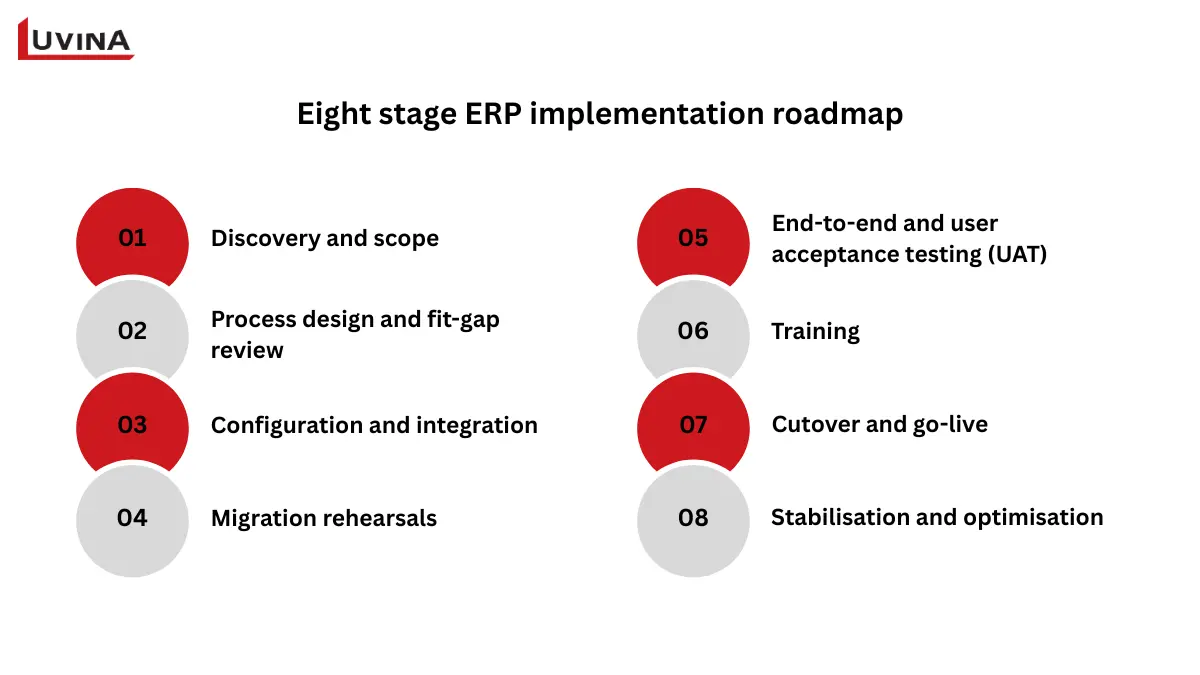
| Step | What happens to SO-1042 | Record that changes |
| 1. Record the order | Sales enters Harbor Foods, 500 rolls, 30-day terms | Sales order created |
| 2. Check availability | System shows 620 on hand but 320 available | Reservation made for available stock |
| 3. Handle a shortage | Planning sees a gap of 180 rolls and proposes a purchase order. A buyer reviews and approves it | Purchase order drafted, then approved |
| 4. Fulfil and record movement | Supplier stock arrives, the warehouse picks and ships 500 rolls | Goods receipt, shipment, inventory reduced |
| 5. Invoice and record payment | Invoice is posted. Revenue recognition follows accounting rules. Cash arrives on day 30 | Receivable created, then cleared on payment |
| 6. Report and manage exceptions | If shipped and invoiced quantities do not match, the system flags the mismatch for investigation | Exception logged and investigated |
The life of order SO-1042 inside an ERP system
A few details sit behind the table:
- On hand and available are different numbers. On hand is what is physically in the warehouse. Available is what remains after reservations. Because 300 rolls are already reserved, only 320 can go to Harbor Foods, so the system shows a shortage of 180.
- A shortage does not automatically trigger a purchase. A purchase proposal appears only if the company has configured rules for it, and a buyer still approves it.
- Invoicing, revenue recognition and payment are three separate events. Each can fall on a different date and create different entries.
- The workflow rests on a few foundations. Role permissions, approval rules, master data (the core records for customers, items and suppliers) and integrations all have to be set up well. How fresh the information is depends on when each transaction is recorded and synced. A shipment posted late in the day may not reach finance reports until the next sync.
Steps and posting rules vary by product and configuration.
What are the main ERP modules
ERP modules are the building blocks of the system. Each one covers a business function such as finance or inventory, and all of them work from the same shared records.
| Module | Plain-language job | Typical users |
| Finance and accounting | Records and reports financial transactions | Finance team |
| Purchasing | Manages supplier orders and approvals | Buyers, procurement |
| Inventory and warehouse | Tracks quantities and movements | Warehouse, planners |
| Sales and order management | Captures orders, prices and delivery commitments | Sales, customer service |
| Manufacturing and material planning | Coordinates materials and production | Production planners |
| Project and service operations | Connects time, costs and billing | Project managers |
| HR and payroll (where supported) | Manages employee records and pay | HR |
| Reporting | Combines data across modules | Management, all teams |
Core ERP modules and the job each one does
Before you pick modules, keep two points in mind:
- Availability varies. Modules differ by product, edition and configuration. Some capabilities come as add-ons or through integrated applications, so check what is native and what is not.
- You do not need everything on day one. Start with the modules that fix the workflow causing the most pain, then add others as the business is ready.
The right mix depends on how the business earns money:
- Manufacturer: needs materials and production coordinated, so a missing component does not stop a line. Smaller plants can see how this looks in practice in our guide to ERP for small manufacturers.
- Distributor: needs accurate stock and reliable fulfilment, like the SO-1042 order above.
- Service business: needs project costs and billing in one view, so hours worked turn into invoices without a spreadsheet in between.
Industry-specific requirements go deeper than this overview, and they are covered in separate guides.
How does ERP compare with accounting software, CRM and MRP
ERP overlaps with tools many businesses already run. Some of them sit inside an ERP suite, others run next to it and connect through integration. Because products overlap, the table below shows the core distinction for each one instead of a feature checklist.
| System | Essential distinction |
| Accounting software | Handles financial transactions and reporting. ERP links finance with purchasing, inventory and sales, and accounting is usually one of its modules |
| CRM | Manages customer relationships, sales opportunities and service interactions. It can be part of an ERP suite or a separate system connected to it |
| MRP | Calculates which materials are needed and when, based on demand, bills of materials (BOMs) and inventory. Its scope is narrower than ERP, and it can be an ERP module or a standalone tool |
| MES | Tracks shop-floor execution and actual production data. It is a separate layer and does not equal the manufacturing module of an ERP |
ERP compared with accounting software, CRM, MRP and MES
Two setups show how this plays out:
- A growing distributor may run accounting software and a CRM for years. ERP enters the picture when orders, stock and invoices stop matching across those tools.
- A manufacturer may use ERP to plan materials and an MES to record what actually happens on the line, with the two systems exchanging data.
What benefits can ERP deliver
ERP can improve how a business runs, but the gains are not automatic. Each benefit below depends on a condition being met, and each can be tracked with a KPI.
| Potential benefit | Condition it depends on | KPI to measure |
| Less repeated data entry | Shared records and reliable integration between systems | Manual re-entry or reconciliation time |
| Better inventory visibility | Timely stock transactions and clean item data | Inventory accuracy, stockout incidents |
| More consistent financial reporting | Correct account mappings and agreed month-end close procedures | Close duration, reconciliation exceptions |
| Clearer order commitments | Accurate stock and capacity information | On-time fulfilment, order-status exceptions |
| Stronger process control | Configured roles and approvals | Unauthorised changes, approval exceptions |
What ERP can improve and how to measure it
A KPI only means something if it is set up before the project starts. Agree on three things first:
- Baseline: record today’s value for each KPI before go-live. Without it, there is nothing to compare against.
- Definition: decide exactly what each KPI counts. “On-time fulfilment” could be measured against the promised date or the customer’s requested date, and the two give different results.
- Owner: name one person responsible for each KPI, so someone answers for the number when it moves.
Once these are fixed, the before-and-after comparison is a fair one. If they are left open, teams end up arguing about how the numbers were calculated instead of what the ERP changed.
When does a business need ERP
No headcount or revenue line tells you it is time. What matters is whether the same operational problems keep coming back as the business grows.
Signs your current tools are struggling
- Staff retype the same order, customer or item data into several tools.
- Stock figures differ between the warehouse spreadsheet and the sales system.
- Monthly reports take days because someone merges files by hand.
- Nobody can easily trace who approved a purchase or a price change.
Try one test. Can you follow a single customer order through sales, purchasing, fulfilment and invoicing without manual reconciliation? If you cannot, that is a sign the current setup is holding the business back.
When ERP may be premature
ERP is not always the next step. If processes are simple, transaction volume is low, or the real problem is one broken link between two tools, fixing the current setup first may cost less and solve the issue. Treat this as a diagnostic suggestion for your own situation, because it does not apply the same way to every company.
Before deciding, work through the questions below.
| Question | What to look for |
| What fails? | The specific process or handoff that breaks |
| How often? | Daily, weekly or only at month-end |
| Who is affected? | Which teams and which customers |
| What does it cost? | Hours of rework, errors and delays |
| Who will own the fix? | A process owner and the capacity to run a project |
A five-question self-check before committing to ERP
Smaller companies can find a closer walkthrough of this decision in our guide to ERP for small business.
What are the main ERP deployment options
Deployment decides where the ERP runs and who looks after it. Three models cover most cases: cloud, on-premises and hybrid.
| Criteria | Cloud (vendor-managed SaaS) | On-premises | Hybrid |
| Hosting | Vendor’s environment | Your own servers or data centre | Core in one environment, some modules or tools in the other |
| Updates | Usually scheduled by the vendor | Planned and applied by your team or partner | Depends on each part |
| Internal support | Lighter infrastructure workload, but still needs process and data owners | Needs infrastructure and admin skills in-house | Needs both skill sets |
| Integration | Relies on vendor APIs and connectors | More freedom, but more to build and maintain | Needs careful design between environments |
| Control | Less control over upgrade timing and customisation | More control over configuration and data location | Mixed |
How cloud, on-premises and hybrid ERP compare
Three points help you read the table correctly:
- Hosting location does not define the service model. A licensed application installed on a cloud server is still run and updated by your team or partner. Vendor-managed SaaS means the vendor operates the platform and the upgrades.
- Two-tier ERP is a separate idea. It describes a strategy where headquarters and subsidiaries run different ERP systems and connect them. Both tiers can use the same hosting model, so the term says nothing about where the system runs.
- No model wins on every point. Cloud is not always cheaper and on-premises is not always safer. Cost and risk depend on the whole operating model, including who handles security, backups, upgrades and support. Check the contract to see which of these tasks the provider takes on.
How much does ERP cost
The total depends on scope, number of users, modules, integrations, data readiness, rollout approach and long-term support. A single price range would mislead, so it is more useful to break the cost into categories.
| Cost category | What it covers |
| Software or hosting fees | Recurring subscription or license, plus hosting if you run it yourself |
| Implementation and configuration | Setting up the system around your processes |
| Data cleansing and migration | Cleaning, mapping and loading existing records |
| Integrations and extensions | Connecting other tools and building custom additions |
| Testing and training | Test cycles and role-based training for users |
| Internal project time | Hours your own staff spend on the project |
| Support, changes and upgrades | Ongoing fixes, adjustments and version updates |
What makes up the total cost of an ERP project
Two habits make cost comparisons fairer:
- Look past the licence fee. Open-source software has no licence charge, but hosting, implementation and maintenance still cost money.
- Compare total cost of ownership (TCO) on equal terms. Use the same scope and the same evaluation period for every option. A three-year view of one vendor against a five-year view of another tells you nothing.
For a closer look at what drives each line item, see our guide to ERP implementation cost.
How should you choose an ERP system
Pick the ERP by working backwards from the process that hurts most. A feature list comes later. Follow these five steps in order:
- Map the failing workflow. Pick one process, such as order-to-cash, and write down where it breaks.
- Define essential requirements and owners. Separate must-haves from nice-to-haves, and name who is responsible for each.
- Shortlist against the process. Judge each product by how well it handles your workflow. A long module list tells you little.
- Test real scenarios and exceptions. Ask each vendor to demonstrate a complete order and one difficult exception, such as a partial shipment or a returned item, using representative data.
- Compare operating cost and support. Look at what it takes to run the system after go-live. The price at signing is only the first bill.
During the demo, check access controls, reporting, data export and local requirements. Do not assume a product meets every local obligation by default. Ask the vendor to show it.
Start with standard capability and configuration
If a packaged process meets the business needs and your controls, use it. Standard functions are tested by the vendor, supported through upgrades and easier to train people on.
Decide what to integrate or extend
Some specialist tools work well and are worth keeping, for example a warehouse scanner system or a design application. Before connecting them to the ERP, ask for evidence on four points:
- API capability and documentation
- Who owns the data
- How failures are handled when a sync breaks
- Whether the connection survives ERP upgrades
Consider custom development when there is a justified gap
Standard ERP handles common processes well. However, some businesses run internal processes that were formed through years of working together that no packaged system can matches, and that is where customisation pays off. A distributor with its own rebate and pricing rules, or a manufacturer with an inspection step before every shipment, can spend more forcing those processes into standard screens than adapting the system.
Custom development can:
- Keep a process that gives the business an edge, such as a pricing model or a service workflow.
- Remove the spreadsheets and manual workarounds staff build around standard screens.
- Match the ERP to your own approval chains, reports and data rules.
Before building anything, compare the options from lightest to heaviest effort.
| Option | When it fits | What to check |
| Standard features | The packaged process already meets the need | Whether the built-in controls fit your rules |
| Configuration | Settings, fields and workflows can cover the difference | Limits of each product |
| Add-ons | A vendor or partner extension already solves it | Support and upgrade compatibility |
| Integration | A specialist tool works well and should stay | Data ownership and failure handling |
| Customisation | The process is specific to your business and nothing above covers it | Maintenance and re-testing after each upgrade |
Five ways to close an ERP gap
The right choice comes from your own process and conditions: how often it runs, how many people rely on it, what it costs when it breaks and how often it will change. Pick the lightest option that closes the gap. Customisation needs a named owner for maintenance and testing after every upgrade, so settle that before development starts.
If a gap remains after those options, Luvina’s ERP services cover customisation and development as well as implementation and integration. The team can review your process against each option first and build only what the gap justifies.
What does ERP implementation involve
Most projects move through the stages below, which we cover in more detail in our ERP implementation process guide. The order and length change with scope, so read this as a common sequence that each project adapts.
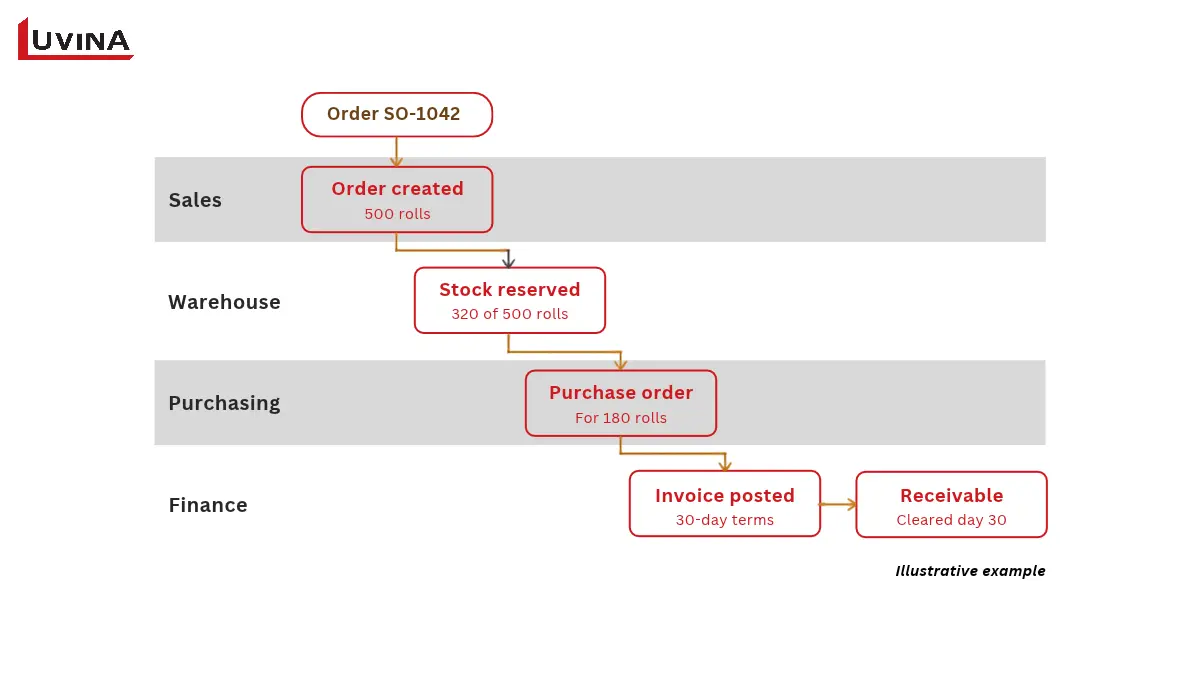
- Discovery and scope: agree what the project covers and what it leaves out.
- Process design and fit-gap review: compare your workflows with the standard system and list the gaps.
- Configuration and integration: set up the system and connect the other tools.
- Migration rehearsals: load trial data and fix what breaks before the real run.
- End-to-end and user acceptance testing (UAT): run full processes, with real users checking the results.
- Training: teach each role the tasks it will do daily.
- Cutover and go-live: switch from the old tools to the new system.
- Stabilisation and optimisation: fix early issues, then keep improving.
Buying a license is only one part of the change. Choose a rollout approach, phased or big-bang, based on dependencies and how ready the teams are. Neither one is better in every case.
| Role | Responsible for |
| Executive sponsor | Resolving business priorities and trade-offs |
| Process owner | Approving how each workflow should run |
| Data owner | Validating master and opening data |
| IT team and delivery partner | Configuring, integrating and testing the system |
| End users | Checking that daily tasks work as expected |
Who does what in an ERP implementation
Contract terms vary, so confirm who owns each task before the project starts.
Most problems have a matching control:
- Scope creep: agree the scope in writing and route changes through approval.
- Bad data: cleanse records and reconcile them against the old system.
- Low adoption: train people by role, using their own tasks.
- Integration failures: test what happens when a sync breaks or a record is rejected.
- Cutover disruption: set readiness criteria and prepare a recovery plan.
How is AI changing ERP
Some ERP platforms now include AI features, though what you get depends on the product and its release. Common examples:
- Forecasting for demand or cash flow
- Anomaly detection, such as a duplicate invoice or an unusual payment
- Natural-language assistants that answer questions about your data
- Agents that carry out multi-step tasks
The key distinction is between a suggestion and an action. An assistant that proposes a purchase order is one thing. An agent that sends it to the supplier is another. Before turning on any action-taking feature, set these controls:
- Permission limits: the AI can only do what its role allows.
- Approval for material transactions: a person signs off on payments and large orders.
- Audit logs: every AI action is recorded and traceable.
- Exception escalation: unusual cases go to a human.
- Human review: someone checks any explanation the AI generates.
AI output is only as good as the data and context behind it. A forecast is an estimate, and a system fed with poor records will produce poor suggestions.
FAQs
What is ERP in simple terms?
ERP stands for enterprise resource planning. It is business software that links accounting, purchasing, inventory and order management, so teams share the same records and workflows. That makes it easier to coordinate work and report on operations.
What is an example of how ERP works?
A distributor records a customer order, checks stock, ships the goods and invoices the customer, all from connected records. Inventory and financial entries update according to configured posting rules. The exact steps depend on the product and the business process.
What is the difference between ERP and CRM?
ERP coordinates financial and operational processes across a business. CRM focuses on customer relationships, sales opportunities and service interactions. CRM can be part of an ERP suite or a separate application connected to it, and the two can share customer and order data.
Do small businesses need ERP software?
Some do. It helps when disconnected tools cause repeated errors, manual reconciliation or poor visibility. A full ERP may be unnecessary if simpler process fixes or integrations solve the problem. Check workflow complexity, data readiness, ownership and budget before committing.
How long does ERP implementation take?
There is no single timeline for every project. Duration depends on scope, data quality, integrations, customisation, user readiness and rollout approach. Agree the work and acceptance criteria with your delivery team before treating any estimate as a commitment. If you want help scoping that, see our ERP implementation support.
Conclusion
Before you look at any software, do three things:
- Map one workflow that crosses departments, such as order-to-cash.
- Mark the records and handoffs that fail.
- Define a measurable result you want to see.
If your teams are working from disconnected records, talk to Luvina. We set up ERP around how your business actually runs: configuring standard modules where they fit, and customizing the parts no packaged system covers. The result is a system where an order entered once reaches the warehouse and finance without retyping, and each team reports from the same numbers.
Resources
- https://www.sap.com/resources/what-is-erp
- https://www.oracle.com/asean/erp/what-is-erp/
- https://www.microsoft.com/en-sg/dynamics-365/resources/what-is-erp
- https://www.ibm.com/think/topics/enterprise-resource-planning
- https://learn.microsoft.com/en-us/dynamics365/business-central/sales-how-sell-products
- https://www.infor.com/apac/solutions/erp/what-is-erp
- https://www.netsuite.com/portal/resource/articles/erp/what-is-erp.shtml
- https://www.sap.com/resources/what-is-material-resource-planning-mrp
- https://www.sap.com/mena/products/scm/digital-manufacturing.html
- https://onemotoring.lta.gov.sg/content/onemotoring/home/driving/ERP/ERP.html
READY TO START A PROJECT?
Our experts are eager to explore your needs.

Read More From Us?
Sign up for our newsletter
Read More From Us?
Sign up for our newsletter