




ERP for Small Business: How to Choose the Right System


An ERP for small business connects core business functions such as finance, sales, purchasing, and inventory in one system, with additional capabilities such as manufacturing added when the operation requires them. No single platform is the best fit for every company. The right pick depends on process complexity, integration needs, compliance rules, and your team’s capacity to run it. Start with the simplest option that covers your critical workflows, not the one packed with the most features.
The sections below walk through how to weigh those factors, which system route fits your situation, and what each option really costs once implementation and integration are factored in.
Does a Small Business Need ERP?
Not every growing business need ERP right away, and buying one too early just adds a system nobody has time to maintain. The sections below break down what ERP connects, how it differs from the narrower tools you may already use, and the signals worth watching before you commit.
What an ERP System Connects
Picture a customer order coming in. It pulls stock from inventory, triggers a purchase order once that stock runs low, updates your books automatically, and lands in one report you can trust. That is the order-to-cash and procure-to-pay flow working as a single system instead of three disconnected tools that need manual reconciliation.
This is the practical definition of ERP for a small business: one dataset feeding finance, sales, purchasing, and inventory, so nobody re-types of the same order twice. You don’t need to switch on every module at once. Most companies start with the workflow causing the most pain today and expanding from there.
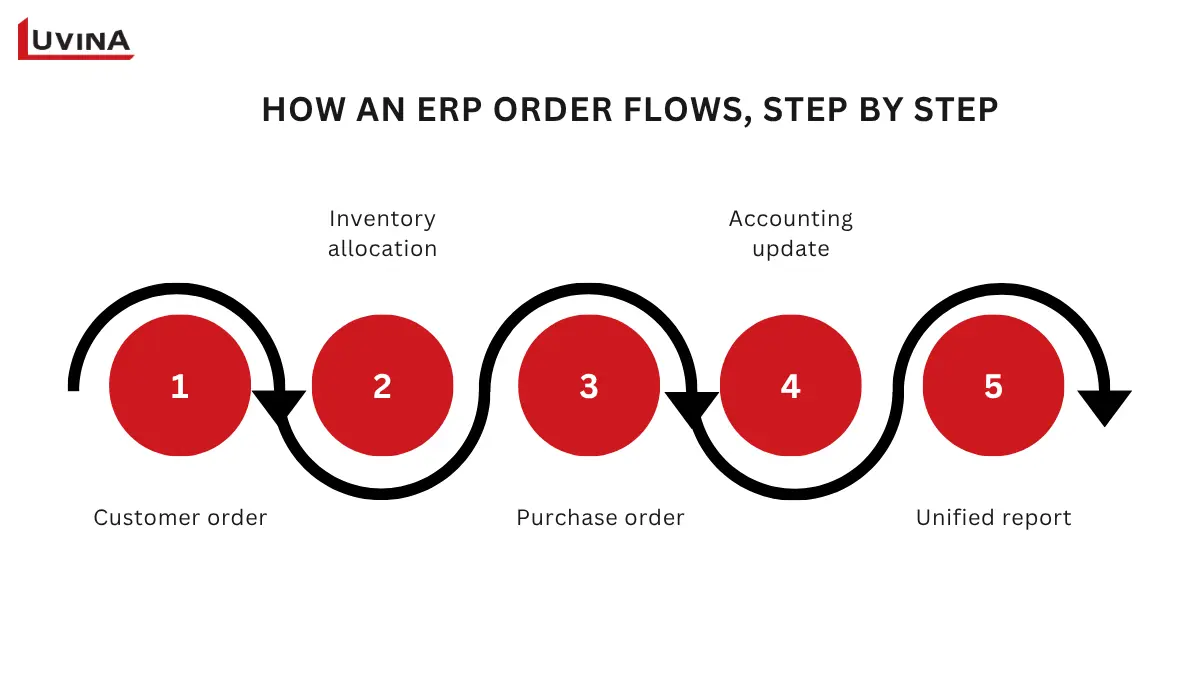
Inside an ERP order flow
ERP vs. Accounting Software, Inventory Software, CRM, POS, and MRP
Before shopping for an ERP, check whether a narrower tool already solves your actual problem:
- Accounting software handles transactions and financial reporting. Some platforms now stretch into inventory or purchasing, but that’s usually an add-on bolted onto a finance core, not a connected operational system built from the ground up.
- Inventory software tracks stock levels and movement but sits apart from finance and sales unless you’re a non-manufacturer with simple stock needs, in which case a dedicated warehouse management system may cover you without a full ERP rollout.
- CRM manages customer and pipeline data. It can automate sales, marketing, and service workflows, but it isn’t built to run finance, inventory, or purchasing the way an ERP is.
- POS processes point-of-sale transactions. Once you’re running multiple locations or wholesale alongside retail, POS usually needs an ERP behind it.
- MRP plans for production only. Manufacturers typically need it paired with finance and inventory, and that combination is where ERP earns its place.
Five Signs It Is Time to Consider ERP
Treat these as signals worth investigating, not a checklist that guarantees you need ERP:
- Staff re-enter the same data across separate tools
- Inventory and financial reports contradict each other between departments
- Operations span multiple locations or entities
- Approval chains are handled manually and no longer scale
- Ecommerce, POS, or production planning sit disconnected from the rest of the business
What Should a Business ERP System Include?
Once you know ERP fits your business, the next question is scope: which capabilities do you need on day one, and which ones can wait. Getting this wrong in either direction, too little or too much, is where most implementations run into trouble.
Core Capabilities for Most Product or Service Businesses
Many small businesses share a similar core set of ERP needs, although the exact scope varies by industry and operating model. The list: finance and accounting, customer and order data, purchasing and inventory where relevant, reporting, user permissions, integrations, and workflow approvals. Together, these create a single source of truth. In practice, that means one dataset behind every report. Finance and operations stop reconciling two different numbers for the same order.
Capabilities to Add Only When the Operation Needs Them
A handful of modules go beyond the core set. Each one only earns its place under a specific condition:
- Ecommerce/POS: add it once online or in-store sales need to sync with the same inventory
- Project accounting: add it once you bill clients by project or milestone, not by standard invoice
- Multi-entity/multi-currency: add it once you invoice or report across more than one currency or legal entity regularly
- Payroll/HR: add it once headcount growth makes a separate HR tool hard to reconcile with finance
- Advanced warehouse controls: add it once you manage more than one warehouse, or need bin-level stock accuracy
- Manufacturing: add it once production, not resale, drives your inventory movement
Skip any module until its condition applies. Paying for capability you don’t use yet is one of the fastest ways to inflate cost.
ERP Options for Small Business by Business Need
These are options for fitting. This is not a ranked “best ERP” list. No single platform wins for every business. Match your process needs to the right fit below.
| ERP | Best fit | Watch out for |
| Odoo | SMEs that want modularity and low entry cost. Can start with one free app. | Per-user cost and add-on modules add up as usage scales. Pricing varies by region. |
| ERPNext | Teams with in-house technical capacity who want open source. | Open source doesn’t mean free to run. Hosting, implementation, and local compliance still cost money. |
| Microsoft Dynamics 365 Business Central | Businesses already on Microsoft 365 need finance and operations together. | Typically need an implementation partner. |
| SAP Business One | Manufacturing or distribution of businesses that need tighter inventory and production controls. | May involve more implementation scope and complexity than lighter small-business options. |
| NetSuite | Fast-growing companies with multi-entity or multi-currency needs. | May be more capability than a simple, single-location SME needs. |
| Katana | Small manufacturers that need inventory plus light production planning, with a strong visual production floor view. | May not cover the full ERP scope required for businesses with complex finance or cross-functional operations. |
| MRPeasy | Small manufacturers that need inventory plus light production planning, with stronger MRP and scheduling depth. | May not cover the full ERP scope required for businesses with complex finance or cross-functional operations. |
ERP Options for Small Business by Best Fit
If Business Central looks like a fit, Luvina’s Microsoft Dynamics 365 solutions cover implementation support once you’ve picked up your platform.
This table is a starting shortlist, not a final decision. The right platform still depends on your process fit, your team’s technical capacity, and your budget for ongoing operation, not just the name on the list.
How to Choose the Best ERP for a Small Business
You’ve seen what’s available. Now comes the harder part: picking the right one for your business. Start with your process, not a brand name. Then narrow down by route and check every finalist against one checklist.
Start with Process Fit, not a Brand List
Before you look at any vendor, map your own operation first. Cover five things:
- Your critical workflow
- Its exceptions
- Who approves what, at each step
- Who owns the data once it’s entered
- What’s already integrated today
This mapping can often be done before vendor demos begin. Skipping it can make it harder to identify a platform that actually fits how your business works.
Choose the Right System Route
Once you know your process, four routes cover most small businesses. Each comes with its own trade-offs.
| Route | Best-fit condition | Advantage | Trade-off | Internal capability needed |
| Preconfigured cloud ERP | You want a standard plan up and running fast | Fastest to launch | Least flexible | Minimum. Vendor handles most setups. |
| Modular or open-source ERP | Your team has technical capacity in-house | Lower license cost | Needs ongoing technical maintenance | A technical owner who can configure and support it |
| Established platform plus extensions | You already run a platform like Microsoft 365 | Builds on tools your team already uses | Extensions add complexity over time | Someone who can manage integrations |
| Bespoke ERP development | No standard product fits your workflow | Matches your exact process | Highest cost and longest timeline | A delivery partner and a clear scope |
ERP System Routes by Fit and Trade-off
If your workflow doesn’t fit any standard product, a guide to custom ERP development walks through what bespoke development actually involves.
Many small businesses can start with the first two routes, while the latter two become relevant when standard functionality or an existing platform no longer fits the workflow.
Use This ERP Selection Checklist
Once you’ve narrowed to a few finalists, check each one against the same list:
- Usability for the team who’ll use it daily
- Who owns implementation on your side
- How data migration will work
- Security and access control
- Reporting depth
- Integration method with your other tools
- Vendor or partner support quality
- Country compliance coverage
- Room to scale as you grow
- Exit terms and data export rights
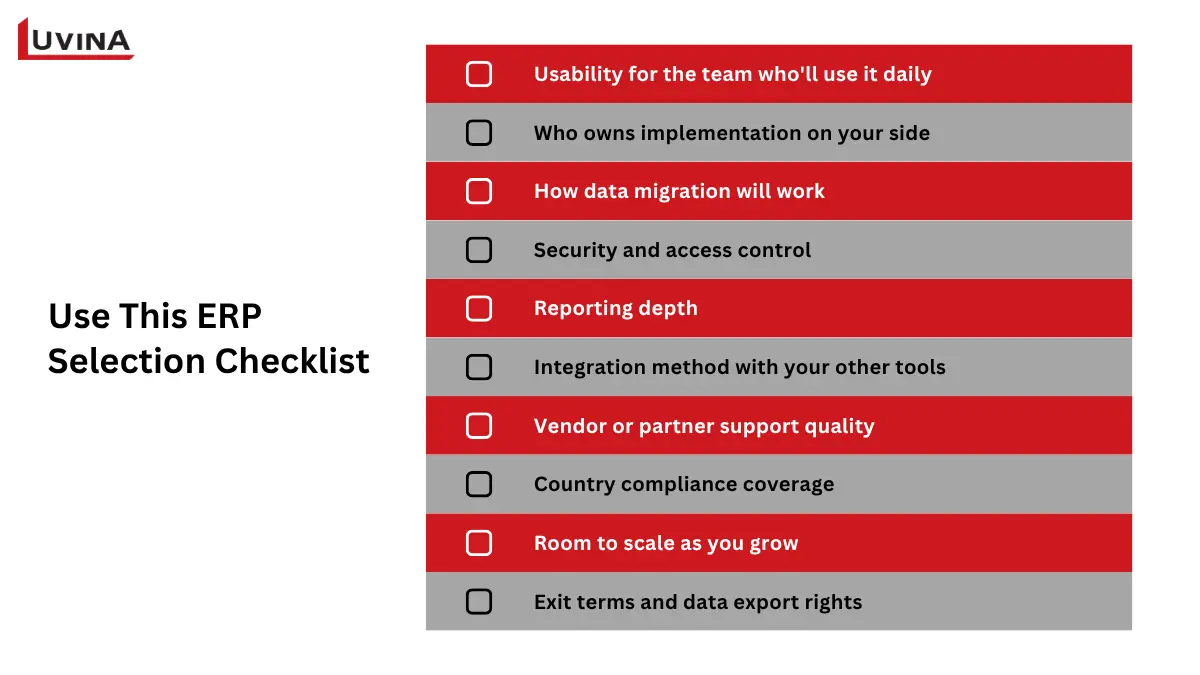
The ERP selection checklist
Score every finalist against this list before you commit. A platform that wins on price but fails on exit terms or compliance can cost you more later.
What Does ERP for Small Business Cost?
“Free” and “cheap” show up everywhere in ERP marketing. Neither term means what it sounds like. Before you budget anything, separate the label from the real cost.
Free ERP and Cheapest ERP Options: What Those Labels Really Mean
Four different things get called “free” or “cheap.” Each one means something different in practice:
- A free trial. Time-limited. Full features. Reverts to a paid plan or shuts off.
- A free single app plan. Odoo’s One App Free is an example. Free indefinitely but limited to one module.
- An open-source license. No license fee. Hosting, implementation, and support still cost money.
- A low headline subscription price. Often quoted before add-ons, extra users, or region-based pricing adjustments.
None of these means a zero-cost implementation. Every one of them still needs setup, data, and someone to run it.
Compare Total Cost of Ownership, Not Subscription Price Alone
What typically drives ERP implementation cost isn’t the subscription line. It’s everything around it.
| Cost component | What it covers |
| License or hosting | Ongoing platform fee, or server and hosting costs for self-hosted options |
| Configuration | Setting up workflows, permissions, and fields to match your business |
| Data cleanup and migration | Getting existing records into a usable, accurate state in the new system |
| Integrations | Connecting the ERP to your other tools |
| Extensions | Add-on modules beyond the base plan |
| Training | Getting your team to use the system correctly |
| Support | Ongoing help from the vendor or implementation partner |
| Upgrades | Version updates and the work they sometimes require |
| Internal administration | Staff time spent managing the system day to day |
Total Cost of Ownership Components
Price bands aren’t included in this table on purpose. Per-user costs can vary by region, plan, currency, and contract structure. Any number quoted here would be outdated by the time you read it. Get a quote scoped for your own business instead.
ERP for Small Business Manufacturing: Requirements That Change the Decision
Manufacturing changes the ERP conversation. Production adds requirements that a resale-only business never has to think about. Here’s what to check, and when the standard package stops being enough.
The Minimum Manufacturing Checklist
If you manufacture anything, look for these capabilities before signing:
- Bill of Materials (BOMs)
- Work orders and routings
- Material planning
- Work-in-progress (WIP) tracking
- Purchasing
- Raw-material and finished-goods inventory
- Quality and traceability, where your product needs it
- Product costing
Requirements differ by manufacturing type. Discrete manufacturing, process manufacturing, and make-to-order operations each stress different parts of this list. Check which one describes your business before comparing platforms.
When Inventory Management Is Enough, and When Manufacturing ERP Is Needed
No single tool is right for every business model. What you need depends on how far your product travels from raw material to shelf:
- Simple resale. An inventory tool alone usually covers you.
- Light assembly. Inventory plus a basic BOM is often enough.
- Multi-step production. This is where manufacturing ERP starts to matter.
- Regulated or traceability-sensitive products may require manufacturing capabilities such as lot tracking and stronger production traceability.
Match your business to the closest description above. If you’re between two categories, plan for the more complex one. Outgrowing a system a year costs more than starting with enough room to grow.
Simple 5-Step Plan: Implement ERP and Evaluate Result
Once you’ve decided your business needed an ERP, implementation follows a predictable sequence. Skipping a step here is where most ERP rollouts go wrong.
Step 01: Map your current business processes and data sources
Write down how work actually happens today, not how it’s supposed to happen on paper. Look at each department, how orders come in, how approvals work, and where your data currently lives.
Step 02: Prioritize Implementation
Decide what your business needs on day one, usually finance plus one core area like sales or inventory. Everything else can wait for a later phase, so the first rollout stays small and manageable.
Step 03: Choose a vender if need
Not every business can handle implementation alone, and that’s fine. You might need a partner if the workload is heavy, your systems and data are scattered across too many places to untangle on your own, or you’d simply rather hand it to someone who’s done this before. If you do bring in a partner, ask them to run demos around your real workflow, not a generic one. A demo built on your actual scenarios shows more than a polished sales pitch ever will.
Step 04: Test integrations, migration, and permissions before committing
Check that the new system connects with your other tools, your old data transfers correctly, and the right people have the right access. These three areas are the most likely to break after launch.
Step 05: Pilot with one team, train, then measure
Roll out to one team first, train them properly, then watch how the system performs day to day. Expand the rest of the business only once the pilot proves it works.
Before you start: appoint one internal process owner before kickoff. Without a single owner, decisions stall and the rollout drags.
When to use a Customized ERP
When a standard platform stops being enough
A standard platform covers most businesses at the start. It stops being enough once you hit one of these:
- Critical integrations with other systems
- Proprietary workflows unique to your business
- Legacy data that needs migrating in
- Custom reporting needs
- Scalability limits
This is where an implementation or delivery partner can help with the work around the platform. Luvina’s custom ERP solutions supports businesses with integrations, extensions, migration, modernization, and custom workflows when standard ERP functionality is not enough.
Custom what’s needed, not what’s familiar
Customization should solve a documented need, not rebuild every old habit.
- Worth customizing: a proprietary approval workflow, a legacy-data migration
- Not worth customizing recreating a process the standard platform already handles well
If you’ve defined your core process and selected a platform, Luvina can help assess integrations, extensions, migration, modernization, and custom workflow scope.
See how this played out for one Singapore business.
Make Sure Your ERP System Comply with Local Policies
Compliance means following the rules your government sets for taxes, invoices, and financial records. These rules differ by country and change over time. Pick an ERP that can’t keep up, and you risk fines, rejected invoices, or redoing work later. That’s why it pays to check your market requirements before you commit to a platform, not after.
Singapore
InvoiceNow is Singapore’s Peppol-based e-invoicing system, connected to IRAS. It’s already mandatory for new voluntary GST registrants, starting 1 April 2026. Existing GST-registered businesses will phase between April 2028 and April 2031, tiered by annual turnover.
This is a near-term checkpoint for Singapore-based SMEs, not a distant one. Confirm the current InvoiceNow requirement directly with IRAS before you plan around it. Dates can shift.
Australia
Peppol eInvoicing is available in Australia and promoted by the government. It is not a general ERP mandate. Treat it as an interoperability consideration, not a requirement. Confirm current eInvoicing guidance on business.gov.au.
Other APAC markets
No two markets are identical. Check each one against this list before making country-specific claims:
- Local tax rules
- E-invoicing requirements
- Currency handling
- Language support
- Data residency
- Integration needs
- Support hours
Don’t state a country-specific requirement without a primary source. Regulations of change, and a wrong claim here undermines trust in the rest of the article.
FAQs
1. What is ERP for a small business?
ERP is one system that connects finance, sales, purchasing, and inventory instead of running them as separate tools. For a small business, that means fewer manual data entries and one set of numbers everyone trusts.
2. Does a small business need an ERP system?
It depends on your process complexity, how fragmented your data already is, and your growth stage. A business with simple, single-location operations may not need one yet.
3. What is the best ERP for a small business?
There’s no universal best. The right choice depends on your process fit, the system route that matches your capacity, and your total cost of ownership, not brand reputation alone.
4. Is there a free ERP for small businesses?
Yes, but “free” options come with limits: self-hosted setup, limited access to modules, capped number of users, or limited data history.
5. What is the cheapest ERP for a small business?
The cheapest sticker price rarely reflects the cheapest total cost. Compare total cost of ownership, not subscription price alone, before deciding.
Conclusion
The right ERP isn’t the one with the most features. It isn’t the one with the lowest headline price either. It’s the one that matches your critical workflows and your team’s capacity to run it.
Start small. Add capability only when a real business condition calls for it. That approach costs less and breaks less than buying for a future you haven’t reached yet.
If you’ve already mapped your process and chosen a platform, Luvina can help with the next step: integration, migration, or custom workflow scope.
READY TO START A PROJECT?
Our experts are eager to explore your needs.

Read More From Us?
Sign up for our newsletter
Read More From Us?
Sign up for our newsletter