




Best PLM Software for Mechanical Engineers in 2026


As products and engineering teams grow, managing CAD files, BOMs, revisions, and engineering changes becomes harder. Disconnected tools can lead to version conflicts, slow approvals, and gaps between engineering and manufacturing.
The best PLM software for mechanical engineers depends on CAD and PDM compatibility, product complexity, change requirements, integrations, deployment, and implementation capacity. Teamcenter, Windchill, ENOVIA, Aras Innovator, Autodesk Fusion, Arena, Duro, and OpenBOM offer different strengths for these needs.
This guide compares their fit, capabilities, and tradeoffs, while covering free PLM options, key limitations, and a practical selection of scorecards.
PLM vs PDM vs CAD: What Does a Mechanical Engineer Actually Need?
CAD, PDM, and PLM support different stages of product development. Knowing the difference helps engineering teams choose the right level of data control without overcomplicating their technology stack.
| System | Primary Role | Typical user and data |
| CAD | Create and modify product designs | Engineers, designers, 3D models, drawings, assemblies |
| PDM | Control engineering files and revisions | Engineers, CAD leads, files, versions, metadata, approvals |
| PLM | Governs product data and lifecycle processes | Engineering, manufacturing, quality, procurement, BOMs, changes, releases |
CAD vs PDM vs PLM: Key Differences
Where Each System Fits
The three concepts differ mainly in their scope and purpose, with PDM functionality often forming part of a broader PLM environment:
- CAD – Design creation
The authoring environment where mechanical engineers create and modify 3D models, drawings, and assemblies.
- PDM – Engineering data management
Controls CAD files and related engineering data through versioning, revisions, metadata, permissions, and release workflows. PDM can be used independently or as part of a broader PLM platform.
- PLM – Product lifecycle governance
Extends beyond engineering data to manage product structures, configurations, changes, approvals, and releases across functions such as manufacturing, quality, procurement, ERP, MES, and service.
The practical distinction is therefore scope rather than a strict system boundary. A PDM solution may address the immediate needs of a design team, while PLM becomes more valuable when product data and processes need to move across departments and lifecycle stages.
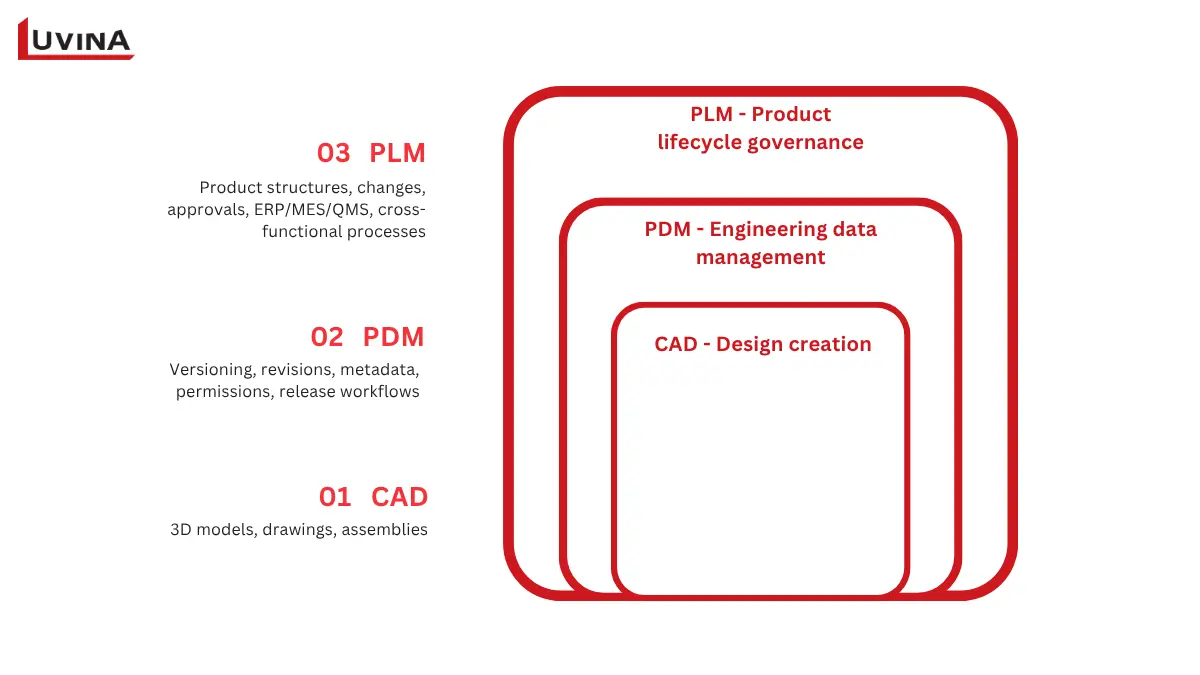
CAD vs PDM vs PLM Scope Diagram
When is PDM Enough?
Ask one practical question: Does the problem stay within engineering, or does it need to be managed across departments?
PDM can be the right choice when the main challenge is engineering file and revision control within a defined design environment.
PLM becomes more relevant when teams need to manage:
- Multi-level BOMs and product configurations
- ECR and ECO processes across departments
- Cross-functional approvals and release governance
- Engineering to manufacturing handoffs
- ERP, MES, QMS, or supplier integration
- Product data throughout multiple lifecycle stages
Some platforms combine CAD, PDM, and PLM capabilities, so product labels alone are not enough to determine their scope. Teams should assess the actual workflows, data structures, and integrations they need.
For a more detailed comparison, see our guide to PLM vs PDM
When Mechanical Engineering Teams Need PLM Software
PLM becomes valuable when engineering data starts moving beyond individual designers and CAD files. The need is often visible through workflow problems rather than team size alone.
Signs Your Team May Need PLM
Look for recurring issues such as:
- Duplicate parts or inconsistent product data
- Unclear released revisions
- BOMs maintained manually in spreadsheets
- Slow or poorly documented ECO approvals
- Repeated data entry between engineering and other systems
- Complex handoffs across sites, suppliers, or departments
- Limited traceability during audits or product changes
- Mismatches between engineering BOMs and ERP records
From CAD Change to Product Traceability
A typical PLM workflow connects several steps that are often handled separately:
CAD revision → BOM impact analysis → ECR/ECO → approval → release → EBOM/MBOM handoff → ERP/MES synchronization → service traceability
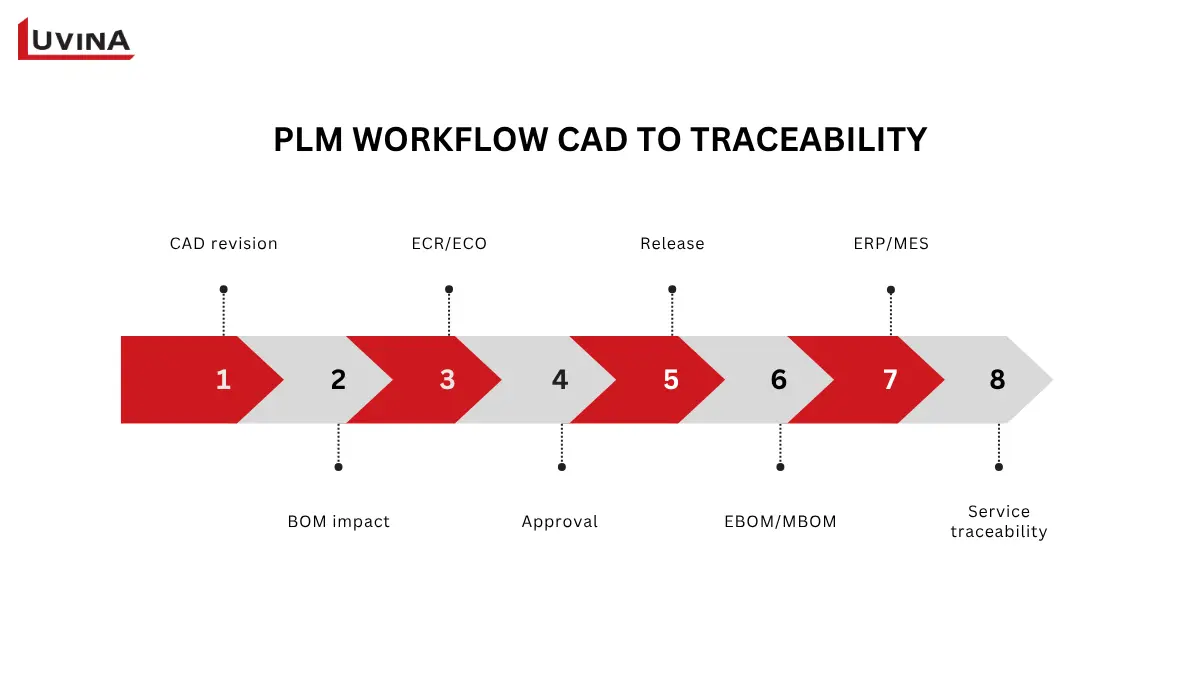
Mechanical engineering PLM workflow diagram
This connected flow helps teams understand what changed, who approved it, which product structures are affected, and where the released information is used downstream.
PDM First or PLM Now?
The right starting point depends on process scope, not company size alone.
| Situation | Starting point |
| File, version, and revision control remain within engineering | PDM first |
| BOMs, changes, and approvals cross departments | PLM now |
| Manufacturing and ERP/MES need controlled product data | PLM now |
| Multiple sites or suppliers require governed collaboration | PLM now |
PDM first vs PLM now
For teams researching the best PLM software for engineering or the best PLM software for manufacturing, the key question is what processes need to be connected. A platform should support the workflow you need today while providing room for the product lifecycle to expand.
How We Compared PLM Software for Mechanical Engineers
A useful PLM comparison should reflect the decisions engineering teams make during evaluation, rather than simply count features. We assessed each platform against eight criteria covering engineering workflows, technical fit, adoption, and total cost. These weights are an editorial framework for comparing fit, not an objective market ranking.
| Criterion | Weight | What your team should assess |
| CAD/PDM integration | 20% | CAD connectivity, release workflows, metadata, and BOM synchronization |
| BOM, configuration, and change | 20% | Multi-level BOMs, variants, ECR/ECO, impact analysis, and audit trails |
| Product complexity fit | 15% | Product variants, assembly complexity, multi-site operations, and regulated workflows |
| ERP/MES/API integration | 15% | Connectors, APIs, middleware, and system of record alignment |
| Deployment and administration | 10% | Cloud or on-premises options, configuration, upgrades, and administration effort |
| Usability and adoption | 10% | Engineer workflow, search, visualization, and cross-functional usability |
| Security and compliance | 5% | Access control, auditability, data protection, and relevant industry requirements |
| Commercial model and TCO | 5% | Licensing, implementation, migration, integrations, support, and training |
PLM Evaluation Criteria and Weights
How We Verified the Information
Our primary evidence comes from official product documentation for capabilities, deployment models, licensing terms, and plan limitations.
The comparison reflects research and verification conducted in August 2026. Product packaging, pricing, integrations, and plan terms can change, so these details should be confirmed with the vendor before making a purchasing decision.
Finally, “best for” means a suitable starting point for evaluation, not a final recommendation. Each platform should be tested against the team’s actual CAD environment, product structure, workflows, integrations, and implementation resources.
Best PLM Software for Mechanical Engineers: Quick Comparison
For a quick shortlist, the strongest starting point depends on your CAD ecosystem, product complexity, workflow requirements, and implementation capacity. The table below highlights where each platform may fit before you explore the detailed profiles.
| Platform | Strongest starting fit | CAD/PDM context | BOM/change scope | Deployment model | Free/trial status |
| Siemens Teamcenter | Complex products and large manufacturers | Strong Siemens and multi-CAD environments | Deep configuration and change capabilities | Cloud and on-premises options | 30-day trial for Teamcenter X |
| PTC Windchill | Creo-centered enterprise environments | Strong Creo and multi-CAD support | Advanced configuration and change control | Cloud and on-premises options | Paid |
| ENOVIA on 3DEXPERIENCE | CATIA and SOLIDWORKS ecosystems | Integrated Dassault ecosystem | Broad product structure and lifecycle workflows | Cloud and platform-based | Paid; 15-day money-back on some roles |
| Aras Innovator | Adaptable workflows and integration | Multi CAD and open integration approach | Flexible BOM, configuration, and change management | Cloud and on-premises options | Free Community Edition |
| Autodesk Fusion / Fusion Manage | Autodesk-centered teams | Strong Autodesk ecosystem | BOM and change workflows | Cloud based | 30-day Fusion trial |
| Arena PLM & QMS | Cloud product and quality workflows | CAD integration available | Product structure, change, and quality processes | Cloud based | Free trial available |
| Duro | Fast-moving hardware teams | Cloud native, API focused | BOM and change workflows | Cloud based | Free trial available |
| OpenBOM | BOM-focused smaller teams | Broad CAD connectivity | BOM and product data management | Cloud based | Free non-commercial plan |
PLM Software Comparison for Mechanical Engineering Teams
The comparison reflects product information available in August 2026. Pricing, packaging, licensing terms, integrations, and free or trial options can change by product, plan, or region. Confirm the current details with the vendor before making a final selection.
The table is intended to narrow the field, not determine the winner. The detailed profiles below explain where each platform fits, what it does well, and what tradeoffs engineering teams should consider.
8 PLM Platforms and Product-Lifecycle Tools to Consider
The right shortlist depends on how your engineering team manages design data, product structures, engineering changes, and downstream processes. The eight platforms below cover a range of enterprise, cloud, adaptable, and BOM-focused approaches.
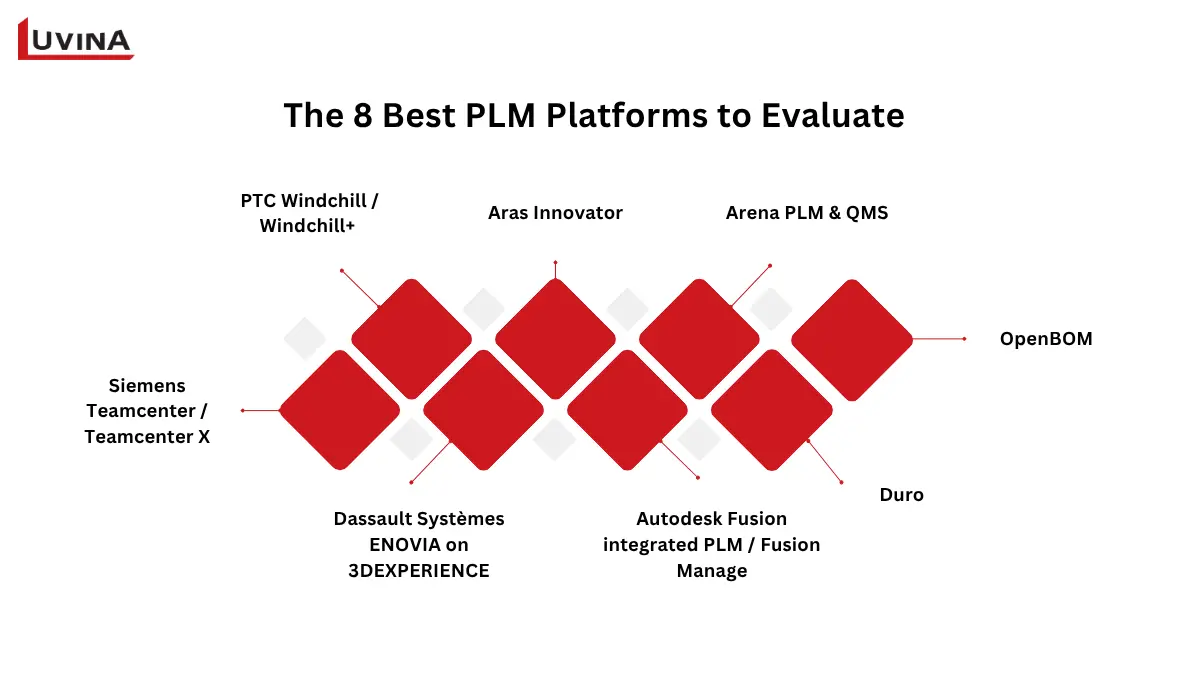
8 best PLM platforms mechanical engineers
1. Siemens Teamcenter / Teamcenter X
Best starting fit: Complex products, large manufacturers, and multi-site engineering environments, particularly those using Siemens tools or multiple CAD systems.
Engineer workflow: Teamcenter connects product data with design, configuration, change, and release processes. It is suited to organizations where engineering information needs to remain traceable across multiple teams and locations.
CAD, PDM, BOM, and change: Its capabilities support CAD data management, product structures, configurations, revisions, and engineering changes. Teams should assess how well the platform handles their specific multi-CAD environment and release processes.
Deployment and administration: Teamcenter X is a Siemens-operated SaaS offering, while other Teamcenter deployment options may be self-managed or on-premises. The appropriate model depends on infrastructure preferences, governance requirements, and internal administration capacity.
Strengths
- Strong fit for complex product structures
- Broad lifecycle and configuration management
- Suitable for multi-site engineering environments
- Extensive integration capabilities
Tradeoffs: The breadth of the platform can require significant implementation planning, technical expertise, and user adoption effort.
Free or trial status: 30-day trial for Teamcenter X
Verify before shortlisting: Can your team support the implementation depth and configuration required for its engineering workflows?
2. PTC Windchill / Windchill+
Best starting fit: Creo-centered organizations and enterprise teams with formal configuration and engineering change processes.
Engineer workflow: Windchill supports controlled product data, revisions, configurations, and engineering changes across the product development process. Its close relationship with Creo can be particularly relevant for teams already working within the PTC ecosystem.
CAD, PDM, BOM, and change: The platform extends beyond file management into product structures, configuration control, change workflows, and downstream collaboration. Multi CAD environments should be tested rather than assumed.
Deployment and administration: Windchill+ is a SaaS offering, while traditional Windchill provides self-managed and on-premises deployment options. Administration requirements vary by the selected architecture, level of configuration, and internal IT capacity.
Strengths
- Strong configuration and change management
- Natural fit for Creo-based environments
- Broad enterprise lifecycle capabilities
- Support for complex product structures
Tradeoffs: Organizations with diverse CAD environments or limited implementation resources may need additional planning around integration and rollout.
Free or trial status: Paid
Verify before shortlisting: Does the deployment model and CAD integration approach match your existing engineering environment?
3. Dassault Systèmes ENOVIA on 3DEXPERIENCE
Best starting fit: CATIA and SOLIDWORKS environments, particularly organizations using simulation and other Dassault Systèmes applications.
Engineer workflow: ENOVIA provides lifecycle processes within the 3DEXPERIENCE platform, connecting design information with product structures, collaboration, changes, and other engineering activities.
CAD, PDM, BOM, and change: Its strength comes from working within the broader Dassault ecosystem. Teams using third-party CAD systems should validate connector coverage, data exchange, and release workflows.
Deployment and administration: 3DEXPERIENCE supports cloud, on-premises, and platform-based environment. Licensing is also closely tied to user roles and the capabilities assigned to them.
Strengths
- Strong integration with CATIA and SOLIDWORKS
- Connected design and lifecycle environment
- Broad engineering and simulation ecosystem
- Role-based access to platform capabilities
Tradeoffs: The breadth of 3DEXPERIENCE can make licensing, migration, and platform scope important considerations for organizations with mixed technology environments.
Free or trial status: Paid; some ENOVIA roles may offer a 15-day money-back period.
Verify before shortlisting: Do the role-based licensing structure and third-party integrations fit your users and existing systems?
4. Aras Innovator
Best starting fit: Organizations that prioritize adaptable workflows, low-code configuration, open integration, or tailored digital thread.
Engineer workflow: Aras Innovator can support product data, BOMs, configurations, changes, approvals, and lifecycle processes while allowing organizations to adapt workflows to their own operating model.
CAD, PDM, BOM, and change: The platform supports broader lifecycle governance beyond engineering file control. Its integration approach can also support connections with CAD, ERP, and other enterprise systems.
Deployment and administration: Aras Innovator offers flexibility around deployment and configuration. That flexibility makes internal technical ownership an important consideration during implementation.
Strengths
- Flexible workflow configuration
- Strong customization potential
- Open integration approach
- Suitable for complex digital thread requirements
Tradeoffs: Greater flexibility can increase the need for technical governance, architecture decisions, and long-term ownership.
Free or trial status: Aras Innovator Community Edition is available under specific usage conditions. Current user limits, features, licensing terms, and support should be verified before adoption.
Verify before shortlisting: Does your organization have the technical ownership needed to configure, maintain, and evolve the platform?
Implementation consideration: Aras’ flexibility can be valuable when workflows or integrations require adaptation, but that flexibility also makes solution architecture and implementation expertise important selection criteria.
For teams evaluating implementation options in Singapore, Aras Innovator can also be assessed alongside regional Aras Innovator partner in Singapore.
5. Autodesk Fusion Manage
Best starting fit: Autodesk-centered design and manufacturing teams looking for cloud-based product lifecycle workflows.
Engineer workflow: Autodesk Fusion is the cloud-based design and manufacturing environment, and it now includes natively integrated PLM capabilities through Fusion Manage. Together, they can connect design data with BOM management, changes, approvals, and manufacturing collaboration.
CAD, PDM, BOM, and change: The strongest fit is likely to be within Autodesk-focused environments. Teams using non-Autodesk CAD or existing PDM systems should validate how product data and BOM information move between systems.
Deployment and administration: The platform follows a cloud-based approach, which can reduce infrastructure management compared with traditional on-premises deployments.
Strengths
- Strong Autodesk ecosystem alignment
- Cloud-based delivery
- Integration between design and manufacturing workflows
- Accessible approach for teams already using Fusion
Tradeoffs: Product packaging and required capabilities can vary, making licensing and integration scope important parts of the evaluation.
Free or trial status: 30-day Fusion trial
Verify before shortlisting: Can the platform support your non-Autodesk CAD, PDM, ERP, and downstream integration requirements?
6. Arena PLM & QMS
Best starting fit: Cloud-based product companies that need product lifecycle and quality workflows across distributed teams.
Engineer workflow: Arena combines product lifecycle management with quality management, making it relevant when engineering changes, product records, approvals, and quality processes need to work together.
CAD, PDM, BOM, and change: It supports product structures, revisions, changes, and collaboration. Mechanical engineering teams should pay particular attention to the depth of CAD integration and the complexity of their product structures.
Deployment and administration: Arena follows a cloud-based model, which can simplify infrastructure management and support distributed users.
Strengths
- PLM and QMS in one environment
- Cloud native architecture
- Useful for distributed product teams
- Strong focus on controlled product and quality processes
Tradeoffs: Teams with highly complex mechanical structures or demanding MCAD requirements should validate the depth of supported workflows before selection.
Free or trial status: Free trial available
Verify before shortlisting: Can Arena handle your mechanical CAD environment, product structures, and quality requirements at the required scale?
7. Duro
Best starting fit: Fast-moving hardware teams looking for cloud native PLM with an API focused approach.
Engineer workflow: Duro focuses on connecting engineering data, BOMs, revisions, and product changes in a centralized environment designed for modern hardware development teams.
CAD, PDM, BOM, and change: Its BOM and product data capabilities can suit teams that need tighter control over hardware development. Larger organizations should assess the depth of configuration, change management, and enterprise integration required.
Deployment and administration: Duro uses a cloud native model and emphasizes API connectivity, which can reduce infrastructure overhead while supporting integration with other systems.
Strengths
- Cloud native architecture
- API focused integration
- Hardware engineering orientation
- Designed for rapid adoption
Tradeoffs: Organizations with highly complex enterprise processes may need to validate configuration depth, compliance capabilities, and downstream integrations carefully.
Free or trial status: Free trial available
Verify before shortlisting: Does Duro provide sufficient enterprise depth and ERP or MES integration for your growth plans?
8. OpenBOM
Best starting fit: Smaller engineering and manufacturing teams that need BOM management, CAD connectivity, and relatively low administrative overhead.
Engineer workflow: OpenBOM focuses strongly on product structures and BOM management, helping teams connect CAD data with product information and downstream processes.
CAD, PDM, BOM, and change: Its broad CAD connectivity can make it useful for BOM-centric workflows. Teams with deeper PDM, configuration, or formal change management requirements should assess whether those needs extend beyond its core strengths.
Deployment and administration: OpenBOM uses a cloud-based model, making it accessible to distributed teams without the infrastructure requirements of traditional on-premises systems.
Strengths
- Strong BOM-focused approach
- Broad CAD connectivity
- Cloud-based delivery
- Lower overhead for smaller teams
Tradeoffs: Teams requiring advanced file control, complex configuration, or extensive lifecycle governance may need broader PLM capabilities.
Free or trial status: As of the early 2026 pricing model, OpenBOM offers a free plan limited to educational, personal, and non-commercial projects, alongside paid Team, Company, and Enterprise tiers plus CAD add-ins and ERP integration options. Verify current record limits and eligibility before shortlisting.
Verify before shortlisting: Do the available records, CAD add-ins, change capabilities, and ERP integration meet your commercial and engineering requirements?
These platforms differ in how much lifecycle governance, configuration depth, and implementation effort they bring to an engineering organization. While enterprise suites offer broader capabilities, lighter solutions can be more practical for teams with narrower requirements. The next section examines free PLM software for mechanical engineers, including what “free” actually covers and where important limitations apply.
Free and Low-Cost Options for Mechanical Engineering Teams
Not every free or low-cost option is a full PLM platform. Some address CAD/PDM or BOM management rather than broader lifecycle governance.
“Free PLM” can mean several different things. A platform may have no subscription fee while still imposing limits on commercial use, users, storage, records, features, or support. Before choosing a free option, identify which model actually applies to your team.
| Free model | What it typically means | Suitable for production? |
| Community edition | A product version available without a standard subscription license, often with feature or usage limits | Sometimes, depending on the license |
| Free non-commercial plan | No license fee for personal, educational, or non-commercial use | Usually not for commercial production |
| Education plan | Free access for students, educators, or academic projects | No |
| Limited trial | Full or expanded access for a defined period | Only for evaluation |
| Open-source component or tool | Source available under an open-source license, but may require significant setup and integration | Depends on the specific tool and license |
Types of Free PLM Options
Aras Innovator Community Edition
Aras Innovator Community Edition provides access without a subscription license fee under defined conditions. It can support evaluation, development, and small-scale production use cases, with feature and usage limitations depending on the current Community Edition terms.
This makes it worth considering smaller teams that want to explore PLM without an initial subscription cost.
OpenBOM
OpenBOM offers a free plan for non-commercial projects alongside paid options. The free plan provides access to core product data and BOM capabilities, while commercial use and broader requirements are covered by its paid plans.
Teams considering OpenBOM should assess whether the available features, CAD connectivity, product data management, and integration capabilities meet their engineering requirements before adopting it as a long-term solution.
Onshape Free
Onshape Free is another option worth knowing, particularly for individual users and learning environments. It is intended for non-commercial use; documents are public, and PDM capabilities are built into the platform.
However, it should not be treated as a replacement for enterprise PLM. Teams requiring controlled product structures, formal change processes, cross-functional governance, or private commercial data management will need to assess broader requirements.
Free License Does Not Mean Zero Cost
Even when the software license costs nothing, implementation still requires resources. Depending on the platform and use case, teams may need to account for:
- Data migration and cleanup
- Configuration and workflow setup
- CAD, ERP, or MES integration
- Security and access management
- Infrastructure, backups, and upgrades
- Administration and user support
- Training and change management
For a small engineering team, a free option can be a practical starting point. For a growing manufacturer, however, total cost of ownership matters more than the initial license fee. The next step is to assess whether the platform can support your actual workflow as requirements become more complex.
How to Choose the Right PLM for Your Engineering Team
Choosing a PLM platform should start with your current engineering processes, not a vendor shortlist. A structured evaluation can help your team identify the actual gaps, compare realistic options, and reduce implementation risk.
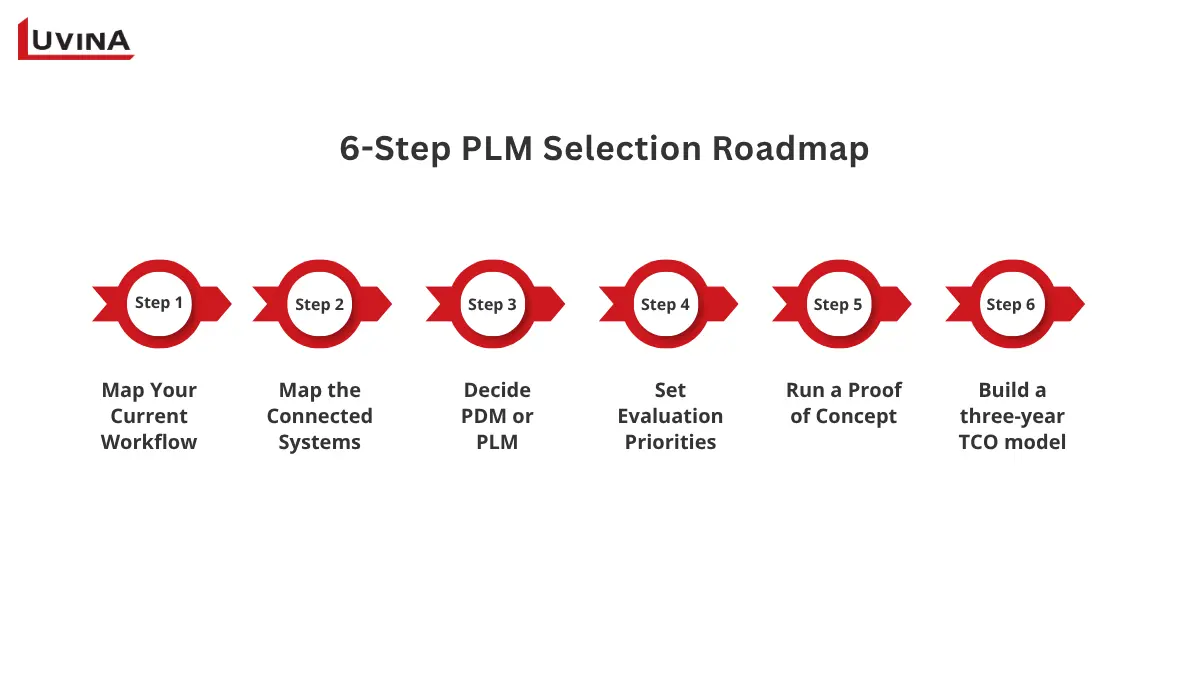
A 6-Step Process for Choosing the Right PLM Platform
1. Map Your Current Workflow
Start by documenting how a product moves from design to release.
Identify:
- CAD creation, revision, and approval
- BOM creation and maintenance
- Engineering change requests and orders
- Release and approval responsibilities
- Manufacturing and service handoffs
- Current pain points and duplicated work
- The authoritative source for each type of product data
This exercise often reveals whether the problem is primarily data control or broader process governance.
2. Map the Connected Systems
Create an inventory of systems that exchange product information, including:
CAD/PDM → PLM → ERP/MES → QMS → Suppliers → Service
Also include document management, identity and access management, and other systems involved in approvals or data exchange. Define which system owns each data type and where synchronization is required.
3. Decide Whether You Need PDM or PLM
Ask a simple question:
Does the problem stay within engineering, or does it extend across the product lifecycle?
If the main requirement is version control, file organization, permissions, and controlled releases, PDM may be enough. If BOMs, configurations, changes, approvals, manufacturing, quality, or suppliers are involved, broader PLM capabilities may be more appropriate.
4. Set Your Evaluation Priorities
Not every team should use the same weight. Adjust the evaluation criteria according to:
- Product complexity and configuration needs
- CAD ecosystem
- Industry and regulatory requirements
- ERP, MES, and QMS integration
- Cloud or on-premises preferences
- Internal technical and administrative skills
- Expected user adoption
This creates a shortlist based on your operating environment rather than generic rankings.
5. Run a Consistent Proof of Concept
Shortlist around three realistic platforms and test each against the same scenario.
Use one representative:
Assembly → BOM → Engineering Change → Approval → Release → ERP/MES handoff
Check how easily engineers complete each step, how data moves between systems, what requires customization, and where users encounter friction.
6. Build a three-year TCO model
License fees are only one part of the investment. Include:
- Licensing and subscriptions
- Implementation and configuration
- Data migration and cleanup
- Connectors and integration
- Infrastructure
- Support and administration
- Training
- Change management
Finally, score the pilot results against your weighted criteria. Choose the smallest viable first release that addresses the most important business problems, with clearly assigned owners for both data and processes.
PLM Selection Considerations for Mechanical Engineering Teams in Singapore
Singapore adds a regional layer to the global comparison above, not a new set of criteria. The key question is whether a platform can connect a Singapore engineering team with regional plants, suppliers, and downstream systems across borders.
This matters most for precision engineering, semiconductor equipment, medtech, and aerospace teams, where a released change often needs to reach a plant or supplier outside Singapore before it reaches production. The key consideration is not a different workflow, but whether hosting, support, and integration can reliably support that regional handoff.
| Consideration | What to assess |
| Local or regional support | Availability of implementation, consulting, training, and ongoing support |
| Hosting and access | Hosting region, cross border access, and regional user requirements |
| Security and auditability | Access controls, audit trails, data protection, and recovery processes |
| Integration ownership | Responsibility for CAD, ERP, MES, QMS, and supplier interfaces |
| Multi-site rollout | Support for Singapore operations and regional manufacturing sites |
| Training and adoption | Training resources for engineering and downstream users |
| TCO over the evaluation horizon | Licensing, implementation, migration, integration, support, and administration |
Singapore PLM Evaluation Checklist
If the PLM environment stores personal data such as user profiles, approval records, or supplier contacts, assess how overseas hosting and support arrangements meet Singapore’s cross-border data transfer requirements under the PDPA’s Transfer Limitation Obligation. This applies specifically to personal data, not engineering or product data in general.
Teams can also use Singapore’s Smart Industry Readiness Index (SIRI) as a broader maturity lens across Process, Technology, and Organization. SIRI does not prescribe a specific PLM platform. Instead, it can help teams identify where stronger product data governance and connected workflows may support wider digitalization goals.
For companies evaluating regional implementation options, PLM system providers in Singapore can also be considered based on their ability to support workflow assessment, integration, migration, and phased rollout. The final choice should still come from a representative pilot using real engineering data and cross-functional processes.
Common PLM Selection and Implementation Mistakes
Selecting a PLM platform is only the first step. Many implementation problems come from how the system is evaluated, configured, and introduced, rather than from the software itself. These are some of the most common pitfalls engineering teams should avoid.
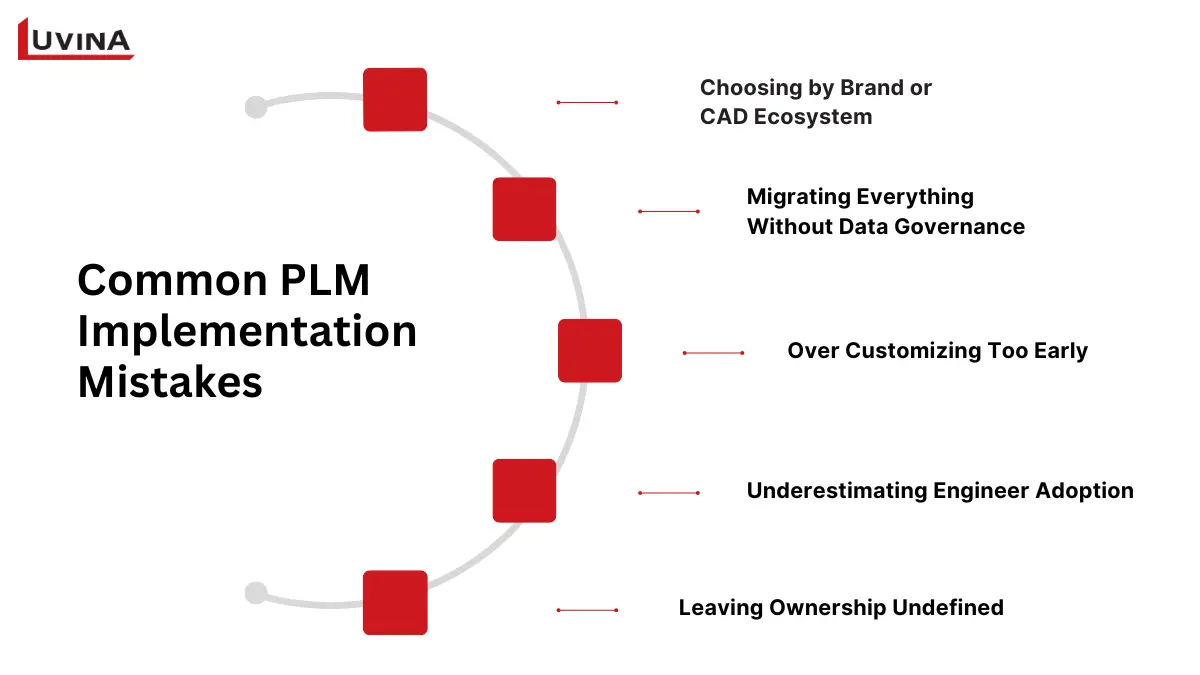
5 Common Mistakes to Avoid When Selecting and Implementing PLM
1. Choosing by Brand or CAD Ecosystem
A familiar vendor or strong CAD integration can make a platform attractive, but that does not guarantee it will support the complete engineering workflow. Test a real scenario from CAD revision to BOM update, change approval, release, and ERP or MES handoff before making a decision.
2. Migrating Everything Without Data Governance
Moving existing data into a new PLM system does not automatically improve data quality. Duplicate parts, obsolete files, inconsistent naming, and ownerless records can quickly become a larger problem in the new environment.
Define data ownership, naming rules, revision structures, and retention policies before migration. Then determine what genuinely needs to be transferred.
3. Over-Customizing Too Early
A PLM implementation can become unnecessarily complex when teams try to reproduce every existing process or deploy every available module from day one.
Start with the workflows that create the most business value, such as release management, BOM control, or engineering changes. Configuration should support a clear process rather than preserve inefficient practices.
4. Underestimating Engineer Adoption
A technically capable platform can still struggle if engineers find it difficult to search, review, visualize, or update product information.
Evaluate everyday usability with actual users. Include engineers, manufacturing, quality, procurement, and other teams that will rely on the system after implementation.
5. Leaving Ownership Undefined
Integration and governance issues often emerge when responsibilities are unclear. Before deployment, establish:
- Which system owns each type of data
- Who manages each interface
- Who approves process changes
- Who handles upgrades and administration
- Which metrics define implementation success
A clear ownership model helps prevent PLM from becoming another isolated system instead of a reliable part of the product development process.
Which PLM Should You Shortlist? A Scenario-Based Answer
There is no need to evaluate every platform with the same level of depth. Start with the options that align most closely with your engineering environment, then validate them through a representative workflow.
| Scenario | Shortlist starting point |
| Siemens/NX, complex enterprise products | Teamcenter. Validate multi-CAD support, configuration depth, rollout, and adoption. |
| PTC/Creo and formal change/configuration | Windchill. Validate packaging, deployment, and integration scope. |
| CATIA/SOLIDWORKS/3DEXPERIENCE ecosystem | ENOVIA. Validate role packaging, third-party systems, and migration. |
| Adaptable low-code workflows and integration | Aras Innovator. Validate technical ownership and upgrade requirements. |
| Autodesk-centered cloud workflow | Autodesk Fusion PLM/Fusion Manage. Validate current packaging and non-Autodesk interfaces. |
| Cloud product and quality workflows | Arena. Validate MCAD depth and product structure complexity. |
| Fast moving hardware/API first team | Duro. Validate enterprise depth, integration coverage, and scalability. |
| BOM-centric smaller team | OpenBOM. Validate PDM, change management, and commercial plan requirements. |
PLM Shortlist by Engineering Scenario
These are starting points, not final recommendations. A representative pilot using real product data, an actual change workflow, and relevant system handoffs can reveal fit gaps that a feature comparison may miss. Before procurement, compare the shortlisted platforms against your weighted criteria, implementation capacity, and three-year TCO.
FAQs
1. What is the best PLM software for mechanical engineers?
The best PLM software depends on your engineering environment and business requirements. Teamcenter may suit complex, multi-site products, while Windchill fits Creo-centered teams and ENOVIA works well within the 3DEXPERIENCE ecosystem. Key factors include CAD compatibility, BOM and change management, product complexity, system integration, and implementation capacity.
2. What is the difference between PLM and PDM for mechanical engineering?
PDM primarily manages engineering files, revisions, metadata, permissions, and release control. PLM covers a broader scope, including product structures, configurations, engineering changes, approvals, and cross-functional processes. PDM is often considered a component of PLM, so the right choice depends on whether your needs remain within engineering or extend across the product lifecycle.
3. Which PLM software integrates with SOLIDWORKS, Creo, NX, CATIA, or Inventor?
Several platforms align closely with major CAD ecosystems. ENOVIA is a natural starting point for CATIA and SOLIDWORKS, Windchill for Creo, and Teamcenter for Siemens NX and multi-CAD environments. Autodesk-centered teams can consider Fusion PLM. However, CAD compatibility alone is not enough. Test connector depth, metadata exchange, BOM synchronization, and release workflows.
4. Is there free PLM software for mechanical engineers?
Some options provide free access under specific conditions. Aras Innovator Community Edition supports defined usage scenarios, while OpenBOM offers non-commercial access subject to its current plan terms. Onshape Free includes built-in PDM but is intended for non-commercial use with public documents. Free licensing does not eliminate costs for migration, integration, infrastructure, administration, or training.
5. When should a mechanical engineering team move from PDM to PLM?
Consider moving beyond PDM when engineering data must support processes outside the design team. Common signals include complex BOMs, product configurations, formal ECR/ECO workflows, compliance requirements, supplier collaboration, and ERP or MES handoffs. If changes increasingly require cross-functional approval and lifecycle traceability, broader PLM capabilities may provide a better fit.
Conclusion
Choosing the best PLM software for mechanical engineers starts with understanding your engineering environment, not simply comparing feature lists. CAD ecosystem, product complexity, change processes, data governance, integrations, and implementation capacity all shape which platform makes sense for your team.
Before committing to a platform, assess your current workflows and product data, then test shortlisted options with a representative assembly, BOM, change process, and downstream handoff. This helps uncover integration gaps and adoption challenges before a full rollout.
Need help validating a PLM shortlist? Luvina can assess your CAD/PDM environment, product-data structure, integration requirements, and implementation readiness before you commit to a platform. For teams considering Aras Innovator, Luvina also provides implementation, integration, customization, and ongoing support. Reach out to discuss your engineering workflows and PLM requirements.
READY TO START A PROJECT?
Our experts are eager to explore your needs.

Read More From Us?
Sign up for our newsletter
Read More From Us?
Sign up for our newsletter